Establishing secure connection…Loading editor…Preparing document…

Complaint for Negligence

This template is fully customizable. Edit the text, fill out the fields, and send it for signature. Give it a try!
Complaint for Negligence

What a Complaint for Negligence Is and when it’s used

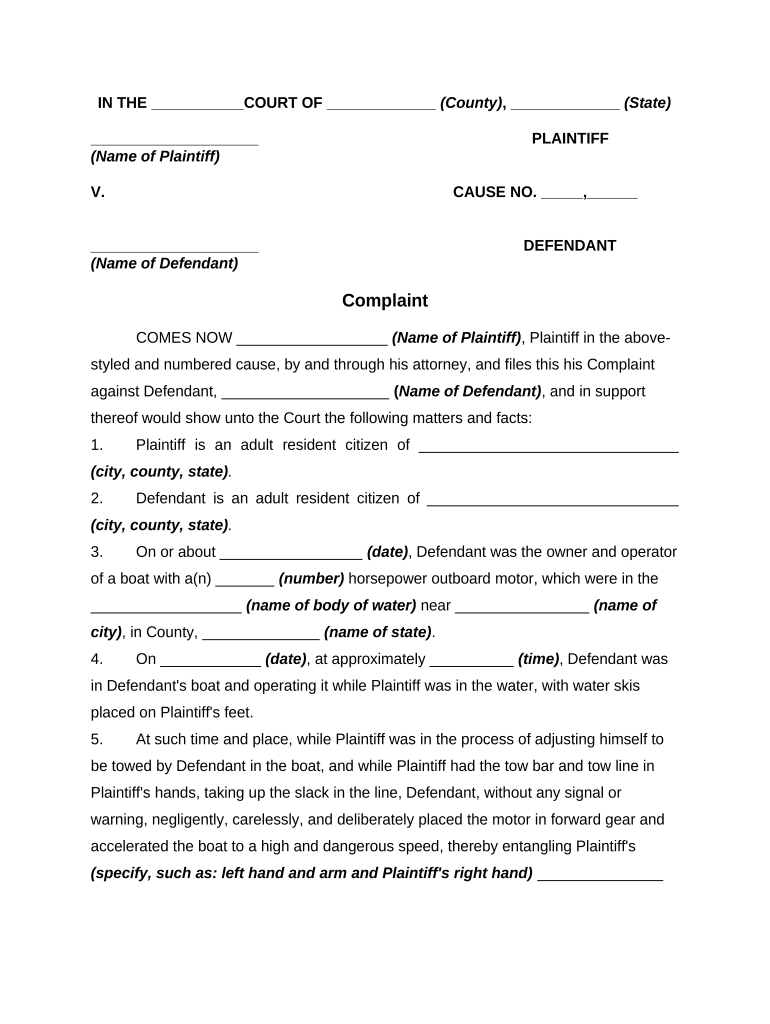
A Complaint for Negligence is a civil pleading that starts a lawsuit alleging that a defendant breached a duty of care and caused harm or loss. It identifies the parties, states jurisdiction and venue, recites facts supporting negligence (duty, breach, causation, damages), and requests relief from the court. Plaintiffs must follow local court rules for formatting, signature blocks, and service. The complaint triggers case deadlines such as service, responses, and discovery planning, and it becomes part of the public docket once filed.

Why a clear, complete complaint matters

A professionally prepared Complaint for Negligence frames your legal theory, preserves claims, and defines the defendant and relief sought. Clear facts and proper jurisdictional allegations reduce dismissal risk and streamline service and discovery.

Why a clear, complete complaint matters

Who typically prepares and files a negligence complaint

Complaints are most often prepared by plaintiff attorneys or pro se litigants; courts expect compliance with local civil procedure rules.

  • Plaintiff attorneys: File complaints on behalf of injured clients and tailor counts to available evidence.
  • Pro se plaintiffs: Represent themselves; should use templates and court guides to meet procedural requirements.
  • Claims administrators: For organizational claimants, in-house counsel or outside counsel coordinate filing and service.

Whether prepared by counsel or a litigant, accuracy in parties, dates, and jurisdictional facts is essential to avoid delays or dismissal.

Who can sign and submit the complaint

Attorney

An attorney of record signs pleadings and files on behalf of a party; signature certifies compliance with procedural rules and good-faith factual and legal assertions.

Pro Se

A self-represented litigant signs the complaint personally, providing contact information and accepting responsibility for service and adherence to local filing requirements.

Core elements included in a professional negligence complaint

A complete complaint combines jurisdictional statements, factual allegations, legal counts, and a clear request for relief so the court and defendant understand the claim.

Caption

Court name, case title, and party designations presented exactly as required by the local rules to ensure proper indexing and service.
Jurisdiction

Allegations that explain why the chosen court has subject-matter and personal jurisdiction and why venue is proper.

Factual Allegations

Chronological, specific facts showing duty, breach, causation, and damages; avoid conclusory language that courts may strike.

Cause of Action

A discrete negligence count identifying legal elements, citing the governing law where helpful for clarity.

Prayer for Relief

A clear statement of the remedies requested—damages, costs, injunctive relief—using permissible and specific forms of relief.

Signature Block

Signature, printed name, bar number if an attorney, address, phone, and email formatted per court rules.

Step-by-step: Prepare and file a negligence complaint

Follow a clear sequence from drafting to service to avoid procedural missteps and to preserve your claim.

  • 01
    Draft Complaint: Assemble caption, facts, counts, and prayer in plain, supported statements.
  • 02
    Review Rules: Confirm court formatting, filing method, and any local verification requirements.
  • 03
    Sign and Verify: Signer applies signature and, if required, a verification or affidavit.
  • 04
    File and Serve: File with the clerk and complete service per court and state rules.

Configuring an online workflow for complaint drafting and filing

Set up fields, signer order, and delivery rules before sending to ensure the complaint is complete and correctly routed.

Field Configuration
Signature Block Required; signer name, date, and bar number fields
Verification Checkbox Optional; include if state law or local rule requires verification
Supporting Upload Attach exhibits or incident reports as separate PDF attachments
Filing Format Export as court-acceptable PDF/A or PDF per local e-filing rules

Where and how the complaint is submitted and served

Filing and service typically follow a two-path process: submit to the court clerk and effectuate service on defendants per statute.

  • Court Filing: File electronically or in-person with the court clerk.
  • Service of Process: Serve defendant by authorized methods under state law.
  • Proof of Service: File affidavit or certificate of service with the court.
  • Return Dates: Track defendant’s deadline to respond or answer.

Digital signing and e-submission considerations

Choose a platform that supports court-acceptable PDFs, audit trails, and multi-factor signer authentication where required.

  • File Formats: PDF, PDF/A, or DOCX
  • Integrations: E-filing portals and cloud storage
  • Security: AES-256 at rest

Confirm the court's electronic filing standards and ensure the platform you use preserves an audit trail and produces a tamper-evident signed PDF.

Key timing issues and deadlines to track

Missing deadlines can bar claims; prioritize statute of limitations, service windows, and response periods when calendaring litigation tasks.

Statute of Limitations:

Typically 2–6 years; varies by state

Service Deadline:

Serve defendant promptly; many courts expect prompt service after filing

Answer Period:

Usually 20–30 days after service, depending on jurisdiction

Discovery Planning:

Rule-based scheduling conference often within 60–90 days

Motion Deadlines:

Local rules set briefing and hearing timelines

Common drafting and filing mistakes to avoid

  • Missing or incorrect defendant names: filing against the wrong party wastes time and may require amendment or dismissal.
  • Vague factual allegations: unsupported conclusions can lead to a Rule 12(b)(6) motion to dismiss.
  • Ignoring local rules: formatting errors, improper certificate of service, or incorrect filing fees can cause rejection.
  • Failure to preserve evidence: not attaching key exhibits or requesting immediate preservation can undermine future proof.

Consequences of errors or missed requirements

Case Dismissal: Risk of dismissal for insufficient pleadings
Service Defect: Service failures delay proceedings
Sanctions: Court may impose monetary sanctions
Statute Bar: Missed limitation period can extinguish claims
Evidence Loss: Spoliation claims if evidence not preserved
Increased Costs: Refiling and correction raise legal fees

Security and compliance considerations when handling complaints

Encryption: TLS 1.2/1.3 in transit
Data at Rest: AES-256 encrypted storage
Audit Trail: Timestamped signer actions
HIPAA: BAA required for PHI
ESIGN / UETA: Electronic signature legal framework
Access Controls: Role-based permissions

Real-world examples of document use and results

These brief client experiences illustrate how streamlined complaint preparation and e-signature workflows supported case intake and filing.

Optica Ventures LLC

Optica used a digital complaint template to standardize intake and reduce drafting time.

  • "The interface is simple and easy-to-use for our team"
  • The streamlined process reduced back-and-forth with clients and ensured consistent exhibits were attached at filing.

Martin Properties

A real estate operator used online forms to collect incident details before filing.

  • "I can process and execute all of these documents online with 100% compliance and built-in security."
  • That approach improved turnaround and avoided in-person notarization delays during urgent filings.

Comparing common eSignature vendors for filing and service workflows

Basic pricing and capability differences matter when choosing a signing platform that must produce court-ready PDFs and maintain audit trails; signNow appears first for comparison.

signNow DocuSign Adobe Sign PandaDoc HelloSign
Starting Price $8/user/mo $15/user/mo $14/user/mo $19/user/mo $15/user/mo
Free Trial Yes, 7-day trial Varies by vendor Varies by vendor Varies by vendor Varies by vendor
Bulk Send Yes Yes Yes Yes No
Audit Trail Yes Yes Yes Yes Yes
HIPAA Compliant Yes Yes Yes No No
Envelope Cap No cap 100 envelopes/user/year Varies Varies Varies

Frequently asked questions about complaints and e-signing

Answers to common procedural and technical questions when preparing, signing, and filing a Complaint for Negligence.


Need help? Contact support

be ready to get more
Join over 28 million airSlate SignNow users