Establishing secure connection…Loading editor…Preparing document…

California Order to Show Cause for Change of Name and Gender

This template is fully customizable. Edit the text, fill out the fields, and send it for signature. Give it a try!
California Order to Show Cause for Change of Name and Gender

What the California Order to Show Cause for Change of Name and Gender Is

The California Order to Show Cause for Change of Name and Gender is a court filing that starts a judicial proceeding to amend an individual's legal name and/or gender marker on state records. It typically includes a petition, supporting declarations, and a proposed order asking the court to set an Order to Show Cause hearing where the judge may grant the requested changes under California law. The form is used to notify the court, request a hearing date, and provide the factual basis needed for the court to consider issuing a final decree changing name and gender.

Why this document matters and its legal basis

Filing an Order to Show Cause is the formal step that allows a judge to review and, if appropriate, legally change your name and gender on public records. Electronic filings and signatures are generally accepted under the ESIGN Act (15 U.S.C. ch. 96) and UETA where adopted, subject to court rules and statutory exceptions.

Why this document matters and its legal basis

Who typically completes this form and why it matters

Accurate completion helps avoid delays, reduces risk of defects, and ensures the court has the information needed to grant a timely order.

  • Self-represented petitioners filing to update identity documents and records.
  • Attorneys preparing a complete petition and declarations for court review.
  • Court clerks receiving filings and scheduling the hearing and calendar.

Step-by-step: how to file the Order to Show Cause

Follow the court's local filing rules and prepare the petition, supporting declaration, proposed order, and notice for publication or service.

  • 01
    Prepare Documents: Complete petition, declaration, and proposed order accurately.
  • 02
    File with Court: Submit via eFile or in person per county requirements.
  • 03
    Serve or Publish: Serve affected parties or publish when required by rule.
  • 04
    Attend Hearing: Appear at the Order to Show Cause hearing for final determination.

How to set up a digital filing workflow

Configure your workflow to capture signatures, schedule notifications, and retain audit records for court use and future verification.

Field Configuration
Upload Petition Accept PDF/X uploads with court-required headers
Add Signers Identify petitioner and any attorney signers
Authentication Use email + SMS or advanced ID proofing
Notifications Enable email confirmations to petitioner and counsel

Overview of the filing and hearing process

A clear linear process helps petitioners understand what follows filing and how a court decision becomes effective.

  • File Petition: Clerk assigns case number and schedules hearing
  • Provide Notice: Service or publication as the court directs
  • Hearing Held: Judge reviews petition and supporting facts
  • Order Issued: Signed decree effects legal name/gender change

Key sections to include in a professional petition package

A complete petition package reduces follow-up from the court and provides a clear factual record supporting the requested change.

Caption and Case Header

Court name, county, case number area, and title identifying petitioner and respondent when applicable, formatted per local rules.
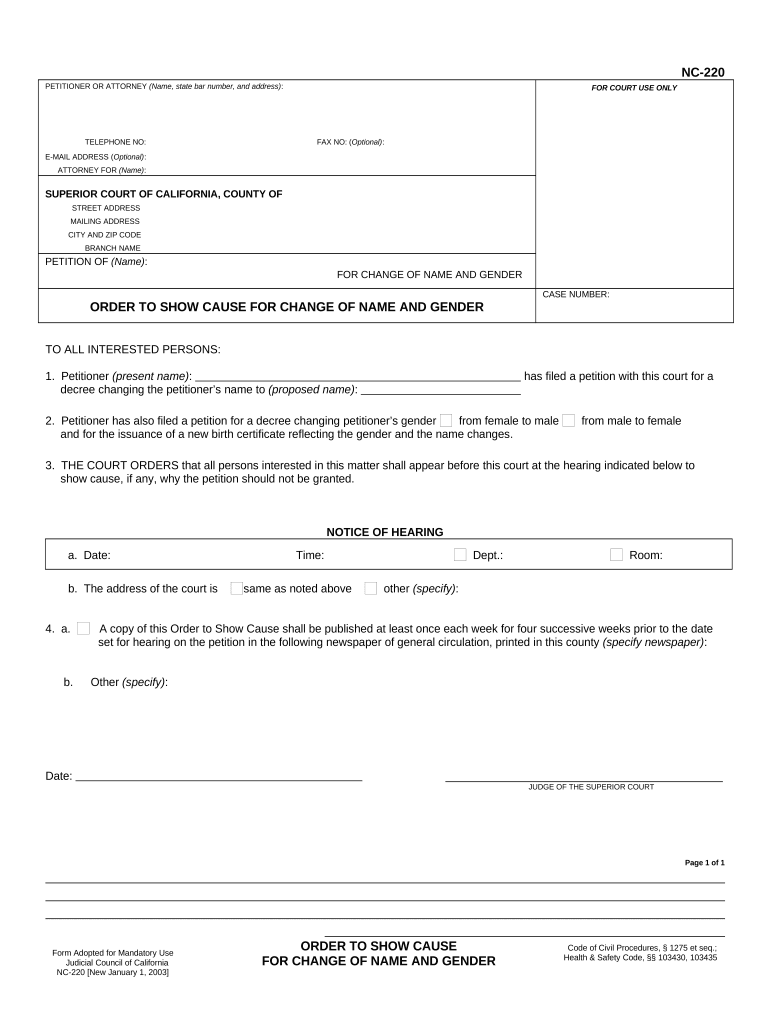
Petition Text

Clear statement of current name/gender, requested changes, and legal basis for relief under state statutes and case law.

Supporting Declaration

Signed declaration describing reasons for the change, relevant facts, and any safety concerns that may justify publication waiver.

Proposed Order

Draft order for judge signature that includes precise name and gender language, effective date, and record update instructions.

Service and Notice Documents

Proof of service or proposed publication notice and affidavit demonstrating compliance with notice requirements.

Sealing or Protective Requests

If safety or privacy concerns exist, include a narrowly tailored request to seal or redact identifying information.

Confidential and identity details to supply

Personal Identifiers: Full legal name, DOB
Contact Information: Current address, phone
Government ID: Driver license or passport
Previous Names: Aliases, prior legal names
Safety Concerns: Domestic violence details
Attorney Info: Counsel name and bar number

Common pitfalls to avoid when preparing the petition

  • Submitting incomplete petitions or missing required declarations can result in immediate rejection or a continuance.
  • Failing to follow local court formatting or eFiling rules often delays assignment of a hearing date and adds administrative steps.
  • Neglecting service or publication requirements leads to default hearing continuances or denial for lack of notice.
  • Using inconsistent names across documents causes confusion for clerks, delays record updates, and can affect identity documents.

Risks and legal consequences of errors

Filing Rejection: Clerk returns petition
Hearing Delay: Case continued
Identity Mismatch: Document updates refused
Publication Exposure: Unwanted public notice
Perjury Risk: False statements penalized
Cost Increases: Additional fees and attorney time

Typical timing and deadlines to expect

Timing varies by county; below are common scheduling and notice milestones petitioners should plan around.

Filing to Hearing:

Court sets hearing per calendar; timing varies by county

Publication Period:

If required, publication often spans weekly notices; exact duration varies

Service Deadlines:

Service on interested parties must be completed before the hearing

Order Entry:

Signed order is filed and becomes the official change record

Record Updates:

Allow additional time for agencies to update IDs and certificates

Key milestones from filing to final order

A sequential view shows the main stages a petition typically passes through before the court issues a final decree.

01

File Petition

Petition and declaration submitted to court for case opening

02

Clerk Schedules Hearing

Court assigns an Order to Show Cause date and case number

03

Notify or Publish

Service or publication completed in accordance with court instructions

04

Hearing and Judgment

Judge hears matter and signs order effecting legal change

How this petition differs from related filings

Compare common document variants so you file the correct petition type for name and gender changes versus administrative or minor corrections.

Criteria Court Petition Administrative Correction
Applicable Process formal hearing agency form
Publication Required sometimes rarely
Hearing Required
Legal Effect judicial decree agency update

Digital signing and submission considerations

Confirm the court and county accept eFiled documents and whether electronic signatures, scanned signatures, or notarized originals are required.

  • Integrations: Salesforce, Google Workspace, NetSuite support
  • File Formats: PDF, DOCX accepted by many courts
  • Authentication: Email, SMS, or advanced ID proofing

Comparing common eSignature options for filing and court-ready documents

Different eSignature vendors offer varied pricing, compliance options, and bulk features. Place vendor choice against specific needs like HIPAA, audit trails, and envelope caps.

signNow DocuSign Adobe Sign PandaDoc HelloSign
Starting Price $8/user/mo $15/user/mo $14/user/mo $19/user/mo $15/user/mo
Free Trial 7-day free trial Varies by plan Varies by plan Varies by plan Varies by plan
Bulk Send Yes (Premium) Yes Yes Yes Yes
Audit Trail Yes Yes Yes Yes Yes
HIPAA Compliant Yes Yes Yes No No
Envelope Cap No cap 100 envelopes/user/year No cap No cap No cap

Frequently asked questions and troubleshooting

Common user questions about filing, service, sealing, and electronic submission with concise answers to reduce confusion and next-step uncertainty.


Need help? Contact support

be ready to get more
Join over 28 million airSlate SignNow users