Establishing secure connection…Loading editor…Preparing document…

New Jersey Consent to Change Name of Minor

This template is fully customizable. Edit the text, fill out the fields, and send it for signature. Give it a try!
New Jersey Consent to Change Name of Minor

What the New Jersey Consent to Change Name of Minor Is

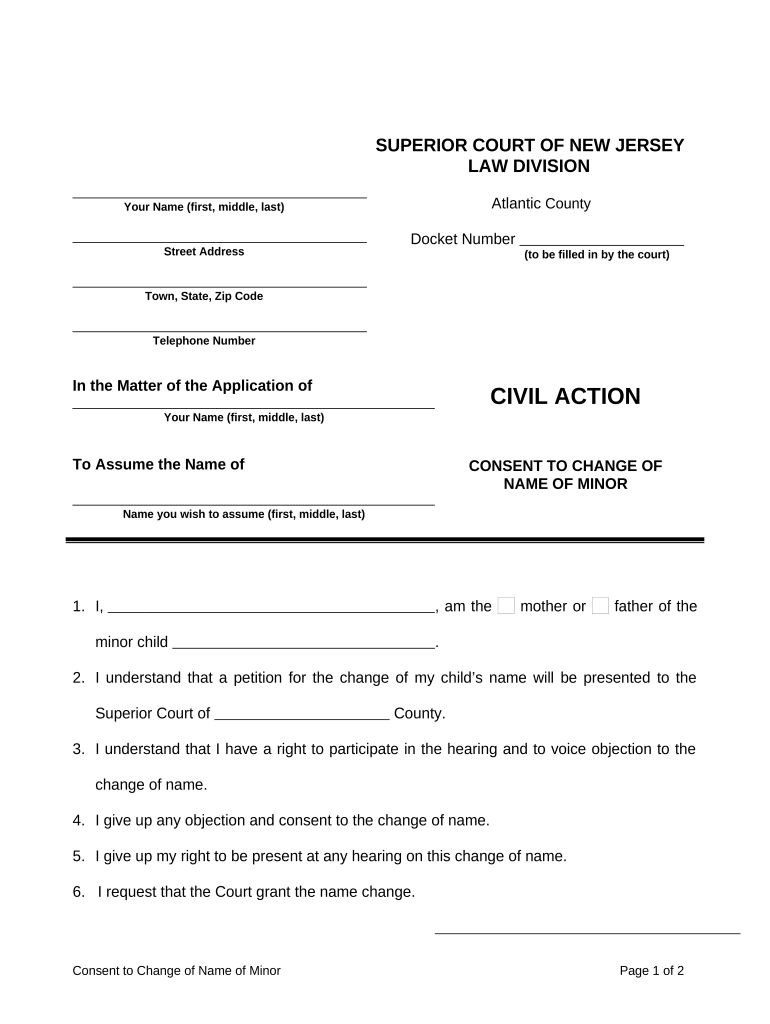
The New Jersey Consent to Change Name of Minor is a legal form used when a parent, guardian, or other authorized adult agrees to a petition to change a child's legal name. It records voluntary consent, identifies the minor and consenting parties, and states the proposed new name for submission to the county Superior Court, Family Part. Courts use the signed consent to confirm parental agreement and to help determine whether the requested change serves the minor's best interests. Missing or unclear consent can trigger hearings or additional notices.

Why a Signed Consent Matters for a Minor Name Change

Providing a clear, signed consent simplifies the court's review, reduces delays in processing a minor name-change petition, and documents agreement among parties. A properly completed consent can prevent contested hearings and clarifies parental responsibilities for records and identification updates.

Why a Signed Consent Matters for a Minor Name Change

Who Typically Prepares and Signs This Consent

Parents, guardians, and family law attorneys commonly prepare and sign this consent before filing a minor name-change petition with the court.

  • Parents or legal guardians seeking a court-approved name change for a child.
  • Family law attorneys preparing petitions or representing parties in Family Part proceedings.
  • Birth registry or agency clerks verifying parental consent for record amendments.

Primary Parties and Their Roles

Parent / Guardian

A custodial parent or legal guardian must provide informed, written consent. Include relationship, contact details, and signature date; if both parents have custody, courts commonly require signatures from both or an explanation supported by court orders.

Attorney / Clerk

An attorney can prepare or review the consent and supporting pleadings; a court clerk accepts filings and can confirm local requirements. Counsel helps ensure statutory language and local rules are met before submission.

Core Elements Included on a Professional Consent Form

A complete consent form and attachments present the child's identity, who is consenting, the requested name change, and authentication to the court in a consistent format.

Child Identification

Full legal name, date of birth, and place of birth. Accurate identification prevents mismatches with birth certificates and school records during record updates.
Proposed Name

Clear statement of the new legal name including given names and surname. Avoid nicknames or ambiguous formatting to prevent processing errors.

Consenting Party

Full name, relationship to minor, address, and contact information of the consenting adult. If more than one adult must consent, list each and supply required documentation.

Parental Rights Statement

Declaration about custody, consent authority, or existing court orders. Courts use this to confirm the signer has authority to grant consent for the minor.

Notary / Signature

Signature block and notarial acknowledgement if required by the court. A proper notary block or witness line ensures authentication and reduces rejection risk.

Supporting Attachments

Attach required documents such as a certified birth certificate, custody orders, or photo ID to verify identity and legal authority.

Essential Fields to Include on the Consent

Child's Full Name: Full current name
Date of Birth: MM/DD/YYYY
Proposed New Name: Exact new legal name
Consenting Adult: Name and relationship
Contact Address: Street, city, state, ZIP
Signature Date: MM/DD/YYYY signed

Step-by-Step: Completing and Submitting the Consent

Follow these key steps to prepare a consent for filing with the county court and related agencies.

  • 01
    Prepare Documents: Complete consent; gather birth certificate and custody orders.
  • 02
    Authenticate Signature: Sign in front of a notary if required by local rules.
  • 03
    File with Court: Submit consent with petition to Superior Court, Family Part.
  • 04
    Update Records: After order, notify vital records, schools, and agencies.

Where to Send the Completed Consent

Understand destination routing so the consent accompanies the petition and supporting pleadings correctly.

  • Court Submission: File the consent with the county Superior Court, Family Part.
  • Clerk's Office: Provide copies and pay filing fees at the court clerk's counter.
  • Opposing Parties: Serve required notices or copies to other legal guardians or interested parties.
  • Vital Records: After order, submit certified order to the state vital records office.

Configuring an Online Consent Workflow

If completing digitally, configure fields, authentication, and attachments to match court requirements and preserve evidentiary value.

Field Configuration
Signature Type Wet ink or verified e-signature
Authentication Email + SMS code or ID check
Conditional Fields Show custody questions only when applicable
Attachments Require ID and certified birth certificate uploads

Digital Signing and File Format Considerations

Courts and agencies expect legible, tamper-evident copies of signed consents; choose formats that preserve signatures and metadata.

  • File Format: PDF/A preferred for archival
  • Authentication: Use strong signer verification
  • Audit Trail: Capture IP, timestamp, actions

Common Mistakes That Cause Delays or Rejection

  • Submitting unsigned or improperly notarized consents; courts often reject incomplete authentication and request re-filing.
  • Mismatched names or dates between the consent and the child's birth certificate, causing identity verification issues for vital records.
  • Failing to include all required parents or legal guardians, or not attaching custody orders when one parent objects or is unavailable.
  • Uploading illegible scans or incorrect file formats that remove metadata and prevent reliable verification of signature or signing time.

Legal Risks and Consequences of an Incorrect Consent

Invalid Consent: May result in petition denial
Court Delay: Additional hearings or notices required
Record Rejection: Vital records offices may refuse amendments
Perjury Exposure: False statements risk criminal penalties
Identity Mismatch: Problems updating IDs and benefits
Notary Defect: Improper notarization can void consent

Practical Tips for Accurate, Efficient Completion

Apply consistent standards and confirm authority before filing to minimize rework and ensure the court accepts the package.

Confirm Custody and Authority
Verify custody arrangements and whether both parents must sign. If a parent cannot consent, obtain a court order or document the legal reason for absence before filing.
Use Certified Documents
Attach a certified birth certificate and, when required, custody or guardianship orders. Originals or certified copies reduce requests for follow-up documentation.
Match Names and Dates
Ensure every document uses the same name formats and date formats (MM/DD/YYYY). Consistency prevents delays with court clerks and vital records offices.
Preserve Evidence of Signing
If signing electronically, use a platform that captures timestamps, IP addresses, and signer authentication; retain those records in case the court requests proof.

Typical eSignature Pricing and Features for Completing This Form

Compare common eSignature vendors and core features relevant when collecting consent signatures; signNow is listed first per platform comparison conventions.

signNow DocuSign Adobe Sign PandaDoc HelloSign
Starting Price $8/user/mo $15/user/mo $14/user/mo $19/user/mo $15/user/mo
Free Trial 7-day free trial Varies by vendor Varies by vendor Varies by vendor Varies by vendor
Bulk Send Yes Yes Yes Yes No
Audit Trail Yes Yes Yes Yes Yes
HIPAA Compliant Yes Yes Yes No No

Frequently Asked Questions About the Consent

Answers to common questions about execution, notarization, electronic signing, and what to do if a parent does not consent.


Need help? Contact support

be ready to get more
Join over 28 million airSlate SignNow users