Establishing secure connection…Loading editor…Preparing document…

Civil Assault and Battery Complaint

This template is fully customizable. Edit the text, fill out the fields, and send it for signature. Give it a try!
Civil Assault and Battery Complaint

What the Civil Assault and Battery Complaint Is

A Civil Assault and Battery Complaint is a formal pleading filed in civil court alleging that one party intentionally caused apprehension of harmful or offensive contact (assault) and/or completed an unwanted physical contact (battery). It creates a civil cause of action separate from any criminal charges, seeks monetary damages and equitable relief, and initiates the court process for service, response, discovery, and trial. Plaintiffs use the complaint to identify parties, state jurisdiction and venue, set out factual allegations, and specify the legal basis and relief sought to obtain compensation or injunctive remedies.

Why You Would File This Complaint

Filing a Civil Assault and Battery Complaint preserves legal rights by starting the claims process, creating a public record, and enabling discovery and damages recovery. It documents harm, triggers defendant response obligations, and establishes the procedural timeline for resolution through settlement, mediation, or trial.

Why You Would File This Complaint

Who Typically Prepares or Files This Complaint

Plaintiffs, plaintiff attorneys, and public interest organizations commonly prepare and file assault and battery complaints when civil remedies are pursued.

  • Private plaintiffs pursuing monetary damages and injunctive relief in state or federal court.
  • Civil litigators and personal injury attorneys who draft pleadings and manage litigation.
  • Self-represented litigants preparing a pro se complaint for small-claims or civil court.

Choice of filer affects procedural steps: attorneys handle service, discovery, and motion practice; self-represented filers must follow court local rules closely.

Common Signers and Filers

Plaintiff Attorney

A licensed civil litigator who drafts the complaint, signs filings on behalf of the client, certifies compliance with procedural rules, and manages service, discovery, and motions through trial. Attorneys often include demand schedules and evidence summaries to support damages claims.

Self-Represented Plaintiff

An individual filing pro se who completes the complaint, signs under penalty of perjury, and is responsible for serving the defendant and complying with court filing requirements. Courts may provide limited-form templates but expect strict adherence to local rules.

Core Sections to Include in a Professional Complaint

A clear, complete complaint reduces the risk of dismissal and speeds case handling. Include these essential sections formatted for the court and jurisdiction.

Caption & Parties

Court caption naming plaintiff(s) and defendant(s), party addresses, and counsel information. Accurate party identification is required for service and jurisdictional analysis.
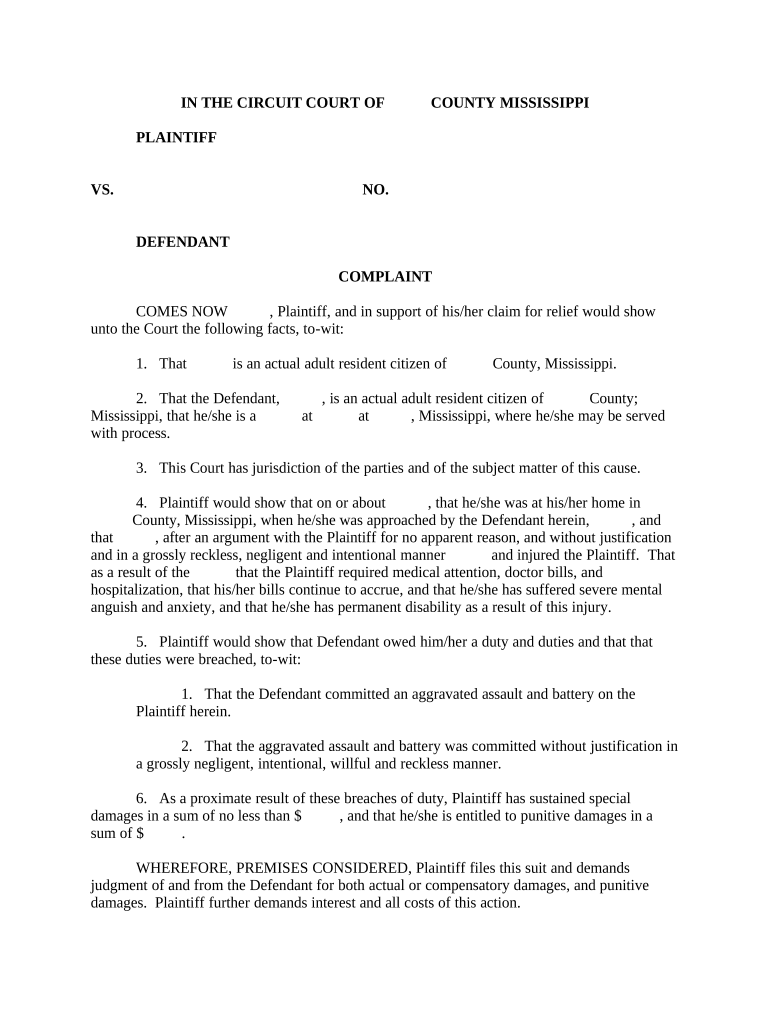
Jurisdiction & Venue

Statement of why the selected court has authority and why venue is proper, referencing statutory or common-law bases under state or federal rules.

Statement of Facts

Chronological, specific factual allegations describing the assault and/or battery acts, times, locations, witnesses, and injuries, with dates where known.

Causes of Action

Separate numbered counts for assault and battery (and related torts such as intentional infliction of emotional distress), with succinct legal elements for each cause of action.

Damages & Relief

Detail compensatory, special, punitive damages if available, and any injunctive or declaratory relief sought, including dollar amounts when required by local rules.

Prayer for Relief

Formal request listing the remedies sought and a signature block for plaintiff or attorney with date and contact details.

Step-by-Step: Filing a Civil Assault and Battery Complaint

Follow these sequential steps from drafting to service and initial response to ensure compliance with court rules and timelines.

  • 01
    Draft Complaint: Compose factual allegations, counts, and relief with supporting detail.
  • 02
    Review Local Rules: Confirm caption format, filing fees, and e-filing procedures for the court.
  • 03
    File with Clerk: Submit the complaint and pay required filing fee; obtain a stamped copy.
  • 04
    Serve Defendant: Arrange personal service, RWN or certified mail per jurisdictional service rules.

Where to File and How Papers Move Through the System

After drafting, route the complaint for filing and service according to court and jurisdiction rules to start the civil process.

  • Court Clerk Filing: File at the county or federal clerk’s office or use the court's e-filing system.
  • Process Server: Use a licensed process server or sheriff for personal service where required.
  • E-Filing Portals: Many courts accept electronic filing and service through authorized e-filing providers.
  • Return of Service: File proof of service or affidavit with the clerk to confirm defendant was served.

Configuring an Online Completion and Submission Workflow

Set up the template, signer roles, authentication, and attachments to streamline e-filing and service preparation.

Field Configuration
Document Template Pre-fill plaintiff and court fields for reuse.
Signer Roles Assign plaintiff, attorney, and witness fields.
Authentication Use email or SMS codes for signer verification.
Attachments Include exhibits, medical records, and witness statements.

Technical Considerations for Digital Signing and eSubmission

Ensure the chosen eSignature platform supports court-acceptable PDF output, audit trails, and the authentication level required by the jurisdiction.

  • File Formats: PDF and PDF/A accepted by most courts.
  • Audit Trail: Timestamp, IP, and signer actions recorded.
  • Integrations: Works with court e-filing portals and cloud storage.

Confirm the court clerk's electronic filing rules before relying solely on eSignatures; preserve audit records and copies to support service and admissibility.

Key Deadlines and Timing Expectations

Timelines drive strategy: filing, service, defendant response, and statute of limitations are the most time-sensitive elements.

Statute of Limitations:

Varies by state, commonly 1–6 years for personal injury claims.

Service Deadline:

Courts often require service within 90 days after filing; check local rule.

Defendant Response:

Answer or motion typically due 20–30 days after service under state rules.

Discovery Timelines:

Initial disclosures and discovery schedules set at case conference.

Trial Readiness:

Expect pretrial deadlines months before trial for motions and exhibit lists.

Consequences of an Incorrect or Deficient Complaint

Dismissal Risk: Insufficient facts
Statute Bar: Filed after limitations period
Sanctions: Frivolous pleading penalties
Service Failure: Case not proceed
Perjury Exposure: False statements risk criminal charges
Lost Recovery: Missed evidence or deadlines

Common Preparation Mistakes to Avoid

  • Using vague allegations without dates, locations, or witness details weakens causation and damages proofs and invites a motion to dismiss.
  • Failing to check jurisdiction and venue can result in transfer or dismissal if the court lacks proper authority.
  • Attempting to serve a defendant improperly or using an incorrect service address frequently delays proceedings and can nullify the filing.
  • Omitting required attachments such as medical records or a statutory demand for punitive damages where jurisdiction demands specifics leads to pleading defects.

Illustrative Examples of Use

Real organizations and practitioners use digital workflows to prepare and sign complaints while preserving evidence and reducing turnaround times.

Optica Ventures LLC

A regional firm standardized complaint templates to reduce drafting time.

  • They pre-fill party and venue fields.
  • The change reduced repetitive entry, improved consistency, and accelerated filing while ensuring court-ready pleadings for every new matter.

Martin Properties

A property manager used a template for tenant-related assault claims.

  • The template linked incident reports.
  • Consolidating facts and exhibits in a single, signed package simplified service, supported quicker insurer responses, and aided settlement negotiations.

Practical Tips for Accurate and Efficient Filing

Adopt these practices to reduce rework and procedural delays when preparing a Civil Assault and Battery Complaint.

Verify Names and Addresses
Confirm defendant identity using government or business records to ensure proper service and avoid dismissal.
Document Chronology
Create a clear timeline of events with dates and witness contacts to strengthen factual allegations.
Preserve Evidence
Secure photos, medical records, and video early; spoliation can bar evidence at trial.
Follow Local Rules
Use the court's required format, filing method, and fee schedule to prevent administrative rejections.

eSignature Vendor Comparison for Filing and Signing Complaints

Comparison of common eSignature offerings for legal workflows. signNow appears first; feature availability and price models affect deployment choices for document-heavy practices.

signNow DocuSign Adobe Sign PandaDoc HelloSign
Starting Price $8/user/mo $15/user/mo $14/user/mo $19/user/mo $15/user/mo
Free Trial 7-day free trial Varies Varies Yes, limited Yes, limited
Bulk Send Yes Yes Yes Yes No
Audit Trail Yes Yes Yes Yes Yes
HIPAA Compliant Yes Yes Yes No No
Envelope Cap No cap 100 envelopes/user/year Varies Varies Varies

FAQs and Troubleshooting for the Complaint Process

Answers to frequent procedural questions about e-signing, filing, service, and correcting complaints to reduce delays and procedural pitfalls.


Need help? Contact support

be ready to get more
Join over 28 million airSlate SignNow users