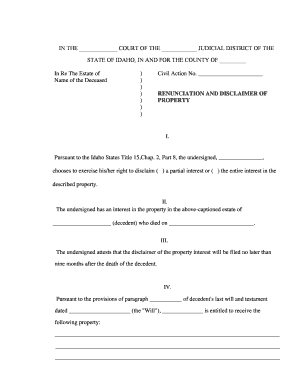
Idaho Renunciation and Disclaimer of Property
What the Idaho Renunciation and Disclaimer of Property Is
Why a Clear Renunciation Matters in Idaho Estates
An Idaho Renunciation and Disclaimer of Property provides certainty in estate distribution by documenting a voluntary refusal of property rights, reducing litigation risk, and enabling efficient probate administration when a beneficiary prefers to pass assets to alternate heirs rather than accept an inheritance.
Who Typically Prepares or Signs This Document
Typical users include beneficiaries, personal representatives, attorneys, and estate administrators involved in Idaho probate or estate planning matters.
- Individual beneficiaries who prefer to decline an inheritance and redirect distribution to alternate beneficiaries.
- Personal representatives or executors managing estate assets and pursuing clear title for distribution.
- Estate planning and probate attorneys preparing renunciations to avoid future contests or claims.
Who Has Authority to Sign
Beneficiary
A named beneficiary who is the current holder of a future or vested interest may execute a renunciation if legally competent. The beneficiary should confirm no prior acceptance of benefits and, when necessary, consult counsel to ensure the renunciation does not create unintended tax or creditor exposure.
Personal Representative
A personal representative or executor cannot renounce on behalf of a beneficiary without clear written authority from that beneficiary. Representatives must include documented proof of the beneficiary's decision and follow Idaho probate procedures before making distribution adjustments.
Step-by-Step: Completing the Renunciation
-
01Identify Property: Describe the specific property interest and the instrument or decedent involved.
-
02State Intent: Clearly state you renounce and disclaim all right, title, and interest.
-
03Sign & Date: Sign in presence of required witnesses or notary per Idaho rules.
-
04File or Serve: Provide copies to personal representative and file with probate if required.
Configuring a Digital Workflow for Renunciations
| Field | Configuration |
|---|---|
| Authentication | Use email and optional SMS code for signer identity |
| Notarization | Enable remote notarization when Idaho RON accepted by county |
| Document Storage | Save signed PDF and audit trail in secure repository |
| Notification | Auto-send copies to personal representative and listed heirs |
Typical Handling from Signing to Probate
-
Prepare Document: Draft with precise property and party identification.
-
Sign & Witness: Sign before required witnesses or notary.
-
Serve Copies: Deliver copies to personal representative and heirs.
-
File if Needed: File into probate docket when court requires.
Technical Requirements for Electronic Completion and Storage
For digital completion and eSubmission, confirm platform supports identity proofing, secure storage, and notarization workflows compatible with Idaho processes.
- File Formats: PDF and DOCX supported
- Integrations: Connect to case management and cloud storage
- Notarization: Support RON and in-person notarization workflows
Common Preparation Pitfalls to Avoid
- Using vague property descriptions that do not match deed or account records, causing the probate court to reject or require clarification.
- Failing to sign in the presence of required witnesses or notary, which can render the renunciation ineffective under Idaho evidentiary rules.
- Submitting the renunciation after taking any benefit or control over the property, which may be treated as acceptance and void the disclaimer.
- Not providing copies to fiduciaries and interested parties, leading to delays in administration and potential duplicative legal steps.
Potential Legal and Practical Risks
Best Practices to Make a Renunciation Defensible
Real-World Examples of Renunciations in Practice
Estate Reallocation
A daughter declined a life estate in favor of siblings to simplify real property transfer without triggering additional probate steps.
- Renunciation executed and notarized promptly.
- The estate administrator recorded the renunciation with the probate court, redirected the interest per the will, and avoided a contested claim; clear documentary evidence shortened administration and reduced legal fees.
Avoiding Accidental Acceptance
A beneficiary inadvertently managed rental income before disclaiming; the counsel advised a formal renunciation to limit tax and creditor exposure.
- Timing and documentation were critical.
- After filing a written renunciation and serving the personal representative, the beneficiary's earlier actions were reviewed; court accepted the disclaimer with conditions, which preserved distribution clarity while addressing creditor claims.
eSignature Pricing and Feature Comparison for Probate Workflows
| signNow | DocuSign | Adobe Sign | PandaDoc | HelloSign | |
|---|---|---|---|---|---|
| Starting Price | $8/user/mo | $15/user/mo | $14/user/mo | $19/user/mo | $15/user/mo |
| Free Trial | 7-day free trial | Varies | Varies | Varies | Varies |
| Bulk Send | Yes (Business Premium) | Yes | Yes | Yes | No |
| Audit Trail | Yes | Yes | Yes | Yes | Yes |
| HIPAA Compliant | Yes | Yes | Yes | No | No |
Key Timing Considerations and Deadlines
Execution and signature date (signatory):
Sign and date when renouncing intent; effective date controls timing.
Service to personal representative and heirs:
Deliver written copy promptly; keep proof of delivery for probate record.
File with court if required by local rules:
Some counties require filing; check local probate rules or clerk.
Tax reporting and information return deadlines:
Provide necessary forms for tax year and consult IRS rules for timing.
Revocation or withdrawal possibilities and limits:
Renunciations may be irrevocable once effective; legal counsel can advise on exceptions.
Milestones: From Draft to Probate Record
Draft Document
Prepare precise property and party identifiers.
Execute
Sign before required witnesses or notary.
Notify Parties
Provide copies to personal representative and heirs promptly.
Record or File
File in probate docket if county requires or attach to estate records.
Frequently Asked Questions About Renunciations in Idaho
-
Can I renounce after accepting benefits?
Possibly not. Acceptance of a benefit or exercise of control over property before a renunciation can be treated as an election to accept, which may preclude disclaimer. Consult counsel promptly; provide full documentation and avoid further dealings with the property pending advice.
-
Is notarization required in Idaho?
Not universally. Idaho practice suggests notarization or witness statements strengthen a renunciation's evidentiary weight, and some courts or counties may expect a notarial certificate. When in doubt, obtain notarization and include a self-proving affidavit to reduce later challenges.
-
Can I revoke a renunciation?
Revocation is limited and may not be permitted if the renunciation is effective and acted upon. Courts consider fairness and reliance by other parties. Seek immediate legal advice if circumstances change and ensure any revocation is documented and filed with the probate court.
-
Does renunciation affect taxes or creditors?
It can. A disclaimer may alter ownership for estate tax or gift tax analysis and can influence creditor claims depending on timing. Consult tax counsel to evaluate potential gift, estate, or income tax consequences before executing the renunciation.
-
How do I file or serve the renunciation?
Provide signed copies to the personal representative, trustee, and all known heirs; retain proof of service. File the document with the probate court only if local rules require or when a recorded record is necessary for title or distribution.
-
Can this be signed electronically and notarized?
Yes in many cases, subject to Idaho notary and remote online notarization rules. ESIGN and UETA generally allow electronic signatures, but exceptions apply. Confirm county acceptance and use identity-proofing and tamper-evident certificates for court-ready electronic notarizations.