Establishing secure connection…Loading editor…Preparing document…

Commission Agreement

This template is fully customizable. Edit the text, fill out the fields, and send it for signature. Give it a try!
Commission Agreement

What a Commission Agreement Is and When It Applies

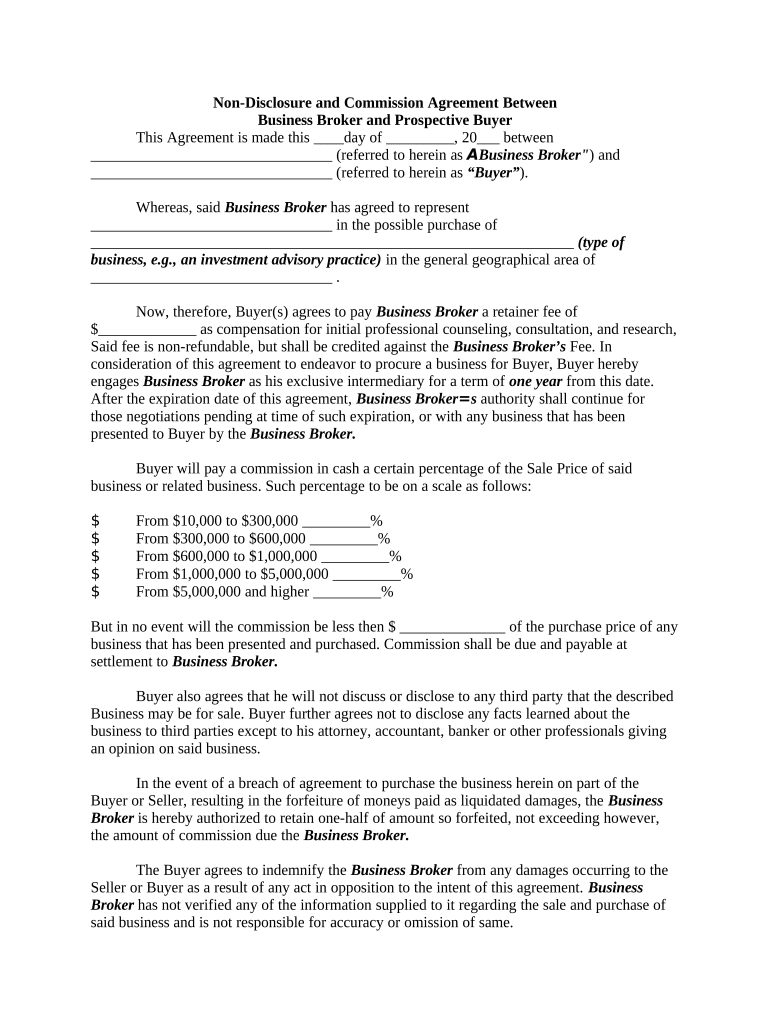
A Commission Agreement is a contractual arrangement that sets out how one party (the payer or principal) compensates another (the sales agent, broker, or representative) for successful sales, referrals, or completed transactions. It specifies commission rates, triggering events, calculation methods, payment schedules, reporting requirements, and any clawback or adjustment rules. These agreements govern independent contractors and employees in sales, real estate, insurance, finance, and agency relationships. Electronic signing is generally acceptable under the ESIGN Act (15 U.S.C. ch. 96) and UETA where adopted, subject to any statutory exceptions and specific industry rules.

Why a Clear Commission Agreement Matters

A precise Commission Agreement reduces disputes, clarifies taxable reporting obligations, and protects both parties by documenting scope, rates, calculation method, and payment timing. Properly executed electronic or paper agreements support enforcement, audits, and tax filings under ESIGN (15 U.S.C. ch. 96) and UETA.

Why a Clear Commission Agreement Matters

Who Typically Uses a Commission Agreement

These agreements are used across sales-driven roles and regulated sectors where commission-based pay is standard.

  • Real estate brokers and agents working on property sales and leasing commissions.
  • Insurance producers and financial advisors paid on policy sales or client referrals.
  • Software and technology resellers or channel partners earning revenue-share commissions.

Use the agreement to align payment mechanics, documentation expectations, and tax reporting between principals and earners.

Example Signers and Their Roles

Principal — CFO

The principal (often labeled payer or company) is responsible for approving the commission structure, supplying sales reports, issuing payments, and complying with tax withholding and information reporting obligations.

Agent — Independent Rep

The agent earns commissions per the agreement, must supply accurate expense and activity reports when required, and may be responsible for maintaining licenses or registrations in regulated industries.

Required Data and Security Considerations

Full Legal Name: Exact name as on government ID
Tax ID: TIN or SSN for IRS reporting
Payment Details: Bank account or remittance instructions
Effective Date: MM/DD/YYYY format
Commission Formula: Clear percentage or fixed amounts
Encryption: TLS 1.2/1.3 and AES-256

Common Preparation Mistakes to Avoid

  • Undefined triggers for payment (e.g., 'sale' vs 'paid invoice') leading to disputes over when commissions vest.
  • Vague commission formulas that use undefined terms like 'net revenue' without deductions or timing rules.
  • Omitting tax and reporting responsibilities, causing backup withholding or 1099-NEC errors.
  • Failing to document clawbacks or returns, which can create retroactive liability for the payer.

Filling Out a Commission Agreement — Step by Step

Follow these core steps to complete a Commission Agreement so terms are clear, enforceable, and ready for signature.

  • 01
    Identify Parties: Enter full legal names and contact details for payer and payee.
  • 02
    Define Scope: Describe covered products, territories, and excluded activities.
  • 03
    Set Rates: Specify commission rates, tiers, or caps with calculation examples.
  • 04
    Establish Payments: Choose payment frequency, triggering events, and method.

Where the Signed Agreement Goes and Who Receives It

Route executed copies to the right departments to support payroll, accounting, and record retention.

  • Accounting: Receives signed agreement to schedule payments and tax reporting.
  • Legal: Keeps original for enforcement and dispute resolution.
  • Sales Operations: Uses terms to configure commission systems.
  • Agent: Retains a copy for personal records and tax purposes.

Essential Clauses Every Professional Commission Agreement Should Include

A robust Commission Agreement combines operational clarity with legal protections; include these six core components to reduce ambiguity and enforce terms.

Commission Definition

A precise formula describing how commissions are computed, including gross vs net definitions, exclusions, prorations, rounding rules, and worked examples for common sale types.
Triggering Event

When the commission is earned (e.g., order acceptance, invoice payment, or cash receipt) and any conditions that delay or accelerate payment.

Payment Terms

Timing (net 30, net 45), method (ACH, check), responsible party, and consequences for late payment or returned funds.

Adjustments and Clawbacks

Circumstances for reversal (returns, chargebacks, cancellations), calculation of recovery, and notice and repayment procedures.

Term and Termination

Start and end dates, renewal mechanics, and commission treatment on termination (paid vs forfeited vs prorated).

Tax and Reporting

Who reports payments, withholding obligations, requirement to provide W-9, and responsibility for backup withholding if TIN is invalid.

Customize and Complete the Agreement Online

Set up an online workflow to auto-populate fields, route approvals, and capture signatures securely.

Field Configuration
Auto-fill Agent Info Use template variables to populate name and TIN
Conditional Sections Show clauses only for independent contractors
Approval Routing Route to manager then finance automatically
Signature Order Set signer sequence and signer authentication

Digital Signing and Technical Requirements

Ensure your eSignature platform supports required security, audit trails, and integrations for post-signature processing.

  • Authentication: Email, SMS, or stronger MFA options
  • Audit Trail: Timestamps, IP addresses, and action logs
  • Integrations: CRM, ERP, and cloud storage connectors

Confirm platform compliance with ESIGN/UETA and industry rules; include HIPAA BAA when handling protected health information.

Key Timelines and Reporting Deadlines to Track

Track payment, dispute, and tax-reporting deadlines to avoid penalties and maintain good accounting practices.

Payment Cycle:

Specify payment frequency (e.g., monthly, net 30) and cut-off dates for earned commissions.

Dispute Notice:

Set a limited window (commonly 30–60 days) for dispute or audit of commission calculations.

Tax Forms:

Provide payee info timely; Form 1099-NEC to recipients and IRS is due Jan 31 each year.

Recordkeeping:

Retain commission records per retention policy to support audits and tax inquiries.

Termination Effects:

State when final commissions are calculated and paid after agreement termination.

Penalties and Common Legal Risks

Breach Claims: Monetary damages possible
Tax Penalties: 1099 failures lead to IRC §6721 fines
Withholding Exposure: Backup withholding may apply
Fraud Allegations: Intentional misreporting increases liability
Enforceability Issues: Ambiguous terms undermine enforcement
Data Breach: HIPAA or state penalties possible

SignNow and Competitor Pricing and Feature Snapshot

Compare starting price, trial options, bulk send, audit trail availability, HIPAA suitability, and envelope caps across common eSignature vendors to match your Commission Agreement needs.

signNow DocuSign Adobe Sign PandaDoc HelloSign
Starting Price $8/user/mo $15/user/mo $14/user/mo $19/user/mo $15/user/mo
Free Trial 7-day free trial Verify vendor Verify vendor Verify vendor Verify vendor
Bulk Send Yes Yes Yes Yes No
Audit Trail Yes Yes Yes Yes Yes
HIPAA Compliant Yes (BAA) Yes Yes No No

Frequently Asked Questions About Commission Agreements

Answers to common questions on enforceability, eSigning, tax reporting, and how to handle disputes and revisions.


Need help? Contact support

be ready to get more
Join over 28 million airSlate SignNow users