Establishing secure connection…Loading editor…Preparing document…

Compensable Work Chart

This template is fully customizable. Edit the text, fill out the fields, and send it for signature. Give it a try!
Compensable Work Chart

What a Compensable Work Chart Is and When It Applies

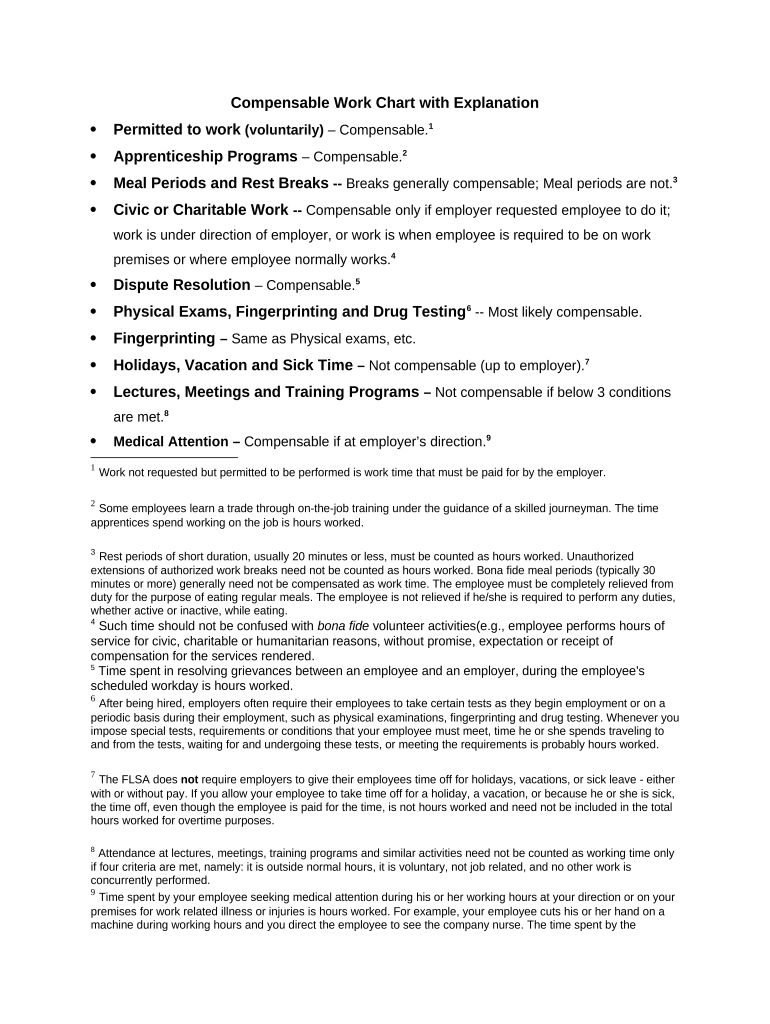
A Compensable Work Chart is a structured record that itemizes work activities, time spent, and compensation-eligible tasks for an employee, contractor, or project worker. It clarifies which activities count toward paid time, documents start and end times, and captures job codes or task descriptions needed for payroll, billing, or project accounting. Organizations use the chart to align pay rules with company policy, collective bargaining agreements, or contract terms. When maintained accurately it supports audits, payroll reconciliation, and compliance with wage and hour rules.

Why a Compensable Work Chart Matters

A clear Compensable Work Chart reduces payroll disputes, ensures consistent application of pay policies, and creates a defensible record for audits or claims. It provides an authoritative source for what work is billable or compensable under internal rules and external law.

Why a Compensable Work Chart Matters

Who Typically Completes and Relies on This Chart

The chart also serves employees and contractors who need clear expectations about what tasks qualify for paid work and how time should be recorded.

  • Supervisors verifying daily or weekly task-level time entries for accuracy and compliance
  • Payroll teams reconciling hours to pay codes and processing wage payments
  • Contract administrators or billing teams converting documented hours into client invoices

Step-by-step: Complete a Compensable Work Chart

Follow these steps to record work accurately and produce a payroll-ready chart.

  • 01
    Prepare Data: Gather timesheets, schedules, and task logs for the period.
  • 02
    Identify Tasks: List discrete activities with matching job or task codes.
  • 03
    Mark Compensable: Flag each activity as compensable based on policy or contract.
  • 04
    Review and Approve: Have supervisor verify entries before submission to payroll.

Core Components of a Professional Compensable Work Chart

A complete chart combines identification, timing, task detail, compensation flags, approvals, and audit metadata to support payroll and compliance.

Identification

Employee name, ID, department, and pay rate connection so payroll systems map hours to the correct wage table and tax profile.
Time Entries

Start and end times, break periods, and total hours per entry recorded consistently to calculate regular and overtime pay correctly.

Task Codes

Standardized job or task codes that link work activity to billing rates, project budgets, or internal chargebacks for accurate costing.

Compensability

Explicit Yes/No indicator plus brief policy reference (policy clause or contract line) explaining why the item is paid.

Approval

Supervisor name, date, and signature field to certify accuracy and establish authorization for payment or invoicing.

Audit Trail

Change history, timestamps, and signer attribution to support audits, discrepancy resolution, and regulatory review if needed.

How to Configure a Digital Completion Workflow

Configure fields, approvers, and export settings so the chart integrates with payroll and project systems.

Field Configuration
Date Format MM/DD/YYYY required
Time Format HH:MM AM/PM or 24-hour
Approval Order Supervisor then payroll
Export Format CSV or XLSX for payroll import

Where to Send or File the Completed Chart

Routing depends on whether the chart is for payroll, billing, or project accounting; ensure the destination accepts the chosen file format.

  • Payroll System: Upload approved CSV/XLSX to payroll import queue for processing.
  • Billing Department: Attach chart to client invoice records for charge verification.
  • Project Accounting: Import task codes into the project ledger for budget reconciliation.
  • Records Retention: Store signed charts in HR or document repository with audit metadata.

Digital Signing and Distribution Considerations

Ensure the chosen service can retain tamper-evident PDFs and deliver an audit report showing signer attribution, timestamps, and IP data for compliance.

  • File Formats: PDF, DOCX, CSV supported
  • Integrations: Works with HR and ERP systems
  • Authentication: Email, SMS, or stronger methods

Typical Timelines and Submission Deadlines

Understand periodic deadlines so charts feed into payroll cycles and client billing without delay.

Payroll Cutoff:

Submit approved charts before payroll cutoff for the pay period, typically 3–7 days prior

Invoice Submission:

Attach charts to client invoices by the billing cycle close to avoid billing disputes

Record Updates:

Correct errors within the pay period when possible to limit retroactive adjustments

Retention Start:

Retention begins on chart creation or the approval date as applicable

I-9 or Tax Audit:

Preserve supporting charts for required regulator retention periods

Common Errors That Undermine a Chart

  • Inconsistent time formats causing import failures and incorrect hour totals
  • Missing supervisor approval leading to payroll holds or manual overrides
  • Unclear task descriptions preventing correct billing or project allocation
  • Incorrect compensable flags that produce overpayments or underpayments

Penalties and Compliance Risks of Inaccurate Charts

Wage Claims: Underpayment can trigger wage and hour claims and statutory damages
Tax Reporting Errors: Incorrect reporting can lead to IRS penalties under IRC §6721 for information returns
Contract Disputes: Billing disagreements may result in contract penalties or withheld payments
Audit Exposure: Lack of audit trail increases risk in internal and external audits
I-9 / Employment Violations: Failure to retain supporting time records can complicate immigration and employment audits
Data Privacy: Improperly stored personal data risks HIPAA or state privacy violations

Real-world Examples of Compensable Work Chart Use

These short case narratives show how organizations apply charts to reduce disputes and accelerate billing.

Optica Ventures LLC

A small investment firm standardized chart entries across analysts to reconcile time with client billing

  • They required task codes for each meeting or model update
  • "The interface is simple and easy-to-use for our team; more importantly, it is just as easy for our customers."

Xerox (NetSuite Ops)

A global operations team integrated charts with NetSuite to auto-import hours into project ledgers

  • Formula mappings reduced manual reconciliation
  • "airSlate SignNow provides us with the flexibility needed to get the right signatures on the right documents, in the right formats, based on our integration with NetSuite."

Common eSignature Vendor Comparison for Chart Signing Workflows

Comparison of starting prices and core capabilities relevant to signing and distributing Compensable Work Charts. signNow is listed first per vendor ordering rules.

signNow DocuSign Adobe Sign PandaDoc HelloSign
Starting Price $8/user/mo $15/user/mo $14/user/mo $19/user/mo $15/user/mo
Free Trial 7-day trial Varies Varies Varies Varies
Bulk Send Yes (Premium) Yes Varies Yes Varies
Audit Trail Yes Yes Yes Yes Yes
HIPAA Compliant Yes Varies Varies Varies Varies

Frequently Asked Questions About Using a Compensable Work Chart

Answers to common questions about completion, signing, storage, and resolving errors.


Need help? Contact support

be ready to get more
Join over 28 million airSlate SignNow users