Establishing secure connection…Loading editor…Preparing document…

Mississippi Letters of Conservatorship

This template is fully customizable. Edit the text, fill out the fields, and send it for signature. Give it a try!
Mississippi Letters of Conservatorship

What Mississippi Letters of Conservatorship Are

Mississippi Letters of Conservatorship are court-issued documents from a county probate court that formally appoint a conservator to manage a ward's person, finances, or both. The letters identify the conservator, summarize court-authorized powers, and serve as official proof for banks, care providers, government agencies, and other third parties that the conservator may act on the ward's behalf. Obtaining letters requires filing a petition, providing notice, a court hearing, and a signed order; the clerk issues certified letters after the judge signs and the order is entered.

Why these letters matter for guardianship and asset management

Letters provide clear, court-backed authority allowing a conservator to act for the ward, reduce disputes with third parties, and create a paper trail for fiduciary decisions and accounting.

Why these letters matter for guardianship and asset management

Primary users and typical signatories

Understanding each user's needs helps ensure correct form completion, acceptable evidence, and smoother interactions with institutions.

  • County probate clerks and court personnel who issue and docket the letters for public record.
  • Attorneys and private fiduciaries who draft petitions, represent petitioners, and accept court appointment terms.
  • Banks and financial institutions who require certified letters to release funds or permit account management.

Core elements found in professional letters

A complete Letter of Conservatorship includes identity, authority, scope, safeguards, and official court authentication so third parties can verify and accept the conservator's actions.

Court Caption

Case number, court name, and judge or clerk identification that ties the letter to the official docket and order.
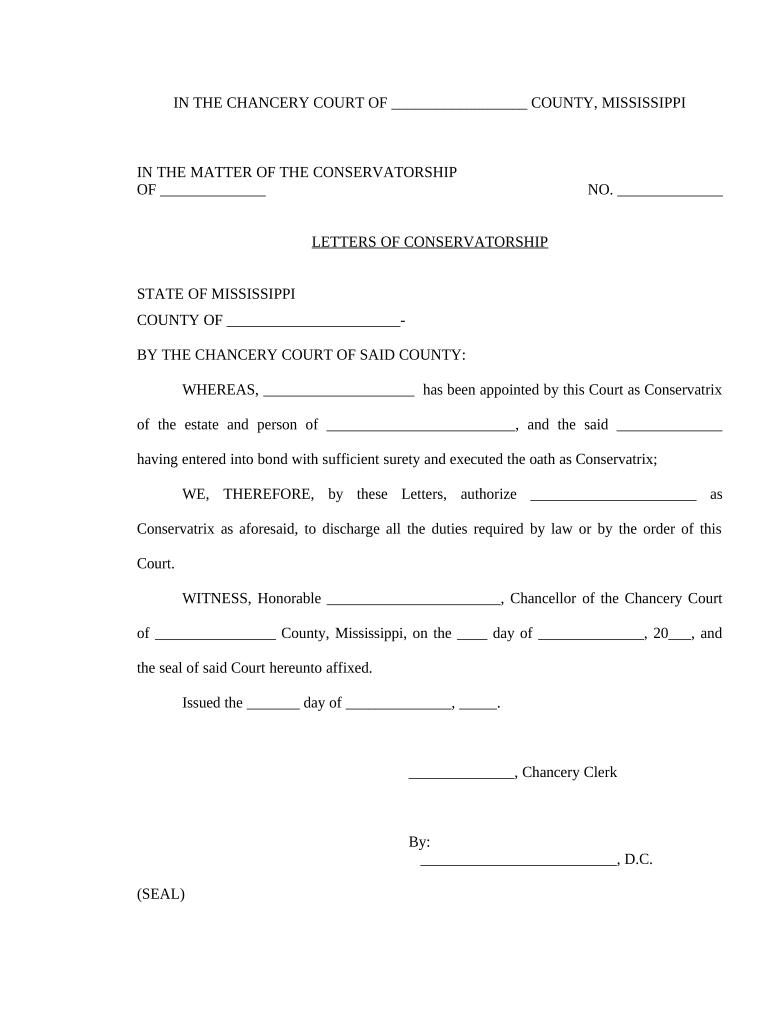
Conservator Identity

Full legal name, address, and any professional or fiduciary credentials for the appointed conservator for unambiguous attribution.

Scope of Authority

Clear, itemized powers granted (financial, medical, real property) and any limitations or required court approvals for major acts.

Bond and Security

Reference to bond amount or waiver where required; identifies surety or court-ordered safeguards protecting the ward's estate.

Inventory Reference

Citation to the required inventory and periodic accounting obligations that the conservator must file with the court.

Official Authentication

Judge signature, court seal, clerk stamp, and date, which certify the document as an enforceable court-issued instrument.

Step-by-step: getting Letters issued in Mississippi

Follow this sequence to prepare, file, and receive Letters of Conservatorship from the probate court.

  • 01
    Prepare Petition: Draft and gather medical and financial affidavits supporting incapacity or need.
  • 02
    File with Clerk: Submit petition, filing fee, and required exhibits to the county probate or chancery clerk.
  • 03
    Provide Notice: Serve interested persons and publish notice when the court requires it under local rules.
  • 04
    Attend Hearing: Appear at the hearing; if the court approves, the judge signs the order and clerk issues letters.

Typical document flow for conservatorship letters

This overview shows who prepares each document, where it moves, and what evidence the court issues after entry of the order.

  • Petitioner Prepares: Attorney or petitioner compiles petition, medical reports, and bond information.
  • Clerk Dockets: Clerk assigns case number and schedules hearing per local rules.
  • Judge Signs: Judge reviews evidence, issues order, and authorizes letters.
  • Letters Issued: Clerk prepares certified letters for delivery to conservator and third parties.

Configuring a digital workflow when using electronic tools

Use these settings to create a repeatable, compliant e-filing and e-signing workflow for conservatorship documents.

Field Configuration
Document Template Lock required fields and include versioning metadata for auditability.
Signer Order Set petitioning attorney then proposed conservator as sequential signers.
Authentication Use email + SMS or knowledge-based checks when permitted by court.
Retention Policy Enable export to PDF/A and store certificates for audit trail retention.

Digital signing and court submission requirements

Confirm local court clerk preferences for electronic submissions; some courts accept scanned certified letters while others require originals or RON notarization.

  • File formats: PDF/A for long-term preservation.
  • Audit trail: Timestamp, IP, and signer attribution required.
  • Authentication: Use two-factor where available for stronger evidence.

Common timing and deadlines to track

Deadlines vary by county and judge; use these typical milestones to plan the petition and hearing schedule.

Filing Date:

Date petitioner files the initial petition with the clerk.

Notice Period:

Minimum service or publication period set by local rule or statute.

Hearing Date:

Date the court hears evidence and decides appointment.

Letters Issued:

Clerk issues letters after entry of the order; timing depends on processing.

Accounting Deadlines:

Periodic inventories/accountings required by the court at specified intervals.

Milestone timeline from petition to letters

Numbered stages that commonly occur after filing a conservatorship petition in Mississippi.

01

File Petition

Initiate the case by filing the petition and supporting exhibits with the clerk.

02

Serve Notice

Serve interested parties and publish notice where the law requires.

03

Attend Hearing

Present evidence; the judge determines necessity and scope of conservatorship.

04

Letters Issued

Clerk prepares and certifies Letters of Conservatorship after the order is entered.

Frequent preparation and acceptance problems to avoid

  • Incomplete case citations or missing judge signature cause institutions to reject letters and request certified copies.
  • Mismatched conservator names between letters and bank account records delay access to funds and require name-change procedures.
  • Vague scope language or omitted bond requirements can trigger additional court motions or third-party refusals.
  • Failure to provide required notice or an inventory may lead to sanctions, contested hearings, or relief motions.

Consequences of errors or misuse

Wrong Appointment: Court reversal possible
Financial Misuse: Civil liability and restitution
Fraud or Theft: Criminal prosecution potential
Delayed Access: Third-party refusal delays care
Accounting Failures: Court sanctions or removal
Tax Consequences: Reporting errors trigger penalties

Security and compliance considerations

Encryption: TLS 1.2/1.3 in transit
Data at Rest: AES-256 encrypted storage
Audit Trail: Immutable timestamps and logs
Compliance: ESIGN, UETA, SOC 2 Type II
HIPAA Support: BAA available when required
Accessibility: WCAG 2.0 Level AA support

How Letters of Conservatorship compare to related documents

Quick comparison of conservatorship letters versus other authority documents to clarify use and limitations.

Document Type Authority Typical Use
Letters of Conservatorship court-appointed authority manage ward affairs
Durable Power of Attorney agent authority pre-incapacity planning
Guardianship personal care authority minor or incapacitated person
Court Order Only specific mandate one-off relief or injunction

Typical eSignature pricing and capability comparison

Vendor-level starting prices and common feature availability for eSignature tools; signNow is listed first per standard comparison format.

signNow DocuSign Adobe Sign PandaDoc HelloSign
Starting Price $8/user/mo $15/user/mo $14/user/mo $19/user/mo $15/user/mo
Free Trial 7-day free trial, no credit card Varies Varies Varies Varies
Bulk Send Yes Yes Yes Yes No
Audit Trail Yes Yes Yes Yes Yes
HIPAA Compliant Yes Yes Yes No No

Real-world scenarios illustrating common outcomes

Two anonymized examples show how Letters of Conservatorship are used to resolve access and authority issues in practice.

Case Study 1

An elderly ward lacked capacity and assets were frozen pending court action.

  • The court appointed a professional conservator after a hearing.
  • Certified letters allowed the conservator to access accounts, pay care providers, and submit periodic accountings that the court later approved.

Case Study 2

A family sought conservatorship after disputes over medical care and finances.

  • The court held a contested hearing and limited the conservator's financial powers.
  • The tailored letters enabled the conservator to act within defined bounds while providing regular accountings to the court and family.

Representative professional roles involved

County Probate Clerk

The clerk receives petitions, assigns case numbers, dockets hearings, processes court orders, and issues certified Letters of Conservatorship once the judge signs and the order is entered.

Fiduciary Attorney

An attorney drafts the petition, compiles medical and financial evidence, advocates at hearing, advises on bond and inventory obligations, and helps prepare the accounting required by the court.

Frequently asked questions about Mississippi Letters of Conservatorship

Answers to commonly asked procedural and technical questions to reduce filing errors and acceptance delays.


Need help? Contact support

be ready to get more
Join over 28 million airSlate SignNow users