Establishing secure connection…Loading editor…Preparing document…

Declaratory Judgment

This template is fully customizable. Edit the text, fill out the fields, and send it for signature. Give it a try!
Declaratory Judgment

What a Declaratory Judgment Is and When It’s Used

A declaratory judgment is a court-issued determination that explains the legal rights, duties, or obligations of one or more parties without ordering specific performance or awarding damages. Parties often seek a declaratory judgment to remove uncertainty about contract interpretation, statutory duties, or the enforceability of rights before either side takes coercive action. Courts use this remedy to clarify legal relationships so parties can act with certainty; the process typically begins with a petition or complaint filed in state or federal court and follows applicable civil procedure rules.

Why Parties File for Declaratory Relief

A declaratory judgment prevents uncertainty and reduces litigation risk by obtaining an authoritative legal interpretation early. It can streamline disputes, inform business decisions, and clarify legal obligations where immediate coercive relief is not required.

Why Parties File for Declaratory Relief

Who Typically Prepares or Requests a Declaratory Judgment

Parties, counsel, or public entities file declaratory actions to resolve legal questions before escalation.

  • Plaintiffs and defendants in contract disputes seeking interpretation or avoidance of future litigation exposure.
  • Commercial entities or insurers needing clarity on policy coverage, indemnity, or contractual obligations.
  • Government agencies or regulated entities requesting court guidance on statutory or regulatory compliance.

Who Can Sign and Submit the Filing

Corporate Officer

An authorized corporate officer (CEO, CFO, or general counsel) may sign filings that bind the corporation. Include an explicit corporate resolution or power-of-attorney when authority is delegated to ensure the court accepts the signature as binding.

Authorized Agent

An attorney of record or an individual with written, notarized authority may sign and file pleadings. Courts generally require counsel signatures to include bar numbers and contact information; pro se filers must follow local rules for signatures and service.

Essential Information to Include in the Declaratory Judgment

Parties: Full legal names of all plaintiffs and defendants
Jurisdiction: Court name and venue for filing
Case Caption: Style of case as required by local rules
Statement of Facts: Concise factual background and chronology
Relief Sought: Specific declaratory rulings requested
Signature Block: Signer name, title, date, and contact details

Consequences of Filing Incorrect or Incomplete Papers

Dismissal Risk: Court may dismiss for lack of standing
Sanctions: Court can impose monetary sanctions
Waiver: Claims may be waived by late assertions
Estoppel: Adverse rulings can bind future positions
Fee Liability: Loser-pays orders may shift fees
Delay: Improper filings prolong resolution

Common Mistakes to Avoid When Preparing a Declaratory Judgment

  • Failing to establish an actual case or controversy, which can result in dismissal for lack of standing or ripeness.
  • Using vague or overly broad requests for relief instead of precise, discrete declaratory rulings tied to specific statutes or contract terms.
  • Omitting required parties or misidentifying parties, causing service defects or later jurisdictional challenges and delay.
  • Neglecting local court formatting, signature, or filing rules, including certificate of service requirements and fee payment procedures.

Step-by-Step: Preparing and Submitting the Declaratory Judgment

Follow a consistent sequence to assemble the pleadings, supporting exhibits, and service documents before filing in the appropriate court.

  • 01
    Draft Complaint: State facts, parties, jurisdiction, and specific declarations sought
  • 02
    Attach Exhibits: Include contracts, statutes, correspondence supporting the request
  • 03
    Sign & Verify: Signer signs; attorney includes bar number if applicable
  • 04
    File and Serve: Pay filing fees, submit to clerk, and serve opposing parties

Where to File and How the Case Moves Forward

Choose federal or state court based on subject-matter jurisdiction, diversity, and statutory criteria; follow local civil rules for intake and service.

  • Federal Filing: File in U.S. district court when federal question or diversity jurisdiction exists
  • State Filing: File in superior or trial court for intrastate disputes without federal basis
  • Clerk Intake: Clerk assigns case number and issues filing receipt
  • Service: Serve defendants per FRCP or state rules, then file proof of service

Anatomy of a Professional Declaratory Judgment Filing

A clear, well-organized petition improves the court’s ability to grant precise relief and minimizes opportunities for procedural challenge.

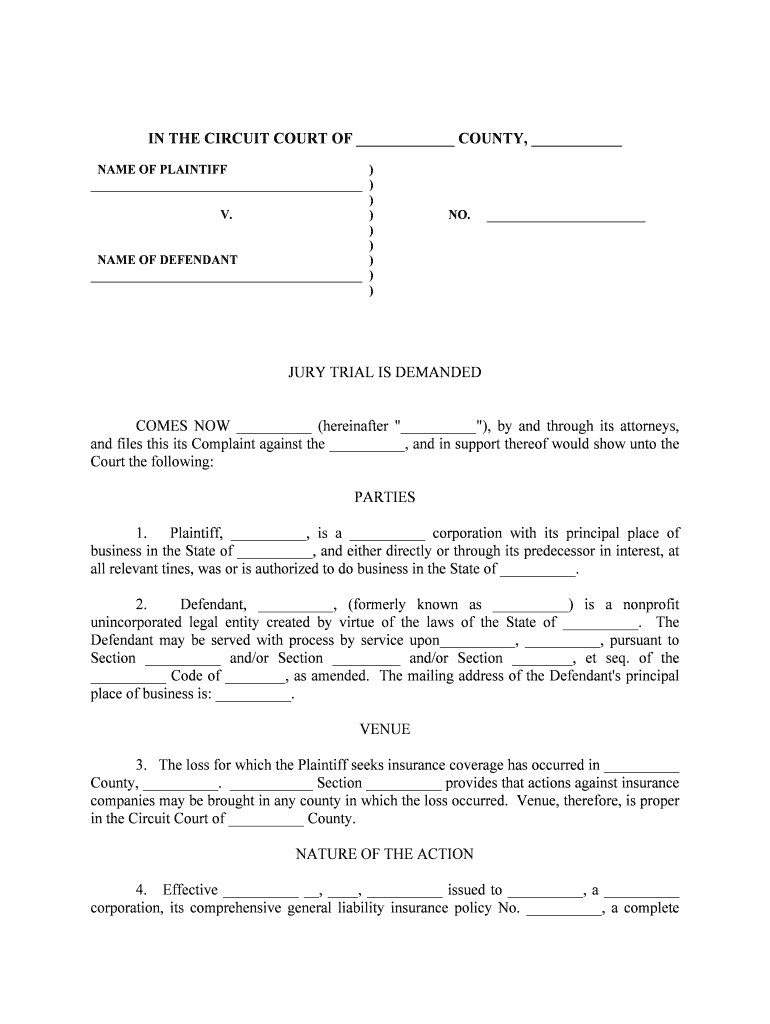
Case Caption

Proper caption and party designations must follow local format and include court name, docket style, and party roles to ensure the clerk and opposing parties can process the filing efficiently.
Jurisdiction Statement

Explain the basis for court jurisdiction and venue concisely, including federal question, diversity of citizenship, or statutory authority, so the court can confirm its power to issue declaratory relief.

Statement of Facts

A neutral, chronological summary of relevant events with referenced exhibits enables the court to assess whether a justiciable controversy exists and whether declaratory relief is appropriate.

Legal Grounds

Cite the statutes, contract provisions, or common-law principles at issue and explain how the requested declaration resolves legal uncertainty for the parties.

Requested Declarations

List each declaratory determination sought as a discrete, numbered request—this clarity helps the court craft a limited judgment tailored to parties’ needs.

Relief and Costs

Specify ancillary relief sought (attorney fees, costs, injunctions) with statutory or contractual bases to support any later application for fee shifting if successful.

Supporting Documents and Export Options

Attach key exhibits and prepare final outputs in commonly accepted formats for filing, service, and later recordkeeping.

Affidavits and Declarations

Include sworn statements or verified declarations that corroborate factual assertions; ensure notarization where required by the applicable jurisdiction or local rule.

Contracts and Exhibits

Attach complete contracts, correspondence, invoices, or statutory excerpts referenced in the complaint; paginate and tab exhibits to ease judicial review.

Filing Copy Format

Prepare court-ready PDFs that match clerk requirements; include a clean copy and a redacted public copy if filings include confidential information.

Download Options

Save final documents as PDF/A for long-term preservation and keep editable DOCX copies for amendments or later motions to modify the record.

Practical Tips for Accurate and Efficient Completion

Adopt quality controls and use consistent templates to reduce errors, avoid delays, and preserve enforceability.

Use a Standard Template
Create or adapt a jurisdiction-specific complaint template that includes required captions, local rule checklists, certificate of service language, and signature blocks to ensure consistent filings.
Verify Party Information
Confirm legal names, entity types, and service addresses before filing; incorrect party data can cause service defects and jurisdictional challenges that delay resolution.
Attach Key Evidence
Include only material exhibits referenced in the pleading; over-inclusion can obscure important evidence and complicate judicial review.
Keep an Audit Trail
Document who prepared, reviewed, and authorized the filing; maintain version history and proof of service to defend against procedural challenges later in the case.

Typical Timing and Deadlines to Track

Monitor filing, service, response, and motion deadlines closely; timelines vary by court and by the relief requested.

Filing Deadline:

No universal deadline; file before statute of limitations expires

Service Deadline:

Follow FRCP or state rules for timely service after filing

Answer Period:

Defendant typically has 20–30 days to respond

Motion Windows:

Motions may have short calendaring periods; check local rules

Appeal Timing:

Post-judgment appeal periods are strictly limited

Representative Use Cases for Declaratory Judgment Actions

The examples below illustrate common factual scenarios where parties seek a declaratory ruling to remove legal uncertainty.

Contract Interpretation Dispute

A tenant and landlord disagree on lease renewal provisions and seek a judicial declaration of rights under a disputed clause.

  • Court review focuses on contract language and surrounding context to issue a binding interpretation.
  • A clear declaratory judgment clarifies renewal obligations, allowing both parties to plan without initiating separate damages litigation or interim remedies.

Statutory Compliance Question

A regulated business requests clarification on whether a new state regulation applies to its operations.

  • The court evaluates statutory text and agency guidance to determine applicability.
  • A declaratory ruling prevents enforcement uncertainty and informs the company’s compliance actions without awaiting agency enforcement or penalties.

Digital Signing, eSubmission, and Integration Considerations

When using eSignature or document platforms for filing, confirm they meet technical and legal requirements for court submissions and sensitive data handling.

  • File Formats: PDF, PDF/A, and DOCX support
  • Integrations: Salesforce, Microsoft 365, NetSuite, Google Workspace
  • Security Standards: TLS 1.2/1.3 and AES-256 at rest

Setting Up an Online Filing Workflow

Configure an e-filing workflow that assigns roles, places signature fields, and preserves an audit trail for each signer.

Field Configuration
Signer Authentication Email link or SMS code; use higher assurance where required
Signature Fields Date, signature, and checkbox fields with validation
Document Versioning Enable automatic version history and download of signed PDF
Retention Settings Set export to PDF/A and archive copies for compliance

eSignature Vendor Comparison for Declaratory Judgment Workflows

Compare starting price and key compliance capabilities across leading eSignature vendors; signNow is listed first per platform comparison conventions.

signNow DocuSign Adobe Sign PandaDoc HelloSign
Starting Price $8/user/mo $15/user/mo $14/user/mo $19/user/mo $15/user/mo
Free Trial 7‑day free trial Varies by vendor Varies by vendor Varies by vendor Varies by vendor
Bulk Send Yes Varies by plan Varies by plan Yes Varies by plan
Audit Trail Yes Yes Yes Yes Yes
HIPAA Compliant Yes Yes Yes No No

FAQs and Troubleshooting When Using Declaratory Judgment Templates

Answers to common questions about filing, signatures, and electronic submission to help avoid procedural errors and delays.


Need help? Contact support

be ready to get more
Join over 28 million airSlate SignNow users