Establishing secure connection…Loading editor…Preparing document…

Complaint for Recovery and Declaratory Judgment

This template is fully customizable. Edit the text, fill out the fields, and send it for signature. Give it a try!
Complaint for Recovery and Declaratory Judgment

What a Complaint for Recovery and Declaratory Judgment Is

A Complaint for Recovery and Declaratory Judgment is a civil pleading a plaintiff files to recover money or property and to obtain a judicial determination of parties' rights under a statute, contract, or other legal relationship. It typically names the parties, states jurisdictional and venue facts, alleges the underlying cause(s) of action, quantifies damages or the relief sought, and asks the court to enter a binding declaratory judgment clarifying legal obligations. The complaint starts the lawsuit, triggers service-of-process requirements, and frames the issues the court will decide.

Why Use This Complaint Format

This combined pleading lets a party both seek recovery (damages or possession) and request a declaratory ruling on rights and duties, reducing separate litigation and promoting efficient case management by resolving substantive legal questions early.

Why Use This Complaint Format

Who Typically Prepares and Files This Complaint

The complaint is used by plaintiffs or their counsel when a legal question needs judicial resolution alongside an action to recover money or property.

  • Plaintiff attorneys representing creditors, contract claimants, or property owners seeking monetary recovery and declaratory relief.
  • In-house legal teams handling contract disputes or regulatory interpretation where a declaratory judgment avoids repeated exposure.
  • Small-business owners or managers initiating suits to recover funds while clarifying contractual obligations or lien rights.

Core Components of a Professional Complaint

A compliant complaint focuses on clear party identification, jurisdictional bases, concise factual allegations, specific causes of action, the exact relief requested, and a properly signed verification or signature block following court rules.

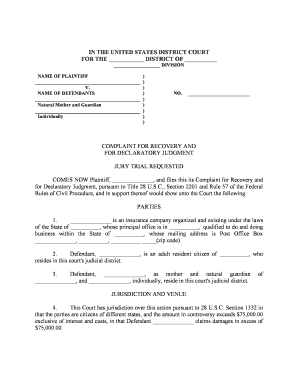
Caption

Court name, case number (if assigned), party names, and document title. Correct caption ensures the filing is routed to the proper docket and calendar.
Jurisdiction

Statement of subject-matter and personal jurisdiction plus venue facts. Cite statutory or diversity bases to avoid dismissal for lack of jurisdiction.

Factual Allegations

Chronological, specific facts supporting each claim. Include dates, amounts, contract provisions, and events that give rise to the dispute.

Causes of Action

Numbered counts that link facts to legal theories (contract breach, account stated, unjust enrichment, declaratory relief). Each count should include elements and supporting facts.

Damages and Relief

Specific monetary amounts or ranges, alternative equitable remedies, attorneys' fees if authorized, and a prayer for declaratory judgment defining parties' rights.

Signature Block

Counsel or pro se signer must include name, bar number (if attorney), contact information, and a dated signature consistent with local rules and 28 U.S.C. §1746 if using unsworn declarations.

Filing Steps: From Draft to Court Docket

Follow a structured sequence: draft, verify jurisdictional prerequisites, attach exhibits, sign, file, and serve according to local rules.

  • 01
    Draft Complaint: Prepare the pleading with numbered counts and exhibits.
  • 02
    Attach Exhibits: Include contracts, invoices, or notices supporting claims.
  • 03
    File with Court: E-file or file in-person following court's filing requirements.
  • 04
    Serve Defendant: Complete service of process per state rules or FRCP; proof of service filed with court.

How the Complaint Progresses Through the System

A typical case moves from filing to service, response, discovery, and eventual resolution by settlement, judgment, or dismissal.

  • File: Court clerk assigns case number and docket entry.
  • Serve: Defendant receives complaint via authorized method.
  • Respond: Defendant files answer, motion, or other response.
  • Adjudicate: Court resolves claims by motion, trial, or settlement.

Digital Workflow Settings for Online Completion

Configure an e-filing and signing workflow to ensure required fields, exhibits, and authentication are captured before submission.

Field Configuration
Signatory Authentication Email plus SMS code or advanced verification
Exhibit Attachment Require PDF uploads and auto-merge
Audit Trail Capture IP, timestamp, and signer details
Access Controls Limit editing to designated users

Technical Considerations for eFiling and eSigning

Ensure the platform supports court-accepted PDF output, robust audit trails, and required signer authentication.

  • PDF Compatibility: Produce print-ready PDFs
  • Audit Trail: Record IP, timestamps
  • Integrations: Link to case management

Key Deadlines and Time Expectations

Timelines vary by court and claim type; track service deadlines, response periods, and statute of limitations when preparing the complaint.

Service Deadline:

Follow state rules; FRCP 4(m) gives 90 days for federal service absent extension.

Response Period:

Defendant typically must answer or move within 21–30 days after service.

Statute of Limitations:

File before the governing statute of limitations expires or claims may be barred.

E-filing Cutoffs:

Some courts close filing portals overnight; confirm local court hours.

Discovery Schedules:

Rule 26(f) conference timing varies; local rules set deadlines.

Milestones: Sequential Case Stages

Track milestones from filing to resolution so each phase—service, pleading, discovery, and adjudication—progresses on schedule.

01

Filing and Docketing

Complaint filed and case number assigned by clerk.

02

Service of Process

Plaintiff completes authorized service and files proof.

03

Defendant Response

Answer or motion to dismiss filed within permitted period.

04

Case Management

Court issues scheduling order and discovery deadlines.

Common Preparation Pitfalls to Avoid

  • Using informal or inconsistent party names that cause defective service or misdirected notices.
  • Failing to attach or label exhibits clearly, leaving the court unable to verify asserted factual bases.
  • Omitting jurisdictional facts such as diversity citizenship or federal-question basis that can lead to early dismissal.
  • Not verifying local court formatting, e-file requirements, or page and signature rules before uploading the complaint.

Potential Consequences of Errors

Dismissal Risk: Loss of claim if jurisdiction or service defects are not cured.
Default Judgment: Failure to serve defendants timely can lead to a later default or prejudice.
Sanctions: Frivolous allegations or discovery abuses can trigger monetary sanctions.
Evidence Loss: Untimely filings may miss preservation obligations and harm proof.
Fee Exposure: Unsuccessful procedural motions may increase costs.
Privacy Risk: Including PHI without protection may violate HIPAA.

Security and Compliance When Handling Filings

Encryption: TLS 1.2/1.3 in transit
Data at Rest: AES-256 encryption
Certifications: SOC 2 Type II available
HIPAA: BAA required for PHI
ESIGN/UETA: Compliant for electronic signing
Audit Trail: Detailed signer logs captured

Real-World Examples Showing Common Uses

The following short case sketches show how organizations used combined recovery and declaratory relief in practice.

Optica Ventures LLC

A small investment firm sought unpaid fees and a declaration on contract interpretation after a client dispute.

  • The firm attached invoices and correspondence as exhibits to support damages.
  • Counsel used a single complaint to seek monetary recovery and a declaratory judgment about contract terms, reducing litigation duplication and clarifying future obligations for both parties.

Fertility Centers of Illinois

A healthcare provider pursued recovery for unpaid services while asking the court to declare party liability under payment agreements.

  • The complaint redacted limited PHI and cited patient-consent procedures.
  • The combined pleading resolved billing obligations and clarified contractual duties, with HIPAA considerations addressed through limited disclosures and a protective order request.

eSignature and Platform Pricing Comparison for This Document

Select an eSignature provider that supports secure PDFs, audit trails, and the authentication level required by your jurisdiction; below is a concise pricing feature comparison.

signNow DocuSign Adobe Sign PandaDoc HelloSign
Starting Price $8/user/mo $15/user/mo $14/user/mo $19/user/mo $15/user/mo
Free Trial 7-day free trial Varies by vendor Varies by vendor Varies by vendor Varies by vendor
Bulk Send Yes Yes Yes Yes No
Audit Trail Yes Yes Yes Yes Yes
HIPAA Compliant Yes Yes Yes No No
Envelope Cap No cap 100 envelopes/user/year Varies Varies Varies

Practical Tips for Accurate and Efficient Pleading

Implement consistent review, version control, and a checklist to reduce rejections and procedural delays when filing.

Standardize Names and IDs
Use exact legal names for parties and include organizational identifiers (LLC, Inc.). Cross-check names against state registries to prevent service issues and to ensure the correct defendant entity is sued.
Attach Numbered Exhibits
Label and paginate exhibits clearly and reference them by exhibit number in allegations. Courts prefer exhibit labeling for efficient review and the practice reduces confusion in discovery and motions.
Verify Jurisdiction
Confirm subject-matter jurisdiction, venue, and any mandatory pre-suit notices. Errors here are frequent causes of dismissal and can be fatal to the claim if uncorrected.
Preserve ESI Early
Issue litigation holds and preserve relevant electronically stored information at filing to avoid spoliation claims and sanctions during discovery.

Typical Signatories and Their Roles

Plaintiff Attorney

A licensed attorney signs and files the complaint, certifies factual allegations and legal contentions under local rules, and serves as the primary point of contact for the court and opposing counsel throughout litigation.

In-House Counsel

Corporate legal teams may prepare and supervise pleadings, coordinate with outside counsel for filing, and authorize settlement parameters while ensuring corporate authorization and signature authority are properly documented.

Frequently Asked Questions

Answers to common procedural and technical questions about preparing, signing, filing, and serving a Complaint for Recovery and Declaratory Judgment.


Need help? Contact support

be ready to get more
Join over 28 million airSlate SignNow users