Establishing secure connection…Loading editor…Preparing document…

Washington Motion and Declaration for Default (Nonparental Custody)

This template is fully customizable. Edit the text, fill out the fields, and send it for signature. Give it a try!
Washington Motion and Declaration for Default (Nonparental Custody)

What this Washington Motion and Declaration for Default (Nonparental Custody) is

The Washington Motion and Declaration for Default (Nonparental Custody) is a court filing used when a petitioner seeks entry of default and a custody determination for a child in proceedings involving nonparental custodial claims. It combines a formal motion asking the court to declare the respondent in default for failure to appear or respond, with a sworn declaration that sets out facts supporting the request and the petitioner’s proposed custody arrangement. Judges use this submission to evaluate whether statutory standards and the child’s best interests are satisfied when the other party is not actively participating.

Why a Motion and Declaration for Default matters in nonparental custody cases

Filing a clear motion and supporting declaration provides the court with the evidence needed to enter default and consider custody on the record, reducing delays and clarifying the petitioner’s requested relief while protecting the child’s immediate needs.

Why a Motion and Declaration for Default matters in nonparental custody cases

Who typically files this motion and why it fits their situation

The motion is appropriate when service was proper, statutory notice requirements were met, and the petitioner documents facts focused on the child’s best interest.

  • Relatives or guardians pursuing custody when a parent fails to respond or appear at service deadlines.
  • Child welfare agencies seeking placement stability after a parent’s unexplained absence.
  • Pro se litigants who need a structured affidavit to let the court adjudicate custody without adversarial hearings.

Who can sign and file the motion

Petitioner

The individual or agency bringing the nonparental custody petition signs the declaration under penalty of perjury and files the motion with the court to request default and custody relief.

Attorney

A licensed attorney representing the petitioner may sign and file the motion, prepare supporting exhibits, and present evidentiary matters at any default hearing required by the court.

Core elements included in a professional motion and declaration

A well-prepared Washington Motion and Declaration for Default (Nonparental Custody) includes clear procedural statements, factual declarations, service proof, proposed custody orders, and exhibits that support the petitioner’s claims and the child’s best interests.

Caption

Court name, case number, parties, and title identifying the document as a Motion and Declaration for Default (Nonparental Custody).
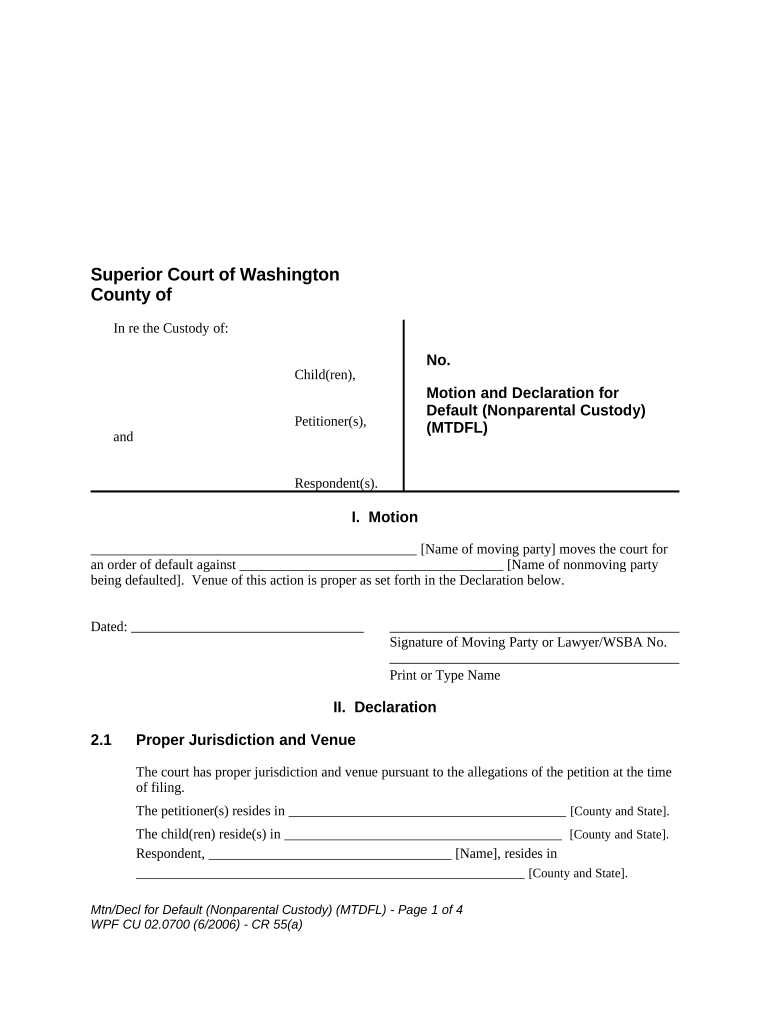
Motion Statement

A short legal request explaining the basis for default and the specific orders sought, including custody, visitation, and temporary placement.

Declaration

Sworn factual narrative describing service attempts, respondent’s absence, the child’s circumstances, and why default custody is appropriate.

Proof of Service

Completed proof or affidavit of service showing how and when the respondent was served according to Washington rules.

Exhibits

Supporting documents: school records, medical reports, affidavits from third parties, and any evidence of respondent abandonment or incapacity.

Proposed Order

A draft order the court can sign that states the custody arrangement, visitation, and any temporary relief requested by the petitioner.

Step-by-step: how to prepare and file the motion

Follow these sequential steps to prepare a compliant Motion and Declaration for Default in Washington nonparental custody matters.

  • 01
    Draft the motion: State legal grounds and requested orders clearly.
  • 02
    Prepare the declaration: Provide factual, sworn statements in numbered paragraphs.
  • 03
    Attach proof of service: Include dated proof showing respondent was served properly.
  • 04
    File and serve copies: File with court clerk and serve required parties per local rules.

Typical online workflow settings for completing the form

Configure e-filing and document fields to reflect court requirements and to capture all required attestation and service data.

Field Configuration
Signature field Require signer name and date, mandate typed name confirmation.
Date fields Use MM/DD/YYYY format and validate for plausibility.
Attachment slots Lock required exhibits until upload is complete.
Authentication Enable email or SMS verification for petitioner's identity.

Digital delivery and signing setup for eSubmission

Verify the system preserves an immutable audit log and produces a downloadable certificate of completion to submit with or after filing.

  • File formats: Use PDF/A or standard PDF for court filings.
  • Audit trail: Capture IP, timestamp, and signer actions.
  • Integrations: Connect with cloud storage for exhibits and backups.

Overview of the filing and court review process

This sequence summarizes how a motion and declaration moves from preparation to judicial decision when a default is requested.

  • Prepare filing: Draft motion, declaration, exhibits, and proposed order.
  • Serve respondent: Complete service per court rules; document method and date.
  • File with clerk: Submit originals and copies for docketing and review.
  • Judge reviews: Judge considers record, may schedule default hearing.

Typical timing and deadlines to watch in default proceedings

Deadlines vary by county and local family court rules; these items reflect common timing that petitioners should track when seeking default relief.

Response period:

Respondent typically has 20–30 days to answer after service in many jurisdictions.

Default motion filing:

File motion after the response period expires and service is proven.

Hearing notice:

Court may set a default hearing within 14–60 days of filing.

Temporary orders:

Emergency relief can be sought immediately if child’s safety is at risk.

Appeal window:

Default judgments are subject to post-judgment motions and appeals per state timelines.

Key milestones from filing to judgment

A simple milestone timeline helps petitioners and clerks track major steps and expected sequencing during the default process.

01

File Petition

Petitioner files initial nonparental custody petition.

02

Complete Service

Serve respondent and file proof of service.

03

Request Default

File motion and declaration after response period ends.

04

Court Entry

Judge enters default or schedules hearing for decision.

Common pitfalls to avoid when preparing the motion

  • Incomplete proof of service that lacks dates or method, which can result in denial of a default request and require re-service or continuance.
  • Vague factual declarations that rely on opinions rather than specific, dated observations and documentary evidence, weakening the petitioner’s case.
  • Missing exhibits such as school or medical records that corroborate custody needs, leading the court to defer a decision pending further proof.
  • Improper signature blocks or unsigned declarations, which clerks commonly reject and which can void the filing until corrected.

Consequences of errors or improper filings

Motion Denial: Insufficient proof can cause denial of default relief.
Delay: Errors often trigger continuances and added expense.
Re-service: Incorrect service requires re-serving the respondent.
Sanctions: False statements risk perjury and sanctions.
Evidentiary Gaps: Missing exhibits weaken custody determinations.
Appeal Costs: Defective orders increase post-judgment litigation expense.

Security and compliance essentials for e-filing and signing

Encryption: TLS 1.2/1.3; AES-256 at rest
ESIGN / UETA: Federal and state e-sign framework compliance
HIPAA: BAA required for health records
Audit Trail: Immutable signer activity log
Access Controls: Role-based permissions and SSO
Certification: SOC 2 Type II and ISO 27001

eSignature vendor pricing snapshot for filing and signing

Compare common vendor starting prices and compliance capabilities for executing a Motion and Declaration for Default (Nonparental Custody); signNow is listed first per vendor comparison standards.

signNow DocuSign Adobe Sign PandaDoc HelloSign
Starting Price $8/user/mo $15/user/mo $14/user/mo $19/user/mo $15/user/mo
Free Trial 7-day trial No No Yes, limited Yes, limited
Bulk Send Yes Yes Yes Yes No
Audit Trail Yes Yes Yes Yes Yes
HIPAA Compliant Yes Yes Yes No No

Practical tips for an accurate and efficient filing

Follow court form conventions and provide clear, verifiable evidence to support default custody requests.

Organize exhibits logically
Number exhibits sequentially, refer to them in declaration paragraphs, and include a table of contents so the judge and clerk can locate key materials quickly.
Confirm service procedure
Verify the required method of service for your county and include a signed proof of service showing the exact date and recipient details to avoid re-service.
Use clear chronology
Structure facts in date order with precise timestamps; courts favor concise, concrete timelines over narrative summaries that omit exact dates.
Preserve originals
Keep original documents, certified records, and any signed statements in a secure location in case the court requires verification.

Representative examples: how petitions often proceed

Two anonymized scenarios illustrate typical paths to default custody determinations when respondents do not engage.

Case Example 1

A guardian files after attempted service by certified mail and personal service failed

  • The declaration lists dates and witnesses of attempts
  • The court accepted the proof, entered default, and signed a temporary custody order pending a final review because the child’s immediate needs were documented and safety concerns were clear.

Case Example 2

A relative files with medical and school records showing neglect and an absent parent

  • The motion requests default because the parent did not respond
  • The judge scheduled a short hearing, reviewed the exhibits and sworn declaration, and entered an order providing custody to the petitioner while advising follow-up service attempts for the absent parent.

Frequently asked questions and common solutions

Answers address typical uncertainties about filing, service, electronic signatures, and post-judgment correction procedures.


Need help? Contact support

be ready to get more
Join over 28 million airSlate SignNow users