Establishing secure connection…Loading editor…Preparing document…

Default Judgment

This template is fully customizable. Edit the text, fill out the fields, and send it for signature. Give it a try!
Default Judgment

What a Default Judgment Means in Civil Cases

A Default Judgment is a court order entered against a defendant who fails to respond or appear after proper service of process. It converts the plaintiff's allegations into a binding judgment when the defendant does not timely file an answer or otherwise defend. Default judgments typically establish liability and may fix damages, costs, and post-judgment remedies such as liens, wage garnishment, or property seizure. Procedures and relief vary by jurisdiction and by whether the court enters a clerk's default or a judicial default after a hearing.

Why a Default Judgment Matters for Case Resolution

Default judgments enable plaintiffs to obtain enforceable relief without a contested trial when a defendant fails to respond. They conserve judicial resources, permit collection or enforcement steps, and create a record that may be used to secure liens or garnishments.

Why a Default Judgment Matters for Case Resolution

Typical Users and Parties Involved

Default judgments are handled by plaintiffs, defense counsel, court clerks, and collection professionals depending on the stage of the case.

  • Plaintiff attorneys and self-represented plaintiffs, who prepare the motion or form and proof of service.
  • Court clerks and judicial officers, who review filings and enter or set hearings for default judgments.
  • Collection and asset recovery teams, who use the judgment to pursue garnishment, liens, or levy.

Roles vary by jurisdiction; courts set local rules for motion practice, required affidavits, and post-judgment enforcement steps.

Core Elements Included in a Professional Default Judgment

A complete Default Judgment typically combines case identification, findings of liability, a damages award or declaratory relief, signature block for the clerk or judge, service and proof documentation, and enforcement directions.

Case Caption

Court name, parties, docket or case number and style that precisely matches the initiating complaint and court file.
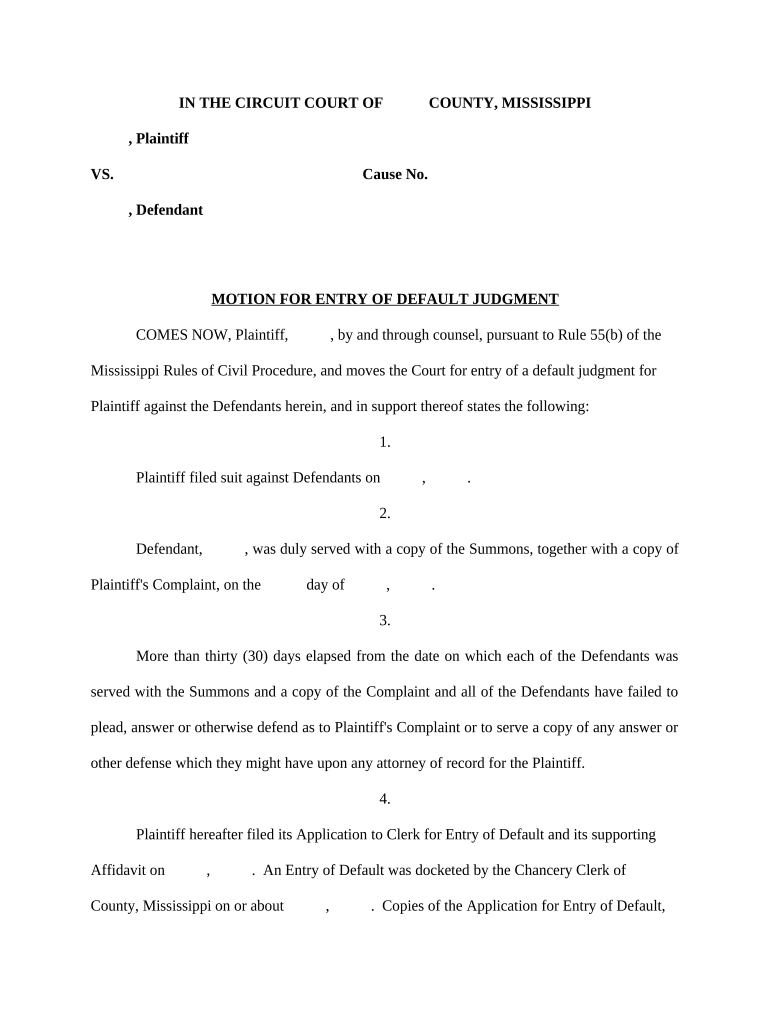
Statement of Default

Short recital that defendant was served and failed to respond within the time permitted by applicable rules.

Judgment Amount

Specific money award or other relief stated in dollars or declaratory terms, including costs and pre-judgment interest if claimed.

Proof of Service

Affidavit or certificate showing how, when, and to whom the complaint and notices were served.

Clerk/Judge Signature

Space for the court clerk or judge to sign and date, plus official stamp or seal where required.

Enforcement Terms

Language authorizing post-judgment remedies and specifying any stay, execution, or lien recording instructions.

Step-by-Step: Preparing and Filing a Default Judgment

Follow a clear sequence: confirm service, assemble evidence, file the default entry and judgment motion, and obtain the court's signature or clerk entry.

  • 01
    Confirm Service: Verify proof of service before filing.
  • 02
    Prepare Motion: Attach affidavit and exhibits supporting damages.
  • 03
    File With Court: Submit proposed judgment and supporting documents to the clerk.
  • 04
    Entry and Notice: Ensure clerk signs and serve the judgment on all parties.

How to Configure an Online Default Judgment Workflow

When using an e-filing or eSignature platform, configure fields, signer roles, and authentication so the court and parties can accept the document.

Field Configuration
Document Upload PDF/A recommended; include exhibits as attachments.
Signer Roles Assign Plaintiff, Attorney of Record, Clerk as roles.
Authentication Email plus SMS code or stronger identity verification.
Audit Trail Enable full timestamps, IP logs, and download history.

Where to File and How the Document Moves Through the System

Default judgments progress from filing to entry to service. Understand each destination to ensure enforceability and proper notice.

  • Clerk's Office: File original judgment and proposed order.
  • Serve Parties: Serve defendant with the entry of judgment.
  • Court Review: Judge or clerk reviews for procedural compliance.
  • Enforcement: Record judgment for liens or initiate garnishment.

Digital Filing and eSignature Considerations

Courts and clerks increasingly accept electronically signed judgments, but local rules determine admissibility and required authentication.

  • File Formats: PDF/A and printable PDF recommended.
  • Authentication: Use multi-factor or identity-proofing when required.
  • Integrations: Platforms commonly connect to e-filing portals and case management systems.

Key Deadlines and Timing to Watch

Timelines differ by federal or state procedure; below are common deadlines practitioners must track to preserve rights and avoid setting aside entries.

Answer Deadline:

Federal: 21 days after service (FRCP 12(a)(1)(A)(i)).

Entry of Default:

Clerk may enter default after the response period expires.

Motion for Default Judgment:

File promptly after clerk's entry or per local rule timelines.

Motion to Set Aside:

Bring under FRCP 60(b): reasonable time or within one year for certain grounds.

Enforcement Actions:

Post-judgment remedies follow local execution and levy timelines.

Common Mistakes That Delay or Void a Default Judgment

  • Failing to serve the correct defendant or using an improper method of service that the court does not accept.
  • Submitting a proposed judgment without matching the case caption or docket number to the filed complaint.
  • Neglecting to attach required affidavits, exhibits, or proof of damages supporting the monetary award.
  • Using inconsistent party names or incorrect amounts that allow the defendant to challenge entry or execution.

Risks and Consequences of An Incorrect or Improper Default Judgment

Set-Aside Risk: Court may vacate the judgment under FRCP 60(b).
Collection Delay: Improper entry can postpone enforcement or garnishment.
Liability Exposure: Incorrect award may subject the plaintiff to sanctions.
Wasted Costs: Filing fees and attorney time may be unrecoverable.
Enforcement Reversal: Post-judgment actions could be unwound if judgment vacated.
Credit Impact: Judgment labels may affect debtor credit records.

Real-World Examples of Electronic Judgment Workflows

Organizations use eSign and digital filing to streamline judgment entry and post-judgment enforcement across case types.

Optica Ventures LLC

The interface is simple and easy-to-use for our team; more importantly, it is just as easy for our customers.

  • Used templates and audit trails for collection judgments.
  • Optica reported easier customer interactions and fewer clerical follow-ups while maintaining compliance with court submission requirements.

Tech Data

Tech Data uses airSlate SignNow to improve our internal and external customer service while increasing our speed to revenue.

  • Moved routine default and collection filings to an e-workflow.
  • They observed faster processing of enforcement steps and clearer recordkeeping for post-judgment collection efforts.

eSignature Vendor Pricing Snapshot for Judgment Workflows

Compare baseline pricing and feature availability across leading eSignature vendors. signNow is listed first as the initial column per comparison guidelines.

signNow DocuSign Adobe Sign PandaDoc HelloSign
Starting Price $8/user/mo $15/user/mo $14/user/mo $19/user/mo $15/user/mo
Free Trial 7-day free trial Varies by vendor Varies by vendor Varies by vendor Varies by vendor
Bulk Send Yes Yes Yes Yes No
Audit Trail Yes Yes Yes Yes Yes
HIPAA Compliant Yes Yes Yes No No

Frequently Asked Questions About Default Judgments

Answers to common procedural questions about entering, challenging, and enforcing default judgments in U.S. courts.


Need help? Contact support

be ready to get more
Join over 28 million airSlate SignNow users