Establishing secure connection…Loading editor…Preparing document…

Delegation Form

This template is fully customizable. Edit the text, fill out the fields, and send it for signature. Give it a try!
Delegation Form

What a Delegation Form Is and When It’s Used

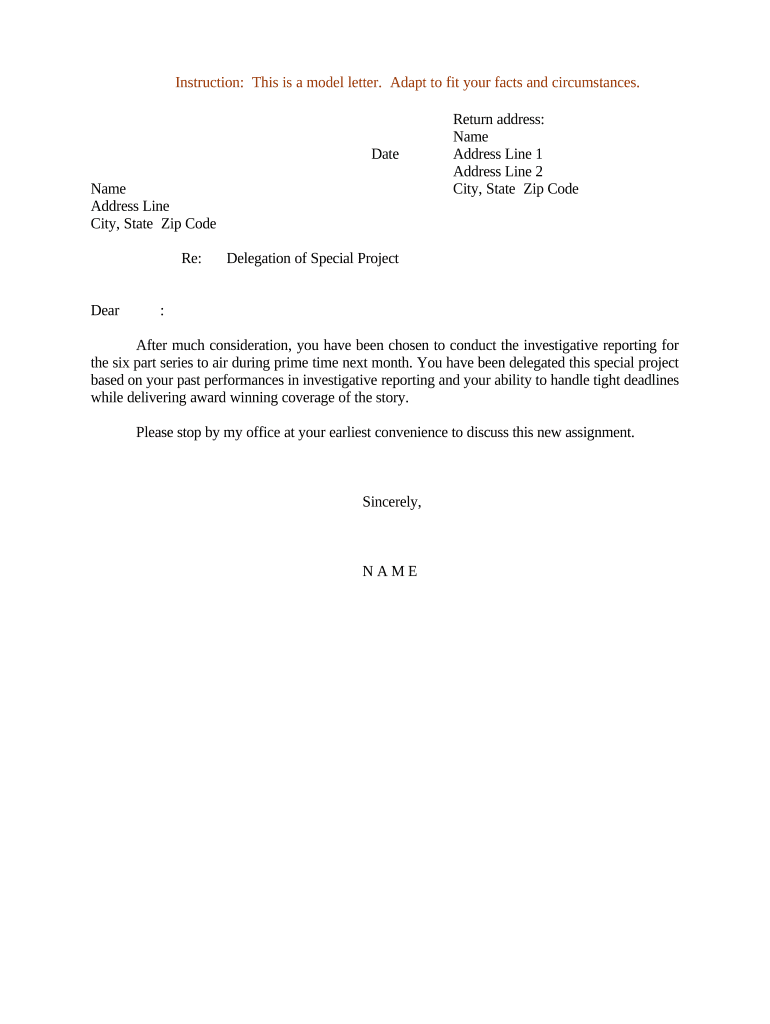
A Delegation Form is a written record that authorizes an individual or entity to perform specific tasks, make decisions, or act on behalf of another party. It can be limited (single task or timeframe) or broad (ongoing authority) and may include conditions, scope, and expiration. Delegation Forms are used in business, HR, procurement, project management, and legal contexts to create a clear, auditable trail of authority and reduce ambiguity about who may bind an organization or access resources.

Why a Clear Delegation Form Matters

A precise Delegation Form reduces operational risk by defining authority, responsibilities, and limits, and it documents intent and consent for later review. When executed and retained correctly, it supports compliance with internal controls and federal e-signature law (15 U.S.C. §7001) and state UETA frameworks.

Why a Clear Delegation Form Matters

Who Typically Completes or Signs a Delegation Form

Delegation Forms are used by multiple roles across organizations; the signers and approvers depend on the authority being transferred.

  • Operations and department managers who assign task-level authority to staff or external agents for day-to-day operations.
  • Legal and compliance officers who approve delegation language, limits, and any required notarization or witness clauses.
  • Project leads or contractors who receive delegated authority for procurement, approvals, or client interactions.

Tailor the signatory list to the organization’s authorization matrix and the specific powers being delegated; involve legal counsel when authority affects contracts, finances, or regulated data.

Step-by-Step: Completing a Delegation Form

Follow these sequential steps to prepare, approve, and finalize a Delegation Form so it is clear, enforceable, and retained correctly.

  • 01
    Identify Parties: Record the delegator and delegate legal names and contact details.
  • 02
    Define Scope: List specific authorities, limits, and exclusions in numbered items.
  • 03
    Set Dates: Enter effective and expiration dates in MM/DD/YYYY format.
  • 04
    Execute & Authenticate: Collect signatures, witness or notary if required, and record the execution timestamp.

How the Delegation Form Process Flows

A straightforward workflow helps avoid gaps: prepare the form, confirm approvals, sign, then store with audit details for later retrieval.

  • Prepare Document: Draft scope, dates, conditions and supporting exhibits.
  • Review & Approve: Legal or compliance reviews for limits and risk controls.
  • Sign: Obtain signatures, witnesses, or notary based on jurisdiction.
  • Record: Store executed copy with audit trail and retention metadata.

Essential Sections to Include in a Professional Delegation Form

A complete Delegation Form organizes authority into consistent, enforceable sections so reviewers and auditors can quickly confirm authority and limits.

Parties

Full legal names, titles, and business addresses for delegator and delegate.
Scope

Detailed list of powers granted, including explicit inclusions and exclusions.

Duration

Effective date, expiration, and conditions for automatic termination or renewal.

Limitations

Monetary, temporal, geographic, or subject-matter limits on the delegate’s authority.

Signatures

Signature blocks for parties, dates, and witness or notary details if required.

Recordkeeping

Reference to where the executed form will be stored and how it may be revoked.

Security and Compliance Considerations for Delegation Forms

Encryption: TLS 1.2/1.3; AES-256 at rest
Audit Trail: Timestamp, IP, and action history
Access Controls: Role-based permissions
HIPAA: BAA required for PHI workflows
21 CFR Part 11: Support for FDA-regulated records
Certifications: SOC 2 Type II and ISO 27001

Typical Digital Workflow Settings for a Delegation Form

Common workflow settings ensure the form reaches the right approvers, captures signatures, and records evidence for audits.

Field Configuration
Signer Order Sequential or parallel routing
Authentication Email, SMS code, or KBA
Notifications Reminders and expiration warnings
Storage Secure repository with retention tags

When Choosing a Platform for eSigning and Storage

Ensure the platform supports legal e-signature standards, required authentication, storage encryption, and your preferred file formats.

  • Integrations: Connectors for Salesforce, NetSuite, Google Workspace
  • File Types: PDF, DOCX, and HTML accepted
  • Authentication: SMS, email, or advanced methods

Verify compliance features such as HIPAA BAAs, 21 CFR Part 11 support, and audit-trail export before adopting any vendor for delegation workflows.

Key Dates to Set and Monitor on a Delegation Form

Accurate dates prevent unintended authority gaps or extended delegations and trigger required reviews and renewals.

Effective Date:

Start date in MM/DD/YYYY format

Expiration Date:

End date or auto-renew condition

Review Interval:

Periodic compliance review schedule

Notarization Window:

Timeframe to notarize when required

Revocation Notice:

Deadline for submitting a revocation

Milestones from Draft to Recorded Delegation

Track these milestones to confirm the delegation becomes effective and is properly documented for audits or disputes.

01

Drafting

Prepare scope, limits, and supporting exhibits for review.

02

Internal Approval

Legal and management approval prior to execution.

03

Execution

Signatures collected with dates and witness or notary if required.

04

Archival

Store executed form with retention metadata and audit trail.

Common Preparation Pitfalls to Avoid

  • Unclear scope that permits actions beyond intended limits and creates liability exposure.
  • Missing or inconsistent names and dates that complicate authentication and enforcement.
  • Failure to notarize or obtain required witnesses where state law or policy demands it.
  • Poor retention practices that make it impossible to produce an executed form during audits or disputes.

Primary Legal Risks If a Delegation Form Is Incorrect

Invalid Authority: Actions may be voided
Financial Loss: Unauthorized payments or commitments
Regulatory Sanctions: Compliance violations possible
Contract Liability: Breach claims against the delegator
Evidence Gaps: No audit trail weakens defense
I-9 or Tax Impact: Paperwork errors trigger fines

Sample Use Cases for a Delegation Form

These short cases show common, practical uses where a clear delegation form removes friction and preserves accountability.

Property Management

A regional manager delegates lease-signing authority to an on-site agent to expedite renewals and maintenance approvals.

  • The delegate can sign lease renewals up to $5,000.
  • The recorded delegation reduces closing time and provides a retrievable audit trail for property owners and auditors.

Clinical Operations

A clinic director delegates ordering and procurement authority to the practice manager to maintain supply continuity.

  • Authority limited to non-controlled medical supplies under $2,500 per order.
  • The delegation includes HIPAA and procurement controls and is stored with retention metadata for compliance reviews.

Frequently Asked Questions and Troubleshooting

Answers to common legal, technical, and process questions about executing, authenticating, and revoking Delegation Forms.


Need help? Contact support

How Typical eSignature Plans Compare for Delegation Workflows

Basic plan features and pricing vary across vendors; choose a plan that matches required authentication, bulk send, and compliance features for delegation workflows.

signNow DocuSign Adobe Sign PandaDoc HelloSign
Starting Price $8/user/mo $15/user/mo $14/user/mo $19/user/mo $15/user/mo
Free Trial 7-day free trial Varies by plan Varies by plan Varies by plan Varies by plan
Bulk Send Yes Yes Yes Yes Yes
Audit Trail Yes Yes Yes Yes Yes
HIPAA Compliant Yes Yes Yes No No
Envelope Cap No envelope cap 100 envelopes/user/year limit Varies Varies Varies
be ready to get more
Join over 28 million airSlate SignNow users