Establishing secure connection…Loading editor…Preparing document…

Demand for Jury Trial

This template is fully customizable. Edit the text, fill out the fields, and send it for signature. Give it a try!
Demand for Jury Trial

What a Demand for Jury Trial Is and when it matters

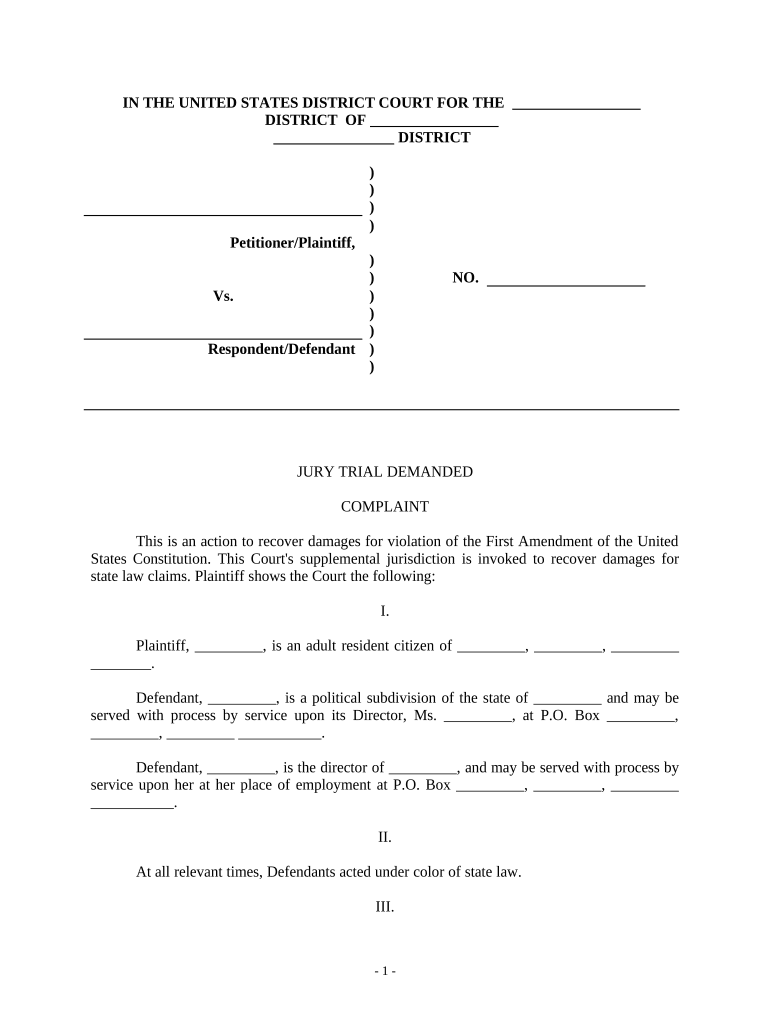
A Demand for Jury Trial is a formal written request filed in a civil case asking the court to resolve disputed facts before a jury rather than a judge. It typically identifies the case caption, the party demanding a jury, and the specific claims for which a jury is requested. Filing a timely demand preserves the constitutional or statutory right to jury determination for triable issues and starts administrative steps such as scheduling, potential jury fees, and notice to other parties and the court clerk.

Why a clear Demand for Jury Trial matters to your case

Filing a clear, properly timed demand protects the right to jury fact-finding, influences case scheduling, and preserves appellate arguments about trial type.

Why a clear Demand for Jury Trial matters to your case

Who typically files or responds to a Demand for Jury Trial

Parties in civil litigation and their counsel commonly prepare and file a Demand for Jury Trial when disputed facts are central to relief sought.

  • Plaintiff attorneys seeking jury fact-finding for damages and liability issues.
  • Defendant counsel who prefer jury resolution for credibility or factual disputes.
  • Self-represented litigants who want to preserve the jury right and avoid bench trials.

Courts require procedural compliance; whether to demand a jury depends on strategy, deadlines, and any contractual waiver or statutory exceptions.

Typical signers and filers

Plaintiff Attorney

A civil litigator or firm prepares the demand as part of initial pleadings or responsive filings, verifies timing under procedural rules, pays required fees, and serves opposing counsel per local rules. Counsel confirms the demand remains on file through trial and preserves appellate record.

Self-Represented Party

An individual without counsel can draft and file the demand; they must follow court formatting, meet local deadline requirements, arrange service, and ensure the court clerk enters the demand on the docket to avoid waiver.

Essential administrative and security details

Filing Method: E-file or paper
Signature: Typed or handwritten
Service: Rule-based service
Retention: Court docketed copy
Access Control: Clerk and parties
Audit Trail: Maintain timestamps

Consequences of incorrect or late demands

Waiver Risk: Right may be waived
Dismissal Risk: Procedural objections possible
Scheduling Delay: Trial timeline shifts
Fee Loss: Unrecoverable jury fees
Appeal Limitations: Preservation issues arise
Service Defect: Invalid service voids demand

Common mistakes to avoid when preparing a Demand for Jury Trial

  • Missing the jurisdictional deadline—many courts treat an untimely demand as waived, so always confirm the applicable rule or local practice.
  • Failing to serve opposing parties correctly—improper service can render the demand ineffective and require refiling or court permission.
  • Using vague language—specify which claims or issues you demand tried by jury to prevent later disputes over scope.
  • Ignoring contractual waivers—some agreements mandate arbitration or waive jury rights; filing may trigger sanctions or preclusion.

Step-by-step: preparing and filing a Demand for Jury Trial

Follow procedural rules closely: prepare the demand, verify timing, sign, file with the clerk, and serve opposing parties.

  • 01
    Prepare Document: Draft caption, parties, and clear jury demand.
  • 02
    Sign and Date: Include attorney signature and printed name.
  • 03
    File with Court: E-file or file paper per local rules.
  • 04
    Serve Parties: Serve opposing counsel and certify service.

Digital workflow basics for completing and submitting the demand

Configure an electronic workflow that captures signatures, timestamps, and a service certificate for the court docket.

Field Configuration
Document Format PDF/A for court compatibility
Signature Method Typed or drawn e-signature
Authentication Email plus optional SMS code
Service Evidence Attach proof of service PDF

How filing and service typically proceed

A standard sequence: file the demand, receive docket entry, serve parties, and monitor scheduling orders from the court.

  • File with Clerk: Clerk receipts and docket entry created.
  • Serve Opposing Counsel: Mail or e-service per local rules.
  • Record Service: File certificate proving service.
  • Court Scheduling: Court issues trial or pretrial dates.

Technical considerations for electronic completion and signatures

Use a PDF-capable workflow that preserves timestamps, captures signer attribution, and produces a court-ready file.

  • File Formats: PDF, DOCX accepted
  • Authentication: Email or multi-factor
  • Integrations: Connects with case management

Ensure the platform you use provides an audit trail, reliable export to court-friendly formats, and clear documentation for certificates of service.

Timing rules and common deadlines for demanding a jury

Observe the governing procedural rules—federal and state courts impose specific deadlines for demanding jury trials; missing them can forfeit the right.

Federal Rule:

FRCP 38(b): within 14 days after last pleading

Local Rules:

State/local rules may shorten or vary deadlines

Initial Pleading:

Include demand with complaint to be timely

Service Deadline:

Serve demand per service rules promptly

Waiver Effect:

Failure to timely demand may waive jury right

Key milestones from filing to trial

Track these stages after filing your Demand for Jury Trial so administrative and scheduling tasks occur on time.

01

Demand Filed

Court clerk dockets the demand and issues entry.

02

Service Certified

Certificate of service filed to prove notice.

03

Jury Fees Paid

Where required, fee payment must be timely.

04

Pretrial Scheduling

Court issues dates, motions, and jury instructions deadlines.

How a jury demand compares with requesting a bench trial

Compare the practical differences between demanding a jury and allowing a bench trial when planning case strategy.

Criteria Demand Bench
When used factual disputes legal issues
Timing early demand no demand needed
Costs possible jury fees typically lower fees
Waiver strict deadline no waiver issue

Typical eSignature vendor pricing and capability snapshot

Below is a concise comparison of starting price and key features for common eSignature vendors used to prepare and file court documents; signNow is listed first per vendor convention.

signNow DocuSign Adobe Sign PandaDoc HelloSign
Starting Price $8/user/mo $15/user/mo $14/user/mo $19/user/mo $15/user/mo
Free Trial 7-day free trial Varies Varies Varies Varies
Bulk Send Yes Yes Yes Yes No
Audit Trail Yes Yes Yes Yes Yes
HIPAA Compliant Yes Yes Yes No No

Realistic scenarios where a Demand for Jury Trial is used

Two common fact patterns illustrate why parties demand a jury and how the process affects case flow.

Commercial Breach

A business sues for contract damages where disputed facts drive liability.

  • The plaintiff demands a jury for credibility determinations.
  • The demand triggers scheduling and potential jury fees; counsel coordinates e-filing and service to preserve the right and fit the trial calendar.

Personal Injury

An individual sues for injuries after an accident and seeks compensation for pain and medical costs.

  • The plaintiff requests a jury trial for damages.
  • Timely filing of the demand and proof of service avoids waiver; evidence and witness preparation then follow the court's scheduling order.

Practical tips for accurate, efficient demands

Adopt consistent templates, verify local rules, and keep clear proof of service to reduce rework and preserve rights.

Use a standard template
Create a jurisdiction-specific template that includes caption, explicit jury demand language, signature block, and a certificate of service to reduce errors.
Confirm deadlines
Check FRCP 38(b) and local rules for timing; calendar the deadline relative to the last pleading to avoid waiver.
Preserve proof of service
File a signed certificate of service and retain copies of emails or e-service receipts to demonstrate notice to opposing parties.
Review contracts
Before filing, inspect agreements for arbitration or jury-waiver provisions that could preclude a jury demand.

Frequently asked questions about Demands for Jury Trial

Answers to common problems with drafting, filing, service, and what to do if a demand is late or contested.


Need help? Contact support

be ready to get more
Join over 28 million airSlate SignNow users