Establishing secure connection…Loading editor…Preparing document…

Disclaimer and Terms of Use

This template is fully customizable. Edit the text, fill out the fields, and send it for signature. Give it a try!
Disclaimer and Terms of Use

What the Disclaimer and Terms of Use Covers

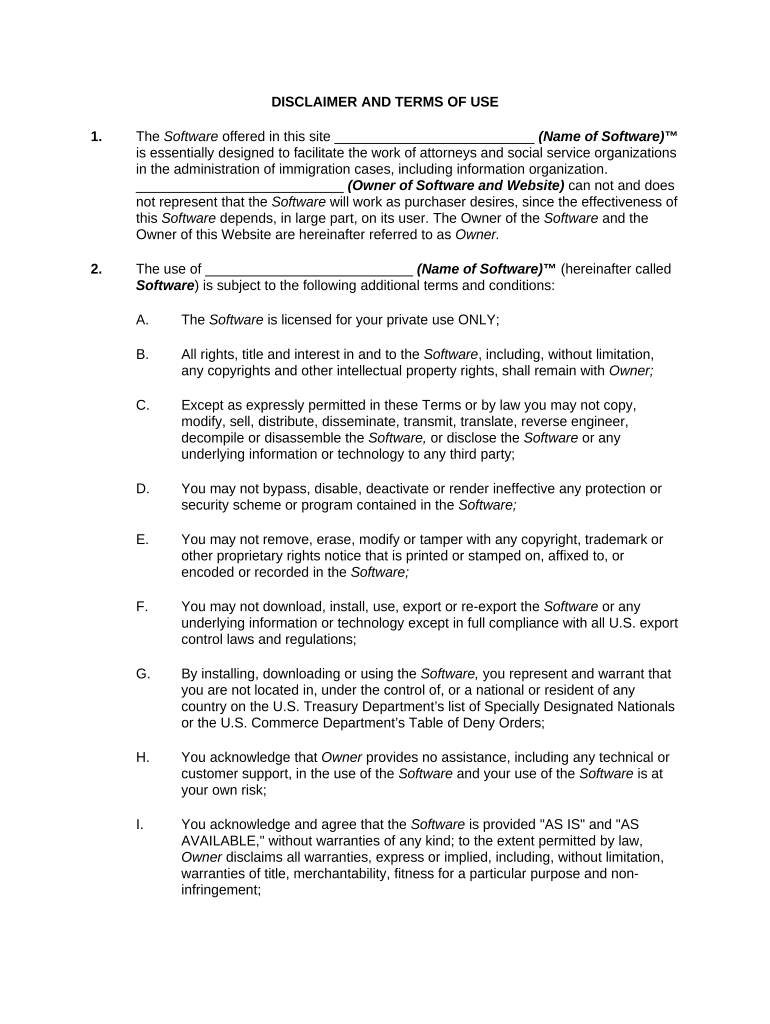
The Disclaimer and Terms of Use is a legal document that sets the rules governing access to and use of a website, product, or service. It explains disclaimers of liability, ownership of content, permitted uses, prohibited activities, and the relationship between the provider and users. For online platforms it typically includes dispute resolution, limitation of liability, indemnification, and intellectual property clauses. This template clarifies key obligations for both parties, establishes the governing law, and sets expectations for electronic communications and modifications to the agreement.

Why a Clear Disclaimer and Terms of Use Matters

A clear Disclaimer and Terms of Use reduces legal exposure, sets user expectations, and supports enforceability of electronic agreements under ESIGN and state law. Well-structured terms aid dispute resolution, consistency in enforcement, and regulatory compliance.

Why a Clear Disclaimer and Terms of Use Matters

Which Organizations Typically Use This Document

Organizations and website operators across industries use Disclaimer and Terms of Use to define rights, responsibilities, and permitted uses for site visitors.

  • Small businesses and startups protecting IP and limiting liability for digital products and services.
  • Enterprises standardizing user behavior, data usage, and dispute mechanisms across global platforms.
  • Service providers addressing electronic communication, subscription terms, and consent to e-signing.

Key Sections to Include in Professional Terms

Core sections of a professional Disclaimer and Terms of Use ensure clarity on liability, permitted use, intellectual property, user obligations, dispute resolution, and modification procedures.

Scope

Define the services, platforms, and content covered by the agreement, including mobile apps, APIs, and third-party integrations. Exclude areas not intended to be governed when necessary.
Disclaimer

State disclaimers of warranties and express that content is provided 'as is.' Clarify limits on accuracy, availability, and fitness for particular purposes.

User Obligations

List permitted and prohibited activities, account security expectations, and requirements for lawful conduct. Include consequences for violations, such as suspension or termination.

IP Rights

Specify ownership of content, user-generated content rules, license grants, and takedown procedures for claimed infringement.

Liability Caps

Limit damages, disclaim consequential damages, and set monetary caps where permitted under governing law; retain carve-outs required by statute.

Dispute Resolution

Describe arbitration, class-action waivers, venue selection, and notice procedures for disputes and claims.

Step-by-Step: Prepare and Publish Your Terms

Follow the steps below to prepare, publish, and maintain a compliant Disclaimer and Terms of Use for online services.

  • 01
    Draft: Identify core provisions and risk allocations.
  • 02
    Review: Legal and compliance team review and revise.
  • 03
    Publish: Display prominently with version and effective date.
  • 04
    Maintain: Document updates and retain prior versions.

Configure Your Online Acceptance Workflow

Configure online publication and e-sign workflows to capture consent, record acceptance, and preserve audit trails for disputes and regulatory review.

Field Configuration
Consent Mechanism Checkbox with timestamp and IP capture
Record Retention Store signed copy and audit trail PDF
Access Confirmation Test file download before consent recorded
Notice Method Prominent link and email notice option

How Electronic Acceptance Is Captured and Stored

A simple routing model shows where to host terms, how users accept them, and how execution records are preserved for enforcement.

  • Host: Publish terms on accessible web page.
  • Linking: Place links in footer and onboarding flows.
  • Consent Capture: Record checkbox, timestamp, and IP address.
  • Audit Trail: Store signed PDF and action log.

Technical Requirements for Digital Publication and eSubmission

Digital publication and e-signature workflows require secure hosting, reliable time-stamping, and access to signed records for audits and disputes.

  • File Formats: PDF, HTML, DOCX supported
  • Integrations: CRM, cloud storage, and SSO
  • Authentication: Email, SMS, and optional KBA

Timing Considerations and Recordkeeping Deadlines

Key timing: set effective dates, publish schedule for updates, and retain acceptance records to meet legal and regulatory timelines.

Effective Date Publication:

Publish on page and in change log.

Update Notice Period:

Provide reasonable notice before material changes.

Retention of Older Versions:

Keep prior versions accessible for audits.

Consumer Disclosure:

Follow 15 U.S.C. §7001 ESIGN disclosure rules.

Tax/Recordkeeping:

Retain signed records per IRS and state rules.

Common Errors to Avoid

  • Using boilerplate that doesn't reflect the product's actual data practices, which undermines enforceability and exposes the business to privacy or consumer-protection claims.
  • Failing to obtain documented consent for electronic records in consumer-facing transactions, neglecting the ESIGN consumer disclosure and access confirmation requirements.
  • Ambiguous limitation of liability clauses or vague indemnities that courts may construe against the drafter and reduce contractual protections.
  • Not tailoring dispute-resolution and governing-law provisions to user locations, creating conflicts between ESIGN, UETA, and state-specific statutes.

Potential Legal and Operational Risks

Unenforceability: Invalid terms may be void.
Regulatory Fines: Consumer statutes can impose fines.
Class Actions: Risk of collective litigation.
Contract Disputes: Damages and injunctive relief.
Data Liability: HIPAA/CCPA exposure possible.
Operational Disruption: Service interruptions and cost.

Essential Data Elements to Include

Full Legal Name: Entity name as registered
Contact Email: Support or legal contact email
Effective Date: Use MM/DD/YYYY format
Governing Law: State chosen to interpret agreement
Acceptance Method: E-signature, checkbox, or click-through
Revision Clause: How and when terms change

Illustrative Examples from Practice

The following real examples show how organizations use electronic terms and acceptance flows to reduce friction, centralize consent, and support compliance.

Optica Ventures

Optica used electronic terms and online consent flows to centralize user agreements across products and channels.

  • Streamlined consent capture reduced signing friction.
  • Brian Fitzgibbons, COO of Optica Ventures LLC, said: 'The interface is simple and easy-to-use for our team; more importantly, it is just as easy for our customers.' That ease supported higher completion and fewer support inquiries during rollout.

Martin Properties

A real estate firm digitized disclosures and consent to streamline lease acceptance and automate document retention with signed timestamps.

  • Mobile and offline signing supported.
  • Tim Martin, Founder of Martin Properties, described the outcome: 'I can process and execute all of these documents online with 100% compliance and built-in security. Whether on mobile or working offline, I can get forms back to their necessary parties efficiently.' The change reduced turnaround and administrative follow-up demands.

eSignature Pricing and Feature Comparison (signNow First)

Vendor snapshot for eSignature pricing and features with signNow first. Use this table to compare basic plan costs and core compliance features.

signNow DocuSign Adobe Sign PandaDoc HelloSign
Starting Price $8/user/mo $15/user/mo $14/user/mo $19/user/mo $15/user/mo
Free Trial 7-day free trial Varies by vendor Varies by vendor Varies by vendor Varies by vendor
Bulk Send Yes Yes Yes Yes No
Audit Trail Yes Yes Yes Yes Yes
HIPAA Compliant Yes Yes Yes No No

Practical Drafting and Publication Tips

Follow practical drafting and publication habits to make Disclaimer and Terms of Use clear, enforceable, and easier to manage across electronic channels.

Write plain-language summaries
Lead with a short plain-language summary of key terms, including user obligations, refund policies, and dispute options. This improves user comprehension and reduces arguments over hidden terms in enforcement or consumer-protection challenges.
Maintain version history and logs
Publish a change log that shows previous versions, effective dates, and reasons for material changes. Preserve signed copies and audit trails to support defense in disputes and regulatory audits.
Tailor for regulated users
Include industry-specific clauses where required: privacy addenda for healthcare, arbitration exceptions for employment, and consumer protections for residents of particular states like California and New York.
Limit legalese and update routinely
Avoid contradictory clauses and periodically review terms after product or law changes. Coordinate legal, product, and security teams to confirm obligations like breach notification and data retention.

Frequently Asked Questions About Enforceability and Publication

Answers to common questions about enforceability, consumer disclosures, e-signature acceptance, and practical problems you may encounter when publishing online terms.


Need help? Contact support

be ready to get more
Join over 28 million airSlate SignNow users