Establishing secure connection…Loading editor…Preparing document…

Letter Requesting Access to EEOC Files

This template is fully customizable. Edit the text, fill out the fields, and send it for signature. Give it a try!
Letter Requesting Access to EEOC Files

What this Letter Is and When it’s Used

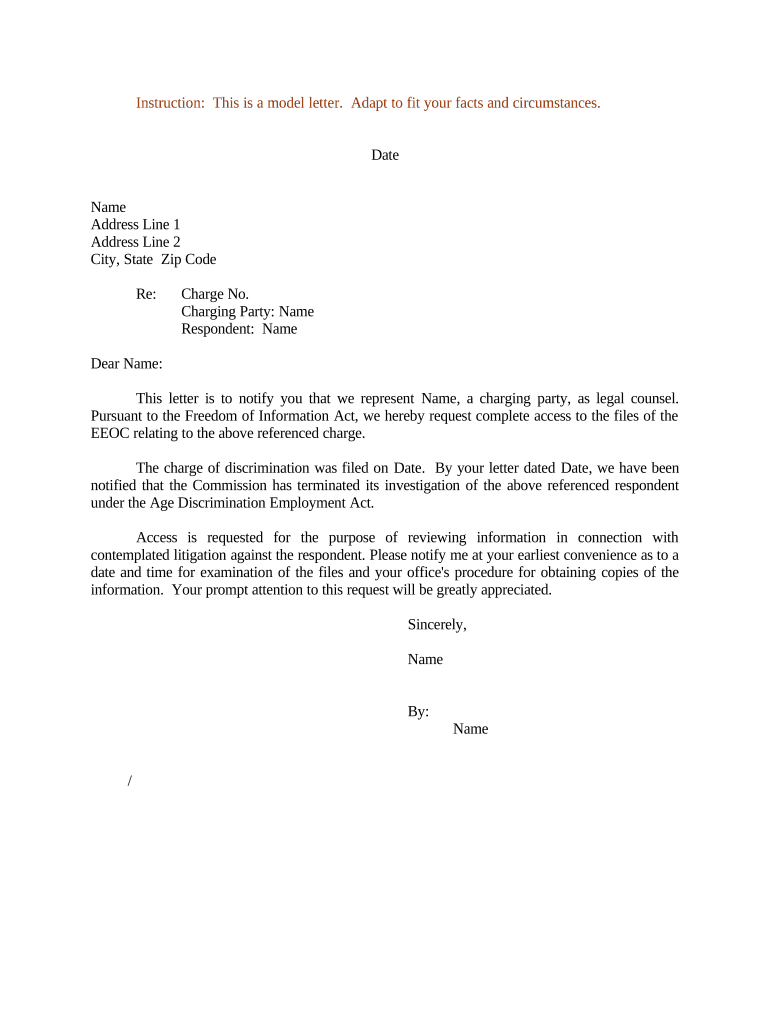
A Letter Requesting Access to EEOC Files is a formal written request submitted to obtain copies or review access to records held by the Equal Employment Opportunity Commission (EEOC) related to a charge, investigation, or mediation. It explains who is requesting the records, identifies the charge or case number, states the scope and purpose of the request, and provides necessary authorizations. Some records may be subject to privacy protections or statutory exemptions under the Privacy Act (5 U.S.C. §552a) and the Freedom of Information Act (5 U.S.C. §552), so the letter should be precise about the documents sought and any consent authorizations provided.

Why a Formal Access Letter Matters

A clear, formal letter creates a documented request trail, clarifies the scope of records sought, and helps the EEOC or counterpart process the request efficiently. Properly prepared letters reduce delays, limit scope disputes, and support later legal or administrative use while respecting privacy and statutory exemptions.

Why a Formal Access Letter Matters

Who Typically Prepares or Sends This Letter

Organizations and individuals use these letters to obtain investigative materials, exhibits, or correspondence from the EEOC for defense, appeal, or internal review.

  • Employer HR teams requesting records for internal review or litigation preparation.
  • Employment law attorneys seeking investigation files for case assessment or defense.
  • Individual charging parties or their authorized representatives requesting copies of their own file.

Step-by-Step: Prepare and Send Your Request

Follow these steps to create a complete, legally defensible request to obtain EEOC files.

  • 01
    Draft Letter: State requester, charge number, records sought, and purpose.
  • 02
    Attach Authorization: Include signed release or proof of representation when seeking another party’s files.
  • 03
    Choose Delivery: Send by certified mail, EEOC online submission, or secure eSubmission.
  • 04
    Track Response: Record receipt and follow up if no response within expected timeline.

Typical Processing Flow After Submission

Understanding the processing stages helps set expectations and prepare for required follow-up steps.

  • Intake & Triage: EEOC logs request and assigns a tracking number.
  • Identity Verification: EEOC confirms requester identity and authority to receive files.
  • Search & Redaction: Staff locates responsive records and redact protected information.
  • Production: EEOC provides copies, access instructions, or denial notice.

Digital Workflow Settings for Online Submission

If submitting electronically, configure fields and authentication to meet EEOC and legal requirements.

Field Configuration
Document Type Letter Request | PDF preferred
Authentication Email + phone code or ID upload
Signature Typed or e-sign with timestamp
Attachments Include PDF authorizations and IDs

Technical Considerations for Electronic Submission

Use secure channels and accepted file formats to avoid rejection or delays.

  • File Formats: PDF or DOCX preferred
  • Identity Support: Upload government ID when required
  • Integration Options: Integrates with Salesforce and Google Workspace

Ensure your eSubmission platform supports audit trails, timestamping, and secure storage to maintain the integrity and admissibility of the record.

Essential Information to Include in the Letter

Requester Identity: Full legal name and contact details
Role or Capacity: State whether counsel, HR, or individual
EEOC Reference: Charge number or docket identifier
Scope Details: Exact records and date range requested
Authorization: Signed release when requesting third-party files
Signature Method: Handwritten or e-signature with timestamp

Risks of an Incomplete or Incorrect Request

Delayed Access: Processing delays or additional clarification requests
Denial: Request can be denied for lack of authority
Privacy Violation: Unauthorized disclosure risks statutory penalties
Evidence Loss: Late requests may miss critical deadlines
Perjury Exposure: False statements may carry legal consequences
Inadmissibility: Improperly authenticated records may be excluded

Common Preparation Mistakes to Avoid

  • Failing to include the exact EEOC charge number causes search errors and long delays in locating responsive records.
  • Omitting a clear authorization when requesting a third party’s file leads to denials or requests for additional proof.
  • Using vague scope language such as 'all documents' without date ranges or categories increases search costs and redaction time.
  • Submitting unsigned or improperly authenticated letters can result in returns or requests for notarization.

Practical Tips for a Complete, Compliant Request

Adopting these best practices reduces processing time and preserves your ability to use produced records in proceedings.

Be specific about scope
List precise record types, date ranges, and custodians to minimize unnecessary searches and copying fees; narrow requests speed production and reduce redaction burden.
Provide clear authorization
If requesting another person’s file attach a signed release or proof of representation; include dates, scope, and explicit consent language to meet agency verification.
Use secure electronic submission
When permitted, submit via secure portals or authenticated eSubmission with audit trails and retained copies to document delivery and receipt.
Document follow-up steps
Record delivery method, tracking numbers, and follow-up deadlines; escalate to EEOC contacts or counsel if the agency misses its processing commitments.

Two Typical Use Cases

Practical scenarios show how the letter functions for different requestors.

Employer Response

A company seeks the EEOC investigative file to evaluate allegations and prepare a legal response.

  • The request cites the charge number and date range.
  • With a detailed scope and signed authorization for counsel, the employer received redacted copies used to evaluate settlement exposure and defense strategy.

Defense Counsel Review

An attorney requests the full investigative record to assess witness statements and exhibits.

  • The letter includes representation letter and ID.
  • After receiving the file and maintaining chain-of-custody, counsel used the materials during discovery and motion practice.

eSignature Vendor Comparison for Submitting and Signing Requests

Basic vendor pricing and capabilities to consider when selecting an eSignature platform for drafting, authenticating, and submitting letters.

signNow DocuSign Adobe Sign PandaDoc HelloSign
Starting Price $8/user/mo $15/user/mo $14/user/mo $19/user/mo $15/user/mo
Free Trial 7-day free trial Varies by plan Varies by plan Varies by plan Varies by plan
Bulk Send Yes Yes Yes Yes No
Audit Trail Yes Yes Yes Yes Yes
HIPAA Compliant Yes Yes Yes No No
Envelope Cap No cap 100 envelopes/user/year Varies by plan Varies by plan Varies by plan

Frequently Asked Questions

Answers to common questions about preparing and submitting a request to access EEOC files.


Need help? Contact support

be ready to get more
Join over 28 million airSlate SignNow users