Establishing secure connection…Loading editor…Preparing document…

Distribution Probate Order

This template is fully customizable. Edit the text, fill out the fields, and send it for signature. Give it a try!
Distribution Probate Order

What a Distribution Probate Order Is and When It Applies

A Distribution Probate Order is a court-issued document that directs how a decedent’s estate assets are to be distributed to beneficiaries following probate procedures. It reflects the court’s approval of an inventory, payment of debts and expenses, and the allocation of remaining property to named heirs or residual beneficiaries. The order becomes part of the probate court record and typically triggers transfers of title, release of financial assets, and instructions to the personal representative or executor to complete distributions.

Why the Distribution Probate Order Matters for Estate Administration

The order gives legal authority for the executor to transfer assets and resolves competing claims by memorializing the court’s final distribution plan. It protects the personal representative from future liability when distributions follow the court order and creates a clear record for banks, title companies, and government agencies that require proof of lawful authority to release funds or transfer property.

Why the Distribution Probate Order Matters for Estate Administration

Typical parties who prepare or rely on a Distribution Probate Order

Each party has distinct responsibilities; ensuring accuracy and proper filing reduces delays and legal exposure.

  • Personal representatives and executors: Prepare required filings and carry out distributions under court supervision.
  • Probate attorneys: Draft proposed orders, advise on creditor claims, and submit documents to the court.
  • Banks and title companies: Require the order as proof before releasing funds or transferring titles.

Core elements found in a professional Distribution Probate Order

A clear, court-ready Distribution Probate Order contains structured legal findings and precise instructions that facilitate creditor resolution, asset transfers, and recordkeeping.

Caption

Court name, case number, decedent name, and estate identifier presented at the top to ensure the order is assigned to the correct file and judge.
Findings of Fact

Factual recitation confirming notice to creditors, inventory completion, debt payments, and that the personal representative complied with statutory duties before distribution.

Distribution Schedule

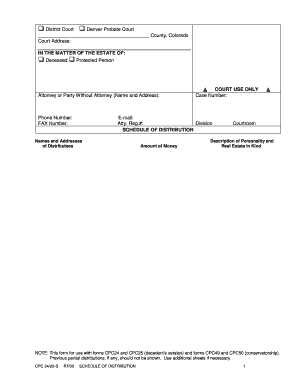
Itemized list tying specific assets or dollar amounts to named beneficiaries, including contingent provisions when recipients predecease or disclaim their share.

Instructions to Fiduciary

Stepwise actions the executor must take, including transfer forms, required endorsements, release language, and timelines for completing distributions.

Reserve and Holdback

Any retained amounts for outstanding claims, taxes, or contingencies, with clear conditions for subsequent disbursement or accountings to the court.

Judicial Signature Block

Signature line, printed name, and date for the judge or clerk plus certificate of entry that indicates filing and effective date of the order.

Step-by-step: preparing a Distribution Probate Order

Follow these sequential steps to draft and submit a distribution order for probate court approval.

  • 01
    Assemble records: Gather inventory, creditor notices, tax clearances, and receipts for estate expenses.
  • 02
    Draft proposed order: Prepare an itemized distribution schedule that matches the estate inventory and paid debts.
  • 03
    File with court: Submit the proposed order along with any required accountings or hearings notice to the probate clerk.
  • 04
    Obtain entry: Receive the signed journal entry or stamped order from the court; distribute copies to stakeholders.

How the Distribution Probate Order moves from draft to effect

The document passes through drafting, court review, entry, and implementation phases that create legal authority to transfer assets.

  • Draft: Attorney/executor drafts the proposed order reflecting approved distributions.
  • Court review: Judge reviews for statutory compliance and may schedule a hearing.
  • Entry: Judge signs and the clerk files the order, creating an official record.
  • Execution: Executor completes transfers, furnishes the order to banks and title companies, and closes estate accounts.

Digital workflow settings when completing the order online

Recommended configuration reduces handoffs and ensures an auditable electronic record for each distribution.

Field Configuration
Document format PDF (fillable) | Microsoft Word draft accepted
Signer order Executor first, then attorney, then court clerk (if electronic submission allowed)
Authentication Email + SMS code or stronger ID verification for fiduciary signatures
Audit requirements Capture IP, timestamp, and signer attribution for each signature event

Technical considerations for e-signing and e-submission

Ensure the selected provider can produce a tamper-evident signed PDF with a detailed certificate of completion for court and third-party acceptance.

  • File types: PDF, DOCX, and flattened PDFs
  • Integrations: Connectors for NetSuite, Salesforce, and Google Workspace
  • Authentication: Email, SMS, or advanced ID verification

Common timeframes and filing deadlines to track

Several deadlines govern creditor claims, accountings, and final distribution; missing these can delay closing the estate.

Creditor notice period:

Typically 3–6 months depending on state

Tax filing:

Estate tax and income filings follow IRS deadlines

Final accounting:

Submitted when distributions are proposed to the court

Distribution after notice:

Often delayed until creditor period expires

Record retention start:

Retention begins on the date of final distribution

Key processing milestones in a typical probate distribution

A sequential timeline helps track court steps from inventory to final distribution and case closure.

01

Inventory Filing

Executor files inventory of estate assets with the probate court.

02

Creditor Notice Period

Court-authorized notice period runs to allow claims to be filed.

03

Proposed Distribution

Executor files the proposed distribution order for court approval.

04

Order Entry and Distribution

Court enters the order and executor completes asset transfers.

Essential data elements to include in the order

Decedent Name: Full legal name
Case Number: Court case identifier
Executor Info: Name and contact
Beneficiary List: Names and addresses
Asset Details: Account or property identifiers
Effective Date: MM/DD/YYYY

Common preparation errors that cause delays

  • Incomplete asset descriptions, such as missing account numbers or property identifiers, create hold-ups when third parties require precise transfer data.
  • Mismatched names between estate documents and financial accounts can trigger requests for additional proof and slow disbursements.
  • Failing to reserve funds for outstanding taxes or contingency claims results in post-distribution disputes and possible court orders to recover funds.
  • Submitting unsigned, incorrectly dated, or unfiled proposed orders leads to rejection by the court clerk and rescheduling of hearings.

Consequences of an incorrect or premature Distribution Probate Order

Delayed Distribution: Court may withhold approval
Creditor Claims: Unpaid claims can reverse transfers
Financial Liability: Executor may face personal liability
Court Sanctions: Sanctions for noncompliance
Tax Exposure: Unreported income or estate tax
Void Transfers: Banks or title companies may refuse

Practical tips for accurate and efficient completion

Adopt these practices to reduce court rejections and speed distributions while preserving legal compliance.

Match names across documents
Ensure the decedent’s name, executor name, and beneficiary names match other probate filings and identification. Consistency prevents bank and title company holds and avoids additional verification steps.
Itemize distributions clearly
Provide precise asset identifiers and dollar amounts rather than vague descriptions. Clear itemization speeds acceptance by third parties and reduces post-distribution disputes requiring corrective court filings.
Reserve for contingencies
Include a reasonable reserve or holdback for unknown creditor claims and tax liabilities. Courts often require a holdback or later accounting to protect estate solvency.
Use auditable e-sign workflows
Where allowed, adopt an e-signature workflow that captures timestamps, IP addresses, and signer authentication to create a reproducible audit trail for court and financial institutions.

Real-world scenarios: how Distribution Probate Orders are used

Practical examples illustrate common distribution patterns and the value of precise orders.

Small Estate Distribution

An executor prepared an order after paying creditors and locating beneficiaries

  • All assets listed with account numbers
  • The court entered the order and banks released funds, closing the estate without further hearings, avoiding delays.

Real Property Transfer

A distribution included a home transfer to a single beneficiary

  • Deed description and title company instructions were attached
  • After the court signed the order and the beneficiary presented a certified copy, the county recorder accepted the deed and updated title.

eSignature platform pricing and compliance overview relevant to Distribution Probate Orders

Compare common vendor starting prices and compliance features that matter when preparing court-ready documents; signNow appears first for reference.

signNow DocuSign Adobe Sign PandaDoc HelloSign
Starting Price $8/user/mo $15/user/mo $14/user/mo $19/user/mo $15/user/mo
Free Trial Yes, 7-day free trial No No Yes, limited Yes, limited
Bulk Send Yes Yes Yes Yes No
Audit Trail Yes Yes Yes Yes Yes
HIPAA Compliant Yes Yes Yes No No

FAQs and troubleshooting for Distribution Probate Orders

Answers to common questions about validity, e-signatures, notarization, and next steps when the court raises issues.


Need help? Contact support

be ready to get more
Join over 28 million airSlate SignNow users