Establishing secure connection…Loading editor…Preparing document…

Articles of Merger of Domestic Corporations

This template is fully customizable. Edit the text, fill out the fields, and send it for signature. Give it a try!
Articles of Merger of Domestic Corporations

What the Articles of Merger of Domestic Corporations Are

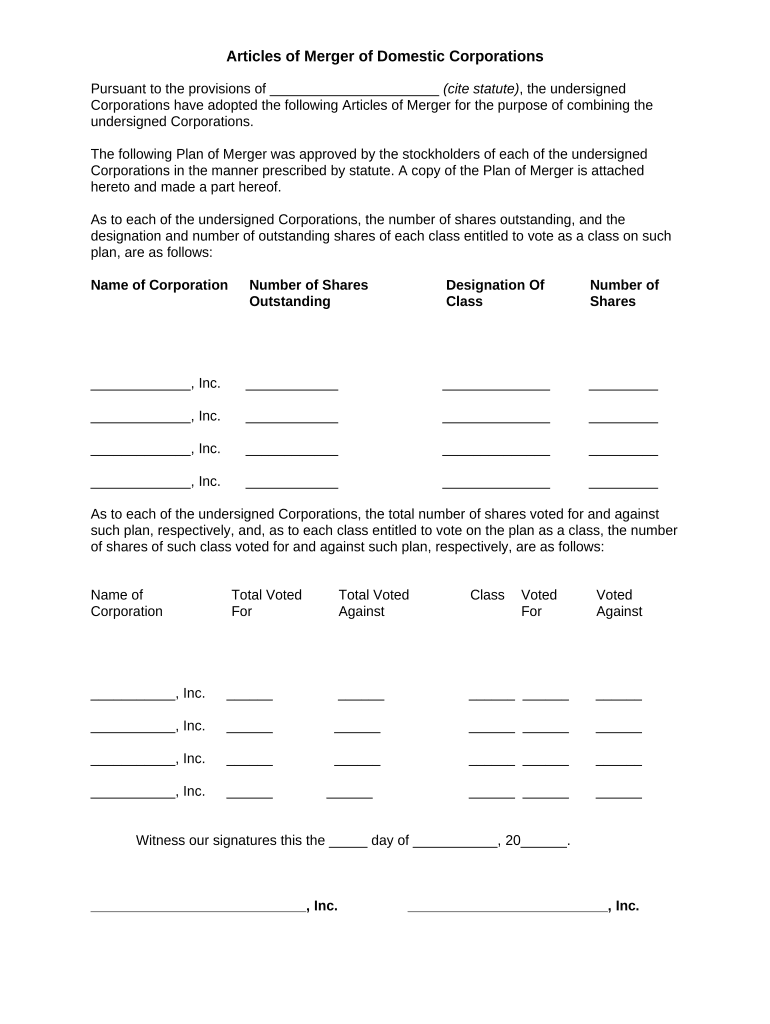
Articles of Merger of Domestic Corporations is a statutory filing used to combine two or more domestic corporations under the laws of a state so that one surviving corporation continues and the other(s) cease to exist. The document records the merging entities, the name of the surviving corporation, the effective date of the merger, and any changes to the surviving entity's articles. Filing produces corporate law effects—transfer of assets and liabilities and changes to capitalization—and triggers internal approval, notice, and tax-reporting steps required by state corporate codes and federal tax rules.

Why Proper Articles of Merger Matter

A correct Articles of Merger preserves the legal continuity of the surviving corporation, transfers assets and liabilities cleanly, and documents shareholder and board approvals required by state law. Accurate filings reduce post-closing disputes, avoid tax and reporting penalties, and support continuity of contracts and licenses.

Why Proper Articles of Merger Matter

Who Prepares and Signs Articles of Merger

Corporations, corporate counsel, corporate secretaries, and authorized officers typically prepare and submit Articles of Merger to the state filing office.

  • Corporate officers and corporate secretaries prepare filings and certify board approvals.
  • Outside counsel or corporate law departments draft merger terms and confirm statutory voting thresholds.
  • Registered agents and filing service providers submit the document and receive the official certificate of merger.

Parties completing the form should confirm signer authority, shareholder approvals, and any required supplemental exhibits before submission.

Core Elements to Include in Professional Articles of Merger

A complete Articles of Merger includes entity identifiers, the merger plan, surviving corporation details, approval statements, effective date, and filing signatures. Each element supports recordkeeping, corporate governance, and statutory compliance.

Entity Names

Full legal names of each merging corporation as they appear in state records, including jurisdiction and file numbers where available.
Surviving Entity

Exact name and legal form of the surviving corporation and any amendments to its articles that will take effect upon merger.

Plan Summary

A concise description of the plan of merger, including exchange terms for shares, treatment of options, and any conversion ratios.

Approvals

Statements that board and shareholder approvals required by statute or bylaws were obtained, including vote percentages when applicable.

Effective Date

The date and time the merger becomes effective, if other than the filing date, stated in clear MM/DD/YYYY format or as permitted by statute.

Filer Signature

Authorized officer signature block certifying accuracy, with printed name, title, and contact information for filing follow-up.

Step-by-Step: Completing Articles of Merger

Follow these sequential steps to prepare, approve, and file Articles of Merger while minimizing errors and processing delays.

  • 01
    Assemble Records: Collect current certificates of incorporation, bylaws, and shareholder lists.
  • 02
    Obtain Approvals: Secure board and shareholder votes as required by statute and bylaws.
  • 03
    Draft Filing: Complete the Articles of Merger with exact names, plan summary, and effective date.
  • 04
    File and Confirm: Submit to the state filing office and obtain the certificate of merger.

Where to File and What Happens After Filing

The articles are filed with the secretary of state or equivalent filing office where the surviving corporation is organized; post-filing steps finalize legal effect and notice obligations.

  • Filing Office: State Secretary of State or Division of Corporations receives the submission and issues a certificate of merger.
  • Effective Record: When accepted, the merger becomes effective on the filed effective date and records update in the state registry.
  • Notice & Filings: Update IRS, banking, licensing, and contract parties as required by law and commercial practice.
  • Record Retention: Keep certified copies and plan of merger in corporate minute books for statutory and audit purposes.

How to Complete and Submit Articles of Merger Online

Digital workflows streamline preparation, routing, signing, and electronic submission to the state filing office when the state accepts e-filings.

Field Configuration
Document Type PDF or DOCX upload; ensure text is selectable for automated field mapping
Signature Order Set signing order: corporate officers first, then registered agent or filer
Authentication Choose email or SMS code; use stronger KBA for higher assurance
Delivery Enable certified copy delivery to all parties and the registered agent

Digital Signing and eSubmission Considerations

Use a platform that supports secure eSignatures, audit trails, required authentication types, and the file formats accepted by the filing office.

  • Integrations: Salesforce, NetSuite, Microsoft 365, Google Workspace compatibility
  • File Types: PDF, DOCX, and structured templates for automated field detection
  • Compliance: TLS in transit and AES-256 at rest

Confirm the filing office accepts electronic submissions and that chosen authentication meets the jurisdiction’s requirements before e-filing.

Essential Information Elements

Entity Names: Full legal names
Surviving Entity: Exact surviving name
File Numbers: State file IDs
Effective Date: MM/DD/YYYY format
Approvals: Board/shareholder
Signatory: Authorized officer

Common Pitfalls to Avoid

  • Using an outdated corporate name or incorrect file number that leads to filing rejection and processing delays.
  • Failing to obtain required board or shareholder approvals before filing, which can render the merger ineffective.
  • Listing an incorrect effective date that creates ambiguity for tax reporting and contract assignments.
  • Neglecting to update licenses, registrations, or IRS accounts after merger, causing compliance and operational gaps.

Legal and Financial Risks of Incorrect Filings

Filing Rejection: Delay in legal effect
Tax Exposure: Penalty or audit risk
Contractual Gaps: Assignment disputes
Creditor Claims: Unresolved liability transfers
Notary Errors: Invalid acknowledgements
Authority Challenges: Voidable corporate acts

Supporting Documents and Export Options

Include and retain supporting exhibits—plan of merger, board resolutions, shareholder consents, and certified copies. Export signed records in common formats for accessibility and audit.

Plan of Merger

Attach the full plan of merger as an exhibit to show share conversion terms and any material conditions precedent.

Resolutions

Board and shareholder resolutions authorizing the merger should be kept with the filed articles for corporate minute books.

Certified Copies

Obtain a certified certificate of merger from the filing office and keep in both digital and printed minute book formats.

Export Formats

Save executed documents as PDF/A for long-term archiving and as searchable PDF for automated indexing.

Practical Tips for Accurate and Efficient Filings

Adopt consistent document controls, use a checklist tied to the filing jurisdiction, and verify signer authority before submission.

Verify Names and Numbers
Cross-check entity names and state file numbers in the appropriate Secretary of State database to avoid rejections and delays.
Document Approvals
Keep written minutes or consents that clearly record board and shareholder votes and attach or reference them as required.
Use Standard Exhibits
Include a clear plan of merger exhibit describing share treatment to prevent ambiguity when transferring assets and liabilities.
Archive Certified Copies
Store certified state-issued merger certificates in both digital and physical minute books for audit and legal defense.

eSignature Pricing Comparison for Merger Workflows

Compare base pricing and key capabilities across common eSignature providers; signNow appears first to provide a clear starting point for cost and capability considerations.

signNow DocuSign Adobe Sign PandaDoc HelloSign
Starting Price $8/user/mo $15/user/mo $14/user/mo $19/user/mo $15/user/mo
Free Trial Yes, 7-day Varies Varies Varies Varies
Bulk Send Yes Varies Varies Varies Varies
Audit Trail Yes Yes Yes Yes Yes
Envelope Cap No cap 100 envelopes/user/year Varies Varies Varies

Frequently Asked Questions

Answers to common questions about preparing, signing, notarizing, and filing Articles of Merger for domestic corporations.


Need help? Contact support

be ready to get more
Join over 28 million airSlate SignNow users