Establishing secure connection…Loading editor…Preparing document…

Washington Easement for Sewer Lines with Access Road

This template is fully customizable. Edit the text, fill out the fields, and send it for signature. Give it a try!
Washington Easement for Sewer Lines with Access Road

What this Washington easement does and when it applies

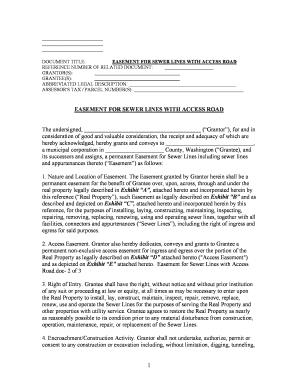
A Washington Easement for Sewer Lines with Access Road is a written, recordable grant by a property owner that permits another party (typically a utility, municipality, or contractor) to install, maintain, inspect, and repair sewer infrastructure and to use a defined access road across private land. The easement describes the parties, the precise easement area and dimensions, permitted uses and limits, maintenance obligations, indemnity and liability allocations, any restoration requirements after construction, and recording instructions for county deed records. Proper execution and recording preserve title clarity and enforceability against future owners.

Why a clear sewer-line easement matters

A professionally drafted easement clarifies property rights, reduces disputes, enables lawful access for inspection and repairs, and protects both the servient and dominant estates under Washington law and recorded title practice.

Why a clear sewer-line easement matters

Who commonly prepares and signs this easement

Typical users include property owners, utility companies, municipalities, developers, and title or land-use attorneys who handle infrastructure access and permanent encumbrances.

  • Property owners granting a right of way for sewer installation or repair to a utility or neighbor.
  • Public utilities or municipalities seeking legal access and maintenance rights across private parcels.
  • Developers or contractors securing permanent access as part of subdivision or site development agreements.

Knowing the usual participants helps determine signature authority, recording venue, and whether additional approvals or public notices are required.

Signers and stakeholders

Property Owner

An individual or entity holding title who must have authority to grant easements; if deeded to multiple owners, all listed grantors typically must sign and acknowledge the instrument to ensure recordability and chain-of-title clarity.

Utility / Grantee

The public or private utility, municipality, or contractor receiving the easement; signatory may require corporate authorization, board resolution, or municipal ordinance evidence depending on organizational rules and the county recorder's expectations.

Core components to include in the easement

A complete Washington easement for sewer lines with an access road contains distinct sections to define rights, obligations, boundaries, and administrative mechanics so it can be recorded and enforced.

Parties

Full legal names and entity types for grantor and grantee, plus contact and representative information to establish attribution and signatory authority for recording.
Legal Description

Precise metes-and-bounds or recorded parcel reference to identify the servient estate; a mapped sketch as an exhibit is recommended for clarity and county filing.

Easement Area

Dimensions, centerline, depth and width of the sewer trench and defined access road corridor with tolerances for future maintenance and expansion.

Permitted Uses

Scope of allowed activity (install, inspect, maintain, repair, replace) and express prohibitions (no permanent structures within corridor, weight limits, etc.).

Maintenance & Restoration

Who performs and funds repairs, standards for restoration after work, seasonal access limits, and vegetative or paving replacement obligations.

Recording & Notices

Instructions to record the easement in the applicable county, responsible party for recording fees, and notice provisions for future transfers or modifications.

Essential data fields to capture

Grantor Name: Full legal name
Grantee Name: Full legal name
Parcel ID: Assessor parcel number
Easement Width: Measured corridor width
Access Road: Defined route description
Execution Date: MM/DD/YYYY

Step-by-step: complete and record the easement

Follow these sequential steps to prepare, sign, notarize, and record a Washington sewer-line easement with access road rights.

  • 01
    Prepare Draft: Assemble parties, legal description, and exhibits.
  • 02
    Obtain Approvals: Secure corporate or municipal authorization if required.
  • 03
    Execution & Notary: Have all required signers execute before a notary.
  • 04
    Record Document: File with the county recorder where the property sits.

Where to send, file, and who receives copies

Routing the executed easement correctly ensures enforceability and public notice; record the original and distribute certified copies to stakeholders.

  • County Recorder: Record original in the county where the parcel is located.
  • Title Company: Provide recorded copy to update title commitments.
  • Grantee Records: Grantee retains a certified recorded copy for operations.
  • Grantor Files: Owner keeps a copy with property records and survey exhibits.

Configuring an online signing workflow

If using eSignature for execution, configure authentication, field placement, and notarization steps to match Washington recording requirements and audit needs.

Field Configuration
Signer Authentication Email plus SMS code or ID verification
Notary / RON Enable remote notarization if permitted
Document Fields Place signature, initial, date, and checkbox fields
Certificate Attach completion audit trail and PDF

Digital signing considerations and file formats

Use secure PDF or DOCX formats and ensure the platform supports notarization workflows, audit trails, and long-term record export.

  • File Types: PDF/A and DOCX supported
  • Integrations: Connect to title or cloud storage
  • Authentication: Offer multi-factor options

Confirm the eSignature provider supports export of a tamper-evident signed PDF, an audit trail, and any certificate required by the county recorder or your legal counsel.

Risks and consequences of incorrect or unrecorded easements

Unenforceable Terms: Ambiguous language
Clouded Title: Failure to record
Encroachment Claims: Incorrect dimensions
Access Disputes: Undefined maintenance duties
Cost Liability: Unallocated repair costs
Invalid Signatures: No notarization or authority

Common mistakes to avoid when preparing the easement

  • Using a vague legal description or failing to attach a survey leads to title defects and recording rejections.
  • Omitting restoration obligations after construction causes disputes about who pays for landscape or paving repairs.
  • Failing to confirm signatory authority for entities (corporate resolution or municipal ordinance) can invalidate the grantee signature.
  • Skipping county recorder requirements for acknowledgments or RON acceptance often requires re-execution and re-recording.

Timing considerations and customary deadlines

Certain time-sensitive actions reduce risk and ensure timely recording and notice to interested parties.

Execution Date:

Sign and notarize prior to recording

Recording Window:

Record promptly; within 30 days recommended

Survey Validity:

Use recent surveys (1–2 years) to avoid boundary disputes

Title Update:

Deliver recorded deed to title company for commitment update

Permit Coordination:

Align easement with municipal permits and utility approvals

Real-world examples and practical outcomes

These concise examples show how recorded easements resolved access needs, streamlined maintenance, and preserved title clarity for property transactions.

Optica Ventures LLC

A portfolio owner granted a recorded utility easement to a city for a replacement sewer main

  • Utility required defined restoration standards
  • The recorded easement eliminated ambiguity at sale and ensured the city’s uninterrupted maintenance access across multiple parcels.

Martin Properties

A developer used a recorded access-road easement for phased subdivision construction

  • Agreement specified maintenance and paving obligations
  • Clear recording and exhibit maps prevented disputes with neighboring landowners and satisfied lender title conditions during closing.

Typical eSignature vendor pricing and capability snapshot

A concise comparison of starting prices and common capabilities for eSignature vendors relevant when planning electronic execution and notarization for easements.

signNow DocuSign Adobe Sign PandaDoc HelloSign
Starting Price $8/user/mo $15/user/mo $14/user/mo $19/user/mo $15/user/mo
Free Trial 7-day free trial Trial varies Trial varies Trial varies Trial varies
Bulk Send Yes (Business Premium) Yes Yes Yes No
Audit Trail Yes Yes Yes Yes Yes
HIPAA Compliant Yes Yes Yes No No
Envelope Cap No cap 100 envelopes/user/year Varies by plan Varies by plan Varies by plan

Frequently asked questions and troubleshooting

Answers to common legal and practical questions about executing, notarizing, recording, and amending a Washington sewer easement with an access road.


Need help? Contact support

be ready to get more
Join over 28 million airSlate SignNow users