Establishing secure connection…Loading editor…Preparing document…

Employment Reference

This template is fully customizable. Edit the text, fill out the fields, and send it for signature. Give it a try!
Employment Reference

What an Employment Reference is and when it matters

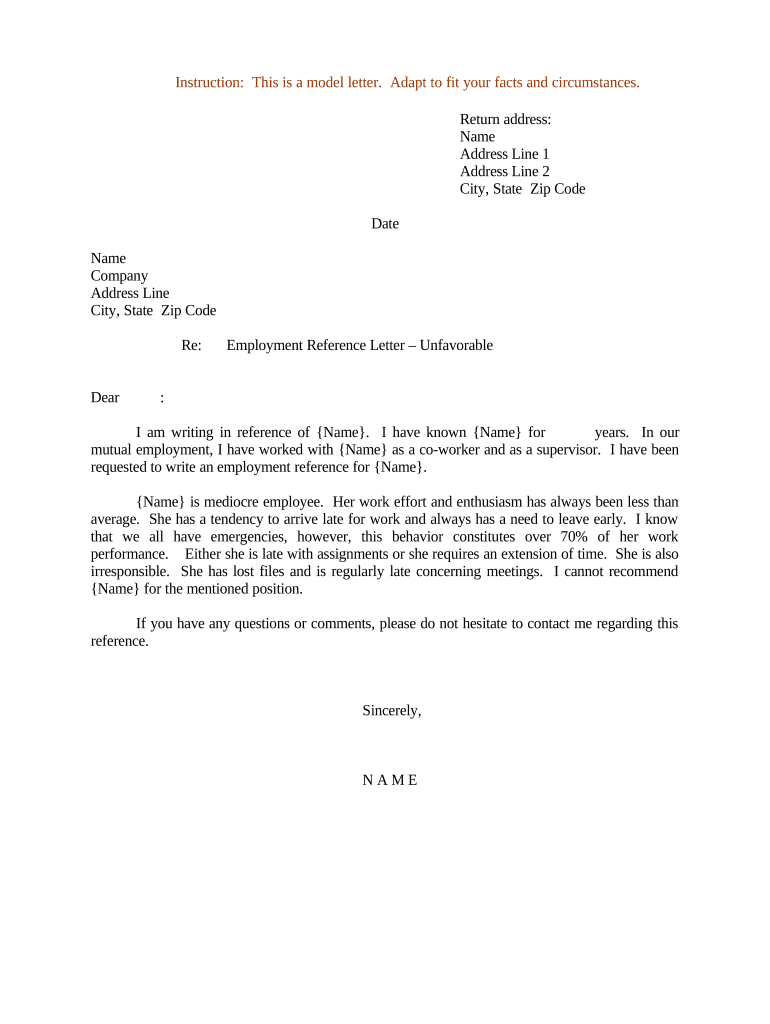
An Employment Reference is a written statement provided by a former employer, manager, or HR representative that verifies an individual's job history, duties, dates of employment, and often performance or eligibility for rehire. Employers request references during hiring, credentialing, or contract placement to confirm qualifications and to evaluate fit. References may be factual (dates, title, duties) or evaluative (performance, conduct). When prepared carefully they support hiring decisions while reducing legal and privacy risk.

Why a clear Employment Reference matters to employers and candidates

A concise, accurate Employment Reference reduces onboarding delays, supports compliance checks, and helps hiring teams assess fit based on documented history. It also protects former employers by limiting liability through factual, consistent statements.

Why a clear Employment Reference matters to employers and candidates

Who prepares and who requests Employment References

Employment References are exchanged between former employers, hiring organizations, staffing firms, and sometimes licensing boards when verifying credentials and work history.

  • Hiring managers and recruiters who need verification of duties and dates before extending an offer.
  • Human resources teams that maintain employment files and respond to reference requests consistently.
  • Former supervisors or designated company contacts who provide factual statements and performance context.

Clear role separation—who answers questions, who signs, and who saves the record—reduces errors and legal exposure for all parties.

Step-by-step: preparing and sending an Employment Reference

Follow these steps to create a clear, verifiable employment reference that minimizes legal and operational friction.

  • 01
    Gather records: Retrieve payroll, job description, and HR notes to confirm facts.
  • 02
    Draft facts: Write dates, titles, and duties in neutral, documented language.
  • 03
    Verify identity: Confirm requestor's legitimacy before releasing information.
  • 04
    Sign and send: Sign the reference, date it, and deliver via secure channel.

Essential components to include in a professional Employment Reference

A well-structured Employment Reference contains consistent sections that make verification straightforward and defensible while limiting subjective commentary.

Header

Company name, address, and the date the reference was prepared. This identifies the source and provides a point of contact for follow-up verification.
Employee identification

Full legal name and employee ID or last four of SSN if routinely used internally. Avoid transmission of full SSN via insecure channels.

Employment timeline

Clear start and end dates with MM/DD/YYYY format. Accurate tenure supports benefit and eligibility calculations by receiving organizations.

Position and duties

Official job title plus concise bullet list of primary responsibilities tied to documented job descriptions or payroll records.

Performance summary

Objective statements such as 'met targets' or 'required improvement' with dates or metrics where appropriate; avoid inflammatory language.

Signature and authorization

Name, title, business contact, signature and date. If signed electronically, include method of authentication and retention note.

Data and security considerations for reference letters

Encryption in transit: TLS 1.2/1.3
Encryption at rest: AES-256
Certifications: SOC 2 Type II
Health data: HIPAA (BAA required)
Signature laws: ESIGN and UETA compliant
Accessibility: WCAG 2.0 Level AA

Common pitfalls when preparing an Employment Reference

  • Using vague or subjective language that increases the risk of defamation claims or dispute during hiring checks.
  • Incorrect dates or job titles that conflict with payroll records and delay background verifications.
  • Sharing personal or medical information without authorization, exposing privacy and HIPAA risks in healthcare contexts.
  • Failing to verify the requestor's identity before releasing information, which can lead to unauthorized disclosure.

Primary legal and operational risks to watch for

Defamation exposure: Civil liability possible
Negligent misrepresentation: Hiring losses risk claims
Privacy violation: HIPAA or state fines
I-9 consequences: Documentation errors
Record-keeping failures: Audit or regulatory issues
Data breach cost: Notification and remediation

Configuring a repeatable Employment Reference workflow

Standardize fields, authentication, and storage so responses are consistent, auditable, and quick to produce.

Field Configuration
Template name Company-reference-template
Signer order HR rep then manager
Authentication Email + optional SMS code
Retention policy Store signed PDF for 7 years

How electronic submission and verification typically proceed

A secure eSubmission workflow reduces turnaround time and captures an audit trail of who signed and when.

  • Upload document: Attach completed reference template
  • Assign signer: Select HR rep or authorized manager
  • Authenticate signer: Email link or SMS code
  • Deliver signed copy: Send PDF with audit certificate

Technical and integration considerations for e-submission

Choose a platform that supports secure signing, audit trails, and integrations with HR systems to reduce manual handling.

  • Integrations: Salesforce, NetSuite, Google Workspace
  • File formats: PDF, Word DOCX
  • Authentication: Email, SMS, KBA

Pricing and feature comparison for eSignature options commonly used with Employment References

Compare basic pricing and key capabilities for common eSignature providers; signNow appears first to reflect available verified pricing and envelope policies.

signNow DocuSign Adobe Sign PandaDoc HelloSign
Starting Price $8/user/mo $15/user/mo $14/user/mo $19/user/mo $15/user/mo
Free Trial 7-day free trial Yes Yes Yes Yes
Bulk Send Yes Yes Yes Yes No
Audit Trail Yes Yes Yes Yes Yes
HIPAA Compliant Yes Yes Yes No No
Envelope Cap No cap 100 envelopes/user/year Varies by plan Varies by plan Varies by plan

Typical response timelines and expectations for Employment References

Set clear internal response SLAs and communicate expected turnaround to requestors to avoid recruitment delays.

Request timing:

Provide references on request; no statutory filing deadline applies

Typical turnaround:

3–5 business days for standard verification if records are accessible

Expedited requests:

Same-day responses possible with pre-approved templates and eSignature workflows

Retention notice:

Record signed copy and audit trail immediately after completion

Dispute window:

Allow former employee to notify disputes within 30 days

Practical examples of Employment Reference use

These anonymized examples show how organizations structure references for speed and compliance.

Mid-size healthcare employer

A hospital HR team creates a standardized template for clinical staff references

  • uses a signed authorization for PHI when required
  • resulting template reduced manual review time and kept disclosures limited to employment facts and licensure.

National staffing firm

A staffing firm centralizes references through a digital portal

  • verifies requestor identity before release
  • consistent templates and audit trails reduced disputes and shortened placement cycles.

Practical tips for accurate, low-risk Employment References

Adopt consistent templates, limit subjective commentary, and capture an auditable signature and retention record for every reference you issue.

Use documented facts
Base statements on HR records and payroll evidence to avoid memory-based errors and potential legal exposure.
Limit evaluative remarks
If including performance commentary, tie it to metrics or documented reviews and keep language neutral and specific.
Authenticate requests
Confirm the identity and authority of the requestor before sending employment details to prevent unauthorized disclosures.
Retain audit trails
Store signed copies with metadata—who signed, method, IP address, and timestamp—for at least the retention period.

Frequently asked questions about Employment References and electronic handling

Answers to common questions about legal validity, eSigning, privacy, and dispute handling for Employment References.


Need help? Contact support

be ready to get more
Join over 28 million airSlate SignNow users