Establishing secure connection…Loading editor…Preparing document…

Court Order

This template is fully customizable. Edit the text, fill out the fields, and send it for signature. Give it a try!
Court Order

What a Court Order Is and when it applies

A Court Order is a written direction issued by a judge or authorized judicial officer that establishes, modifies, enforces, or clarifies legal rights and obligations in a case. Court Orders resolve motions, set deadlines, grant relief (injunctive, monetary, or procedural), and become part of the official case record once entered by the clerk. Orders may be final or interlocutory, and they can trigger enforcement remedies such as contempt, execution, or garnishment when validly issued and served under applicable court rules.

Why an accurate Court Order matters

A clear, complete Court Order ensures enforceability, reduces grounds for appeal or objection, and preserves the record needed for enforcement and compliance with statutory timelines and procedural rules.

Why an accurate Court Order matters

Who prepares and relies on Court Orders

Proper role alignment prevents procedural delay and reduces the risk a court will reject or amend an order for technical defects.

  • Judges and magistrates issue orders after motions and hearings are decided.
  • Court clerks enter orders on the docket and provide certified copies.
  • Attorneys draft proposed orders and submit them for judicial signature.

Essential elements every professional Court Order should include

Include standardized sections so the order is precise and enforceable across jurisdictions.

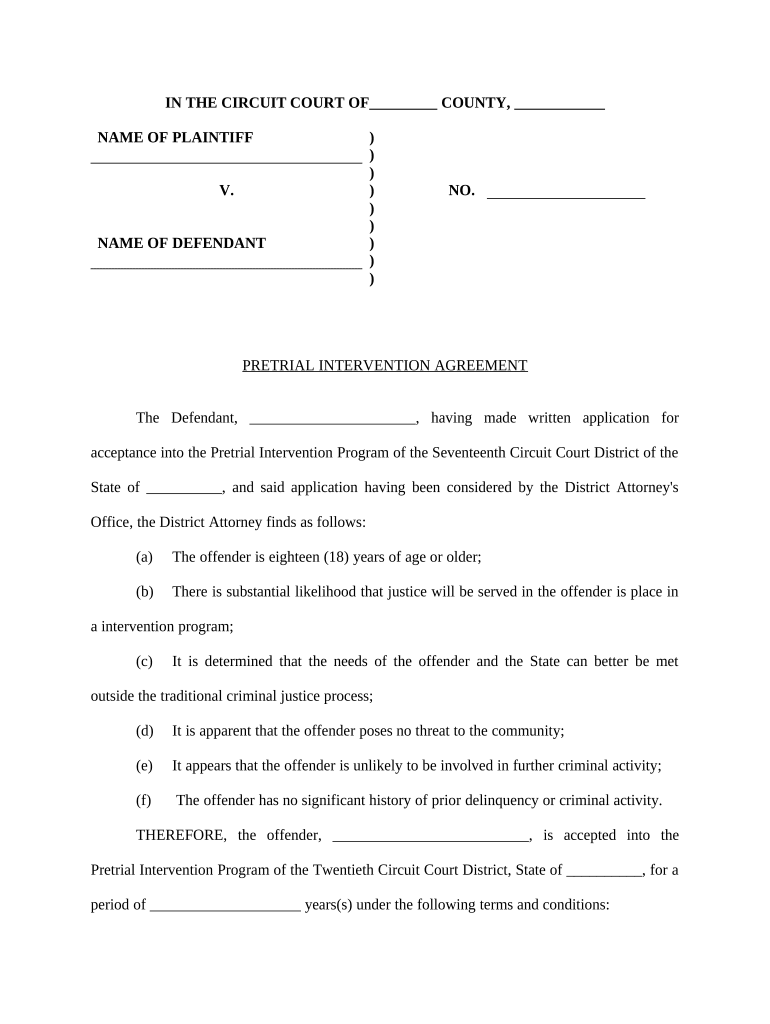
Case Caption

Full court name, case number, and parties exactly as on the complaint or docket to ensure correct filing and retrieval.
Recitals

Brief factual and procedural background describing relevant motions, hearings, or evidence justifying the courtÕs action without argument.

Ruling

Clear, unambiguous directive specifying what the order requires, prohibits, or adjudicates, using defined terms and measurable actions.

Duration

Effective date, expiration or review date, and any conditions for early termination or modification of the order.

Signature Block

JudgeÕs printed name, signature line, title, and date of signature; include clerk entry notation where required.

Service Details

Method and date of service on parties and counsel; identify who is responsible for effectuating service.

Step-by-step: preparing and submitting a Court Order

A sequential drafting and filing workflow reduces defects and accelerates entry.

  • 01
    Draft Order: Prepare proposed order with precise relief and numbered paragraphs.
  • 02
    Submit to Judge: Transmit proposed order via clerk procedure or internal judicial channels.
  • 03
    Judge Signs: Judge reviews and signs; do not alter post-signature.
  • 04
    Clerk Entry: Clerk stamps/enters on docket and distributes certified copies.

Configuring an online workflow for Court Orders

Map approval paths and e-filing steps to match local court procedures before sending documents for signature or filing.

Field Configuration
Proposed Order File Upload PDF/A; include metadata for case caption and number.
Judge Review Step Set as approver-only; no edits after signature.
Clerk Filing Step Assign clerk role to receive final signed copy for entry.
Service Automation Enable automatic email or e-service to counsel after entry.

Where and how Court Orders are filed or distributed

Understand the route from drafting to docket entry and party service for reliable enforcement.

  • Local Court Clerk: Primary recipient for signed orders and official docket entry.
  • Electronic Filing System: Submit via court e-filing (CM/ECF or state portal) where required.
  • Service to Parties: Deliver certified copies by court-designated methods.
  • Enforcement Agencies: Transmit to law enforcement or collections when execution required.

Digital signing and e-submission: technical considerations

Match platform capabilities to court rules: certified audit trails, tamper-evident signed PDFs, and integration with e-filing portals reduce rejection risk.

  • Formats: PDF, PDF/A, Word DOCX supported
  • Integrations: Salesforce, NetSuite, Google Workspace, Microsoft 365
  • Security: TLS 1.2/1.3 and AES-256 encryption

Common timelines and deadlines to watch when issuing an order

Time limits depend on the type of relief and the courtÕs procedural rules; confirm local rules in every case.

Emergency / Ex Parte Orders:

Take immediate effect; follow expedited notice and hearing requirements.

Service Deadlines:

Service methods and timing vary by jurisdiction and motion type.

Appeal Windows:

Federal civil appeals typically begin within 30 days after entry.

Post-Judgment Relief:

Motions to alter or amend have short statutory or rule-based deadlines.

Clerk Processing Time:

Docketing and distribution timelines vary across courts and counties.

Frequent drafting and filing errors to avoid

  • Using incorrect party names or docket numbers that cause clerks to reject or misfile the order.
  • Ambiguous or non-specific relief language that makes enforcement or compliance unclear.
  • Failing to follow local form or signature requirements for judicial or clerk entry.
  • Neglecting to include service instructions or proof of service, leading to lack of notice.

Consequences of defective or improperly served Court Orders

Voidable Order: May be vacated or reversed
Contempt Risk: Noncompliance can trigger sanctions
Delay: Correction requirements slow enforcement
Monetary Sanctions: Fees or counsel costs may be imposed
Appeal Grounds: Technical defects create reversal risk
Enforcement Failure: Execution and collection may be hindered

Required data elements commonly included in Court Orders

Case Caption: Court name, parties, docket number
Judge Name: Presiding judge or judicial officer
Order Date: Date the judge signed the order
Relief Specified: Precise actions, amounts, or prohibitions
Service Method: How parties were served or notified
Clerk Entry: Docket stamp and entry notation

Who is authorized to sign and enter an Order

Presiding Judge

The judge or judicial officer assigned to the case signs orders reflecting judicial determinations; only that officialÕs signature creates enforceable judicial direction.

Court Clerk

The clerk does not sign judgments but records entry, issues certified copies, and populates docket metadata essential for enforcement and appeals.

Key milestones from draft to enforceable Court Order

Track milestones as numbered stages to ensure timely review, signature, entry, and service.

01

Drafting Complete

Prepare the proposed order with clear relief and required metadata.

02

Judicial Review

Judge reviews content and may request revisions or clarifications.

03

Signature and Entry

Judge signs; clerk enters on docket and issues certified copies.

04

Service and Enforcement

Serve parties per local rules and initiate enforcement if necessary.

Representative use cases illustrating Court Order workflows

These examples show how orders move from draft to entry in typical scenarios.

Civil Motion Order

A party submitted a proposed order after a motion hearing to compel discovery.

  • Judge signed the proposed form the same day.
  • The clerk entered the order on the docket and served counsel electronically, enabling enforcement within the courtÕs timeline and avoiding additional briefing.

Emergency Relief Order

Counsel prepared an ex parte application with supporting affidavits for immediate relief.

  • The judge issued a temporary emergency order overnight.
  • The order required prompt service and a return hearing within days, giving opposing parties notice and preserving emergency relief while the matter proceeded.

How Court Orders compare with related document types

Compare common document types to determine the correct instrument for relief and enforcement.

Criteria Court Order Judgment Consent Order Administrative Order
Enforceable by Contempt varies
Typical Issuer judge judge parties/judge agency
Requires Entry often
Common Use procedural relief final disposition settlements regulatory action

eSignature vendor pricing and feature snapshot for Court Order workflows

Compare starting price, trial availability, and core features relevant to signing and managing Court Orders; signNow is listed first per vendor comparison convention.

signNow DocuSign Adobe Sign PandaDoc HelloSign
Starting Price $8/user/mo $15/user/mo $14/user/mo $19/user/mo $15/user/mo
Free Trial 7-day free trial, no credit card required Varies by vendor Varies by vendor Varies by vendor Varies by vendor
Bulk Send Yes (Business Premium) Yes Yes Yes No
Audit Trail Yes Yes Yes Yes Yes
Envelope Cap No envelope cap 100 envelopes/user/year limit Varies Varies Varies

Common questions about Court Orders and electronic handling

Answers to practical issues encountered when drafting, signing, filing, or enforcing Court Orders electronically.


Need help? Contact support

be ready to get more
Join over 28 million airSlate SignNow users