Establishing secure connection…Loading editor…Preparing document…

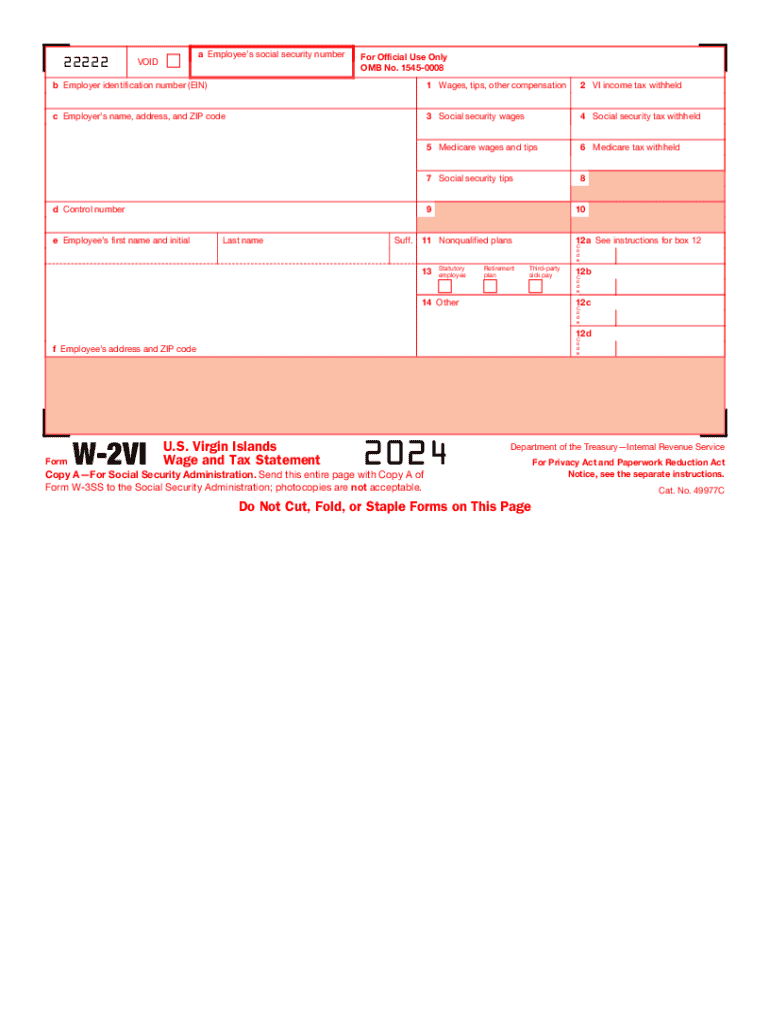
Virgin Islands Wage and Tax Statement

This template is fully customizable. Edit the text, fill out the fields, and send it for signature. Give it a try!
Virgin Islands Wage and Tax Statement

What the Virgin Islands Wage and Tax Statement Is

The Virgin Islands Wage and Tax Statement is an employer-issued payroll summary that reports wages, withholdings, and tax information for employees subject to territorial or federal reporting. Employers use this statement to document year-to-date earnings, federal and territorial income tax withholdings, Social Security and Medicare contributions, and other payroll deductions. It serves both as an employee pay summary and a filing record for payroll tax obligations. The statement may be required by the U.S. Virgin Islands Bureau of Internal Revenue, the IRS, or payroll recordkeeping rules depending on the employee’s tax residence and withholding status.

Why a Clear Wage and Tax Statement Matters

A correct Virgin Islands Wage and Tax Statement ensures compliance with payroll tax rules, supports employee tax filing, and reduces audit risk by documenting withheld amounts and employer contributions in a verifiable format.

Why a Clear Wage and Tax Statement Matters

Who Completes and Receives These Statements

Employers prepare the statement for each pay period or annually; employees receive it to confirm earnings and withholdings before filing taxes.

  • Payroll departments and providers who calculate wages, withholdings, and employer contributions for territory and federal reporting.
  • Employees who need the statement to verify earnings, prepare returns, or resolve withholding discrepancies.
  • Accountants and tax preparers who use the statement when preparing individual tax returns or reconciling employer filings.

Step-by-step: Preparing the Statement

Follow these steps in order to compile, verify, and distribute the wage and tax statement accurately.

  • 01
    Gather payroll data: Export gross wages and benefit deductions from payroll system.
  • 02
    Calculate taxes: Apply federal and territorial withholding formulas per employee.
  • 03
    Verify identity fields: Confirm employee name and SSN match tax records.
  • 04
    Distribute statement: Provide employee copy and retain employer records.

Essential Elements of a Professional Wage and Tax Statement

A clear statement groups employer and employee identifiers, detailed pay and withholding lines, year-to-date totals, and supporting codes so recipients and tax authorities can reconcile amounts quickly.

Employer Info

Legal name, EIN, and mailing address to identify the reporting entity and link the statement to employer filings.
Employee Info

Full legal name, SSN/TIN, and address to ensure proper attribution and prevent mismatches with tax agency records.

Gross Pay Lines

Itemize regular, overtime, bonuses, and other taxable earnings so taxable income can be precisely calculated.

Tax Withholdings

Detail federal, territorial, Social Security, and Medicare withholdings, including any voluntary pre-tax contributions.

Deductions & Benefits

List pre-tax deductions like retirement or health premiums and employer-paid benefits that affect taxable wages.

Year-to-Date Totals

Provide cumulative totals for wages and withholdings to support annual filing and reconciliation.

Security and Compliance Considerations

Encryption: TLS 1.2/1.3 in transit; AES-256 at rest.
Certifications: SOC 2 Type II and ISO 27001 available.
HIPAA Controls: HIPAA-compliant workflows; BAA required.
ESIGN & UETA: Meets ESIGN and UETA legal frameworks.
21 CFR Part 11: Support for FDA-regulated records where required.
Audit Trail: Detailed timestamps, IPs, and action logs.

Suggested eSubmission Workflow Settings

Configure your digital workflow to match your payroll system and retention policies; keep file formats consistent for downstream reporting.

Field Configuration
File Format PDF/A for archival, CSV for imports
Delivery Method Secure email or signed portal link
Authentication Email + SMS code or SSO
Retention Retain master copy per policy

Typical Routing for Wage Statements

A standard routing path reduces errors and ensures employees and tax authorities receive consistent records.

  • Prepare: Generate statement from payroll system.
  • Verify: Reconcile taxes and identity fields.
  • Issue: Send to employee and store employer copy.
  • File: Submit required copies to tax authorities.

Technical Requirements for Digital Delivery

Ensure your platform supports common integrations, file formats, and signer authentication to streamline distribution and recordkeeping.

  • Integrations: Salesforce, NetSuite, Google Workspace available
  • File Types: PDF, DOCX, HTML, Excel supported
  • Authentication: Email, SMS, SSO, and advanced options

Key Filing and Distribution Deadlines

Timely distribution and filing avoid penalties; deadlines differ by form and recipient.

W-2 / Employee Copy:

Provide to employee by January 31.

1099-NEC:

Recipient and IRS deadline is January 31.

W-9:

Provide upon request; no fixed filing date.

Form 1040:

Individual return due April 15 (extension possible).

Electronic IRS Filing:

Follow IRS e-file timing and cutoff rules.

Processing Milestones from Payroll to Filing

These numbered stages show the typical sequence from payroll close to tax filing for wage statements.

01

Payroll Close

Finalize pay runs and export payroll totals for period reconciliation.

02

Reconciliation

Reconcile withholding, benefits, and tax liabilities against payroll totals.

03

Statement Generation

Create statements and validate identity fields and amounts before issue.

04

Filing & Retention

Submit required returns and archive employer copies per retention policy.

Penalties and Risks of Incorrect Statements

1099 Late Fine: IRC §6721: $60 per form (short delay) up to statutory caps.
Extended Late Penalty: IRC §6721: $130–$330 per form depending on delay length.
Intentional Disregard: IRC §6721: $660+ per form with no maximum cap.
W-2 Penalties: Late or incorrect W-2s mirror 1099 penalties under §6721.
I-9 Paperwork: 8 CFR §274a.2: $281–$2,789 per violation for recordkeeping errors.
Backup Withholding: Missing/incorrect TIN can trigger 24% backup withholding.

Common Preparation Errors to Avoid

  • Using an incorrect SSN or TIN for an employee causes IRS notices and may require corrected filings and penalties.
  • Mismatched employer names or EINs on statements versus filings can delay reconciliation and trigger correspondence from taxing authorities.
  • Failing to include taxable benefits or overtime pay leads to understated wages and potential liability for unpaid taxes and penalties.
  • Late distribution or filing of statements increases exposure to per-form penalties and can harm employee trust and tax compliance.

Electronic Signature vs Digital Signature

Understand the legal and technical distinction when signing wage and tax statements electronically to match regulatory needs.

Criteria Electronic Signature Digital Signature
Definition any electronic mark pki-based cryptographic signature
Legal Acceptance esign/ueta broad acceptance accepted where cryptographic required
Non-repudiation audit trail dependent strong certificate-based non-repudiation
Typical Use payroll forms, consent high-assurance regulatory submissions

eSignature Vendor Pricing Snapshot for Document Workflows

Comparison of common vendor starting prices and core features for signing payroll and tax statements; signNow is listed first per vendor ordering rules.

signNow DocuSign Adobe Sign PandaDoc HelloSign
Starting Price $8/user/mo $15/user/mo $14/user/mo $19/user/mo $15/user/mo
Free Trial 7-day trial, no card No No Yes, limited Yes, limited
Bulk Send Yes (Business Premium) Yes Yes Yes No
Audit Trail Yes Yes Yes Yes Yes
HIPAA Compliant Yes (BAA available) Yes Yes No No

Real-World Examples of Digital Wage Statement Use

These examples show how organizations moved to digital wage and tax statements to improve delivery and compliance.

Martin Properties — Tim Martin

Payroll moved fully online to issue statements faster and support remote workers

  • Reduced mailing and processing time significantly
  • "I can process and execute all of these documents online with 100% compliance and built-in security. Whether on mobile or working offline, I can get forms back to their necessary parties efficiently."

Fertility Centers of Illinois — John Butler

Switched to digital statements integrated with practice management to centralize payroll records

  • Improved audit readiness and access controls
  • "The airSlate SignNow team has been exceptional, responsive, the API has been great, and we're extremely happy that we chose airSlate SignNow as a company."

Practical Tips for Accurate and Efficient Statements

Adopt consistent templates, validate identity fields, and automate distribution to reduce manual errors and support compliance.

Standardize templates
Use a single, validated template for all employees to ensure every required field is present and formatted consistently.
Automate validations
Run automated checks on SSNs/TINs, totals, and tax calculations before issuing statements to reduce corrected filings.
Keep audit logs
Retain complete audit trails showing who viewed or received each statement, with timestamps and IP addresses.
Train payroll staff
Regularly update staff on territorial and federal withholding rules to prevent misreporting and classification errors.

FAQs and Troubleshooting for Common Issues

Answers to frequent questions about preparing, delivering, and correcting Virgin Islands wage and tax statements.


Need help? Contact support

be ready to get more
Join over 28 million airSlate SignNow users