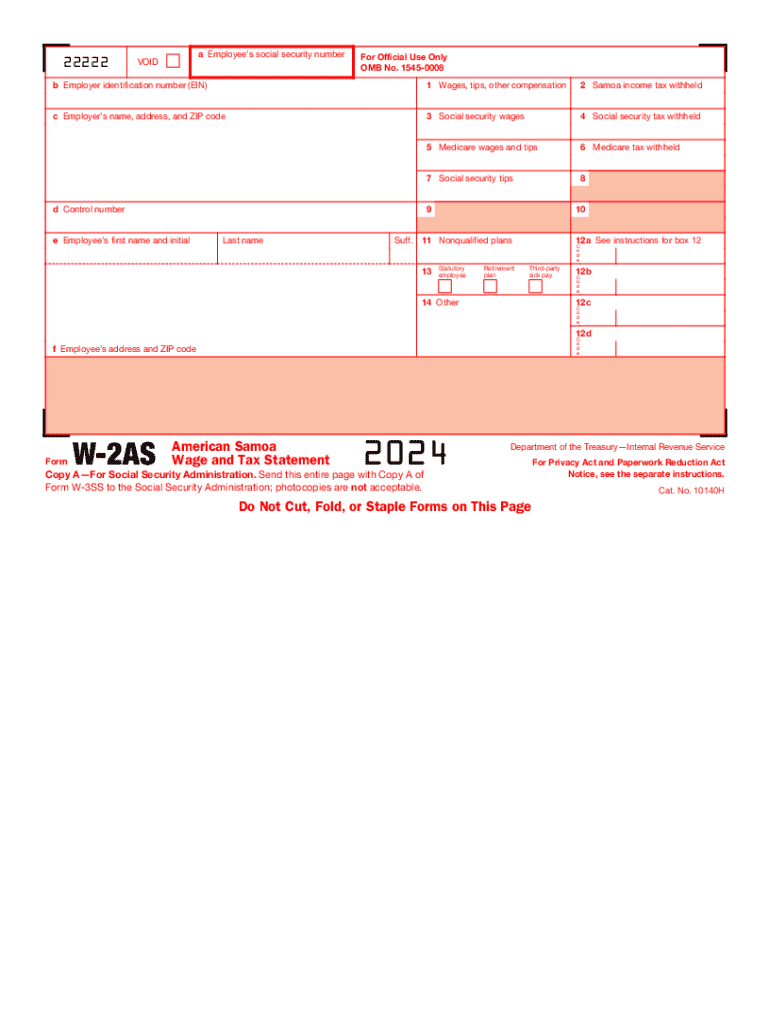
American Samoa Wage and Tax Statement
What the American Samoa Wage and Tax Statement Is
Why this statement matters for employers and payroll teams
A clear, accurate American Samoa Wage and Tax Statement reduces withholding errors, supports payroll compliance, and creates a reliable record for employee disputes or audits. It centralizes wage, tax, and deduction details relevant to the territory.
Who typically completes and receives this wage statement
The form is prepared by payroll administrators and HR staff for each pay period and provided to employees working in American Samoa.
- Payroll administrators responsible for wages and withholdings
- HR professionals who manage benefits and employee records
- Employees who need pay detail for personal records or tax purposes
Step-by-step: complete a wage and tax statement
-
01Collect payroll data: Aggregate hours, rates, and bonuses for the pay period.
-
02Compute gross pay: Calculate regular, overtime, and taxable allowances accurately.
-
03Apply withholdings: Deduct federal, territory tax, and authorized benefits.
-
04Issue and retain: Provide statement to employee and store employer copy securely.
Configuring an electronic workflow for wage statements
| Field | Configuration |
|---|---|
| Employee Identifier | Auto-populate from payroll system |
| Pay Period Date | Require MM/DD/YYYY format |
| Gross and Net Fields | Use calculated fields to avoid manual math |
| Signature / Acknowledgement | Enable e-sign or click-to-acknowledge |
Typical routing from payroll to employee
-
Prepare statement: Payroll system generates completed wage statement
-
Validate figures: HR or payroll reviewer confirms totals and withholdings
-
Distribute electronically: Send via secure platform or provide downloadable PDF
-
Retain audit trail: Store signed copy and activity log for compliance
Technical considerations for digital completion and delivery
Choose platforms that support fillable PDFs, secure delivery, and reliable record retention for payroll documents.
- Document formats: PDF, DOCX supported
- Authentication options: Email, SMS code, or stronger methods
- Audit capabilities: Timestamps and activity logs
Key penalties and risks from incorrect statements
Common preparation mistakes to avoid
- Entering names or TINs that do not match government records, which can trigger backup withholding or rejected filings and delay refunds.
- Failing to include taxable fringe benefits or bonuses in gross wages, causing underreporting and subsequent reconciliation headaches.
- Relying on manual calculations for overtime without cross-checking payroll rules, increasing the likelihood of wage disputes and compliance reviews.
- Not keeping an auditable copy of issued statements and acknowledgements, which complicates audits and employee inquiries.
Key filing and distribution deadlines to track
Provide to employee:
By Jan 31 for annual wage summaries
1099-NEC:
Recipient and IRS due Jan 31
1099-MISC paper to IRS:
Due Feb 28 if paper filed
1099-MISC electronic to IRS:
Due Mar 31 if filed electronically
Individual tax return:
April 15 standard deadline
Typical processing milestones each payroll cycle
Data Collection
Capture hours, rates, and adjustments before cutoff
Payroll Calculation
Compute gross, taxes, and deductions
Review and Sign-off
Supervisor or payroll lead approves totals
Distribution and Archival
Deliver to employees and store employer copy
eSignature vendor pricing and capability snapshot
| signNow | DocuSign | Adobe Sign | PandaDoc | HelloSign | |
|---|---|---|---|---|---|
| Starting Price | $8/user/mo | $15/user/mo | $14/user/mo | $19/user/mo | $15/user/mo |
| Free Trial | 7-day free trial | Varies by vendor | Varies by vendor | Varies by vendor | Varies by vendor |
| Bulk Send | Available on higher tiers | Available on higher tiers | Available on higher tiers | Available on higher tiers | Available on higher tiers |
| Audit Trail | Yes | Yes | Yes | Yes | Yes |
| HIPAA Compliant | Yes | Yes | Yes | No | No |
| Envelope Cap | No cap | 100 envelopes/user/year | Varies by plan | Varies by plan | Varies by plan |
Real-world examples of electronic wage statement use
Optica Ventures
Optica used online wage statements to simplify employee access
- "The interface is simple and easy-to-use for our team"
- Post-implementation the team reported fewer support requests and faster employee acknowledgement cycles, improving payroll confirmation times and record accuracy.
Martin Properties
A real estate operator shifted to digital wage statements for remote staff
- "I can process and execute all of these documents online"
- The change enabled consistent distribution across sites and mobile receipt for employees, reducing mailed statement costs and lost-statement inquiries.
Practical tips for accurate, efficient wage statements
Frequently asked questions and answers
-
Do I need to notarize this statement?
Not typically. Wage statements are payroll records and usually do not require notarization. Verify with local American Samoa tax or labor authorities if a specific declaration requires notarization for legal proceedings.
-
How do I correct an error after distribution?
Issue an amended statement clearly marked 'Corrected' and explain the change in a cover note. Retain both the original and amended versions for audit trails and employee records.
-
Can employees sign electronically?
Yes. Electronic signatures meet U.S. legal standards under ESIGN and local electronic transaction laws when intent, consent, attribution, and retrievability are present.
-
Where should employers file records?
Keep employer copies in secure payroll records systems and retain according to tax and labor retention schedules; provide copies to tax authorities when required.
-
What triggers backup withholding?
An incorrect or missing TIN typically triggers backup withholding at the statutory rate; confirm the TIN with the employee and correct filings promptly to avoid withholding liabilities.
-
How long should records be kept?
Follow federal minimums—generally three years for tax records—and retain longer when industry rules or state law require extended retention for audits or legal claims.