Establishing secure connection…Loading editor…Preparing document…

Guam Wage and Tax Statement

This template is fully customizable. Edit the text, fill out the fields, and send it for signature. Give it a try!
Guam Wage and Tax Statement

What the Guam Wage and Tax Statement Is

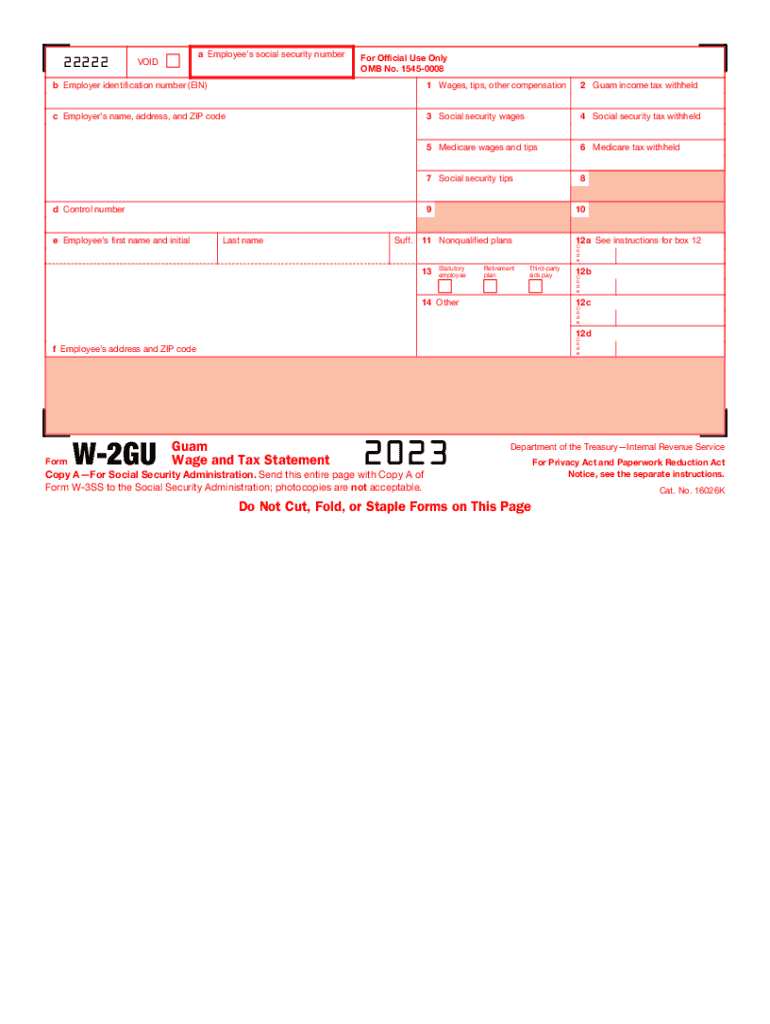
The Guam Wage and Tax Statement is an employer-issued payroll summary that documents an employee's wages, Guam and federal tax withholdings, and year-to-date payroll totals. It functions as the territory-level record employees use for individual tax filings and for employers to reconcile payroll withholding and reporting obligations with the Guam Department of Revenue and Taxation and federal agencies. The statement typically mirrors federal wage-reporting elements while adding Guam-specific withholding and local tax codes where applicable.

Why this statement matters for compliance and payroll accuracy

A complete Guam Wage and Tax Statement ensures employees receive accurate year-end information, supports correct Guam and federal tax filings, and helps employers avoid filing penalties and backup withholding liabilities.

Why this statement matters for compliance and payroll accuracy

Who prepares and who receives the Guam Wage and Tax Statement

Common users include payroll administrators, HR teams, and employers with staff working in Guam.

  • Payroll and accounting teams preparing periodic and year-end payroll reports for Guam employees.
  • Employees who use the statement to prepare Guam and federal income tax returns.
  • Tax preparers and third-party payroll providers reconciling withholding and employer tax deposits.

The statement is relevant for any organization with Guam-based employees, including remote workers whose services are subject to Guam income tax rules.

Core elements to include on a professional Guam Wage and Tax Statement

A well-structured statement groups identification, period totals, tax withholdings, and employer reporting details to support employee filing and employer reconciliation.

Employee Info

Full legal name, mailing address, and employee identification such as SSN or ITIN to match federal and territory records.
Employer Info

Employer name, FEIN or Guam tax account number, and employer address used for filing and correspondence with Guam DRT.

Earnings

Gross wages, tips, taxable benefits and year-to-date totals separated by pay period and calendar year for clear reporting.

Guam Withholding

Total Guam income tax withheld by period and YTD, plus any Guam-specific tax code or locality annotations.

Federal Withholding

Federal income tax withheld, Social Security and Medicare withholdings, and any pre-tax deduction totals shown separately.

Notes & Codes

Box or line for special codes, third-party sick pay, retirement contributions, or adjustments required for Guam or federal reconciliation.

Essential data protections and legal frameworks

Data Encryption: TLS 1.2/1.3 in transit; AES-256 at rest
eSignature Law: ESIGN and UETA acceptance
HIPAA Consideration: BAA required if payroll contains PHI
Audit Trail: Timestamps, IP, and action history
Access Controls: Role-based signer and admin permissions
Retention Policies: Store per IRS and Guam rules

Step-by-step: preparing and issuing the statement

Follow these sequential actions to prepare accurate Guam Wage and Tax Statements and deliver them to employees and the Guam tax authority.

  • 01
    Collect payroll data: Aggregate gross pay and deductions for each employee
  • 02
    Calculate withholdings: Apply Guam and federal withholding rules
  • 03
    Populate statement: Complete all identification and amount fields
  • 04
    Distribute copies: Provide employee and file employer copy to Guam DRT

How the statement moves from payroll to filing

A reliable routing process reduces errors and creates a verifiable record for both employee and tax authorities.

  • Payroll System Export: Export year-to-date totals and tax lines from payroll software
  • Statement Generation: Generate individual Guam Wage and Tax Statements in PDF or approved format
  • Employer Filing: Submit required employer copies to Guam DRT per local filing method
  • Employee Delivery: Deliver to employees electronically or in hard copy with audit record

Template and e-filing setup for digital completion

Configure your digital workflow to reduce manual entry, enforce required fields, and ensure consistent output for employee and agency copies.

Field Mapping Map payroll export columns to statement fields
Required Fields Mark SSN, name, wages, and withholding as required
Conditional Fields Show Guam withholding only for Guam employees
Signer Authentication Use email or SMS code for employee acknowledgment
Delivery Method Select PDF email and agency e-file options

Digital distribution and format considerations

Ensure the platform supports secure PDF generation, audit trails, and the file formats your payroll system exports.

  • File Formats: PDF, DOCX, CSV input and output
  • Integrations: Payroll and HR integrations reduce manual transfer
  • Authentication: Email, SMS, or stronger signer verification

Confirm the platform can retain signed copies and generate a certificate of completion to support audit and regulatory review.

Key timing: employee copies and filing deadlines

Timely distribution and filing reduce penalty risk. Confirm Guam DRT e-filing windows and any calendar variances for electronic submissions.

Provide to Employee:

By January 31 for the prior calendar year

Employer Filing to Guam:

Submit employer copy by January 31 unless Guam sets alternate dates

Electronic Filing Deadline:

Use agency electronic deadline; federal analogs often require March/April windows

Withholding Deposit Schedule:

Deposit frequency varies (monthly/semimonthly) per Guam rules

Record Corrections:

Issue corrected statements immediately when errors are found

Penalties and risks from incorrect or late statements

Information Return Penalties: Penalties under IRC §6721 for late/incorrect filings
Per-Form Fines: $60–$330 per form depending on lateness
Intentional Disregard: $660+ per form with no maximum
Backup Withholding: 24% if TIN is missing or incorrect
I-9 Compliance: Separate fines $281–$2,789 per violation
Reputational Risk: Employee disputes and audit exposure increase costs

eSignature vendor comparison for signing and distributing wage statements

Compare basic pricing and capability indicators for common eSignature vendors. signNow appears first per comparison conventions for template guidance.

signNow DocuSign Adobe Sign PandaDoc HelloSign
Starting Price $8/user/mo $15/user/mo $14/user/mo $19/user/mo $15/user/mo
Free Trial 7-day free trial Varies Varies Varies Varies
Bulk Send Yes Yes Yes Yes No
Audit Trail Yes Yes Yes Yes Yes
HIPAA Compliant Yes Yes Yes No No

Frequently asked questions about Guam Wage and Tax Statements

Answers to common operational and compliance questions about preparing, signing, and retaining Guam wage and tax records.


Need help? Contact support

be ready to get more
Join over 28 million airSlate SignNow users