Establishing secure connection…Loading editor…Preparing document…

Louisiana Writ of Habeas Corpus

This template is fully customizable. Edit the text, fill out the fields, and send it for signature. Give it a try!
Louisiana Writ of Habeas Corpus

What the Louisiana Writ of Habeas Corpus Is and when it applies

A Louisiana Writ of Habeas Corpus is a formal petition filed in state or federal court seeking immediate judicial review of a person's detention or imprisonment. The petition asks the court to determine whether the detention is lawful and, if not, to order the detainee's release or other corrective relief. Habeas corpus petitions often challenge jurisdiction, constitutional violations, insufficient process, or excessive bail. Remedies and procedure vary between state and federal courts; filing a properly formatted petition with complete factual allegations and supporting exhibits is essential to secure prompt consideration.

Why this writ matters for prompt review of unlawful detention

A Louisiana Writ of Habeas Corpus provides a direct mechanism to challenge unlawful restraint and secure swift judicial review. It preserves liberty interests and can compel a court to correct jurisdictional, procedural, or constitutional defects that led to continued detention.

Why this writ matters for prompt review of unlawful detention

Who typically files or relies on a Louisiana habeas petition

The writ is used by detained persons, their counsel, family members, and public defenders to seek immediate court relief from unlawful confinement.

  • Criminal defense attorneys representing clients alleging constitutional or procedural violations during arrest or conviction.
  • Public defenders or appointed counsel filing on behalf of indigent detainees seeking prompt judicial intervention.
  • Pro se litigants or family members requesting review where counsel is not available or representation is delayed.

Step-by-step: preparing and filing the writ

Follow these steps to assemble a complete Louisiana writ of habeas corpus for filing at the appropriate court; missing elements commonly cause delays or rejection.

  • 01
    Gather records: Collect booking, indictment, judgment, and parole documents supporting the challenge.
  • 02
    Draft petition: Prepare caption, petitioner facts, legal grounds, relief requested, and verification.
  • 03
    Attach exhibits: Include certified copies or authenticated records referenced in the petition.
  • 04
    File and serve: File with the clerk and serve the named respondent per local rules.

Essential components to include in a professional Louisiana petition

A complete petition organizes factual and legal claims to enable a prompt judicial assessment. Ensure each section is clear, supported, and signed under penalty of perjury where required.

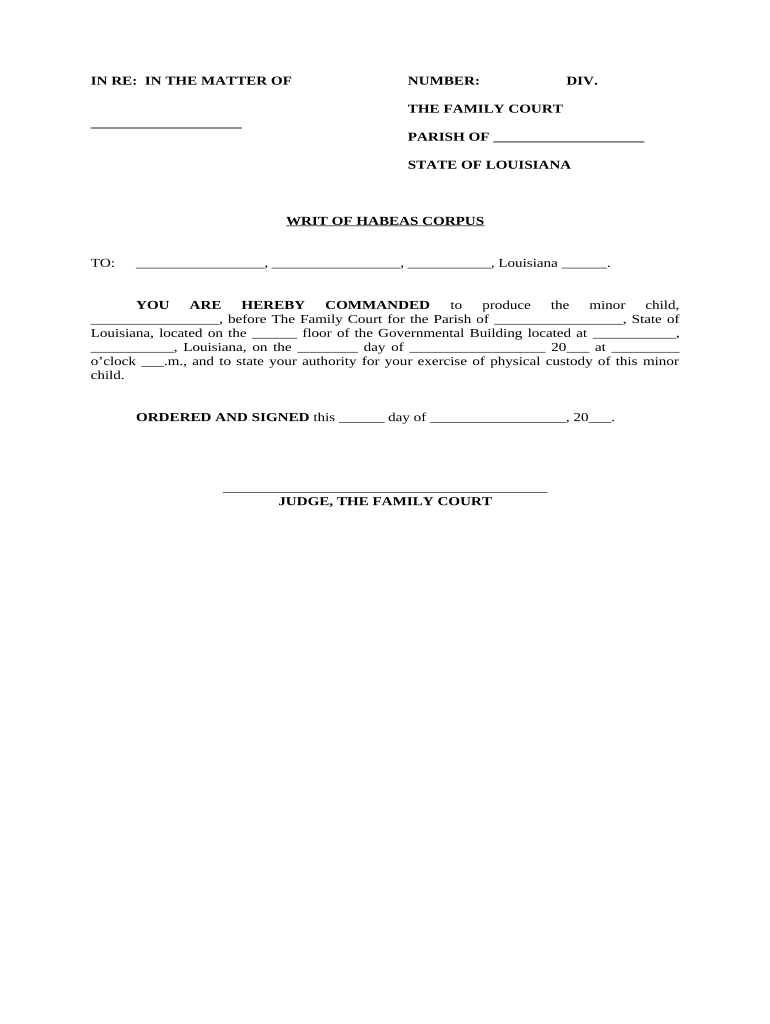
Caption and Court

State the correct court name and caption that identifies petitioner, respondent, case number (if any), and whether the petition seeks emergency or non-emergency relief.
Petitioner identification

Provide full legal name, aliases, date of birth, DOC number if applicable, and current location to avoid ambiguity in custody claims.

Respondent identification

Name the custodian by title (warden, sheriff) and include facility details so the court can order proper service and custody verification.

Statement of facts

Present a concise chronological narrative of the detention, arrests, charges, convictions, sentencing, and any post-conviction actions relevant to the legality of custody.

Legal grounds

Identify specific legal or constitutional bases for relief (e.g., due process, ineffective assistance, jurisdictional error), citing statutes or constitutional provisions where applicable.

Verification and signature

Include a verification under penalty of perjury with the petitioner's or counsel's signature and date to attest to factual accuracy and authenticity.

Data and security considerations when preparing or transmitting the writ

Encryption in transit: TLS 1.2/1.3
Encryption at rest: AES-256
Legal frameworks: ESIGN and UETA compliance
Healthcare compliance: HIPAA (BAA required)
Audit trail: Tamper-evident logs
Accessibility: WCAG 2.0 Level AA

Consequences and risks of an incorrect or incomplete petition

Dismissal risk: Petition may be dismissed for procedural defects
Delay of relief: Errors can delay hearings and prolong detention
Service failure: Improper respondent naming blocks judicial review
Sanctions: Court may impose sanctions for frivolous filings
Waiver of issues: Incomplete claims risk waiver at later stages
Record exclusion: Unauthenticated exhibits may be excluded

Common preparation mistakes to avoid

  • Filing in the wrong court or wrong jurisdiction for the detention; verify where the custodian is located and which court has authority.
  • Failing to name the proper custodian by title and facility; generic or misstated respondent names can prevent service.
  • Providing vague factual allegations without supporting dates or documents; courts require facts sufficient to evaluate legality.
  • Neglecting to include a verification or signature under penalty of perjury when state rules require one.

How electronic preparation and submission typically works

Electronic workflows enable drafting, secure attachments, and routing to the court clerk or counsel; authentication and local court acceptance are required for e-filing.

  • Draft online: Prepare the petition in a PDF or DOCX file with clearly labeled exhibits.
  • Attach evidence: Upload certified copies, judgment rolls, and any supporting affidavits.
  • Authenticate: Use required signer authentication per court or counsel instructions.
  • Submit: File via the court's e-filing portal or deliver to the clerk following local rules.

Configuring an e-filing or eSignature workflow for the writ

Set up fields and signer roles to match court and service requirements before submission to avoid rejections.

Field Configuration
Petitioner Signature Required; date field linked to signature
Counsel Signature Optional; include title and bar number if signing
Exhibit Upload PDF attach; label exhibit numbers consistently
Authentication Email + SMS code or court-specified method

Technical and platform factors for eSubmission

Ensure your chosen platform supports secure storage, audit trails, and the specific signer authentication required by the receiving court or clerk.

  • File formats: PDF or DOCX
  • Integrations: Salesforce, Microsoft 365, Google Workspace
  • Authentication: Email, SMS, or KBA as required

Comparing common eSignature providers for preparing and routing legal filings

Platform selection may affect authentication, audit trail, and per-user cost; signNow appears first below for feature and price comparison without any dated claims.

signNow DocuSign Adobe Sign PandaDoc HelloSign
Starting Price $8/user/mo $15/user/mo $14/user/mo $19/user/mo $15/user/mo
Free Trial 7-day free trial Varies by plan Varies by plan Varies by plan Varies by plan
Bulk Send Yes Yes Yes Yes Varies
Audit Trail Yes Yes Yes Yes Yes
HIPAA Compliant Yes Yes Yes No No
Envelope Cap No cap 100 envelopes/user/year Varies by plan Varies by plan Varies by plan

Key milestones in a typical habeas petition lifecycle

These sequential stages show the normal milestones from preparation through hearing; actual timing depends on court rules and emergency status.

01

Prepare Petition

Assemble facts, exhibits, and verification sufficient for initial judicial review.

02

File & Serve

Submit petition to the clerk and serve the named respondent per local rules.

03

Court Screening

Clerk or judge screens for procedural completeness and may set a briefing schedule.

04

Hearing or Order

Court may schedule a hearing, issue temporary relief, or deny petition with reasons stated.

Frequently asked questions about Louisiana habeas filings

Answers address common procedural and technical questions encountered when drafting, signing, and filing a writ of habeas corpus in Louisiana.


Need help? Contact support

be ready to get more
Join over 28 million airSlate SignNow users