Establishing secure connection…Loading editor…Preparing document…

Iowa Verified Statement of Account

This template is fully customizable. Edit the text, fill out the fields, and send it for signature. Give it a try!
Iowa Verified Statement of Account

What an Iowa Verified Statement of Account Is

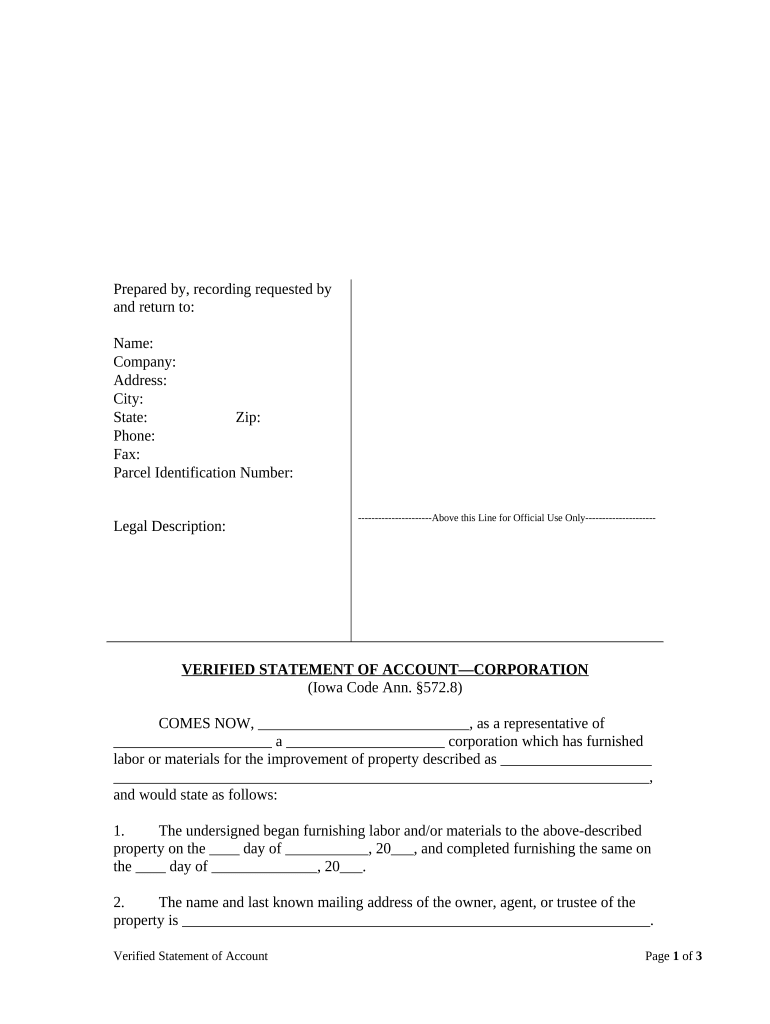
The Iowa Verified Statement of Account is a sworn, itemized summary of charges, payments, and balances presented by a creditor, vendor, or claimant to substantiate an amount owed. In practice it accompanies collection actions, lien filings, or accounting claims and serves as a formal record for courts, opposing parties, and recordkeepers. The statement identifies parties, lists invoice dates and amounts, allocates credits and payments, and concludes with a total balance due. When sworn, the signer attests to accuracy under penalty of perjury consistent with Iowa evidentiary procedures.

Why a Verified Statement of Account Matters

A verified statement provides a concise, sworn accounting that supports monetary claims, reduces disputes over amounts, and documents balances for courts, lienholders, or opposing parties. It makes calculations transparent and helps clerks and counsel verify the basis for collection or recording actions.

Why a Verified Statement of Account Matters

Who Prepares and Receives This Statement

Typical users who prepare or receive an Iowa Verified Statement of Account include creditors, collection counsel, title companies, and county record clerks.

  • Creditor accounting teams preparing itemized invoices and reconciling payments for legal or lien actions.
  • Collection and litigation attorneys using sworn statements as evidence in court or settlement negotiations.
  • Title companies and county clerks relying on certified account summaries for recordings and public records.

Core Elements to Include for Clarity and Admissibility

A professional Iowa Verified Statement of Account contains consistent headings, line-item detail, supporting exhibits, and a clear verification clause so it is readily accepted by clerks, counsel, and tribunals.

Header

Include the document title, case or account number, full names and addresses of parties, and preparer contact details so the statement can be matched to existing files and served correctly.
Itemization

List each invoice or charge with invoice number, date, detailed description of goods or services rendered, original amount, and any discounts or adjustments so each line can be independently verified against records.

Payments

Show all payments with receipt or check numbers, dates received, payer identity, payment method, amounts applied, and allocation details to reconcile the outstanding balance and explain any remaining variance.

Totals

Calculate and display subtotal, itemized taxes, applied fees, credits, adjustments, and the final total balance due; state currency and rounding rules and show arithmetic for transparency.

Verification

Include a verification clause signed and dated by the preparer or authorized officer, stating that the account is true and correct under penalty of perjury and identifying the signer's role.

Attachments

Attach supporting documents such as original invoices, payment receipts, contracts, and ledger extracts; label exhibits and cross-reference line items for straightforward auditability.

Step-by-Step: Preparing and Authenticating the Statement

Follow these sequential steps to accurately prepare, verify, and transmit an Iowa Verified Statement of Account for filing or service.

  • 01
    Prepare Draft: Assemble invoices, receipts, and ledger entries.
  • 02
    Itemize Charges: Enter each line with invoice number and date.
  • 03
    Verify Totals: Recalculate subtotals, taxes, and final balance.
  • 04
    Sign & Notarize: Sign, date, and notarize if required by local rules.

Configure an Electronic Workflow Before Sending

Configure the electronic workflow to match signer order, authentication strength, retention rules, and notification preferences before sending the verified statement.

Field Configuration
Template Name Use a descriptive name with case ID.
Signer Roles Assign preparer, approver, and recipient roles.
Authentication Choose email link, SMS code, or stronger KBA as needed.
Retention Settings Set document retention period and export formats.

Where to File, Send, or Submit the Statement

Routing and filing options depend on the claim type and recipient requirements; select the destination that matches the procedural posture of the matter.

  • File with Court: Attach as supporting affidavit or exhibit to a complaint.
  • Record with County: Submit to county recorder when a recorded lien or notice is required.
  • Serve Opposing Party: Deliver per service rules applicable to collections or litigation.
  • Email and Archive: Send certified copies to client and maintain secure archives.

Digital Signing and File Format Requirements

Use electronic platforms that support PDF, DOCX, secure storage, and an auditable activity log when e-signing or transmitting verified account statements.

  • File Formats: Supports PDF, DOCX, and searchable PDF exports for court filing.
  • Integrations: Common integrations include NetSuite, Microsoft 365, and Salesforce.
  • Security Standards: Use platforms with TLS 1.2/1.3 and AES-256 encryption at rest.

Typical Timing Considerations to Track

Key timing and deadlines for issuing, filing, and responding to a verified statement depend on the procedure, forum, and local filing office requirements.

When to Issue the Statement:

Provide upon request by payer, claimant, or counsel.

Local Filing Deadlines:

Follow court or county clerk deadlines for attachments and filings.

Response Period for Opponent:

Allow time for dispute, reconciliation, or settlement discussions.

Appeal or Motion Windows:

Observe procedural deadlines in civil or lien proceedings.

Document Retention Deadlines:

Maintain original records in line with federal and state retention rules.

Key Processing Milestones from Draft to Archive

Track these sequential milestones from preparation through final record to avoid missed filings, service defects, or retention failures.

01

Prepare and Verify

Compile supporting invoices and verify arithmetic and dates.

02

Sign and Notarize

Execute signature and obtain notary acknowledgment where required.

03

File or Record

Submit to court clerk or county recorder as applicable.

04

Serve and Archive

Serve opposing parties and archive certified copies securely.

Common Preparation Mistakes to Avoid

  • Failing to itemize charges leads to disputes and makes verification difficult for courts or opposing parties, often delaying resolution and increasing legal costs.
  • Using inconsistent names or account numbers can result in rejected filings, misapplied payments, or backup withholding if tax reporting relies on the document.
  • Omitting supporting documents such as invoices or receipts weakens evidentiary value and may require supplementary discovery or additional affidavits.
  • Skipping notarization or incorrect notary procedure where local rules require it exposes the statement to objection and possible exclusion by a tribunal.

Penalties and Risks from Incorrect Statements

Late Filing: May forfeit priority or remedies.
Incorrect Amounts: Can lead to dispute or reduced recovery.
Missing Signature: May invalidate verification clause.
No Notary: Objection or rejection possible.
Improper Service: Motions to quash or delay.
Retention Failure: Violates recordkeeping and compliance rules.

Essential Data Fields to Include

Account Number: Vendor or creditor account ID
Statement Date: MM/DD/YYYY verification date
Party Names: Full legal names of parties
Invoice Details: Invoice number, date, description
Totals & Taxes: Subtotal, taxes, fees, final total
Signature Block: Printed name, title, signature date

eSignature Vendor Pricing and Feature Comparison

Compare core pricing and features across common eSignature vendors to determine operational fit when sending and managing Iowa Verified Statements of Account.

signNow DocuSign Adobe Sign PandaDoc HelloSign
Starting Price $8/user/mo $15/user/mo $14/user/mo $19/user/mo $15/user/mo
Free Trial 7-day free trial Varies by vendor Varies by vendor Varies by vendor Varies by vendor
Bulk Send Yes Yes Yes Yes No
Audit Trail Yes Yes Yes Yes Yes
HIPAA Compliant Yes Yes Yes No No
Envelope Cap No cap 100 envelopes/user/year Varies Varies Varies

Frequently Asked Questions About the Iowa Verified Statement of Account

Common questions about preparing, authenticating, and filing an Iowa Verified Statement of Account, with practical answers and applicable legal context.


Need help? Contact support

be ready to get more
Join over 28 million airSlate SignNow users