Establishing secure connection…Loading editor…Preparing document…

Idaho Garnishment

This template is fully customizable. Edit the text, fill out the fields, and send it for signature. Give it a try!
Idaho Garnishment

What an Idaho Garnishment Is and When It Applies

An Idaho garnishment is a court-authorized legal process that permits a creditor to collect a judgment by seizing funds or wages from a third party holding assets of the judgment debtor. Commonly used for wage garnishment and bank account levies, the garnishment begins after a judgment or qualifying order is entered and a writ or notice is issued by the court. The procedure requires proper service, statutory forms and timelines, and may include exemptions that protect a portion of the debtor’s income. Parties must follow Idaho statutes and local court rules to enforce and conclude a garnishment correctly.

Why the Idaho Garnishment Matters for Creditors and Employers

A garnishment provides a court-backed method to satisfy unpaid judgments and recover funds without voluntary payment.

Why the Idaho Garnishment Matters for Creditors and Employers

Who Typically Prepares and Responds to an Idaho Garnishment

The form and process are used by judgment creditors to collect and by employers, banks, and other third parties to respond to collection orders.

  • Judgment Creditors and Attorneys who pursue court judgments and prepare garnishment writs and supporting affidavits for filing.
  • Employers and Payroll Officers who must identify wages, calculate allowable withholding, and remit funds per court instruction.
  • Clerks of Court and Process Servers who file documents, issue writs, and ensure proper service and return of process.

Proper role recognition reduces compliance risk and clarifies who must act at each stage of the garnishment lifecycle.

Primary Signers and Responsible Parties

Creditor — Collection Manager

A collections manager or creditor’s counsel signs and files the writ or application for garnishment; they must ensure the judgment, case number, and debtor identity match court records and that service complies with Idaho rules.

Employer — Payroll Officer

An employer or payroll officer certifies wage amounts and withholds per the garnishment order; they must track withholding dates, remit funds to the designated registry or creditor, and keep proof of compliance for audits.

Step-by-Step: Completing and Filing an Idaho Garnishment

Follow this sequence to prepare, file, serve, and track a garnishment while maintaining required documentation and timelines.

  • 01
    Verify Judgment: Confirm the judgment is final and eligible for garnishment before preparing forms.
  • 02
    Prepare Writ: Complete the garnishment writ or notice with accurate debtor and creditor details and attach judgment copy.
  • 03
    File with Court: File the writ with the appropriate county clerk and request issuance of a writ or summons for service.
  • 04
    Serve and Return: Serve the employer or bank per statutory rules and file proof of service and any return of garnishment.

How an Idaho Garnishment Moves Through the System

This flow outlines the core operational stages from judgment to collection remittance.

  • Record Judgment: Court enters judgment and docket details establishing the legal basis for garnishment.
  • Issue Writ: Clerk issues writ or notice to be served on the third party holding debtor assets.
  • Third-Party Response: Employer or bank identifies funds, calculates exemptions, and withholds per the order.
  • Remit Funds: Withheld funds are sent to the court registry or creditor and tracked with remittance records.

Configuring an Online Workflow for Garnishment Preparation

Set up a digital template and approval workflow to reduce manual errors and speed filing.

Field Configuration
Authentication Email or SMS code for signer verification
Field Types Signature, date, text, numeric currency format
Bulk Send Enable for multiple employers or accounts
Audit Trail Capture IP, timestamp, and signer email

Digital Signing and eSubmission: Platform Considerations

Choose a platform that supports secure signatures, templates, and evidence capture for court filings and employer notifications.

  • Integrations: Salesforce, NetSuite, Microsoft 365, Google Workspace
  • File Formats: PDF and Word DOCX supported for court-ready submissions
  • Evidence Capture: Audit trail, timestamps, and signer authentication

Use vendor platform logs and exported audit reports as part of your proof of service and compliance package when submitting to the court or responding to disputes.

Essential Components Every Idaho Garnishment Should Include

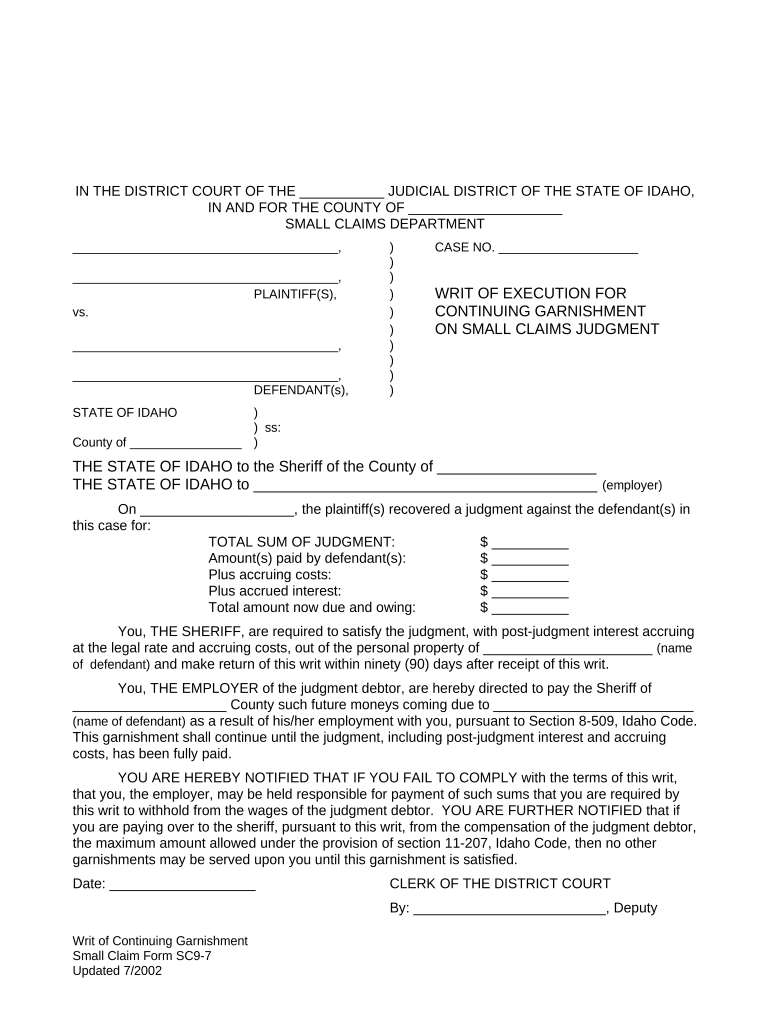
A complete garnishment form combines legal identifiers, clear monetary detail, service instructions, and evidence fields to streamline enforcement and avoid rejection.

Court Identifier

Name of issuing court, county, and case number to link the garnishment directly to the underlying judgment and ensure the clerk can process without supplemental information.
Party Identification

Full legal names and contact details for creditor, debtor, and third party (employer or bank), including addresses to permit correct service and return of process.

Monetary Details

Break out principal, accrued interest, post-judgment interest rate, fees, and any credits so withholding and accounting are transparent to employers and the court.

Withholding Instructions

Specify the amount or percentage to be withheld and identify applicable statutory exemption thresholds or calculation method for net pay.

Service and Proof

Fields for server name, service date, method, and a return of service area that the clerk will use to verify proper notice was given.

Compliance Evidence

Space for employer declarations, remittance details, and attachments such as payroll records or bank statements required to substantiate collections and avoid disputes.

Saving, Exporting, and Retaining Garnishment Records

Ensure signed garnishments and supporting documents are saved in formats accepted by courts and for internal compliance checks.

Accepted Formats

Export final signed documents as PDF/A or searchable PDF for court filing and archival; retain original editable DOCX for internal edits.

Signed Copies

Provide creditors and employers with completed signed copies and an audit certificate showing signer identity, IP, and timestamps for evidentiary purposes.

Secure Storage

Keep copies in encrypted storage with role-based access and routine backups to preserve chain-of-custody and support any later audits.

Retention Notes

Follow applicable retention policies and export a complete file package (forms, proof of service, remittances) when closing the enforcement matter.

Key Timelines and Deadlines for Garnishment Processing

Timely filing, service, and employer response are central to lawful enforcement; observe statutory windows and court-specified dates.

Filing after Judgment:

File a garnishment application soon after judgment entry; some clerks require filing within a set time frame for prompt issuance.

Service Deadline:

Serve the third party per local rules—service timing affects when withholding must begin and when exempt funds may be claimed.

Employer Response Window:

Employers typically have a limited time to respond and remit withholdings; missing deadlines can trigger contempt or penalties.

Exemption Claim Period:

Debtors must file exemption or claim-of-right petitions within the statutory period set by court rule to protect specific wages or funds.

Record Retention:

Retain proof of service, remittances, and employer correspondence for several years to defend against post-collection challenges.

Consequences and Risks of Errors in Garnishment Handling

Contempt of Court: Civil sanctions for failure to comply
Monetary Damages: Liability for mistaken or excessive withholding
Service Defects: Invalid service may void the garnishment
Expired Orders: Collecting after expiration risks forfeiture
Wrong Defendant: Seizing third-party funds belonging to another person
Privacy Violations: Improper disclosure of protected personal data

Common Mistakes to Avoid When Preparing an Idaho Garnishment

  • Using an incorrect case number or mis-typed debtor name, which can delay court acceptance and service.
  • Failing to attach a certified copy of the judgment or required affidavit documenting amounts due.
  • Serving the wrong third party or using improper service methods under local rules.
  • Neglecting statutory exemptions, resulting in over-withholding or later refund obligations.

Practical Tips for Accurate and Efficient Garnishment Completion

Adopt consistent templates, verify party data with court records, and record every service and remittance act for a defensible audit trail.

Use Court-Validated Templates
Start with forms accepted by the county clerk or court; pre-fill case and party data from the docket to reduce typographical errors and rejections.
Document Service Carefully
Capture the server name, method, and time of service and upload proof of service documents immediately to the case file to avoid disputes.
Calculate Exemptions Accurately
Apply statutory or court-specified exemption formulas precisely and document calculations so employers and the court can verify with payroll records.
Maintain an Audit Package
Preserve the signed garnishment, proof of service, remittance receipts, and communication logs in a single, exportable package for easy production if required.

eSignature Pricing and Feature Snapshot for Garnishment Workflows

This vendor comparison highlights starting prices and selected plan features relevant to document preparation, bulk sending, and compliance support. Confirm vendor plan details before purchase.

signNow DocuSign Adobe Sign PandaDoc HelloSign
Starting Price $8/user/mo $15/user/mo $14/user/mo $19/user/mo $15/user/mo
Free Trial 7-day trial Varies by vendor Varies by vendor Varies by vendor Varies by vendor
Bulk Send Yes (Business Premium) Yes Yes Yes Varies
Audit Trail Yes Yes Yes Yes Yes
Envelope Cap No envelope cap 100 envelopes/user/year Varies by plan Varies by plan Varies by plan

Frequently Asked Questions About Idaho Garnishment

Answers to common procedural and compliance questions to help avoid processing delays and legal disputes when using garnishment remedies in Idaho.


Need help? Contact support

be ready to get more
Join over 28 million airSlate SignNow users