Establishing secure connection…Loading editor…Preparing document…

Motion to Modify or Dismiss Protection Order

This template is fully customizable. Edit the text, fill out the fields, and send it for signature. Give it a try!
Motion to Modify or Dismiss Protection Order

What the Motion to Modify or Dismiss Protection Order Is

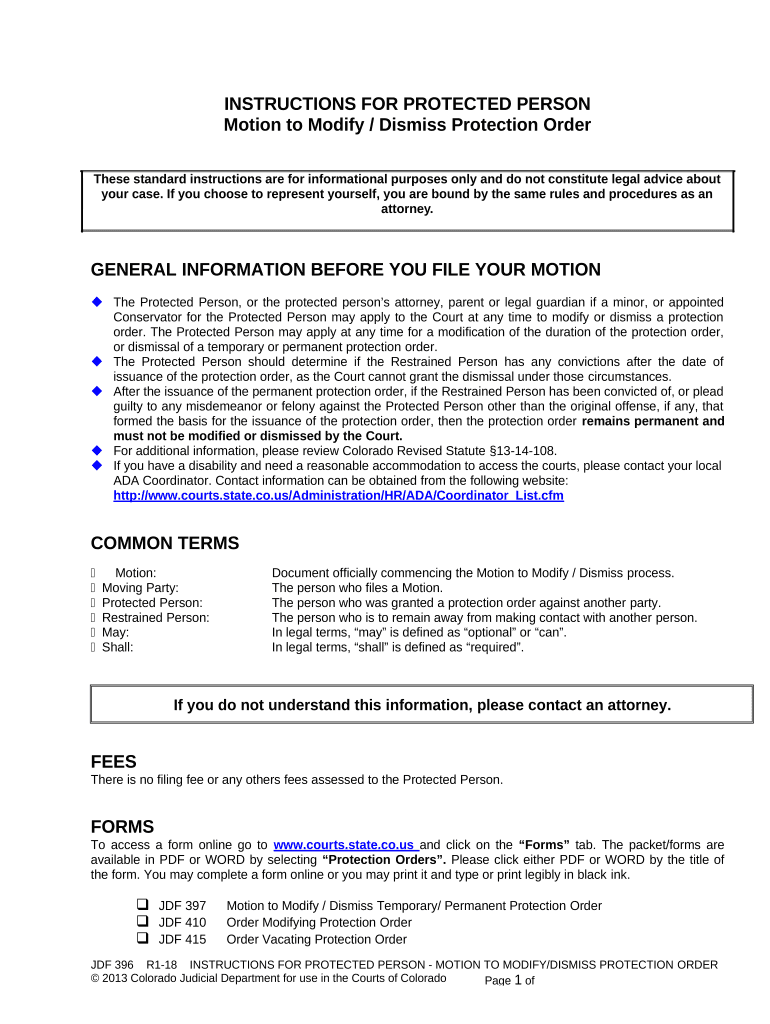
A Motion to Modify or Dismiss Protection Order is a court filing used to request that an existing protective or restraining order be changed or terminated based on new facts, changed circumstances, lack of jurisdiction, or procedural defects. The moving party explains legal and factual grounds, cites supporting evidence, and asks the court for relief such as narrowing terms, altering duration, or vacating the order. Courts consider safety, due process, and statutory standards. The motion may trigger a hearing where both parties can present testimony and exhibits before the judge rules.

Why Filing This Motion Matters and Its Legal Basis

A Motion to Modify or Dismiss Protection Order lets parties correct mistakes, reflect changed relationships, or challenge jurisdictional or evidentiary issues. It preserves due process by allowing judicial review and can limit unnecessary restrictions while balancing safety and statutory protections.

Why Filing This Motion Matters and Its Legal Basis

Who Typically Files or Responds

Typical users include respondents, petitioners, and attorneys seeking to modify or dismiss protection orders through formal court filings.

  • Respondents who wish to remove or narrow restrictions placed by a prior order.
  • Petitioners requesting modification for safety planning or to reduce overly broad conditions.
  • Attorneys filing procedural or jurisdictional challenges on factual or legal grounds.

Primary Parties Who Use the Motion

Respondent

An individual named in the protection order who seeks modification or dismissal. Their filing should explain changed circumstances, attach supporting exhibits, and include proposed revised order language. Accurate identification and proof of service are critical to proceed.

Petitioner

A person or agency that originally obtained the protection order and may move to amend terms for safety or administrative reasons. Petitioner motions should state specific legal grounds and provide notice to affected parties per local rules.

Key Elements to Include in a Professional Motion

Core elements of a Motion to Modify or Dismiss Protection Order ensure clarity, evidentiary support, and lawful grounds for requested relief under court procedures.

Caption

Case caption lists court name, parties, case number, and current order date. Accurate captioning ensures the motion is filed in the correct matter and accepted by the clerk without administrative rejection.
Grounds

Legal and factual bases for modification or dismissal such as changed circumstances, lack of jurisdiction, consolidation errors, or newly discovered evidence. Cite statutes and prior orders where relevant.

Facts & Evidence

A clear statement of facts supported by affidavits, declarations, documents, and exhibits. Chronologies and incident dates improve credibility and help the judge assess necessity and proportionality of relief.

Relief Requested

Specify precisely what the court should grant: termination, narrowing of provisions, shortened duration, changed contact restrictions, or alternative dispute arrangements. Provide proposed order text to streamline entry.

Service & Proof

Describe how opposing parties were served and attach proof of service. Incorrect or missing service can delay hearings or cause dismissal for procedural defects.

Hearing Logistics

Request a date and indicate whether an evidentiary hearing is necessary. Include witness lists and estimated hearing time if local rules require prehearing disclosures.

Step-by-Step: Drafting and Filing the Motion

Follow these steps to draft, serve, and present a Motion to Modify or Dismiss Protection Order.

  • 01
    Prepare Motion: Draft legal grounds and proposed order.
  • 02
    Assemble Evidence: Collect affidavits, exhibits, and timelines.
  • 03
    Serve Parties: Serve per local rules and file proof.
  • 04
    Attend Hearing: Present argument and evidence to judge.

What Happens After Filing: Court Routing and Processing

Routing and court processing steps after filing a motion, from clerk acceptance to judicial decision.

  • Filing: Clerk checks caption and fees, assigns case action.
  • Scheduling: Court issues hearing date or briefing schedule.
  • Service: Opposing party receives notice and proof is filed.
  • Ruling: Judge grants, denies, or modifies order with findings.

Configuring an Electronic Workflow for the Motion

Configure a digital workflow to prepare, sign, and file the motion using eSignature and document automation.

Field Configuration
Template Use motion template with editable fields.
Signer Order Set petitioner and respondent signing sequence.
Authentication Apply email or SMS code per court sensitivity.
Auto-rename Auto-name file with case number and party.

Technical Considerations for eSubmission

Digital submissions must meet court format, authentication, and local e-filing requirements to avoid rejection by clerk.

  • File Format: PDF/A preferred by many courts.
  • Authentication: ESIGN-compliant e-signatures accepted with audit trail.
  • E-Filing: Follow local e-filing portal instructions.

Key Filing and Response Timelines to Monitor

Understand filing windows, service deadlines, and typical hearing timeframes to avoid missed opportunities or default rulings.

File and Serve Promptly:

File immediately after preparing motion; service deadlines set by local rule.

Response Deadline:

Opposing party typically has 14 to 30 days to respond depending on local rule.

Hearing Notice Period:

Courts often require notice 7 to 21 days before a hearing.

Emergency Relief Timing:

File ex parte or emergency motions if imminent harm exists; standards are stricter.

Appeal and Modification:

Post-hearing motions and appeals have separate deadlines; consult rules for timelines.

Sequential Milestones From Filing to Final Order

Key procedural milestones from filing through final order and any post-judgment motions, with typical timeframes indicated.

01

Draft & File

Prepare motion, exhibits, and proof of service before filing.

02

Clerk Review

Clerk accepts or returns motion for correction within a few days.

03

Hearing or Briefing

Court schedules hearing or sets briefing deadlines after acceptance.

04

Judge's Ruling

Judge issues order; entry may be immediate or follow memorandum.

Common Pitfalls to Avoid

  • Failing to attach supporting affidavits or exhibits, leaving assertions unverified and reducing the motion's persuasive weight at hearing.
  • Incorrectly completing proof of service, using improper methods, or failing to serve all required parties can lead to delay or denial.
  • Relying on stale or unrelated evidence without clear linkage to current grounds for modification weakens credibility and may prompt dismissal.
  • Missing local formatting, filing fees, or e-filing portal requirements often results in administrative rejections and lost filing dates.

Consequences of Incorrect or Frivolous Filings

Dismissal Risk: Motion denied for procedural defects.
Delay of Relief: Extended restrictions remain during appeals.
Sanctions: Filing frivolous motions can prompt sanctions.
Contempt: Violating court orders risks contempt charges.
Perjury: False affidavits may trigger perjury prosecution.
Fee Exposure: Court may award costs and fees.

Practical Tips to Increase Success and Reduce Delay

Practical tips improve procedural compliance and increase chances of favorable rulings when seeking modification or dismissal.

Use clear, numbered factual statements
Number paragraphs and present facts in chronological order. Courts and opposing counsel rely on concise, easily referenced statements during hearings and in drafting orders. Clear numbering simplifies exhibits and citation in oral argument or written reply briefs.
Attach sworn declarations for key facts
Affidavits or declarations under penalty of perjury strengthen factual claims; include personal knowledge statements, dates, and supporting documentation. Avoid hearsay where possible and explain why certain evidence is admissible or necessary for modification.
Provide proposed order language
Draft and attach proposed order text to reduce clerical burden and show precisely what relief you request. This practice assists judges and clerks and can shorten time to an enforceable order when the court accepts the proposed language.
Confirm service and filing procedures
Follow local e-filing portal rules, verify acceptable service methods, and file proof of service immediately. Timely and proper service prevents jurisdictional challenges and preserves the motion's procedural standing before the court.

Real-World Examples of Motions and Outcomes

Real-world examples show when motions succeed, the typical grounds, and procedural approaches used by practitioners.

Case Study 1

A respondent filed for dismissal after the petitioner withdrew allegations and provided a joint stipulation to vacate the order.

  • Judge granted dismissal based on lack of ongoing risk.
  • The respondent attached affidavits, proof of service, and a redacted communication record. Effective presentation of admissions and corroborating evidence persuaded the court the protections were no longer necessary and that dismissal was appropriate under local statute.

Case Study 2

A petitioner sought narrowing of contact terms after relocation and new protective arrangements were documented by a caseworker.

  • Court held a limited modification was warranted.
  • The petitioner presented updated safety plans, third-party declarations, and a revised proposed order. The judge approved narrowed contact restrictions while preserving essential protections, demonstrating how specific evidence and tailored proposed language can yield partial relief without full dismissal.

eSignature Pricing and Feature Comparison for Filing and Signing

Compare common eSignature pricing and feature dimensions to choose a vendor suited for filing and signing court motions and supporting exhibits.

signNow DocuSign Adobe Sign PandaDoc HelloSign
Starting Price $8/user/mo $15/user/mo $14/user/mo $19/user/mo $15/user/mo
Free Trial 7-day trial Varies Varies Varies Varies
Bulk Send Yes Yes Yes Yes No
Audit Trail Yes Yes Yes Yes Yes
HIPAA Compliant Yes Yes Yes No No

Security and Compliance Considerations for Electronic Filings

Encryption in Transit: TLS 1.2 and 1.3 in transit.
Encryption at Rest: AES-256 encryption at rest.
Certifications: SOC 2 Type II, ISO 27001.
Regulatory Compliance: ESIGN, UETA, HIPAA (BAA required)
FDA/21CFR: 21 CFR Part 11 compliant
Accessibility: WCAG 2.0 Level AA

Frequently Asked Questions About Filing and Signing

Common questions about filing, service, e-signing, and evidentiary support for Motions to Modify or Dismiss Protection Order.


Need help? Contact support

be ready to get more
Join over 28 million airSlate SignNow users