Establishing secure connection…Loading editor…Preparing document…

Notice of Intent to File a Fee Petition

This template is fully customizable. Edit the text, fill out the fields, and send it for signature. Give it a try!
Notice of Intent to File a Fee Petition

What the Notice of Intent to File a Fee Petition Is

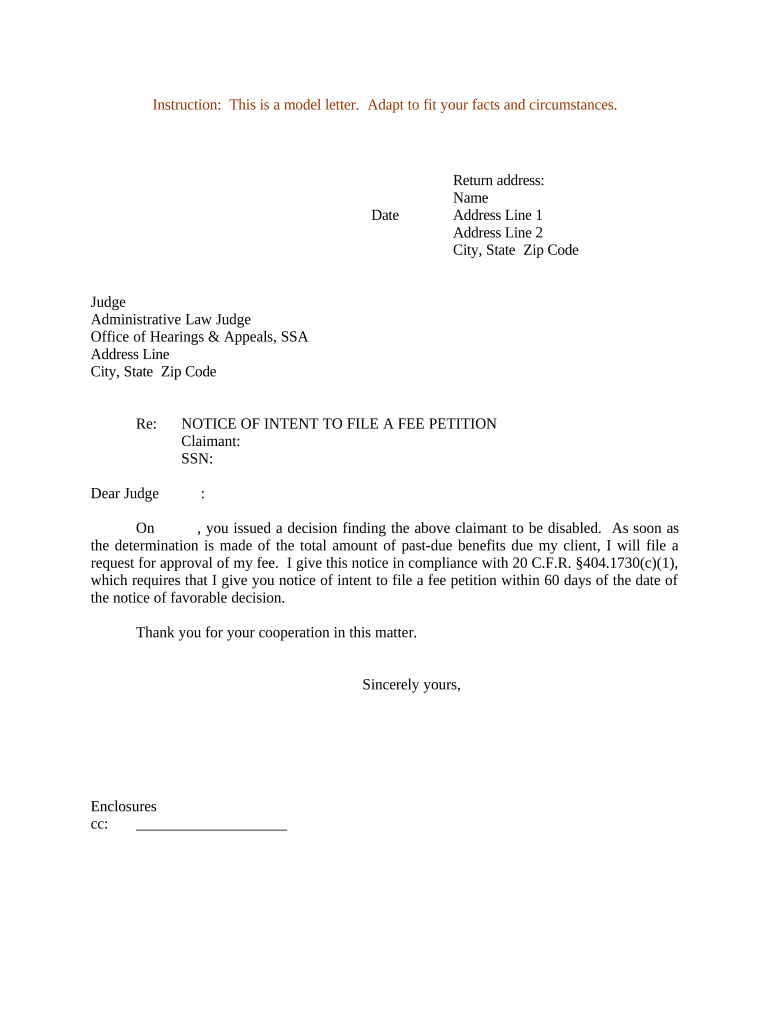
A Notice of Intent to File a Fee Petition is a formal written notification that a party plans to seek recovery of fees or costs from an opposing party, an administrative tribunal, or a court. It typically summarizes the grounds for the fee request, identifies the claimant and the opposing party, provides relevant case or matter identifiers, and sets a short timeline for negotiation or response. The notice preserves procedural rights, starts local meet-and-confer obligations where applicable, and gives recipients reason to consider settlement before a formal fee petition is filed.

Why a Clear Notice Matters

Providing a timely, well-drafted notice improves transparency, meets procedural obligations, and often satisfies local rules requiring a pre-petition warning or meet-and-confer period before filing a fee petition.

Why a Clear Notice Matters

Who Typically Prepares and Receives This Notice

The document is most often prepared by counsel or an in-house legal team for delivery to opposing counsel, the adjudicating body, or an adverse party as part of fee recovery procedures.

  • Litigators and law firms representing prevailing parties seeking fee recovery
  • In-house counsel or agency staff pursuing administrative fee reimbursement
  • Nonprofit or public-interest organizations notifying adversaries of fee claims

Distribution and content vary by venue and local rule; tailor the notice to the procedural posture and the recipient's expected review process.

Step-by-step: Preparing and Serving the Notice

Follow a concise sequence to prepare, document, and deliver the notice so it meets local procedural expectations and preserves your fee claim.

  • 01
    Draft: Summarize basis, amount range, and supporting facts.
  • 02
    Attach Evidence: Include key time entries, invoices, or cost receipts.
  • 03
    Serve: Send to opposing counsel and relevant tribunal contacts.
  • 04
    Document: Retain proof of delivery and any response received.

Configuring an online workflow for the notice

Set up an e-delivery workflow that secures signatures, records service, and notifies stakeholders automatically.

Field Configuration
Signers and Roles Claimant counsel | Opposing counsel notifications
Authentication Email link with optional SMS code or KBA
Document Format PDF/A recommended for archiving
Retention & Notices Audit trail retention and automatic delivery receipts

Typical delivery and tracking flow

A simple eWorkflow reduces friction and creates admissible evidence of service.

  • Upload Document: Prepare final PDF and supporting exhibits.
  • Add Signers: Specify signer emails and roles.
  • Send & Authenticate: Use chosen authentication level and dispatch notices.
  • Capture Evidence: Store audit trail, timestamps, and delivery receipts.

Technical considerations for eSubmission

Choose a platform that supports secure delivery, detailed audit trails, and flexible authentication.

  • File types: PDF, DOCX accepted
  • Authentication: Email, SMS, or KBA
  • Audit Trail: IP, timestamps, action log

Confirm the platform meets applicable legal and organizational compliance needs before use, including any HIPAA or agency-specific requirements.

Essential elements to include in a professional notice

Ensure the notice contains a clear factual basis, procedural context, and contact information so recipients can respond promptly and appropriately.

Caption and Identifiers

Include the matter caption, docket or file number, and the court or agency name to ensure the notice is associated with the correct proceeding.
Statement of Intent

Explicitly state that the sender intends to file a fee petition and whether the petition will seek attorney’s fees, administrative costs, or other recoverable expenses.

Legal Basis

Reference the statutory, contractual, or rule-based authority permitting fee recovery and briefly summarize how it applies to the facts at hand.

Summary of Fees

Provide a concise breakdown or estimate of hours, rates, and categories of recoverable costs with an explanation of the calculation method.

Meet-and-Confer Request

Offer dates or a window for discussion and note any local rule obligations that govern pre-filing negotiation.

Signature and Service

Include the preparer’s name, firm or employer, contact details, signature line, and the date and method of service for the recipient’s record.

Required data points and security considerations

Encryption: TLS 1.2/1.3; AES-256 at rest
Authentication: Email, SMS, KBA, or stronger
Audit Trail: IP, timestamp, action log
HIPAA: BAA required for PHI
ESIGN/UETA: Electronic signatures recognized
Retention: Secure storage with immutability options

Risks of incorrect or late notices

Waiver Risk: Missed procedural deadlines can forfeit fee recovery
Sanctions: Frivolous or bad-faith filings risk sanctions
Increased Costs: Poor documentation raises litigation or briefing costs
Rejection: Noncompliant notices may be rejected by court
Privilege Issues: Over-disclosure can waive privilege unintentionally
Authentication Failures: Weak service proof may be contested

Common drafting and submission mistakes to avoid

  • Using vague fee estimates without supporting time entries or invoices, which invites challenge and reduces credibility.
  • Serving the notice without retaining verifiable proof of service or delivery receipt, undermining your timeline for filing.
  • Failing to tailor the notice to local rules or agency procedures, resulting in procedural objections or rejection.
  • Including privileged work product in attachments without proper redactions or privilege assertions, risking waiver.

Typical timelines and deadline checkpoints

Deadlines vary by court or agency; confirm local rules and count service dates carefully to compute response and filing windows.

Initial Notice Window:

Often required before filing to allow negotiation or informal resolution

Local Rule Filing Period:

Courts commonly set a fixed window after judgment or decision

Response Deadline:

Opposing party may have a short period to respond or oppose

Hearing Scheduling:

Request for hearing may follow the petition and response

Service Proof:

Retain date/time stamps for any subsequent deadline calculations

Milestone timeline from notice to petition

A typical sequence of milestones helps you track mandatory steps and predictable dates.

01

Serve Notice

Deliver the notice and supporting summary to opposing counsel or the agency.

02

Meet-and-Confer

Engage in good-faith discussions within the time specified by applicable rules.

03

File Petition

Prepare and submit the full fee petition with supporting records if discussions fail.

04

Hearing / Ruling

Attend any scheduled hearing or await the adjudicative decision on fees.

eSignature supplier comparison for preparing and serving notices

Compare core pricing and core capabilities commonly relevant for document preparation, signing, and authenticated service of legal notices.

signNow DocuSign Adobe Sign PandaDoc HelloSign
Starting Price $8/user/mo $15/user/mo $14/user/mo $19/user/mo $15/user/mo
Free Trial 7-day free trial Varies by vendor Varies by vendor Varies by vendor Varies by vendor
Bulk Send Yes Yes Yes Yes Varies
Audit Trail Yes Yes Yes Yes Yes
HIPAA Compliant Yes Yes Yes No No
Envelope Cap No cap 100 envelopes/user/year Varies by plan Varies by plan Varies by plan

Real-world use examples

These short examples show how organizations use a notice before filing a formal fee petition.

Law Firm Example

A plaintiff firm served a concise notice summarizing hours and authorities

  • The defendant proposed partial settlement
  • After limited negotiation the parties agreed to narrow the fee petition and avoided a contested hearing by submitting a stipulated amount.

Agency Matter

An in-house counsel sent a notice to an administrative respondent stating statutory authority and cost categories

  • The respondent requested documentation
  • Counsel provided redacted invoices and resolved the claim through administrative offset without formal petition.

Practical tips for accuracy and efficiency

Follow these best practices to reduce objections and accelerate resolution of fee disputes.

Be concise and specific
Limit the notice to essential facts, a brief legal basis, and a clear estimated range to focus negotiations.
Organize supporting materials
Include a one-page summary of time and categories, with detailed invoices attached for review.
Preserve privilege
Redact privileged entries and include a privilege log rather than full unredacted files.
Confirm service method
Use delivery methods that create verifiable receipts and preserve evidence for subsequent filing.

Frequently asked questions about the Notice of Intent to File a Fee Petition

Answers to common questions about preparation, service, electronic submission, and fallout from improper notices.


Need help? Contact support

be ready to get more
Join over 28 million airSlate SignNow users