Establishing secure connection…Loading editor…Preparing document…

Amendment of Inter Vivos Trust Agreement for Withdrawal of Property

This template is fully customizable. Edit the text, fill out the fields, and send it for signature. Give it a try!
Amendment of Inter Vivos Trust Agreement for Withdrawal of Property

What this Amendment document does and when it’s used

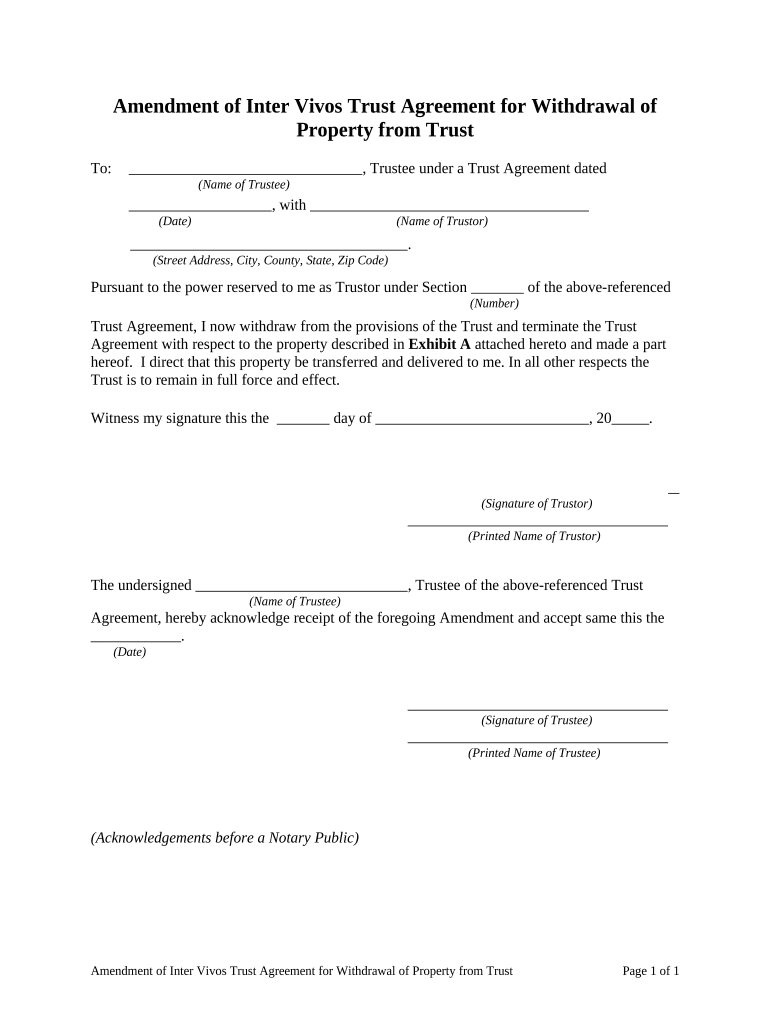
An Amendment of Inter Vivos Trust Agreement for Withdrawal of Property is a written modification to a living (inter vivos) trust that documents the removal or transfer of specific trust property back to the settlor, to a beneficiary, or to a new owner. It records the trustee's authority to withdraw described assets, clarifies title or possession changes, and references the original trust instrument and its provisions. The amendment typically identifies the trust by name and date, describes the property in detail, states the effective date, and records signatures, notarial acknowledgements, and any required consents to create a clear legal trail for title, tax, and probate purposes.

Why use a formal amendment for property withdrawal

Using a written amendment reduces disputes, documents trustee authority and beneficiary consent, preserves chain of title, and supports accurate tax and estate accounting while giving a clear record for recording or probate if required.

Why use a formal amendment for property withdrawal

Who typically prepares and signs this amendment

Key participants involved in preparing or approving the amendment.

  • Trustees and co-trustees responsible for executing trust instructions and ensuring compliance with fiduciary duties.
  • Settlor or grantor where withdrawals alter retained interests or introduce tax consequences.
  • Beneficiaries or successor beneficiaries whose consent or acknowledgement is needed for certain withdrawals.

Other parties often involved include estate attorneys, title companies for real property withdrawals, and notaries when acknowledgements are required.

Core elements to include in a professional amendment

A completed amendment should be precise, reference the original trust, clearly describe withdrawn property, identify parties, state effective dates and authority, and include proper execution formalities to avoid later disputes.

Trust Identification

Full trust name and original execution date to tie the amendment to the correct instrument and avoid ambiguity.
Property Description

Detailed legal description for real estate or precise identification for personal property, account numbers, or serial numbers.

Authority Clause

Citation of the trust provision authorizing withdrawals and a short statement of the trustee's power to act.

Effective Date

Clear statement of when the withdrawal occurs and whether the transfer is immediate or conditional.

Consents and Notices

Signed beneficiary consents, creditor notices, or mortgagee approvals when required by the trust or associated contracts.

Execution Formalities

Signature blocks, notarial acknowledgement if required, and directions for recording or filing, if applicable.

Step-by-step: preparing and executing the amendment

Follow these steps to prepare, execute, and preserve a valid amendment to withdraw trust property.

  • 01
    Review Trust: Confirm the trust grants withdrawal authority and note any consent requirements.
  • 02
    Draft Amendment: Prepare precise amendment language and property description.
  • 03
    Obtain Consents: Get beneficiary or creditor approvals required by the trust.
  • 04
    Execute and Record: Sign, notarize as needed, and record deed or instrument when required.

Digital workflow configuration for online completion

Set up a secure, auditable workflow when completing the amendment electronically.

Field Configuration
Authentication Email plus SMS or ID proofing for signer verification
Notarization Use RON where allowed, otherwise schedule in-person notary
Template Save a reusable amendment template for recurring withdrawals
Recordkeeping Export signed PDF/A and store encrypted backups

Typical e-signing flow for an amendment

A standard online signing sequence reduces delay while preserving an audit trail and signer attribution.

  • Upload Document: Import the amendment draft as PDF or DOCX.
  • Place Fields: Add signature, date, and initial fields where required.
  • Assign Signers: Set signing order: trustee, beneficiaries, witness/notary if needed.
  • Execute: Signer authenticates and completes the signature; system records audit trail.

Technical and format requirements for electronic completion

Ensure the chosen platform supports required formats, authentication, and compliance features.

  • Supported Formats: PDF, DOCX, fillable PDFs supported.
  • Integrations: Works with cloud storage and title company systems.
  • Authentication: Email, SMS, and advanced ID proofing available.

Confirm the platform can produce an unalterable signed PDF with an audit trail and export for secure recordkeeping.

Comparing eSignature pricing and features for amendments

Select an eSignature provider that meets compliance and notary requirements; the table summarizes starting prices and critical feature differences.

signNow DocuSign Adobe Sign PandaDoc HelloSign
Starting Price $8/user/mo $15/user/mo $14/user/mo $19/user/mo $15/user/mo
Free Trial 7-day free trial Varies Varies Varies Varies
Bulk Send Yes Yes Yes Yes Yes
Audit Trail Yes Yes Yes Yes Yes
HIPAA Compliant Yes Yes Yes No No

Security and compliance features to verify

In-transit Encryption: TLS 1.2/1.3
At-rest Encryption: AES-256
Certifications: SOC 2 Type II, ISO 27001
Regulatory Compliance: ESIGN, UETA, 21 CFR Part 11
HIPAA Support: BAA available
Audit Trail: Detailed timestamps and IP logs

Legal risks and consequences of a faulty amendment

Invalid Transfer: May be void or reversible
Tax Exposure: Unintended income or gift tax consequences
Creditor Claims: Withdrawal may expose assets to creditors
Fiduciary Breach: Trustee liability for improper withdrawal
Title Issues: Failure to record can cloud title
Probate Disputes: Challenges to validity in probate court

Common preparation errors to avoid

  • Vague property descriptions that make identification impossible and create title disputes on transfer or recording.
  • Failing to obtain required beneficiary consents or mortgagee approvals, which can invalidate or delay the withdrawal.
  • Not notarizing when local law or recording requirements demand an acknowledgement, undermining recordability.
  • Neglecting to update related records such as deeds, insurance, and account registrations after the withdrawal.

Real-world scenarios where an amendment is used

Two typical examples show how amendments solve specific estate or operational needs.

Case Study 1

Family house reallocation to a child after remarriage

  • trustee removes the house from the trust
  • the amendment names the transferee, sets the effective date, and instructs the trustee to execute a deed and record it to clear title.

Case Study 2

Business equipment reassigned to an operating company

  • asset moved for operational needs
  • amendment cites the trust clause authorizing transfer, describes equipment, documents beneficiary consent, and directs transfer of title and registration.

Typical signatories and their roles

Mary Johnson, Trustee

As acting trustee Mary confirms authority under the trust instrument, signs the amendment to effect the withdrawal, and ensures proper recording or transfer to the designated party.

Robert Lee, Estate Attorney

The attorney reviews trust language, drafts precise amendment language to avoid ambiguity, confirms tax implications, and advises on notarization and recording requirements.

Practical tips for accurate and efficient completion

Adopt these practices to reduce execution errors and downstream disputes.

Use exact legal descriptions and identifiers
Avoid colloquial or partial descriptions; include parcel numbers, account numbers, or VINs to ensure precise asset identification and prevent title ambiguity.
Confirm authority and consent in writing
Document trustee powers and secure beneficiary or creditor consents when the trust or related contracts require them to avoid later challenges.
Follow local notary and recording practices
Check county recorder rules and witness/notary requirements prior to execution, particularly for deeds conveying real property.
Retain signed originals and digital copies
Store executed originals in a secure location and maintain an encrypted, tamper-evident electronic copy with an audit trail.

How an amendment differs from a deed or restatement

Use this quick comparison to choose the right document type when withdrawing property from a trust.

Criteria Amendment Deed
Title transfer
Recording required usually no
Primary purpose modify trust terms transfer real property
Typical signatory trustee grantor or trustee

Frequently asked questions — execution, validity, and recording

Answers to common questions about validity, notarization, signatures, and next steps after signing.


Need help? Contact support

be ready to get more
Join over 28 million airSlate SignNow users