Establishing secure connection…Loading editor…Preparing document…

Iowa Easement

This template is fully customizable. Edit the text, fill out the fields, and send it for signature. Give it a try!
Iowa Easement

What the Iowa Easement Is and when it applies

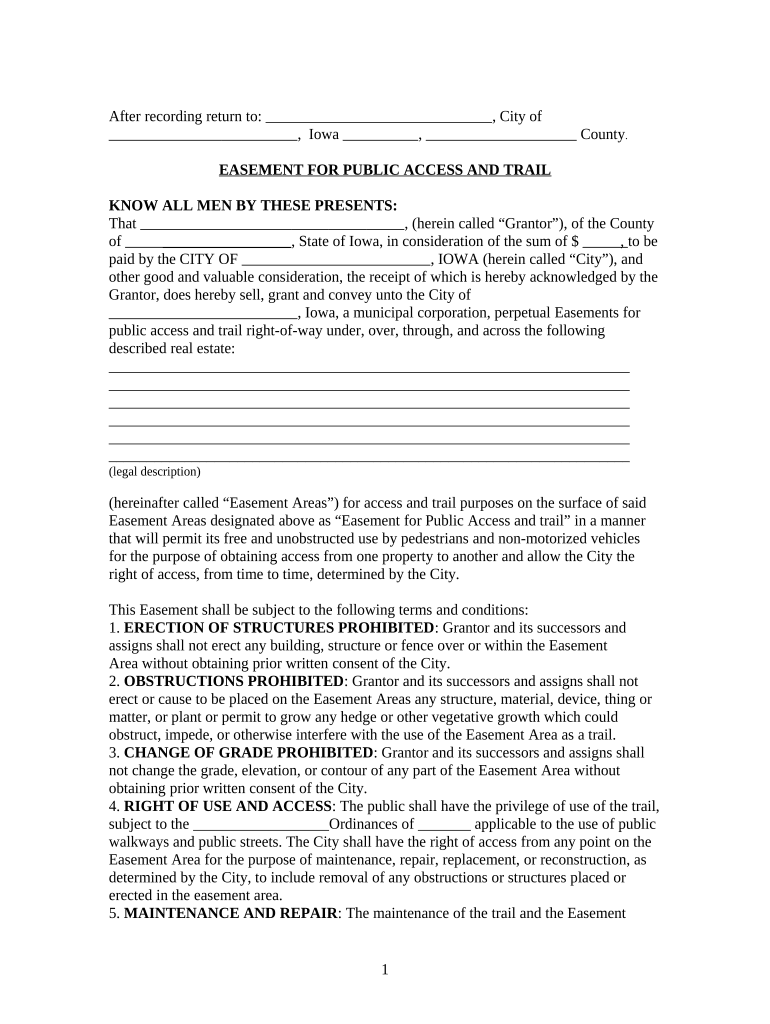
An Iowa easement is a recorded legal instrument that creates a nonpossessory right for one party to use another party's real property for a defined purpose, such as access, utilities, or drainage. In Iowa the easement is typically executed as a deed or grant, signed by the property owner and then recorded with the county recorder to provide public notice and establish priority against subsequent buyers or encumbrances. Easements may be permanent or temporary, express or implied, and must clearly describe the parties, property, purpose, and duration to be enforceable under state recording practice.

Why a professionally prepared Iowa Easement matters

A clear, correctly executed easement protects access rights, minimizes future disputes, and preserves marketable title. Recording the instrument promptly establishes priority and reduces the risk of competing claims or lender objections while providing a durable, public record of the right granted.

Why a professionally prepared Iowa Easement matters

Who commonly creates, reviews, and signs an Iowa Easement

Multiple stakeholders interact with an easement: grantors, grantees, surveyors, title companies, and attorneys often participate to document rights and limits.

  • Property owners and developers who need legal access or utility corridors across neighboring land.
  • Title companies and closing agents preparing recording documents and reviewing title exceptions.
  • Attorneys and surveyors who draft legal descriptions, resolve boundary issues, and confirm proper exhibits.

Each participant has a distinct role; accurate drafting and correct execution help avoid recording rejections, lender delay, or future disputes.

Step-by-step: Completing an Iowa Easement

Follow these sequential actions to prepare, execute, and record an Iowa easement with minimal delays.

  • 01
    1. Identify Parties: Enter full legal names of grantor and grantee as on IDs and title.
  • 02
    2. Describe Property: Provide a metes-and-bounds or recorded legal description; attach survey exhibits.
  • 03
    3. Define Rights: Specify permitted uses, access corridor, maintenance responsibilities, and duration.
  • 04
    4. Execute & Record: Sign before a notary if required and file with the county recorder promptly.

Typical recording and routing flow for an Iowa Easement

The recording workflow involves preparation, approvals, execution, notarization (if needed), and county recording; each step can affect priority and acceptance.

  • Prepare Document: Draft easement with legal description and exhibits attached.
  • Obtain Consents: Secure lender or municipality consent if required by encumbrance clauses.
  • Execute & Notarize: Sign before an authorized notary; preserve notarial certificate.
  • Record with County: File original with county recorder; request certified copy for records.

Digital workflow settings for completing an easement

Configure your digital signing workflow to mirror the legal execution and recording order used in Iowa.

Field Configuration
Signing Order Sequential: grantor, grantee, witness/notary if applicable
Authentication Email + optional SMS code or KBA for stronger signer attribution
Notary Handling Reserve a signing block for in-person or RON notary acknowledgement
Storage Store final PDF/A with audit trail and attached survey exhibit

Technical considerations for eSigning and eSubmission

Choose a platform that supports required authentication, notarization workflows, and secure storage for recorded easements.

  • Authentication Options: Email, SMS code, KBA, or advanced signer verification
  • Integrations: Connectors for title, storage, and closing systems
  • File Formats: PDF and PDF/A support for long-term preservation

Ensure chosen tools preserve an unalterable audit trail and meet any HIPAA, ESIGN, or UETA requirements relevant to your industry and jurisdiction.

eSignature vendor comparison relevant to executing an easement

Basic feature and price comparison can help select an eSignature provider that supports notarization, secure storage, and compliance for legal conveyances.

signNow DocuSign Adobe Sign PandaDoc HelloSign
Starting Price $8/user/mo $15/user/mo $14/user/mo $19/user/mo $15/user/mo
Free Trial 7-day free trial Varies by vendor Varies by vendor Varies by vendor Varies by vendor
Bulk Send Yes Yes Yes Yes Varies
Audit Trail Yes Yes Yes Yes Yes
HIPAA Compliant Yes Yes Yes No No

Essential elements to include in a professional Iowa Easement

A complete easement document contains distinct components that clarify the parties' rights, duties, and the property affected.

Parties

Identify grantor and grantee by full legal name and status (individual, corporation, trustee), including mailing addresses and contact details for notices.
Legal Description

Include a precise metes-and-bounds description or recorded plat reference and attach the certified survey as an exhibit for clarity.

Scope of Use

Define permitted activities, access routes, limitations, maintenance obligations, and any exclusive or nonexclusive language affecting use.

Term and Conditions

State duration (perpetual or finite), conditions for termination, and consequences on property restoration or repair obligations.

Consideration

Record the consideration paid or other value exchanged—dollar amount, mutual covenant, or nominal value as appropriate for enforceability.

Notary / Recording Clause

Provide notarization block and recording instructions; include county recorder details and space for recording stamp and instrument number.

Risks and consequences of improper easement preparation

Void or Unenforceable: Improper description may void rights
Priority Loss: Delayed recording risks subordinate claims
Title Objections: Lenders may require corrective instruments
Survey Disputes: Incorrect exhibits can trigger boundary litigation
Insurance Denial: Coverage issues if scope differs from policy
Tax Impacts: Misstated consideration can affect reporting

Common preparation mistakes to avoid

  • Using vague language for location or purpose, which leads to interpretive disputes and possible litigation to clarify rights.
  • Omitting an attached survey or failing to label exhibits, causing the county recorder or title company to reject the filing.
  • Not confirming lender consent or outstanding liens, which can cause lenders to demand removal or corrective documents.
  • Failing to notarize when required, producing a document that the recorder will not accept or that requires re-execution.

Time-sensitive steps and practical deadlines

Certain filing and preservation actions are time-sensitive to protect priority and comply with related regulatory requirements.

Record Promptly:

Record the easement as soon as practicable to establish priority against later instruments.

Title Search Timing:

Obtain an updated title search immediately before recording to identify liens or encumbrances.

Notary Session Retention:

If RON used, retain audio-video recordings 5–10 years per RON rules.

Tax Reporting:

Report any taxable consideration in the year received per IRS filing rules.

Survey Currency:

Use a current survey; outdated surveys can invalidate the attached exhibit.

Frequently asked questions about the Iowa Easement

Answers to common legal, procedural, and technical questions encountered when preparing or recording an Iowa easement.


Need help? Contact support

be ready to get more
Join over 28 million airSlate SignNow users