Establishing secure connection…Loading editor…Preparing document…

IRS Form W-3SS

This template is fully customizable. Edit the text, fill out the fields, and send it for signature. Give it a try!
IRS Form W-3SS

What IRS Form W-3SS Is and when you’ll encounter it

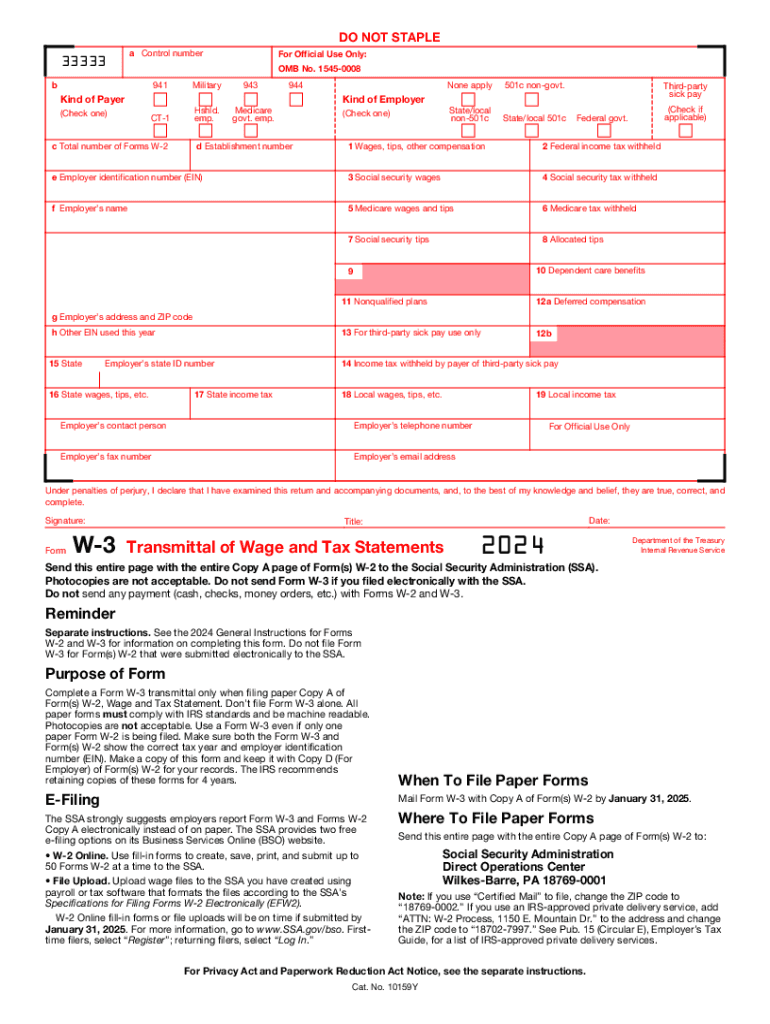
IRS Form W-3SS is a U.S. federal information-transmittal form used to summarize and submit related information returns to the IRS. It consolidates totals from a batch of individual statements so the IRS can reconcile recipient reports with payer filings. Organizations that file multiple related information returns use the W-3SS to transmit groups of records and to certify totals. While the specific line items vary by year, the form is primarily administrative: it organizes EINs, payer totals, and counts of attached recipient statements for the IRS’s processing systems.

Why accurate completion of IRS Form W-3SS matters

Completing Form W-3SS correctly reduces IRS processing delays, lowers risk of penalties for information-return mismatches, and helps preserve consistent accounting records across payroll and tax reporting systems.

Why accurate completion of IRS Form W-3SS matters

Who prepares and relies on IRS Form W-3SS

Typical preparers include payroll departments, third-party payers, accounting teams, and tax service providers responsible for bulk information returns.

  • Payroll and accounting teams that reconcile wage and withholding totals for multiple employees and contractors.
  • Tax preparers and reporting vendors that batch and transmit large sets of information returns to the IRS.
  • Third-party payers and financial institutions that aggregate payments and produce summary transmittals.

Proper role assignment and review procedures help ensure the transmittal matches attached returns and reduces audit friction.

Stepwise process to complete and verify Form W-3SS

Follow these sequential steps to prepare, validate, and transmit the W-3SS with minimal risk of errors.

  • 01
    Collect Returns: Assemble all related information returns before starting the transmittal.
  • 02
    Verify Totals: Reconcile counts and dollar totals against source systems.
  • 03
    Complete W-3SS: Enter payer details, EIN, counts, and aggregate amounts on the form.
  • 04
    Submit and Retain: File with IRS filing channel and retain a copy per retention rules.

How electronic completion and eSubmission typically flow

A standard eSubmission workflow for W-3SS reduces manual handling and speeds reconciliation with the IRS processing pipeline.

  • Prepare Files: Export batch returns from payroll or accounting software into the required format.
  • Map Fields: Map export fields to W-3SS fields and validate totals programmatically.
  • Attach Transmittal: Generate the W-3SS transmittal and attach or reference the related returns.
  • Transmit Electronically: Send via IRS-authorized e-file channels or accepted transmittal methods.

Typical digital workflow settings for W-3SS batch submissions

Configure these settings in your e-filing or document platform to ensure consistent transmittal and auditability.

Field Configuration
Batch Name Use YYYY-MM-DD_PAYER to standardize identification
Validation Rule Require EIN match and total sum reconciliation
Retention Setting Archive signed transmittal and attachments for 7 years
Signer Authentication Use email+SMS or SSO for preparer identity verification

Technical delivery and platform considerations for eSubmission

Choose a platform that supports PDF output, audit trails, and the authentication level required for payer authorization.

  • Format Support: PDF, DOCX, XML exports for system ingestion.
  • Integrations: Connectors for payroll, ERP, and tax software.
  • Security: TLS in transit and AES-256 at rest.

Ensure the platform captures signer attribution, time stamps, and a verifiable audit trail to support IRS reconciliation or future audits.

Essential parts of a professional W-3SS transmittal package

A compliant transmittal package pairs a correctly completed W-3SS with matching returns and clear metadata to aid IRS processing and internal audits.

Payer Identification

Accurate payer legal name and EIN are primary identifiers; they must match IRS records to avoid processing exceptions and notices.
Batch Counts

The total number of attached information returns must be exact; discrepancies cause reconciliation flags and require manual review.

Aggregate Amounts

Provide totals using whole-dollar calculations; rounding policy must be consistent with attached forms to prevent mismatches.

Preparer Contact

Include preparer name, phone, and email so IRS or state agencies can request clarifications quickly when needed.

Signature and Date

Authorized representative must sign and date according to company signature authority; eSignatures are permissible when legal tests are met.

Attached Returns

Include or reference the full set of attached information returns; file structure should make attachment-to-transmittal mapping explicit.

Security and compliance essentials for handling W-3SS data

Encryption: TLS 1.2/1.3 in transit; AES-256 at rest
Audit Trail: Immutable timestamps and IP logs
Access Controls: Role-based access and SSO
HIPAA Considerations: BAA required when PHI present
ESIGN/UETA: Meets ESIGN and UETA legal tests
21 CFR Support: Options for 21 CFR Part 11 compliance

Common preparation pitfalls to avoid with W-3SS

  • Mismatched EINs between W-3SS and attached returns, which often trigger IRS automated rejections and require manual correction.
  • Incorrect total counts or aggregated dollar amounts stemming from export errors or duplicate records in the source system.
  • Use of inconsistent rounding rules between the transmittal and individual returns, causing reconciliation discrepancies.
  • Failure to retain a signed transmittal and attachments for the recommended retention period, complicating response to IRS notices.

Penalties and legal risks tied to inaccurate information returns

Filing Penalties: IRC §6721 penalties for incorrect or late information returns
Higher Penalties: Per-form fines escalate for later or intentionally disregarded filings
Backup Withholding: 24% withholding can be triggered by missing/incorrect TINs
I-9 Exposure: Separate documentation penalties may also apply for employment records
State Notices: State tax agencies may issue additional penalties or assessments
Operational Risk: Manual remediation consumes staff time and increases audit exposure

Key filing and recipient delivery dates to track

Observe the IRS information-return calendar carefully; deadlines vary by form and by whether filings are electronic or paper.

Recipient Copy Deadline:

Provide recipient statements by January 31 when required by the specific information-return series

IRS Electronic Deadline:

Many information returns require IRS transmittal by January 31 when filing electronically

IRS Paper Deadline:

Paper submissions for some 1099-MISC categories can have a later deadline, typically February 28

Extension Options:

Use IRS-authorized extensions where available, but recipient delivery deadlines usually remain unchanged

Late-Filing Fallout:

Late or corrected filings may incur per-form penalties under IRC §6721

eSignature vendor pricing and capability snapshot for W-3SS workflows

Compare common vendor starting prices and high-level capabilities relevant to high-volume information-transmittal and signing workflows; signNow appears first for clarity.

signNow DocuSign Adobe Sign PandaDoc HelloSign
Starting Price $8/user/mo $15/user/mo $14/user/mo $19/user/mo $15/user/mo
Free Trial 7-day trial Varies by plan Varies by plan Varies by plan Varies by plan
Bulk Send Yes Yes Yes Yes No
Audit Trail Yes Yes Yes Yes Yes
HIPAA Compliant Yes Yes Yes No No

Real-world examples: transmittal workflows and outcomes

Examples from organizations that automated bulk transmittal and signing illustrate practical benefits and considerations.

Tech Data — Enterprise workflow

Tech Data automated batch transmittals to reduce manual handling.

  • Bulk send integration reduced turnaround time significantly.
  • The implementation improved internal and external service delivery while shortening time to revenue by streamlining signer flows and audit trails.

Martin Properties — Small business use

Martin Properties processed tenant and vendor transmittals online.

  • Mobile signing was critical for on-site execution.
  • Using an integrated eSignature workflow allowed the team to handle filings remotely with consistent compliance and secure recordkeeping across devices.

Frequently asked questions about IRS Form W-3SS

Answers to common questions about eSigning, filing timing, and resolving transmittal mismatches.


Need help? Contact support

be ready to get more
Join over 28 million airSlate SignNow users