Establishing secure connection…Loading editor…Preparing document…

California Petition for Disclosure of Juvenile Court Records

This template is fully customizable. Edit the text, fill out the fields, and send it for signature. Give it a try!
California Petition for Disclosure of Juvenile Court Records

What the California Petition for Disclosure of Juvenile Court Records Is

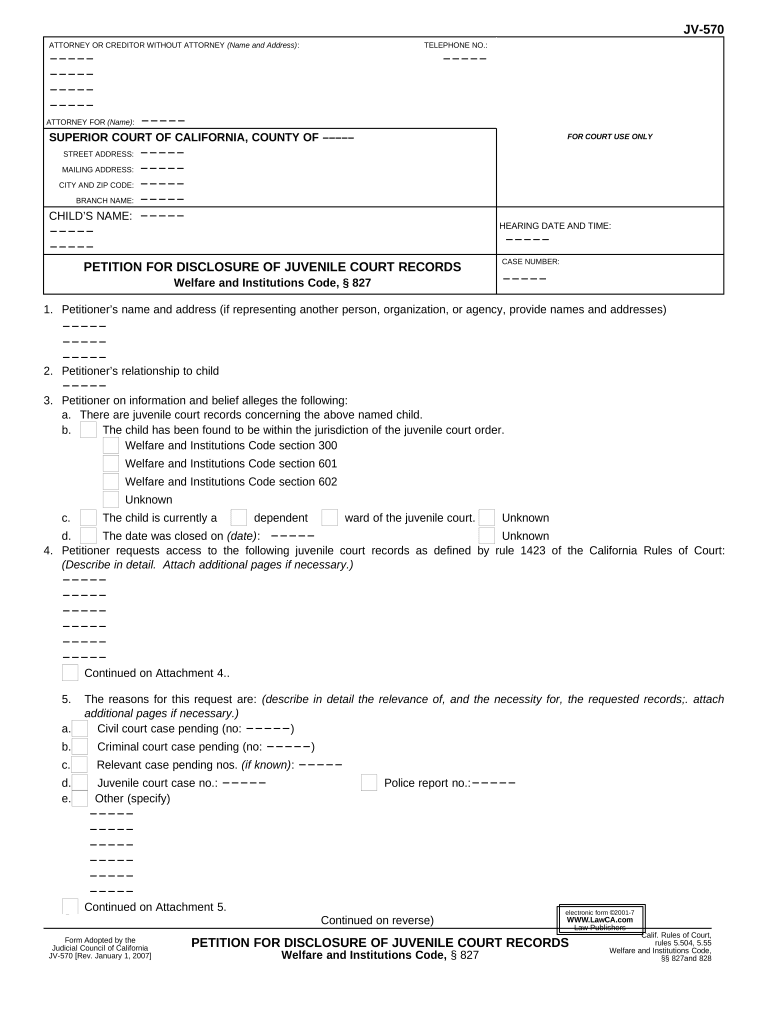
The California Petition for Disclosure of Juvenile Court Records is a formal court filing used to request access to juvenile dependency or delinquency files that are ordinarily confidential. The petition identifies the specific records sought, explains the legal or administrative purpose for disclosure, names affected parties, and proposes protective measures such as redaction or limited access. The juvenile court evaluates need against privacy interests and may grant, limit, or deny disclosure; orders often include conditions to protect minors and preserve sealed records.

Why this Petition Matters for Access and Privacy Balance

A petition provides the lawful mechanism to obtain otherwise confidential juvenile records when a clear, articulated need exists. Courts use the petition to ensure disclosures are narrowly tailored, preserving minors' privacy while allowing access for litigation, licensing, investigative, or administrative purposes under appropriate safeguards.

Why this Petition Matters for Access and Privacy Balance

Who Typically Files or Requests These Records

Typical filers include attorneys, government agencies, licensing boards, and researchers who can show a valid need and appropriate safeguards.

  • Attorneys representing parties in litigation or custody matters who require certified excerpts of juvenile court records for court proceedings.
  • Government or licensing agencies needing records to investigate allegations, evaluate fitness, or conduct administrative reviews under statutory authority.
  • Researchers or journalists granted court authorization with protocols to protect minors' identities and comply with confidentiality orders.

Step-by-Step: Preparing and Filing the Petition

Follow a clear sequence: describe the records, state the legal purpose, attach supporting declarations, file with the clerk, serve affected parties, and attend any court hearing.

  • 01
    Prepare Petition: Describe records sought and legal basis.
  • 02
    Attach Evidence: Include declarations and identification documents.
  • 03
    File with Court: Submit to juvenile or family court clerk.
  • 04
    Service & Hearing: Serve parties and appear at court hearing.

How to Configure an Online Workflow for Filing and Signatures

Set up a workflow that captures signer identity, secures attachments, and produces a timestamped audit trail for courts that accept electronic submissions.

Field Configuration
Signer Identity Use verified email and attach government ID scan.
Signature Type Allow typed name or cryptographic signature.
Document Format PDF/A preferred for court filings
Storage Location Encrypted cloud storage with access audit

Where to File and How the Routing Works

The routing flow includes drafting the petition, collecting required verifications, filing with the court clerk or e-filing portal if available, and serving interested parties according to local rules.

  • Draft: Prepare petition and exhibits.
  • Collect Signatures: Obtain signatures and required verifications.
  • File: Submit to court clerk or e-file if allowed.
  • Serve: Serve notice to affected parties per local rules.

Digital Filing and eSignature Considerations

E-submission and e-signature requirements vary by county; verify local court rules before relying solely on electronic filings or signatures.

  • Supported Formats: PDF, DOCX, or scanned TIFF.
  • Authentication: Email, SMS code, or ID verification.
  • Integrations: Court e-filing systems and cloud storage.

Key Timelines and What to Expect

Timing varies widely by county and caseload; review local rules and plan for filing, service, and any hearing date when preparing your petition.

Filing Window:

File as soon as facts warrant; county procedures vary.

Service Deadline:

Provide notice to affected parties per local rules before hearing.

Court Response Time:

Processing and review typically take 2–8 weeks by county.

Hearing Scheduling:

Court sets hearing; expect scheduling delays in busy jurisdictions.

Record Availability:

Court may order partial release, redaction, or sealed access.

Essential Petition Details and Privacy Elements

Confidentiality Status: Indicate sealed or confidential designation.
Case Number: Include county and full court case number.
Parties' Names: Full legal names of petitioner and respondent.
Records Sought: Specify documents, dates, and custody details.
Purpose of Request: Explain precise legal or administrative purpose.
Protective Measures: Propose redaction, limited access, or sealing.

Primary Risks and Potential Consequences

Denial of Petition: Request may be denied.
Contempt or Sanctions: False statements risk sanctions.
Privacy Violations: Unauthorized disclosure liability.
Delays and Costs: Extended processing and attorney fees.
Data Misuse: Improper handling can cause harm.
Record Sealing Issues: Sealed records may remain inaccessible.

Common Preparation Mistakes to Avoid

  • Failing to narrowly tailor the requested records often leads to denial; courts require specificity about document types, date ranges, and relevance.
  • Omitting proposed protective measures increases privacy concerns; always suggest redaction, restricted viewing, or in-camera review to reduce risk.
  • Using incorrect case captions or failing to identify the correct court and case number causes administrative rejection or processing delays.
  • Not serving notice on affected parties or failing to comply with local procedural rules can result in sanctions or dismissal of the petition.

Who Can Sign or Authorize the Petition

Privileged Counsel

A licensed attorney representing a party may petition for disclosure when records are material to litigation. The attorney must identify a compelling need, provide specific record descriptions, and propose redactions or in-camera review to minimize risk to the juvenile's privacy.

State Agency

A child welfare agency or licensing board may request access for investigations or adjudicative reviews. Typically the petition explains statutory authority, the specific administrative purpose, and why alternative sources cannot provide equivalent information.

eSignature Pricing and Feature Comparison Relevant to Petition Filing

Compare basic pricing and key features across common eSignature vendors; signNow is listed first per product data to aid procurement comparisons.

signNow DocuSign Adobe Sign PandaDoc HelloSign
Starting Price $8/user/mo $15/user/mo $14/user/mo $19/user/mo $15/user/mo
Free Trial Yes, 7-day free trial No No Yes, limited Yes, limited
Bulk Send Yes Yes Yes Yes No
Audit Trail Yes Yes Yes Yes Yes
HIPAA Compliant Yes Yes Yes No No
Envelope Cap No cap 100 envelopes/user/year Varies by plan Varies by plan Varies by plan

Frequently Asked Questions About the Petition and Electronic Filing

Practical answers to common concerns about filing, e-signatures, sealing, and correcting mistakes for the California Petition for Disclosure of Juvenile Court Records.


Need help? Contact support

be ready to get more
Join over 28 million airSlate SignNow users