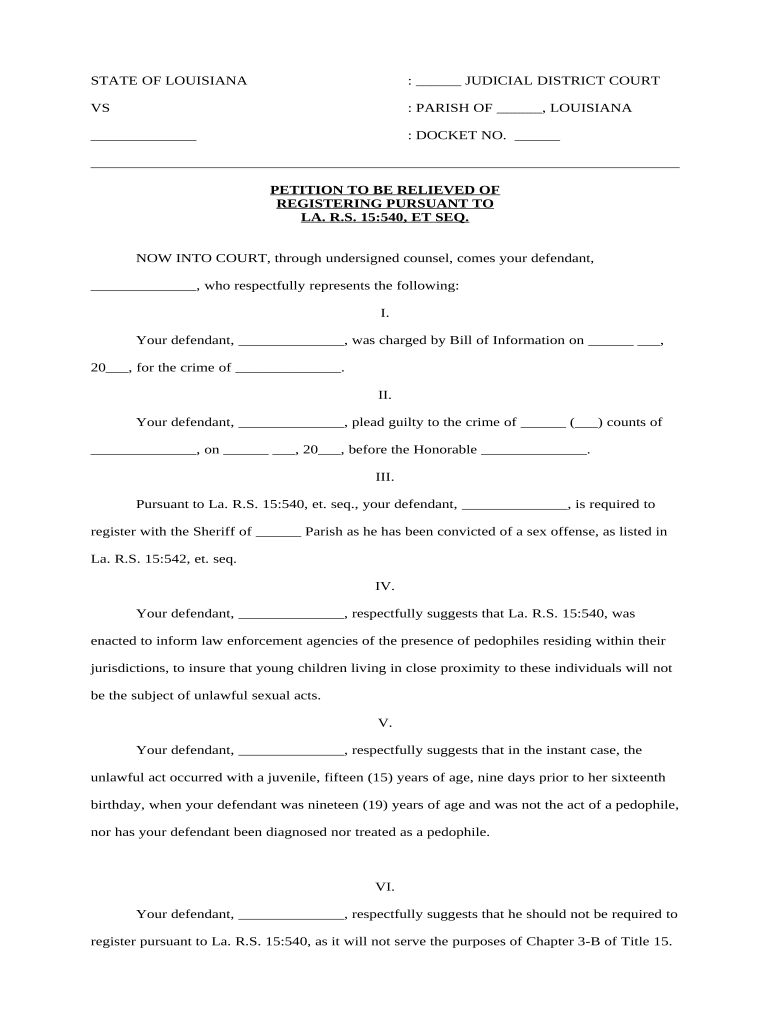
Louisiana Petition to be Relieved of Registration
What the Louisiana Petition to be Relieved of Registration Is
Why Filing a Petition to Be Relieved of Registration Matters
A successful petition can remove ongoing reporting duties, reduce public disclosure or collateral limitations, and correct records. It provides a legal path to terminate or narrow registration obligations where statutory criteria or rehabilitative evidence justify relief.
Who Typically Prepares or Files This Petition
The petition is usually prepared by the person affected or by their attorney on their behalf.
- Individuals required to register who seek removal or modification of obligations
- Criminal defense or civil-rights attorneys representing petitioners
- Clerks, public defenders, or probation officers assisting eligible petitioners
Eligibility and process are fact-specific; legal counsel or clerk guidance helps identify the correct pleadings and local filing steps.
Step-by-Step: Completing the Louisiana Petition to be Relieved of Registration
-
01Confirm eligibility: Verify statutory criteria and any waiting periods with local counsel.
-
02Prepare petition: Draft factual statement, legal grounds, and relief requested.
-
03File and serve: Submit to the correct court clerk and serve interested parties.
-
04Hearing or order: Attend hearing or submit proposed order for judge's review.
How to Set Up an Electronic Filing Workflow for the Petition
| Field | Configuration |
|---|---|
| Authentication method | Email link or SMS code; use stronger ID for sensitive filings |
| Template fields | Prefill names, docket numbers, and petitioner address |
| Notary / RON option | Enable audio-video or in-person notarization if required |
| Routing order | Petitioner → counsel → clerk → judge (if applicable) |
Digital Signing and Submission Considerations
Ensure the platform you use supports court-accepted formats, robust audit trails, and the required signer authentication methods.
- File formats: PDF/A or searchable PDF preferred by many courts
- Security: TLS in transit; AES-256 at rest for document storage
- Authentication: Email, SMS, or stronger KBA/ID verification when required
Confirm the court's e-filing rules and any local notary or RON acceptance before submitting electronically to avoid rejection or the need to refile in paper form.
Where to File and How the Submission Flow Works
-
Court clerk: Primary filing location for paper or e-filed petitions
-
E-file portal: Use parish or statewide e-filing where available
-
Agency notice: Serve registry administrators or probation offices as required
-
In-person delivery: Hand-deliver when local rules or timing require it
Typical Timing and Notice Requirements to Expect
Service deadline:
Typically 14–30 days for responsive parties, varies by rule
Hearing scheduling:
Courts often set hearings 30–90 days after filing
Response period:
Opposing party or agency may have 10–30 days to respond
Notice to registry:
Court order may direct registry update within 7–30 days
Refile timing:
Statutory waiting periods may require months or years before refiling
Key Milestones in the Petition Process
Prepare petition
Draft facts, cite statutes, and assemble exhibits.
File and docket
Clerk assigns a cause number and enters case.
Service completed
Proof of service filed to notify affected parties.
Hearing and order
Judge decides; court issues a signed order.
Potential Risks and Consequences of Errors
Common Preparatory Mistakes to Avoid
- Omitting certified supporting records such as completion certificates or treatment documentation leads to credibility issues and motions to strike.
- Using inconsistent names or dates between exhibits and the petition generates identity disputes and filing delays with the clerk.
- Failing to follow local parish filing procedures, including specific cover sheets or e-file formats, results in administrative rejection.
- Neglecting proper service on agencies or affected parties can result in dismissal for lack of notice or procedural defect.
Compare eSignature Providers for Completing and Filing the Petition
| signNow | DocuSign | Adobe Sign | PandaDoc | HelloSign | |
|---|---|---|---|---|---|
| Starting Price | $8/user/mo | $15/user/mo | $14/user/mo | $19/user/mo | $15/user/mo |
| Free Trial | Yes, 7-day free trial | No | No | Yes, limited | Yes, limited |
| Bulk Send | Yes | Yes | Yes | Yes | No |
| Audit Trail | Yes | Yes | Yes | Yes | Yes |
| HIPAA Compliant | Yes | Yes | Yes | No | No |
Frequently Asked Questions About the Petition Process
-
Am I eligible to petition?
Eligibility depends on the specific statutory program and your factual circumstances. Review the statute that created the registration obligation and consult local rules or counsel to determine waiting periods and disqualifying factors.
-
How long will the process take?
Processing time varies by parish and case complexity. Expect administrative processing, service, and a hearing window commonly between 30 and 90 days, but local calendars may extend that timeline.
-
Can I sign and file documents electronically?
Electronic signatures are generally enforceable under the ESIGN Act (15 U.S.C. §7001) and UETA where adopted; however, courts may require notarization, specific authentication, or RON for certain filings.
-
What supporting documents help my petition?
Include certified convictions records, treatment completion letters, certificates of rehabilitation, probation records, and any documentation showing changed circumstances that support relief.
-
Do I need an attorney to file?
You can file pro se, but an attorney familiar with local practice and statutory proofs improves compliance and presentation chances at hearing.
-
What if the petition is denied?
If denied, the order should state reasons; you may have appellate remedies or statutory reapplication windows. Consult counsel about next steps and applicable timelines.