Establishing secure connection…Loading editor…Preparing document…

Letter of Termination of Lease

This template is fully customizable. Edit the text, fill out the fields, and send it for signature. Give it a try!
Letter of Termination of Lease

What a Letter of Termination of Lease Is

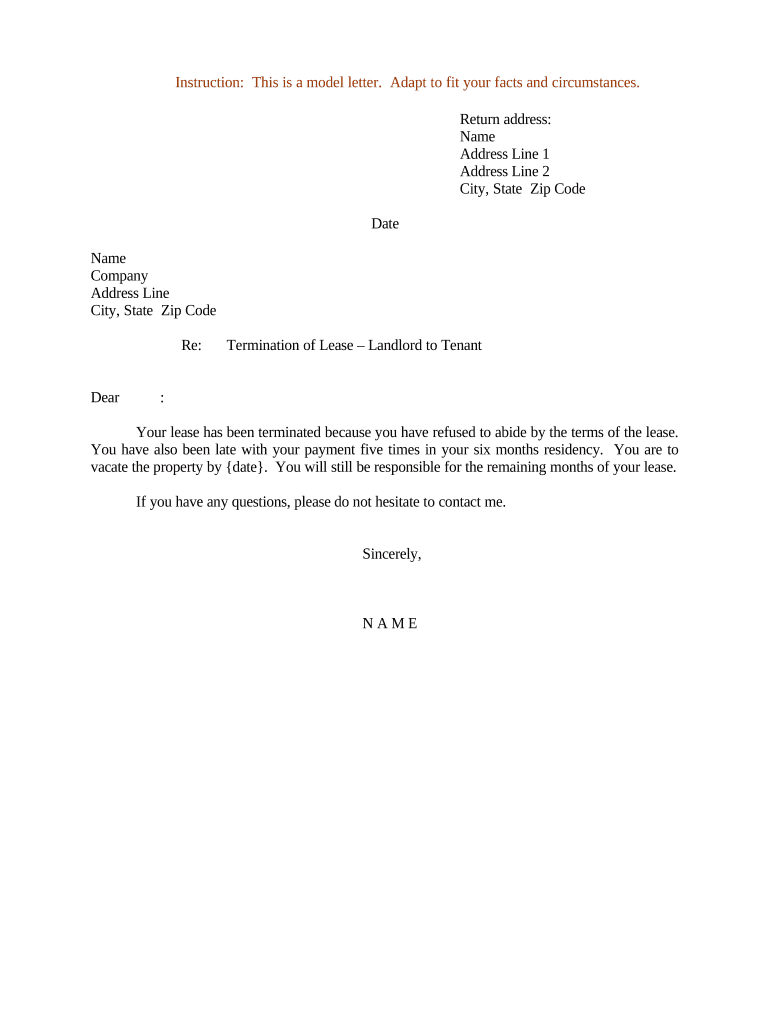
A Letter of Termination of Lease is a written notice from a landlord or tenant that ends a tenancy according to the lease terms or applicable law. It states the parties involved, identifies the lease being terminated, specifies the effective termination date, and explains required actions such as vacating the premises, returning keys, and arranging final inspection or security deposit handling. The letter creates a clear record of intent to end the lease and supports enforcement or dispute resolution if either party contests the termination.

Why a Clear Termination Letter Matters

A concise, properly formatted termination letter documents notice, reduces misunderstandings, preserves legal rights, and creates a verifiable record for courts, housing authorities, or insurers.

Why a Clear Termination Letter Matters

Who Commonly Prepares and Receives This Letter

Accurate preparation and documented delivery protect both parties and help avoid penalties or unintended lease continuation.

  • Landlords and property managers notifying tenants of lease nonrenewal or early termination.
  • Tenants providing required notice to end a fixed-term or month-to-month tenancy.
  • Attorneys or housing advocates drafting formal notices for eviction avoidance or dispute resolution.

Typical Signatories and Their Roles

Landlord

A landlord or authorized property manager signs when terminating tenancy. The letter should include the landlord's full legal name, business entity (if applicable), contact details, and a statement of authority referencing the lease or management agreement.

Tenant

A tenant who signs must use their full legal name as on the lease. If multiple tenants are listed, each should sign to avoid disputes. The signer should reference the lease by date and unit to ensure the notice links to the correct agreement.

Essential Elements to Include in the Letter

A professional Letter of Termination of Lease contains specific sections and clear language to ensure enforceability and smooth transition for both parties.

Heading and Date

Include a clear heading (Letter of Termination of Lease) and the date of the notice at the top so the timeline is unambiguous and the document is easy to reference.
Parties and Property

Identify landlord and tenant full legal names plus the property address, unit number, and lease start date to tie the notice directly to the existing agreement.

Lease Reference

Cite the original lease execution date, any amendment dates, and the specific lease clause (if applicable) authorizing termination to avoid ambiguity about the basis for ending tenancy.

Termination Date

State the exact effective termination date using MM/DD/YYYY format so obligations like possession, keys return, and final rent responsibilities are clearly scheduled.

Action Items

List required actions such as vacating, cleaning, final inspection appointment, forwarding address for deposit return, and who to contact for coordination.

Delivery and Proof

Indicate how notice was delivered (mail, personal delivery, email, eSignature) and retain proof of delivery or a signed acknowledgment to support enforcement if needed.

Step-by-Step: Drafting and Sending the Notice

Follow these sequential steps to prepare a legally defensible termination letter and confirm delivery.

  • 01
    Review Lease: Check notice periods, early termination clauses, and remedies under the lease and state law.
  • 02
    Confirm Dates: Calculate required notice window and select an effective termination date in MM/DD/YYYY format.
  • 03
    Draft Letter: Include parties, property, termination date, required actions, and signature block; keep language plain and specific.
  • 04
    Deliver and Document: Send via a verifiable method and retain proof of delivery and any recipient acknowledgment.

Where to File or Send the Termination Letter

A termination letter is typically delivered to the other lease party and retained by both; these routing options are common and practical.

  • Direct Delivery: Hand-deliver to the tenant or landlord and obtain signed receipt when possible.
  • Certified Mail: Send certified or registered mail to create a postal delivery record and tracking number.
  • Email or eSignature: Use documented email or an eSigning platform to demonstrate transmission and acceptance.
  • File with Agent: Provide a copy to the managing agent or property management office and retain a scanned copy.

Online Workflow Settings for a Termination Letter

Configure these settings when sending the letter electronically to ensure secure delivery, signer verification, and a complete audit trail.

Field Configuration
Signature Type Electronic signature with timestamp
Authentication Email link or SMS code
Delivery Receipt Enable read receipts and delivery tracking
Retention Save signed PDF and audit trail for records

Technical and Integration Considerations

Verify the platform meets legal and security requirements for your industry and retains a verifiable certificate of completion.

  • File Formats: PDF, DOCX, or HTML accepted
  • Integrations: Salesforce, Microsoft 365, NetSuite
  • Audit Trail: IP, timestamp, and signer email

Timing and Notice Period Considerations

Timing depends on lease provisions and state law; verify the lease notice clause first and then confirm any statutory minimums that may apply.

Lease Notice Clause:

Follow the notice period specified in the lease

Month-to-Month Tenancy:

Often requires at least 30 days' notice; check local law

Fixed-Term Nonrenewal:

Provide notice per lease timing before end of term

Nonpayment or Breach:

Remedies and shorter notices may apply under state statutes

Request for Early Release:

Document consent terms, prorations, and any fee obligations

Common Mistakes to Avoid

  • Using informal language that fails to cite the lease or a specific termination date, causing ambiguity and potential disputes.
  • Failing to calculate and observe the required notice period from the lease or state law, which can extend the tenancy by default.
  • Not documenting delivery or using an unverifiable method, making it difficult to prove notice was given if contested.
  • Neglecting to obtain all tenant or landlord signatures when multiple parties are named on the lease, which can invalidate the notice.

Potential Consequences of an Incorrect Notice

Extended Tenancy: Lease may continue
Damages Claim: Monetary liability possible
Eviction Delays: Court timeline extended
Deposit Disputes: Withholding or litigation risk
Penalty Fees: Possible contract penalties
Reputational Risk: Manager/landlord credibility harmed

Security and Compliance Considerations for Electronic Notices

Encryption: TLS 1.2/1.3 in transit; AES-256
Audit Trail: Timestamps, IP, and action log
ESIGN / UETA: Electronic signatures legally valid
HIPAA: BAA required for PHI workflows
SOC 2: SOC 2 Type II available
ISO 27001: Certified information security

eSignature Provider Comparison for Sending Termination Letters

Platform choice affects cost, compliance, and delivery options; this table compares signNow with commonly used competitors on key criteria.

signNow DocuSign Adobe Sign PandaDoc HelloSign
Starting Price $8/user/mo $15/user/mo $14/user/mo $19/user/mo $15/user/mo
Free Trial 7-day free trial Vendor plans vary Vendor plans vary Vendor plans vary Vendor plans vary
Bulk Send Yes Yes Yes Yes No
Audit Trail Yes Yes Yes Yes Yes
HIPAA Compliant Yes Yes Yes No No

Real-World Examples of Termination Letters in Practice

These examples highlight how different organizations use professional termination letters to manage leases and tenant transitions.

Martin Properties

Property manager needed standardized notices for hundreds of units to reduce disputes and administrative time.

  • Used templated termination letters with documented delivery and checklists.
  • The process allowed consistent enforcement of move-out procedures and improved recordkeeping for security deposit reconciliation and dispute defense.

Optica Ventures LLC

A small landlord group required verifiable proof of notice for nonrenewal cases.

  • Implemented signed electronic letters and retained audit trails.
  • This reduced in-person delivery, maintained compliance with lease terms, and provided admissible evidence when tenants contested notices.

Frequently Asked Questions About Termination Letters

Answers to common questions clarify legal validity, delivery proof, electronic signing, revocation, and next steps after sending a termination letter.


Need help? Contact support

be ready to get more
Join over 28 million airSlate SignNow users