Establishing secure connection…Loading editor…Preparing document…

Louisiana Mortgage Certificate Request

This template is fully customizable. Edit the text, fill out the fields, and send it for signature. Give it a try!
Louisiana Mortgage Certificate Request

What the Louisiana Mortgage Certificate Request Is

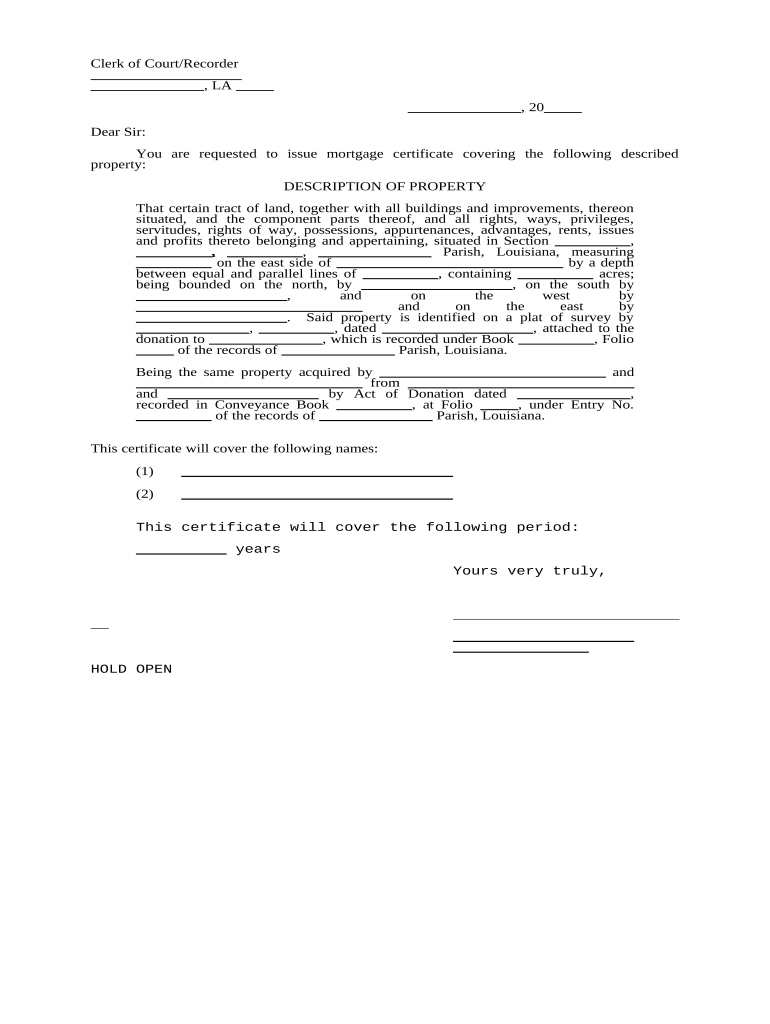
The Louisiana Mortgage Certificate Request is a standardized document used to request an official certificate or confirmation regarding a mortgage lien or mortgage status on Louisiana real property. It is commonly used during real estate closings, title searches, payoff processing, reconveyances, and lien clearance. The form identifies the property, lender, borrower, loan reference, and the precise information sought from the recorder, title company, or mortgage servicer. Completing the Request accurately helps avoid recording delays, incorrect payoffs, or title exceptions that can delay transfer or financing.

Why a Clear Mortgage Certificate Request Matters

A correct Louisiana Mortgage Certificate Request reduces title exceptions, speeds closings, and provides an auditable record of what was requested. Electronic handling is legally accepted under the federal ESIGN Act (15 U.S.C. ch. 96, 2000) and state UETA frameworks where adopted, so valid e-signed requests can substitute for paper in most interstate and intrastate transactions.

Why a Clear Mortgage Certificate Request Matters

Typical Users and Roles

Professionals who commonly prepare or sign this request include title examiners, lenders, closing attorneys, and escrow officers.

  • Title companies and examiners prepare requests during liability and title searches to confirm encumbrances and recording details.
  • Lenders or servicers use the form to request payoff figures, reconveyance instructions, or lien satisfaction information.
  • Closing attorneys and settlement agents generate and confirm certificate requests to ensure clean title delivery at closing.

Smaller stakeholders such as sellers, buyers, and real estate agents may receive or review the resulting certificate but typically do not draft the request itself.

Who Signs and Authorizes the Request

Closing Attorney

Often signs on behalf of the closing agent or escrow holder after verifying payoff amounts and lender instructions. The attorney certifies that the request reflects instructions necessary to clear title for transfer.

Mortgage Servicer

An authorized officer or agent from the servicer provides confirmation, payoff figures, or lien release details and affixes the official response to the requesting party.

Core Elements to Include in a Professional Request

A complete Louisiana Mortgage Certificate Request contains precise identifiers and concise instructions so the responding party can locate and certify the correct record without additional follow-up.

Property ID

Provide full street address, parish, and legal description (lot/block or metes-and-bounds) to ensure an exact title search and avoid ambiguity between parcels.
Loan Details

List lender name, loan number, origination date, and recording book/page or instrument number so the servicer or recorder can match the mortgage instrument rapidly.

Request Type

Specify whether you need a payoff statement, lien satisfaction, mortgage certificate, or reconveyance instructions and state the deliverable format.

Effective Date

Indicate the date the payoff or certification should be calculated (MM/DD/YYYY) to avoid stale figures or inaccurate reconveyance amounts.

Delivery Instructions

Indicate return method (email, secure portal, mail), attention line, required contacts, and acceptable file formats for scanned certificates or certified copies.

Authorization

Include the name, title, contact details, and signature block of the person authorized to request payoff or certificate information.

Step-by-Step: Completing the Request

Follow these steps in sequence to prepare and submit a clear request that supports accurate and timely responses from title or mortgage parties.

  • 01
    Verify Property: Confirm legal description, address, and parcel ID.
  • 02
    Gather Loan Info: Collect lender name, loan number, and recording reference.
  • 03
    Specify Deliverable: Choose payoff amount, certificate, or reconveyance details.
  • 04
    Sign and Send: Authorize request and send to servicer or recorder.

How to Configure an Online Request Workflow

Set up a repeatable online workflow to reduce manual errors and centralize responses during closings and title work.

Field Configuration
Property Field Required; auto-populate from title database to avoid manual entry.
Loan Reference Field Optional but recommended; validate format with regex for loan number.
Delivery Method Set default to secure PDF via email or portal; allow manual override.
Signer Authentication Require email verification and optional SMS or ID proofing for higher assurance.

Where the Request Goes and What Happens Next

The path below outlines typical routing from sender to the responding party and back to the closing file.

  • Sender: Prepares request and attaches supporting references.
  • Recipient: Mortgage servicer or recorder locates the instrument.
  • Response: Certified payoff, certificate, or lien satisfaction returned.
  • File: Attach response to closing/title file and distribute copies.

Digital Delivery and eSubmission Considerations

Electronic submission reduces mail time but requires format and security planning before sending requests to lenders or recorders.

  • File Formats: PDF/A or searchable PDF preferred for long-term records.
  • Authentication: Use email verification, SMS code, or ID proofing for signer attribution.
  • Audit Trail: Capture timestamps, IP addresses, and signer events for evidentiary value.

Platforms integrated with title or CRM systems and that support secure PDF delivery simplify tracking and reduce follow-up cycles for missing or ambiguous requests.

Timing Expectations and Common Deadlines

Be aware of internal and external timing requirements: payoff validity windows, recording timelines, and closing cutoffs affect what date you request.

Payoff Validity Window:

Many payoffs are valid for 7–30 days; confirm the expiration when scheduling closing.

Recording Cutoff:

County/parish recording offices may have daily or weekly batching that affects final recorded date.

Response Time:

Servicers often respond in 3–10 business days; commercial lenders may require longer.

Closing Date:

Request payoff or certificate with an effective date that aligns with the scheduled closing.

Rush Requests:

Expect additional fees or expedited processing for same-day or next-day requests.

Key Milestones in Processing a Request

A standard request moves through defined stages from creation to file closure; tracking these milestones reduces surprises on closing day.

01

Request Submitted

Originator sends completed request to servicer or recorder.

02

Acknowledgement Received

Recipient confirms receipt and provides estimated response time.

03

Document Issued

Payoff, certificate, or reconveyance documentation is prepared and transmitted.

04

File Closure

Returned document is attached to title file and parties receive final copies.

Comparing eSignature Options for Mortgage Certificate Requests

Price and feature needs vary by volume and compliance requirements. The table below compares common vendor attributes affecting mortgage certificate workflows.

signNow DocuSign Adobe Sign PandaDoc HelloSign
Starting Price $8/user/mo $15/user/mo $14/user/mo $19/user/mo $15/user/mo
Free Trial 7-day free trial Varies by vendor Varies by vendor Varies by vendor Varies by vendor
Bulk Send Yes (plan-dependent) Yes (plan-dependent) Yes (plan-dependent) Yes Varies
Audit Trail Yes Yes Yes Yes Yes
HIPAA Compliant Yes Yes Yes No No
Envelope Cap No cap 100 envelopes/user/year Varies by plan Varies by plan Varies by plan

Security and Compliance Basics

Encryption: TLS 1.2/1.3 in transit; AES-256 at rest
Audit Trail: Comprehensive signer events and timestamps
HIPAA: BAA required for protected health data
ESIGN / UETA: Legal frameworks applicable to electronic records
21 CFR Part 11: Available for regulated FDA workflows
SOC 2 / ISO: SOC 2 Type II and ISO 27001 certifications

Consequences of Incorrect or Incomplete Requests

Closing Delays: Missed or incorrect payoffs delay closings
Title Exceptions: Unresolved liens create exceptions at closing
Recording Rejection: Improper form or notarization can be rejected
Extra Costs: Rush fees and rework increase expenses
Liability Risk: Faulty authorizations can create legal exposure
Data Privacy: Improper handling can breach privacy controls

Common Preparation Mistakes to Avoid

  • Providing an incomplete legal description which forces additional title searches and delays response.
  • Using an outdated payoff effective date that produces inaccurate payoff amounts at closing.
  • Failing to include an authorized signature or proof of authority, causing the servicer to decline the request.
  • Sending unsupported file formats or unsecured email that prevent the recipient from returning certified documents.

Real-world Examples

Below are brief, real customer scenarios illustrating how organizations use electronic processes for mortgage certificate requests.

Optica Ventures

The interface is simple and easy-to-use for our team; more importantly, it is just as easy for our customers.

  • Platform adoption reduced manual follow-up.
  • Optica Ventures used electronic requests to cut turnaround time across multiple closings and improved customer satisfaction by reducing back-and-forth.

Martin Properties

I can process and execute all of these documents online with 100% compliance and built-in security.

  • Mobile and offline signing helped field teams.
  • Martin Properties processed remote certificate requests and achieved smoother closings while maintaining a secure audit trail for each transaction.

Practical Tips for Faster, More Accurate Requests

Apply these practical steps to reduce errors, accelerate responses, and preserve an auditable trail for title and closing teams.

Standardize Templates
Use a consistent template with required fields, validation rules, and prefilled data where possible to minimize manual entry errors and speed preparation.
Confirm Authority
Attach authorization letters or evidence of signing authority for third-party submitters to avoid service refusals from mortgage servicers.
Align Dates
Coordinate effective payoff or certification dates with the scheduled closing to avoid stale or invalid payoff amounts at settlement.
Secure Delivery
Use encrypted email or secure portals for sensitive documents and retain audit trails showing delivery and access events for compliance.

Frequently Asked Questions

Answers to common procedural and legal questions about preparing, signing, and handling Louisiana Mortgage Certificate Requests.


Need help? Contact support

be ready to get more
Join over 28 million airSlate SignNow users