Establishing secure connection…Loading editor…Preparing document…

Letter Regarding Complaint to Close Estate

This template is fully customizable. Edit the text, fill out the fields, and send it for signature. Give it a try!
Letter Regarding Complaint to Close Estate

What a Letter Regarding Complaint to Close Estate Is

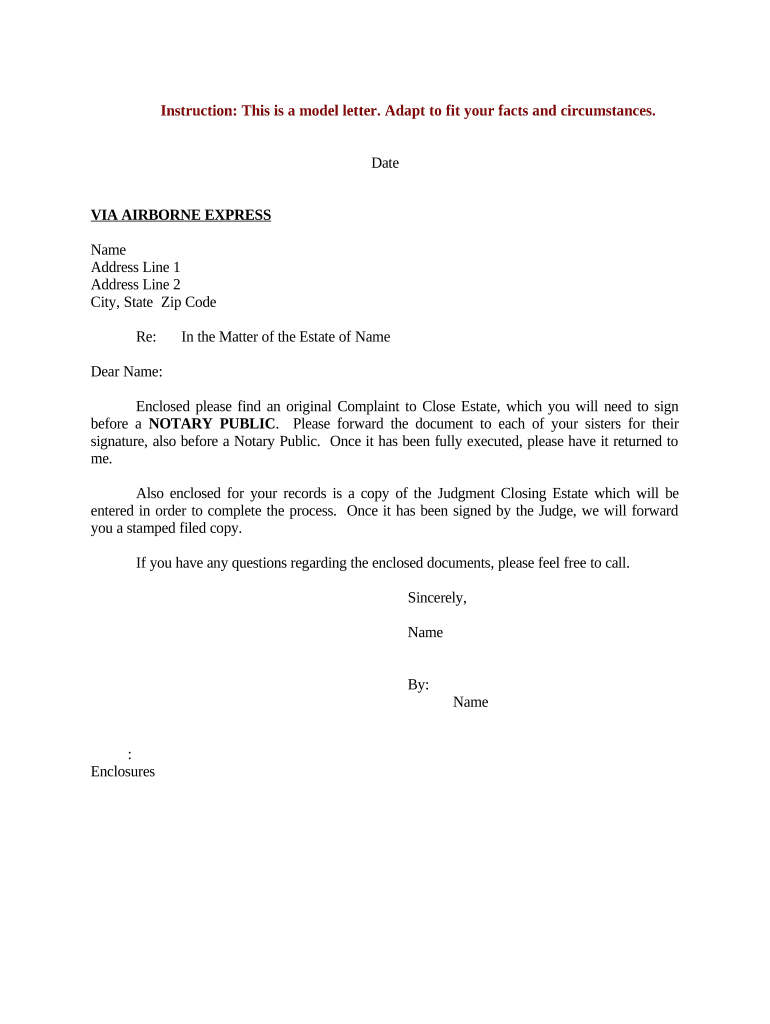
A Letter Regarding Complaint to Close Estate is a formal written notice sent to interested parties and the probate court when a party files or intends to file a complaint to close an estate or seek final distribution. It summarizes the filing party's request, identifies the decedent and estate file number, lists known heirs and creditors, and states the relief sought. The letter helps ensure proper notice, supports service and jurisdiction requirements, and creates a record that parties received information about the proposed closing and distribution plan.

Why this Letter Matters for Estate Closure

A clear complaint-to-close letter documents notice to beneficiaries and creditors, supports court scheduling, and reduces the risk of contested distribution. Under most U.S. probate rules, timely and accurate notice is required to avoid delays or objections.

Why this Letter Matters for Estate Closure

Who Typically Prepares and Receives This Letter

The letter is prepared by the personal representative, executor, or the estate attorney and sent to beneficiaries, known creditors, and the probate clerk.

  • Personal representative or executor notifying beneficiaries and the court of intent to close the estate.
  • Estate counsel preparing supporting paperwork and managing objections or creditor claims.
  • Beneficiaries and creditors receiving formal notice to review distributions and assert claims.

Primary Roles and Responsibilities

Personal Representative

The individual appointed by the court to administer the estate. Responsible for preparing the closing documents, notifying heirs and creditors, filing the complaint to close, and ensuring distributions align with court orders and statutory requirements.

Estate Attorney

A lawyer who drafts the complaint and the notice letter, verifies statutory notice periods and filing requirements, represents the estate at hearings, and advises on creditor claims, possible objections, and retention of supporting records.

Essential Elements to Include in the Letter

A professional letter should be concise, include identifiers, state the requested relief, list affected parties, attach supporting documents, and explain next steps and objection deadlines.

Case Identifiers

Include court name, case number, decedent full name, and date of death so the letter ties directly to the probate file and avoids administrative confusion.
Sender Information

Name, mailing address, email, and phone of the personal representative and estate counsel so recipients can respond or request additional documentation.

Statement of Relief

Clear description of the complaint to close, proposed distributions, and any accountings or receipts that support the proposed final order.

Recipient List

Names and addresses of beneficiaries, known creditors, and interested parties to demonstrate who received notice and satisfy service requirements.

Attachments

Attach the proposed order, accounting summary, inventories, and proof of prior notices to support the closing request and facilitate beneficiary review.

Objection Timeline

State the deadline and method for filing objections or claiming creditor rights and include filing instructions for the probate clerk.

Step-by-Step: Preparing and Sending the Letter

Follow these sequential steps to prepare, verify, and distribute the complaint-to-close letter correctly.

  • 01
    Draft the Letter: Compose letter with case ID, relief requested, recipients, and attachments.
  • 02
    Assemble Attachments: Include accounting, proposed order, and proof of prior notices.
  • 03
    Verify Recipient List: Confirm addresses for beneficiaries and known creditors.
  • 04
    Send and Record Service: File with court if required; keep proof of mailing or e-service logs.

Filing Path and Typical Routing for the Letter

Understand where the letter is sent and how it moves through court and estate processes to avoid missed deadlines.

  • To the Probate Clerk: File a copy with the court if local rules require formal filing alongside the complaint.
  • To Beneficiaries: Serve all named heirs and beneficiaries by mail or permitted electronic service methods.
  • To Known Creditors: Send to addresses on the creditor register and include claim instructions.
  • Retention: Keep proof of service and delivery confirmations for the estate record.

Digital Workflow Settings for Online Completion

Configure your digital workflow to capture signatures, proof of delivery, and a tamper-evident audit trail before filing.

Field Configuration
Signature Field Require signer name, signature, and date.
Authentication Use email or SMS code for signer verification.
Attachments Lock attached accounting before sending.
Audit Trail Enable IP, timestamp, and action logs.

Delivery Options and Technical Considerations

Choose distribution channels that satisfy your court's and parties' service rules and create durable proof of receipt.

  • Email / eService: Permitted in many jurisdictions when parties consent; record delivery and read receipts.
  • Registered Mail: Provides postal proof of delivery useful for contested matters.
  • eSignature Platform: Use an eSignature solution that provides an audit trail and secure storage.

Match the chosen distribution method to local probate rules and retain electronic or physical delivery records in the estate file.

Consequences of Errors or Incomplete Notice

Dismissal Risk: Court may dismiss or delay final distribution for defective service.
Creditor Claims: Late or improper notice can revive creditor claims against distributions.
Sanctions: Clerks or courts can impose costs or sanctions for improper filings.
Statute Delays: Failure to meet statutory notice periods can extend administration timelines.
Contested Accounting: Incomplete attachments increase the likelihood of objections and contested hearings.
Privacy Breach: Wrongful disclosure of sensitive personal data risks compliance and reputational harm.

Common Preparation Mistakes to Avoid

  • Using an incorrect court case number or decedent name that prevents the clerk from associating the letter with the probate file.
  • Sending notice to outdated or incomplete beneficiary addresses without keeping proof of attempted service.
  • Failing to attach accounting or proposed distribution schedules that recipients need to evaluate the closing request.
  • Relying on informal email delivery when the court or statute requires formal service or notarized filings.

Typical Timeframes and When to Expect Responses

Probate timelines vary by state and case complexity; use these common intervals as planning guidance and confirm locally.

Court Filing to Hearing:

Often scheduled 4–12 weeks after the complaint is filed depending on calendar.

Objection Period:

Beneficiaries or creditors usually have 30–90 days to file objections.

Creditor Claim Deadlines:

State-specific; commonly 3–6 months from notice or probate publication.

Final Distribution:

Distribution often occurs after accounting and objection resolution, commonly 3–12 months.

Record Retention:

Keep service proofs and orders until statute of limitations risks expire.

eSignature Pricing Comparison for Letter Completion and Filing

Select an eSignature provider that meets court evidence, audit trail, and compliance needs; the table compares starting prices and core capabilities.

signNow DocuSign Adobe Sign PandaDoc HelloSign
Starting Price $8/user/mo $15/user/mo $14/user/mo $19/user/mo $15/user/mo
Free Trial 7-day free trial Varies Varies Varies Varies
Bulk Send Yes Yes Yes Yes No
Audit Trail Yes Yes Yes Yes Yes
HIPAA Compliant Yes Yes Yes No No
Envelope Cap No cap 100 envelopes/user/year Varies Varies Varies

Security and Compliance Considerations for Electronic Letters

Transport Encryption: TLS 1.2/1.3
Data at Rest: AES-256 encryption
Audit Trail: Tamper-evident timestamps
Legal Compliance: ESIGN and UETA conformity
Healthcare: HIPAA support (BAA required)
Regulated Records: 21 CFR Part 11 compatible options

Real-World Examples of eSign and Notice Usage

These examples show how organizations relied on eSignature workflows to manage notice and documentation for estate or legal processes.

Optica Ventures LLC

The interface is simple and easy-to-use for our team; more importantly, it is just as easy for our customers.

  • Team adoption accelerated document turnaround by eliminating in-person signings.
  • With reliable audit trails and secure delivery, the firm reduced follow-up inquiries and expedited administrative closures across multiple small estates.

Fertility Centers of Illinois

airSlate SignNow team has been exceptional and responsive in support.

  • Integration into existing systems made distribution seamless.
  • The organization retained comprehensive records for compliance, reduced mailing costs, and shortened finalization timelines when closing administrative matters tied to patient records.

Practical Tips for Accurate Letter Preparation

Use a checklist and standard template to reduce errors and ensure consistent compliance with court rules.

Use Verified Names and Addresses
Confirm beneficiary names and addresses against court filings or government ID to avoid service defects and subsequent delays.
Attach Supporting Schedules
Provide a concise accounting, proposed distribution, and copies of receipts to allow beneficiaries to evaluate the closing request without needing follow-up.
Record Proof of Service
Retain postal receipts, registered mail logs, or electronic delivery confirmations to demonstrate compliance with notice requirements.
Follow Local Rules
Check the probate court's local rules for required wording, filing formats, and whether electronic filing or e-service is accepted.

Frequently Asked Questions About the Letter and Filing

Answers to common questions about electronic delivery, signatures, timing, and correcting mistakes while preparing a complaint-to-close letter.


Need help? Contact support

be ready to get more
Join over 28 million airSlate SignNow users