Establishing secure connection…Loading editor…Preparing document…

Light Duty Assignment Request Form

This template is fully customizable. Edit the text, fill out the fields, and send it for signature. Give it a try!
Light Duty Assignment Request Form

What the Light Duty Assignment Request Form Is and When it’s Used

The Light Duty Assignment Request Form documents an employee's request or employer offer for temporary modified work following injury, illness, or medical restriction. It records employee identity, treating provider restrictions, proposed duties, effective dates, and signatures from the employee, supervisor, and medical provider when required. Organizations use it to coordinate return-to-work plans, manage workers' compensation claims, and ensure workplace safety while tracking temporary accommodations and timelines.

Why a Clear Light Duty Assignment Request Form Matters

A well‑structured form reduces misunderstandings, speeds return to productive work, and creates an auditable record for workers' compensation, ADA, and occupational safety programs. Clear fields for medical restrictions and duration limit disputes, help managers assign appropriate tasks, and support consistent payroll and benefit decisions while protecting privacy.

Why a Clear Light Duty Assignment Request Form Matters

Who Typically Completes or Reviews This Form

The form is completed by employees or initiated by supervisors and routed to HR, occupational health, or claims adjusters for review.

  • Human resources and benefits teams review restrictions and confirm pay/leave implications.
  • Supervisors propose modified duties, confirm assignment feasibility, and track shift or schedule changes.
  • Workers' compensation adjusters and occupational health professionals use the form to authorize accommodations and document medical guidance.

A centralized routing and record retention process reduces processing time and ensures compliance with internal policy and external reporting requirements.

Primary Signatories and Their Roles

HR Manager

Responsible for reviewing the employee request, confirming benefits and pay treatment, coordinating accommodations with the supervisor, and keeping the completed form in the personnel file according to retention policy.

Employee / Worker

Provides accurate identification and medical information, signs to confirm understanding of the assigned duties, and notifies employer promptly if restrictions change or further medical documentation is provided.

Essential Parts of a Professional Light Duty Assignment Request Form

A complete form combines identifiable parties, medical restriction details, assignment specifics, dates, signatures, and routing instructions so each stakeholder can act and records can be retained consistent with policy.

Employee Information

Full legal name, employee ID, job title, department, contact details, and hire date to link the form to payroll and personnel records.
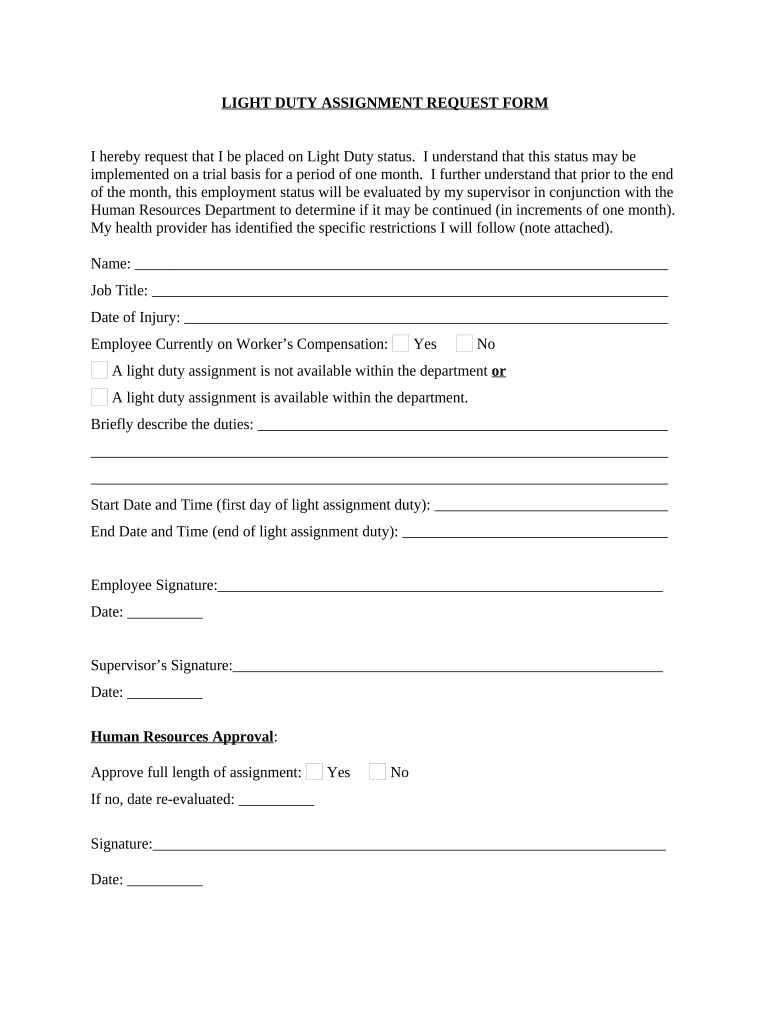
Medical Restrictions

Clear description of functional limits (lifting, standing, hours) reported by the treating provider with effective and expected end dates.

Proposed Duties

Detailed list of modified tasks, physical demands, schedule adjustments, and any tools or ergonomic changes required to accommodate restrictions.

Duration and Review

Effective start date, anticipated review or re-evaluation date, and instructions for submitting updated medical documentation if conditions change.

Signatures and Dates

Signed and dated authorizations from employee, supervisor, HR, and treating provider when necessary to confirm agreement and medical authorization.

Routing Instructions

Designated workflow for distribution—who receives copies, how the document is stored, and which system holds the authoritative record.

Step-by-Step: How to Complete and Route the Form

Follow a clear sequence to avoid delays: collect medical details, confirm feasible tasks with the supervisor, and route for HR and claims review.

  • 01
    Gather Medical Info: Obtain treating provider restrictions and dates in writing.
  • 02
    Draft Assignment: List specific tasks that meet medical limitations.
  • 03
    Obtain Signatures: Employee, supervisor, HR, and provider sign as required.
  • 04
    Store and Notify: Save signed copy in HR and send notices to payroll and claims.

How to Configure Online Workflows for Light Duty Forms

Set up a predictable digital workflow to route forms automatically, capture attestations, and store signed records with an audit trail.

Field Configuration
Upload Template Use a locked PDF template with fillable fields to maintain form integrity.
Assign Signers Order signers: employee → supervisor → HR → medical provider (if needed).
Authentication Use email + SMS code or SSO for higher assurance signers.
Retention Setting Auto-archive signed PDFs to secure HR storage with versioning enabled.

Digital Delivery and Authentication Options

Choose delivery channels that balance signer convenience with required identity assurance.

  • Formats Supported: PDF, DOCX, HTML, Excel
  • Integrations: Salesforce, Microsoft 365, NetSuite, HRIS
  • Authentication Options: Email link, SMS code, KBA, SSO

Use stronger authentication (SMS, SSO) when forms affect benefits or workers' comp; combine with audit trails and secure storage.

Where to Send Completed Light Duty Forms

Routing depends on organizational structure; ensure the authoritative signed copy is placed in HR and claims systems and that relevant stakeholders receive copies.

  • Human Resources: Primary retention for personnel and benefits administration.
  • Immediate Supervisor: Receives assignment details and implementation instructions.
  • Workers' Comp / Claims: Claims adjuster receives copy if medical benefits are affected.
  • Occupational Health: Medical reviewer retains clinical recommendations and follow-up dates.

Typical Timelines and Internal Deadlines to Track

Organizations often define internal response windows to keep return‑to‑work plans timely; align these with collective bargaining agreements and state notice rules.

Employee Submission Window:

Submit as soon as possible; many employers set 48–72 hour internal windows.

Supervisor Response:

Supervisor confirms feasible duties within 3 business days of receiving form.

HR Review:

HR completes benefits and payroll review within 5 business days.

Medical Re-evaluation:

Set review date per provider guidance, commonly every 2–4 weeks.

Claims Notification:

Notify workers' comp carrier per employer policy and state reporting rules.

Security and Compliance Considerations for Digital Forms

Encryption In Transit: TLS 1.2/1.3
Encryption At Rest: AES-256 encrypted storage
HIPAA Support: BAA available when PHI processed
Audit Trail: Timestamp, IP, action history
ESIGN / UETA: Complies with ESIGN and UETA
Certifications: SOC 2 Type II, ISO 27001

Common Preparation Mistakes to Avoid

  • Missing or vague medical restrictions that prevent accurate task matching and lead to unsafe assignments or disputes.
  • Incomplete dates (no anticipated end date) which create confusion about duration and review timing.
  • Wrong or inconsistent names and IDs that delay payroll, benefits, and claim processing across systems.
  • Routing errors—sending the form only to a supervisor instead of HR and claims—causing processing delays and lost records.

Risks and Potential Consequences of an Improper Form

Benefit Denial: Claim or benefit delays
ADA Exposure: Failure to accommodate can lead to complaints
Workers' Comp Dispute: Inconsistent records increase litigation risk
Payroll Errors: Incorrect pay classifications or timekeeping issues
Privacy Breach: Improper PHI handling may violate HIPAA
Recordkeeping Fines: Noncompliance with retention rules

How This Form Differs from Related Documents

Compare the Light Duty Assignment Request Form with similar HR documents to ensure you use the correct template for each purpose.

Criteria Light Duty Form Accommodation Request
Purpose temporary modified work long-term reasonable accommodation
Medical Detail functional limits medical diagnosis often included
Signatories employee, supervisor, hr employee, hr, sometimes medical
Typical Use short-term return to work ada interactive process

eSignature Vendor Comparison for Light Duty Form eSubmission

Compare baseline pricing and compliance features when choosing an eSignature provider for secure light duty form delivery and storage.

signNow DocuSign Adobe Sign PandaDoc HelloSign
Starting Price $8/user/mo $15/user/mo $14/user/mo $19/user/mo $15/user/mo
Free Trial 7-day free trial Varies Varies Varies Varies
Bulk Send Yes Yes Yes Yes No
Audit Trail Yes Yes Yes Yes Yes
HIPAA Compliant Yes Yes Yes No No
Envelope Cap No envelope cap 100 envelopes/user/year Varies by plan Varies Varies

How to Revise or Update a Submitted Light Duty Assignment

Use a controlled amendment process so updated medical information and assignments replace prior versions while preserving an audit trail.

01

Request Amendment:

Employee or provider submits updated medical restrictions in writing.
02

Draft Revision:

HR creates a new version noting prior effective dates and changes.
03

Collect Approvals:

Obtain signatures from employee, supervisor, and medical provider if required.
04

Archive Prior:

Mark earlier version superseded; retain per retention policy.
05

Notify Stakeholders:

Inform payroll, claims, and supervisor of changes.
06

Update Systems:

Replace form in HRIS and document management system.

FAQs: Common Questions About Using the Light Duty Assignment Request Form

Answers to frequent questions about electronic signatures, medical information, routing, and retention for light duty assignments.


Need help? Contact support

be ready to get more
Join over 28 million airSlate SignNow users