Establishing secure connection…Loading editor…Preparing document…

Resolution to Sell Assets

This template is fully customizable. Edit the text, fill out the fields, and send it for signature. Give it a try!
Resolution to Sell Assets

What a Resolution to Sell Assets Is and when it’s used

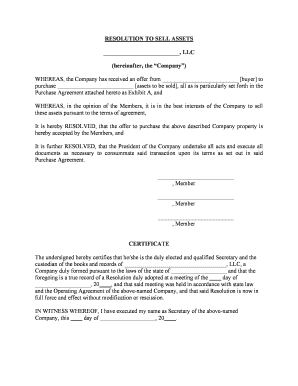
A Resolution to Sell Assets is a formal written decision, typically adopted by a board of directors, members, or trustees, authorizing the sale or disposition of company property, business units, or material assets. The resolution documents the approving body, records the motion and vote, describes the assets to be sold, sets terms or delegates authority to negotiate and execute sale documents, and creates an official record for corporate minutes and third parties. Use this document when corporate governance rules or an operating agreement require formal approval before completing asset transfers.

Why a clear, well‑drafted resolution matters

A precise Resolution to Sell Assets protects corporate directors and officers, creates an audit trail of authority, and reduces the risk of disputes or claims of unauthorized transfers.

Why a clear, well‑drafted resolution matters

Who commonly prepares and signs these resolutions

Parties should confirm signatory authority in bylaws or the operating agreement before relying on a signed resolution.

  • Board of Directors — Approves major asset sales under corporate bylaws and minutes the action.
  • Corporate Secretary — Prepares the resolution text and maintains official records and minutes.
  • Authorized Officer — Executes closing documents under delegated authority specified in the resolution.

Stepwise process to complete and adopt the resolution

Follow these sequential steps to ensure the resolution is valid, documented, and actionable.

  • 01
    Draft the text: Prepare clear recitals, asset description, and authority language.
  • 02
    Call the meeting: Provide notice per bylaws or operating agreement.
  • 03
    Record the vote: Document motions, seconds, and voting results in minutes.
  • 04
    Execute and distribute: Have authorized signers sign and circulate signed copies.

Typical online workflow for adopting and executing a resolution

Digital workflows streamline review, approval, and signature collection while preserving an audit trail and copies for minutes.

  • Upload document: Add the draft resolution (PDF or DOCX) to the platform.
  • Place fields: Add signature, date, and name fields for each signer.
  • Assign signers: Set signer order and authentication level (email, SMS, KBA).
  • Collect signatures: Capture signatures and issue completed document to all parties.

Key digital settings to configure for secure execution

Configure these settings before sending the resolution for signatures to balance ease of signing with appropriate authentication.

Field Configuration
Signer Authentication Email link, SMS code, or identity provider (SSO)
Signing Order Sequential or parallel signing as governance requires
Conditional Fields Show specific fields only if certain answers apply
Audit Trail Enable full timestamps, IP addresses, and event log

Technical compatibility and integration considerations

Choose platform settings that match your internal compliance, archival, and access control policies.

  • File Formats: PDF, DOCX, and editable forms supported
  • Integrations: Salesforce, NetSuite, Google Workspace available
  • Authentication: SSO, SMS, and advanced options supported

Essential sections to include in a professional resolution

A complete Resolution to Sell Assets contains standardized sections that clarify authority, describe assets, record approvals, and set execution mechanics.

Title and Recitals

Begin with a clear title and recitals summarizing background facts and reasons for the proposed asset sale, providing context for third parties.
Authority Clause

Cite specific bylaws, operating agreement provisions, or statutory authority that empowers the board or members to approve and execute the sale.

Asset Description

Provide a precise description of assets for transfer, including identifiers, addresses, account numbers, or attached schedules describing bulk or mixed asset groups.

Approval Mechanics

Describe the motion, voting results, quorum confirmation, and any dissent or abstention relevant to enforceability and corporate records.

Delegation of Authority

If applicable, delegate negotiation and execution authority to named officers or agents with limits on price, timing, and material terms.

Execution and Delivery

Include signature blocks with printed names and titles and specify whether electronic signatures are permitted and how originals will be retained.

Security and compliance checks to include with the resolution

Encryption in transit: TLS 1.2/1.3
Encryption at rest: AES-256
Regulatory compliance: ESIGN and UETA
Healthcare compliance: HIPAA (BAA required)
Audit trail: Timestamped event log
Certifications: SOC 2 Type II, ISO 27001

Primary legal and operational risks to watch for

Unauthorized sale: May be voidable
Breach of fiduciary duty: Director liability risk
Tax consequences: Incorrect reporting penalties
Recordkeeping failures: Evidence gaps at audit
Notarization errors: Could delay transfers
Contract defects: Ambiguous terms invite disputes

Common mistakes that delay or invalidate a sale resolution

  • Failing to confirm signatory authority or to attach bylaws/operating agreement citations, which can make a transfer challengeable in litigation.
  • Using vague asset descriptions such as 'all company assets' without schedules or serial numbers, leading to disputed ownership at closing.
  • Omitting required voting records or minutes that demonstrate quorum and the required approval threshold under state law or governing documents.
  • Neglecting post‑approval filings or third‑party consents (lenders, lienholders, regulators) that can block the transfer or trigger defaults.

eSignature vendor comparison for signing and executing resolutions

Pricing and core capabilities vary; signNow is listed first. Confirm feature availability and plan limits directly with vendors before procurement.

signNow DocuSign Adobe Sign PandaDoc HelloSign
Starting Price $8/user/mo $15/user/mo $14/user/mo $19/user/mo $15/user/mo
Free Trial Yes, 7-day trial Varies Varies Varies Varies
Bulk Send Yes (Premium) Yes Yes Yes Limited
Audit Trail Yes Yes Yes Yes Yes
HIPAA Compliant Yes Yes Yes No No

Key milestones from approval to closing

These numbered stages represent typical milestones you should track from resolution adoption through the transfer and post‑closing record updates.

01

Stage 1 — Board Approval

Adopt resolution and document vote in minutes.

02

Stage 2 — Delegation

Authorize officers to negotiate and sign closing documents.

03

Stage 3 — Notices & Consents

Obtain lender, lienholder, or regulatory consents as required.

04

Stage 4 — Closing

Execute transfer documents, deliver funds, and record filings.

Frequently asked questions about using a Resolution to Sell Assets

Answers to common questions about authority, signatures, notarization, and digital execution for sale resolutions.


Need help? Contact support

be ready to get more
Join over 28 million airSlate SignNow users