Establishing secure connection…Loading editor…Preparing document…

Louisiana Act of Correction to Real Estate Description

This template is fully customizable. Edit the text, fill out the fields, and send it for signature. Give it a try!
Louisiana Act of Correction to Real Estate Description

What the Louisiana Act of Correction to Real Estate Description Is

The Louisiana Act of Correction to Real Estate Description is a recorded document used to correct clerical, typographical, or transpositional errors in an existing recorded real estate description without altering ownership. It clarifies legal descriptions, parcel numbers, or metes-and-bounds language to match original intent, references the original instrument, and is typically acknowledged before a notary and placed in the parish conveyance records to preserve chain of title and avoid future boundary disputes.

Why a Corrective Act Matters for Title and Boundaries

A properly prepared Act of Correction protects title by aligning the public record with the deed and survey, reduces closing delays, and minimizes future disputes or insurance exceptions when recorded in the appropriate parish.

Why a Corrective Act Matters for Title and Boundaries

Stepwise Process to Prepare and Record the Act of Correction

Follow these four steps to prepare, execute, and record a correction that will be accepted by parish records.

  • 01
    Verify Source: Obtain the recorded deed and current survey for exact comparison.
  • 02
    Draft Correction: Prepare clear corrected wording and cite the original instrument.
  • 03
    Notarize Signatures: Sign before a Louisiana notary public with required acknowledgment.
  • 04
    Record Document: File the Act with the parish recorder and obtain recording details.

Who Commonly Prepares and Relies on an Act of Correction

After recording, stakeholders such as lenders, buyers, and insurers use the corrected record to clear exceptions and reduce litigation risk.

  • Title companies and escrow officers who need clean public records for policy issuance and closings.
  • Real estate attorneys drafting corrective language tied to recorded instruments and resolving chain-of-title issues.
  • Licensed land surveyors who identify discrepancies between plats, surveys, and recorded legal descriptions.

Representative Signatories and Preparers

Real Estate Attorney

Attorneys typically draft the Act of Correction to ensure legal precision, cite the original instrument, and include language that limits the correction to clerical errors rather than substantive conveyance changes; they advise on recording strategy and liaise with title insurers.

Title Company Agent

Title professionals prepare or review the correction to secure insurer approval, confirm survey alignment, and obtain necessary signatory acknowledgements; they track recording data and update title commitments once the Act is recorded.

Core Elements of a Professional Louisiana Act of Correction

A well-formed Act includes specific references and formalities accepted by parish records and title insurers.

Corrected Description

Precise replacement text that corrects the original legal description while preserving intent and boundary definitions in record-compatible language.
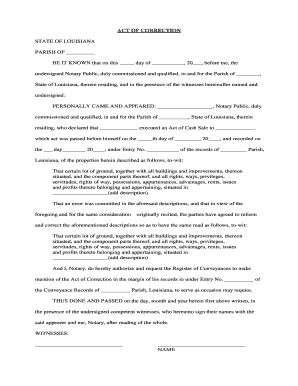
Original Reference

Citation of the original instrument: book and page or clerk instrument number, recording date, and parties to link records.

Statement of Error

Concise explanation identifying the clerical or typographical mistake being corrected without creating a new conveyance.

Notary Acknowledgment

Formal Louisiana notarial acknowledgment showing signer appeared before the notary and executed the instrument.

Signature Blocks

Printed names, signatures, and dates for all required parties, formatted for notarial acknowledgment and recording.

Recording Data

Space for clerk use: recording stamp area, instrument number, and county/parish recorder notation.

Required Information Typically Included

Property Description: Full legal description
Original Instrument: Book/page or instrument number
Corrected Text: Exact replacement wording
Parties Named: Grantor and grantee names
Notary Block: Acknowledgment with seal
Recording Space: Clerk stamp area

How to Configure an Online Correction Workflow

Set up a digital workflow that mirrors the paper process while preserving record integrity and audit trails.

Field Configuration
Document Upload Accept PDF/DOCX, preserve original metadata
Signature Placement Designate notary and party signature fields
Signer Authentication Use email or stronger methods as required
Recording Storage Archive signed copy with audit trail

Where to Record and Who Receives Copies

Recording and distribution routes ensure the corrected description updates public records and relevant stakeholders.

  • Parish Recorder: File the Act with the recorder or clerk of court in the relevant parish.
  • Title Company: Provide the recorded copy to the title insurer to clear exceptions.
  • Lender or Buyer: Deliver recorded instrument to lienholders or purchasers as required.
  • Surveyor: Share with the surveyor to confirm corrected boundaries on maps.

Consequences of an Incorrect or Improperly Executed Correction

Recording Rejection: Clerk may refuse to record until defects are cured
Title Exceptions: Title insurance may issue exceptions or deny coverage
Boundary Disputes: Ambiguity can trigger litigation or survey conflicts
Lien Exposure: Improper corrections can create or obscure lien priorities
Additional Fees: Re-filing or corrective instruments increase costs
Enforceability Risk: Substantive changes may be treated as conveyances and challenged

Common Preparation Mistakes to Avoid

  • Referencing the wrong instrument number or recording reference, which severs the correction’s link to the original record and causes clerks to reject the filing.
  • Using vague or inconsistent metes-and-bounds language that conflicts with the survey or original deed, increasing the risk of boundary litigation and title exceptions.
  • Failing to execute the Act before a Louisiana notary or omitting required acknowledgments, creating grounds for rejection or insurer denial of coverage.
  • Submitting the correction to the wrong parish recorder or failing to provide copies to lenders and title companies, delaying closings and insurance endorsements.

Practical Tips for Accurate, Efficient Corrections

Follow these practices to reduce rework, speed recording, and preserve clear chain of title.

Verify Original Records
Compare the original deed, chain-of-title documents, and a current survey before drafting the correction; coordinate with the surveyor and title examiner to ensure the corrected description matches both the recorded instrument and physical boundaries.
Limit Scope of Correction
Draft language that expressly limits the Act to clerical or typographical errors rather than altering the grant or servitudes; this reduces the chance the instrument will be treated as a conveyance requiring additional consents or notarial formalities.
Coordinate with Insurer
Obtain preliminary approval or guidance from the title insurer to confirm the correction meets underwriting standards and will remove intended exceptions from the commitment once recorded.
Confirm Recording Details
Include a clear clerk stamp area, contact information for returning recorded copies, and file with the correct parish recorder; verify recorded instrument number and distribute certified copies promptly to stakeholders.

Real-World Correction Scenarios

Examples show typical problems resolved by an Act of Correction and the practical outcome for parties.

Title Company Correction

A title agent discovered a transposed lot number in the recorded deed that created an exception on the commitment.

  • Title added corrective language referencing the original book and page.
  • After notarization and recording, the title company removed the exception and issued the owner’s policy without additional curative instruments.

Homeowner Boundary Fix

A homeowner’s survey revealed a typographical error in a section description that conflicted with the plat.

  • The homeowner and lender executed a narrowly worded Act of Correction.
  • The parish recorder stamped the instrument and the surveyor updated the plat reference, preventing future boundary challenges.

Digital Signing and eSubmission Considerations

Ensure any e-signature and storage solution complies with ESIGN and parish recording rules, and preserves the audit trail and final signed PDF for the recorder and title insurer.

  • File Formats: Use PDF/A or flattened PDF for stable archival
  • Integrations: Connectors like Salesforce, NetSuite, and Google Workspace aid routing
  • Notarization Support: Platform must accommodate remote or in-person notarization steps

eSignature Vendor Comparison Relevant to Recording Corrections

Compare common vendor attributes that affect digital signing, authentication, and compliance when preparing recordable instruments; signNow is listed first per standard comparison format.

signNow DocuSign Adobe Sign PandaDoc HelloSign
Starting Price $8/user/mo $15/user/mo $14/user/mo $19/user/mo $15/user/mo
Free Trial 7-day free trial Varies Varies Varies Varies
Bulk Send Yes Yes Yes Yes Varies
Audit Trail Yes Yes Yes Yes Yes
HIPAA Compliant Yes Yes Yes No No

Frequently Asked Questions About Acts of Correction

Answers to common questions on scope, execution, recording, and electronic signing for Louisiana Acts of Correction.


Need help? Contact support

be ready to get more
Join over 28 million airSlate SignNow users