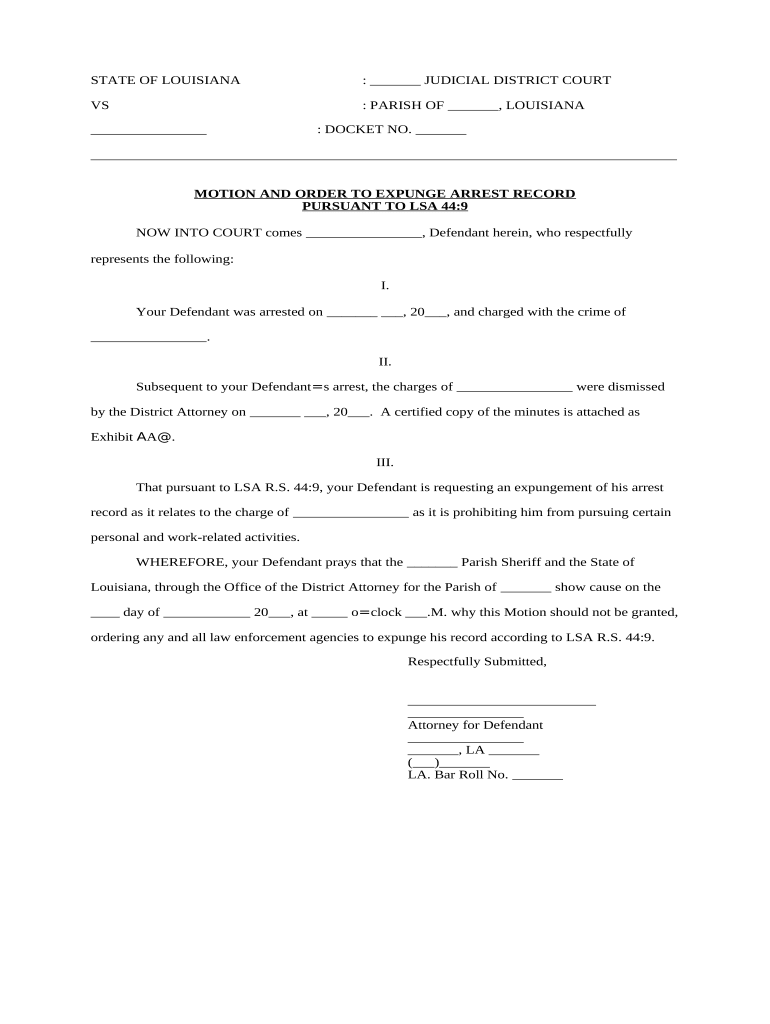
Louisiana Expungement Form
What the Louisiana Expungement Form Is and when you need it
Why completing the form correctly matters
A properly prepared Louisiana Expungement Form clarifies eligibility, reduces processing delays, and improves the likelihood the court will grant relief. Errors or missing exhibits commonly trigger continuances or denials, prolonging the record’s legal and practical consequences and affecting employment, licensing, and housing opportunities.
Who typically completes or files this form
Knowing the role you play (petitioner, counsel, or clerk) helps determine which sections you complete and which supporting certificates you must attach.
- Self-represented petitioners preparing their own filings, often with public defender or legal clinic assistance.
- Criminal defense attorneys or civil legal aid attorneys filing on behalf of clients after eligibility review.
- Court clerks, probation officers, or prosecutors who must review filings and prepare notices to agencies.
Common signers and filers
Petitioner
A person named in the petition who seeks sealing or destruction of records. The petitioner must provide identity details, the exact disposition sought, and attestations about prior petitions or pending matters; signature verifies intent and accuracy under penalty of perjury.
Attorney
A licensed attorney completing the form for a client files the petition, signs the certificate of service, and may submit a supporting memorandum. Counsel commonly attaches certified dispositions and transmits notices to the district attorney and relevant agencies.
Step-by-step: completing and filing your petition
-
01Gather records: Request certified dispositions and criminal history reports to confirm eligibility.
-
02Complete petition: Fill all form fields precisely and attach required exhibits.
-
03Serve notices: Serve the district attorney and other required agencies per local rule.
-
04File with court: File the petition and proof of service with the court clerk; pay any filing fee.
Filing workflow overview and parallel tasks
Records request:
Draft petition:
Prepare service:
Scheduling:
Clerk follow-up:
Record updates:
From filing to order: the typical court process
-
Petition Filed: Court clerk accepts petition and assigns docket number.
-
Notice Served: District attorney and affected agencies receive copies for review.
-
Court Review: Judge examines eligibility, objections, and evidence.
-
Order Issued: If granted, clerk issues an order directing sealing or destruction.
How to configure an electronic filing and service workflow
| Field | Configuration |
|---|---|
| Document Type | PDF/A with embedded metadata |
| Signer Authentication | Email + SMS code or stronger identity proofing |
| Service Method | Certified mail or approved e-service per local rule |
| Retention | Store signed petition and audit trail for required period |
Digital signing and e-filing considerations
Ensure your chosen platform produces court-ready exports, keeps an immutable audit trail, and meets any local e-filing specifications.
- Document formats: PDF, PDF/A, DOCX
- Integrations: Supports Google Drive, Box, NetSuite
- Authentication: Email, SMS, or advanced verification
Risks and consequences of errors on the expungement form
Common mistakes to avoid when preparing the petition
- Using an incorrect case number or court name, which prevents the clerk from matching the petition to the underlying record and often leads to immediate rejection.
- Failing to attach a certified disposition or RAP sheet, a frequent reason judges continue or deny expungement requests due to lack of verified proof.
- Neglecting to serve the district attorney or required agencies per local rules, which can result in objections or procedural dismissal.
- Entering inconsistent personal details (name, DOB, SSN) across documents, causing identity mismatches and delays in agency action.
Practical tips for accurate and efficient petitions
Real-world examples of expungement filings
Example 1
A petitioner files with certified disposition attached and clear eligibility
- DA files no objection
- Court signs sealing order; clerk notifies agencies and records are sealed within 60 days.
Example 2
An attorney files without RAP sheet and incorrect case number
- Court continues for corrected exhibits
- After resubmission with proper documents, judge grants relief and issues order.
How the expungement e-filing differs from related document types
| Criteria | Expungement Petition | Motion to Vacate | Clemency Application |
|---|---|---|---|
| Purpose | record sealing | sentence relief | executive clemency |
| Typical Decision Maker | judge | judge | governor/board |
| Required Exhibits | certified dispositions | sentencing transcript | complete criminal history |
| Filing Outcome | sealed/destroyed records | modified sentence | pardon or commutation |
eSignature vendor pricing and capability snapshot for filing and signing expungement packets
| signNow | DocuSign | Adobe Sign | PandaDoc | HelloSign | |
|---|---|---|---|---|---|
| Starting Price | $8/user/mo | $15/user/mo | $14/user/mo | $19/user/mo | $15/user/mo |
| Free Trial | 7-day free trial | Varies by vendor | Varies by vendor | Varies by vendor | Varies by vendor |
| Bulk Send | Yes (Business Premium) | Varies by plan | Varies by plan | Varies by plan | Varies by plan |
| Audit Trail | Yes | Yes | Yes | Yes | Yes |
| HIPAA Compliant | Yes (BAA available) | Varies by plan | Varies by plan | Varies by plan | Varies by plan |
Frequently asked questions about the Louisiana Expungement Form
-
Am I eligible to file?
Eligibility depends on offense type, time elapsed since disposition, and prior petitions. Review the specific Louisiana statute and local court rules or consult counsel to confirm whether your record qualifies for sealing or destruction.
-
What supporting documents are needed?
Most petitions require certified dispositions, arrest reports or RAP sheets, and proof of identity. Courts commonly expect original or certified copies rather than photocopies and will specify required exhibits in local filing instructions.
-
Can I e-sign the petition?
Electronic signatures are generally valid under the ESIGN Act (15 U.S.C. ch. 96) and UETA where adopted; verify local court e-filing rules and ensure the eSignature platform produces an auditable certificate of completion.
-
Who must be served?
Service usually goes to the district attorney and any state repositories identified by the court; follow local rule for timing and method of service to avoid procedural defects.
-
What happens after an order is entered?
Clerks and criminal repositories update records per the court order; agencies may take additional time to implement sealing or destruction and may require certified copies of the order for their files.
-
How long does processing take?
Processing timelines vary by parish and workload; uncontested petitions can be resolved within weeks while contested matters may take months. Check local court procedures for typical timelines.