Establishing secure connection…Loading editor…Preparing document…

Louisiana Motion

This template is fully customizable. Edit the text, fill out the fields, and send it for signature. Give it a try!
Louisiana Motion

What a Louisiana Motion Is and when it’s used

A Louisiana Motion is a written request filed with a state court asking the judge to take a specific action in an existing case, such as granting temporary relief, compelling discovery, or setting hearings. Motions must follow the court’s caption and formatting rules, include a clear statement of facts and legal grounds, and usually attach supporting evidence or affidavits. Filing and service requirements vary by parish and court; parties should confirm local rules. Electronic tools can prepare and deliver motions where courts permit e-filing or electronic service.

Why preparing a correct motion matters

A properly drafted motion focuses the court on the relief requested, reduces the risk of procedural rejection, and preserves rights through documented service and filing. Clear structure and accurate fields help avoid delays or sanctions.

Why preparing a correct motion matters

Who typically prepares and files Louisiana motions

Motions are used by different participants in litigation depending on the case stage and subject matter.

  • Private attorneys representing plaintiffs or defendants in civil matters, preparing legal argument and exhibits.
  • Self-represented litigants who must follow the same caption, filing, and service requirements as attorneys.
  • Court clerks and filing staff who accept e-filed or paper motions and record the filing in the docket.

Confirm each court’s local rules on formatting, filing fees, e-filing acceptance, and service methods before submitting.

Essential parts of a professional Louisiana motion

A motion should be concise, clearly captioned, supported by factual statements or affidavits, and conclude with a precise request for relief.

Caption

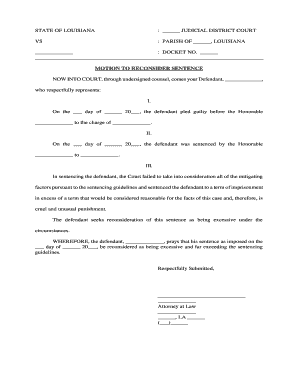
Identifies the court, parish, case number, and parties. Use the exact case style and number shown on the docket to ensure the clerk associates the motion with the correct file.
Statement of Facts

Concise chronology of relevant facts with dates and citations to exhibits or prior filings. Avoid argumentative language in the factual section and attach documentary support when available.

Legal Argument

Citation to statutes, rules, or case law supporting the requested relief. Explain how law applies to the facts and why the relief should be granted.

Relief Requested

A short, numbered list specifying the exact orders sought (for example: continue hearing, compel responses, vacate default judgment). Be specific to avoid ambiguity.

Supporting Evidence

Affidavits, exhibits, or records referenced in the motion. Mark exhibits as Exhibit A, B, etc., and ensure each exhibit is properly labeled and paginated.

Certificate of Service

Statement describing how and when opposing parties were served, with addresses or electronic delivery methods, plus the filer’s signature and date.

Required motion fields at a glance

Case Caption: Court, party names
Docket Number: Exact case number
Movant Identity: Name and counsel
Relief Sought: Precise remedy
Supporting Exhibits: Affidavits, records
Certificate of Service: Method and date

Step-by-step: preparing and filing a Louisiana motion

Follow a clear sequence from drafting through service to reduce procedural risk and preserve hearing schedules.

  • 01
    Draft Motion: Assemble caption, facts, argument, exhibits.
  • 02
    Review & Sign: Proofread, confirm authority, sign or apply e-signature.
  • 03
    File with Clerk: E-file or deliver paper filing to clerk's office.
  • 04
    Serve Parties: Provide proof of service per local rules.

Where to file and how service typically occurs

Filing and service paths depend on the court’s e-filing rules and the parties’ agreed service methods.

  • Clerk Filing: E-file where available or file paper at clerk’s counter.
  • Electronic Service: Email or court portal service permitted if consented or authorized.
  • Personal Service: Hand delivery via process server when required.
  • Certified Mail: Use return receipt where local rule allows.

Configuring an online motion workflow

Set workflow fields to match court formatting, signer authentication, and proof-of-service requirements.

Field Configuration
Signing Method Email link with audit trail and optional SMS code
Authentication Email verification; phone code or ID analysis as needed
Template Pre-built caption and certificate of service fields
Delivery Attach PDF with certificate and docketing stub

Technical requirements for e-submission and signatures

Confirm the court accepts e-filed motions and whether the court requires scanned wet signatures or accepts electronic signatures under local rules.

  • File Formats: PDF/A or PDF preferred
  • Integrations: Court e‑filing portals or email delivery
  • Authentication: Email or access-code verification

Use an eSignature platform that preserves a verifiable audit trail, timestamps, signer attribution, and generates a signed PDF compatible with court systems; confirm any notarization needs separately.

Common timelines and response windows to expect

Timelines depend on local rules and motion type; plan for preparation, service, and court scheduling time.

Filing Lead Time:

File early to secure a hearing slot.

Opposition Deadline:

Opposing party typically has set days to respond.

Hearing Scheduling:

Hearings often set weeks after filing.

Ruling Period:

Judge issues decision within days to months.

Rehearing Window:

Short statutory or local time to seek reconsideration.

Milestone timeline for a typical motion filing

A sequential milestone view helps track the motion from draft to final order.

01

Draft Completed

Motion and exhibits compiled and reviewed.

02

Filed with Clerk

E-filed or paper filed at the clerk’s office.

03

Service Completed

Certificate of service executed and filed.

04

Hearing and Ruling

Court hears arguments and issues an order.

Common errors to avoid when preparing motions

  • Using an incorrect caption or case number that prevents the clerk from associating the motion with the right file.
  • Failing to attach or correctly label supporting exhibits, which can undercut factual assertions in the motion.
  • Omitting the certificate of service or using an improper service method, resulting in procedural rejection.
  • Relying on an unsigned or improperly authenticated affidavit as primary evidence, risking exclusion at hearing.

Penalties and risks from incorrect motion filings

Filing Rejection: Clerk returns or strikes filing
Sanctions: Court fines or fee shifting
Default Risk: Failure to respond may cause default
Evidence Excluded: Affidavits rejected without proper form
Delay: Hearing or ruling postponed
Ethics Exposure: Misstatements can trigger disciplinary review

eSignature vendor comparison for preparing and executing motions

Costs and capabilities vary by vendor; signNow appears first and provides entry-level pricing and compliance features suitable for routine legal workflows.

signNow DocuSign Adobe Sign PandaDoc HelloSign
Starting Price $8/user/mo $15/user/mo $14/user/mo $19/user/mo $15/user/mo
Free Trial 7-day trial Varies Varies Varies Varies
Bulk Send Yes Yes Yes Yes No
Audit Trail Yes Yes Yes Yes Yes
HIPAA Compliant Yes Yes Yes No No

Frequently asked questions about Louisiana motions

Answers to common procedural questions about filing, service, signatures, and correcting motions in Louisiana courts.


Need help? Contact support

be ready to get more
Join over 28 million airSlate SignNow users