Establishing secure connection…Loading editor…Preparing document…

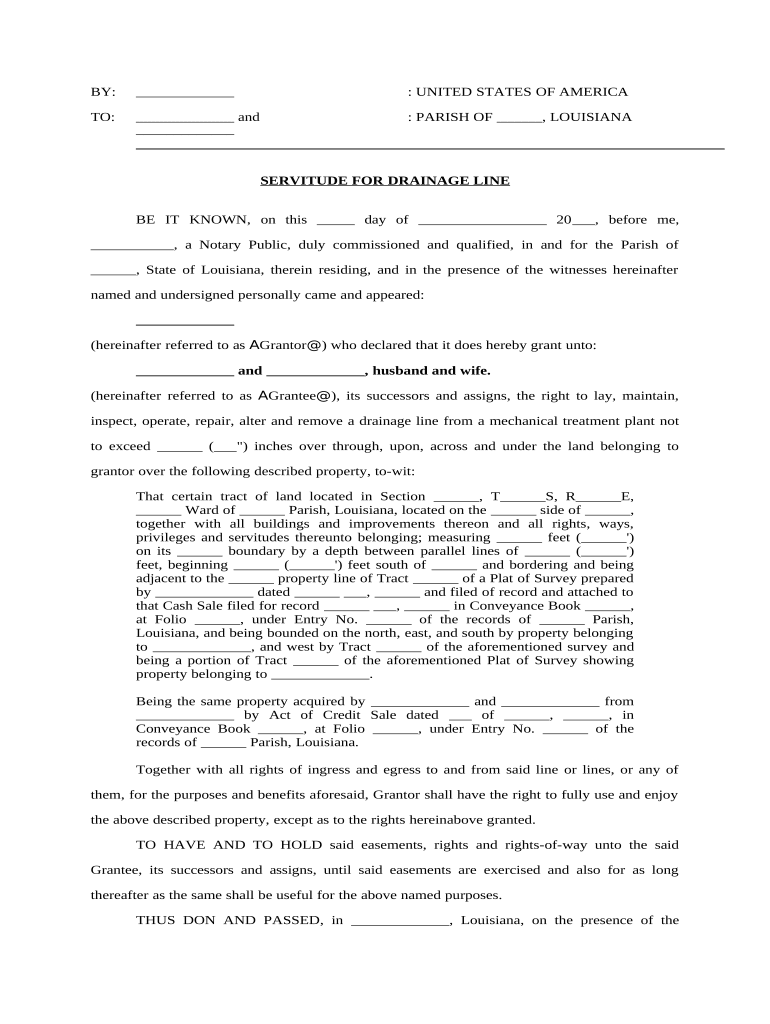
Louisiana Servitude for Drainage Line

This template is fully customizable. Edit the text, fill out the fields, and send it for signature. Give it a try!
Louisiana Servitude for Drainage Line

What the Louisiana Servitude for Drainage Line Is

A Louisiana Servitude for Drainage Line is a written property instrument that grants a servitude (a civil-law equivalent of an easement) permitting installation, use, inspection, maintenance, or repair of a drainage pipe or channel across a servient estate to benefit another property. The servitude defines the location, scope of use, duration, maintenance responsibilities, and any access rights. In Louisiana this instrument typically requires a precise legal description, proper signatures, and recording in the parish conveyance records to provide public notice and priority against third parties.

Why a Clear Drainage Servitude Matters

A formal servitude clarifies rights and duties, prevents disputes over access and maintenance, and preserves drainage infrastructure integrity.

Why a Clear Drainage Servitude Matters

Who Typically Prepares or Signs This Servitude

Parties should confirm authority to convey or accept servitudes, and consult counsel for drafting and recording requirements under Louisiana civil law.

  • Real estate developers seeking predictable site drainage and stormwater routes.
  • Adjacent landowners granting or receiving a drainage easement for mutual benefit.
  • Parish or municipal governments and drainage districts for public stormwater infrastructure.

Essential Elements of a Professional Servitude for Drainage Line

A professional servitude includes a precise legal description, defined scope of rights, maintenance rules, duration, indemnities, and recording instructions to ensure enforceability and clarity between parties.

Legal Description

Provide a precise metes-and-bounds or lot-and-block description and reference to an attached survey to clearly locate the drainage line.
Purpose and Scope

State permitted activities (install, inspect, repair, replace) and any limitations, e.g., vehicle access or excavation limits within the servitude corridor.

Duration

Specify term (perpetual or fixed term) and conditions for termination, renewal, or reversion of rights to the servient estate.

Maintenance Allocation

Assign responsibilities and cost-sharing for routine maintenance, emergency repairs, and replacement of the drainage infrastructure.

Access and Notice

Describe ingress/egress rights, required advance notice for non-emergency access, and any temporary disruption protocols.

Recording and Priority

Include instructions to record the servitude in the parish conveyance records and describe how it ranks against existing encumbrances.

Step-by-Step: Drafting and Executing the Servitude

Follow these steps in sequence to create, authenticate, and record a valid servitude for a drainage line.

  • 01
    Draft Document: Prepare servitude language with legal description and maintenance terms.
  • 02
    Obtain Signatures: Have grantor and grantee sign before a notary or follow RON procedures.
  • 03
    Notarize: Complete required notarial acknowledgment or RON session per parish rules.
  • 04
    Record: File with the parish recorder to provide public notice and priority.

Recommended Digital Workflow Settings

Configure an online workflow to capture signatures, authentication, and a final recorded copy efficiently.

Field Configuration
Authentication Email or SMS code for signer verification
Required Fields Signature, printed name, date, notary block
Notarization Support RON or in-person acknowledgment
Recording Prep Attach exhibit survey and recording cover sheet

Where to Send and How Recording Works

After execution and notarization, route the servitude to the appropriate parish recorder and retain certified copies for parties.

  • Upload Final PDF: Prepare a record-ready PDF with exhibits attached
  • Submit to Recorder: File at the parish conveyance office or authorized e-recording vendor
  • Pay Fees: Include recording and any documentary transfer taxes
  • Distribute Copies: Provide stamped recorded copies to all parties

Technical Options for Digital Signing and Notarization

Ensure the chosen system provides a tamper-evident audit trail, signer attribution, and long-term export options for the recorded instrument.

  • File Formats: PDF, DOCX supported for upload
  • Integrations: Connectors to NetSuite, Salesforce, Google Workspace
  • Notarization Support: Enable RON sessions or in-person acknowledgment

Timing and Typical Deadlines to Expect

Certain actions are time-sensitive; recording promptly preserves priority and reduces dispute risk.

Effective Date:

Use the signed MM/DD/YYYY date as the operative start

Recording Window:

Record as soon as possible; within 30 days recommended

Notary Retention:

Notary or RON provider retains journal per state rules

Notice to Neighbors:

Provide notice per any agreement timelines

Tax Assessment:

Expect next billing cycle changes after recording

Notarization and Witness Flow for Execution

Follow a consistent authentication and recording checklist to ensure formal validity and public notice.

01

Signatures

Parties sign the servitude in presence of notary or during RON session

02

Notary Acknowledgment

Notary completes acknowledgment or certificate as required

03

Witnesses

Provide witness signatures where state law or recorder demands them

04

RON Option

If permitted, run a compliant RON session with identity proofing

05

Prepare Recording

Attach exhibits and cover sheet for the recorder

06

Pay Fees

Include recording fees and documentary taxes

07

Recorder Review

Recorder checks formality and indexing information

08

Return Copies

Distribute stamped recorded copies to relevant parties

Security and Compliance Considerations

Encryption: TLS 1.2/1.3 in transit, AES-256 at rest
Audit Trail: Timestamps, IP, and action history retained
ESIGN/UETA: Electronic signature legal frameworks supported
HIPAA: BAA required for health-related data
21 CFR Part 11: Available controls for FDA-regulated records
SOC 2 / ISO: SOC 2 Type II and ISO 27001 certified

Common Preparation Pitfalls to Avoid

  • Incomplete legal description or missing survey reference that prevents accurate recording and enforcement.
  • Using informal or ambiguous maintenance obligations that leave costs and responsibilities unclear between parties.
  • Failing to notarize or follow RON rules for the parish, resulting in rejection by the recorder or questions on validity.
  • Not checking title encumbrances or mortgagee consents when required, which can impair the servitude's effectiveness.

Consequences of Improper or Unrecorded Servitudes

Recording Delay: Loss of priority
Invalid Instrument: Possible rejection by recorder
Liability Exposure: Damage claims from improper drainage
Repair Costs: Unclear cost allocation
Title Issues: Clouds on title and mortgage conflicts
Enforcement Risk: Difficulty enforcing access or repair rights

Typical Signatories and Their Roles

Grantor — Property Owner

The grantor is the current title holder conveying the servitude. They must have authority to bind the property; if an entity holds title, an authorized officer should sign with title stated.

Grantee — Benefited Party

The grantee is the party receiving the drainage rights (neighbor, developer, municipality). For entities, supply the legal entity name, formation state, and signer title.

Use Cases: How Servitudes Are Applied in Practice

Two concise scenarios illustrate common servitude arrangements for drainage infrastructure.

Developer Project

A residential builder grants a perpetual drainage servitude across a rear parcel to connect to a public swale

  • Servitude includes access for inspection and a maintenance cost-share clause
  • Recording the servitude before closing preserved drainage rights and prevented downstream flooding disputes with future owners.

Neighboring Parcels

An uphill landowner grants a 20-year servitude for a buried drainage pipe across a lower lot

  • Agreement limits excavation within the corridor and sets emergency access terms
  • The written servitude and attached survey avoided ambiguous boundaries and simplified title searches.

Practical Tips for Accurate Completion

Follow these best practices to reduce errors and ensure recordability.

Use Precise Descriptions
Always attach a dated survey exhibit and reference parcel identifiers to avoid ambiguity and to facilitate recording and title searches.
Clarify Maintenance
Spell out who performs routine upkeep, emergency repair procedures, and cost allocation to prevent disputes and litigation.
Confirm Authority
Verify signers' authority, obtain mortgagee consents if required, and ensure entity signatures include printed names and titles.
Record Promptly
File the executed and notarized servitude with the parish recorder promptly to protect priority and provide public notice.

Typical eSignature Vendor Comparison for Servitude Workflows

Compare baseline plan attributes when choosing an eSignature provider for executing and distributing servitude documents; signNow appears first per table convention.

signNow DocuSign Adobe Sign PandaDoc HelloSign
Starting Price $8/user/mo $15/user/mo $14/user/mo $19/user/mo $15/user/mo
Free Trial Yes, 7-day free trial No No Yes, limited Yes, limited
Bulk Send Yes (Business Premium) Yes Yes Yes No
Audit Trail Yes Yes Yes Yes Yes
HIPAA Compliant Yes (BAA required) Yes Yes No No

Frequently Asked Questions about Louisiana Drainage Servitudes

Answers to common concerns when preparing, signing, and recording a servitude for a drainage line in Louisiana.


Need help? Contact support

be ready to get more
Join over 28 million airSlate SignNow users