Establishing secure connection…Loading editor…Preparing document…

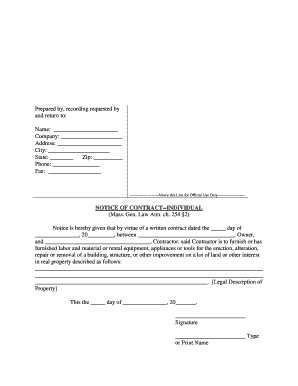
Massachusetts Notice

This template is fully customizable. Edit the text, fill out the fields, and send it for signature. Give it a try!
Massachusetts Notice

What the Massachusetts Notice Is and when it applies

A Massachusetts Notice is a formal written statement used to inform a party of a specific legal or administrative action under Massachusetts law, such as tenant termination, contract cure notices, wage deductions, or regulatory disclosures. It typically states the reason for the action, the effective date, steps the recipient may take in response, and the sender’s contact details. While the exact form and required content vary by topic and statute, many notices must meet timing and delivery rules to be enforceable and may trigger statutory deadlines or rights of appeal.

Why a correct Massachusetts Notice matters

A complete and compliant notice preserves rights, starts statutory timelines, and reduces the risk of procedural challenges. Accurate notices help avoid monetary penalties, delay, or invalidation of the action being taken.

Why a correct Massachusetts Notice matters

Who prepares and receives a Massachusetts Notice

The Massachusetts Notice is used by organizations and individuals who must give formal notice under state law or contractual terms.

  • Landlords and property managers who provide lease termination or eviction-related notices to tenants.
  • Employers issuing wage, payroll, or corrective action notices to employees.
  • Businesses and government agencies delivering regulatory, licensing, or benefits-related notices to consumers or licensees.

Typical signers and preparers

Property Manager

A mid-size residential property manager preparing lease termination notices and cure demands. They must ensure tenant names, addresses, lease references, and statutory cure periods are correct to proceed with any legal step.

HR Director

An HR director issuing wage or disciplinary notices. Accurate employee identification, effective dates, and policy citations are essential to comply with state wage laws and avoid administrative fines.

Core elements to include in a professional Massachusetts Notice

A properly drafted notice includes specific content elements so recipients clearly understand the action, legal basis, and required response. Missing or ambiguous language can void the notice or extend statutory timelines.

Recipient identity

Full legal name and last known mailing address of the individual or entity receiving the notice; match government ID where relevant.
Sender details

Full name, title, organization, mailing address, phone number, and email for follow-up or service.

Legal basis

Citation of the statute, regulation, or contract clause authorizing the notice, stated briefly and clearly.

Effective date

Date on which the notice takes effect or the recipient's response period begins; use MM/DD/YYYY format where possible.

Action required

Concrete next steps the recipient must take, including deadlines, cure options, payment amounts, or appearance instructions.

Delivery statement

Method of delivery used (mail, certified mail, personal service, email) and date/time of delivery or attempted delivery.

Step-by-step: creating and issuing a Massachusetts Notice

Follow these steps to prepare, authenticate, and deliver a legally sound Massachusetts Notice. Each step reduces risk and documents the chain of custody.

  • 01
    Draft the notice: Assemble required facts, legal basis, and precise remedies.
  • 02
    Confirm authority: Ensure the signer has authority to act on behalf of the sender organization.
  • 03
    Select delivery method: Choose the method required by statute or contract (certified mail, personal service, email where allowed).
  • 04
    Record delivery: Retain proof of sending and any delivery receipts or tracking numbers.

Setting up a digital workflow for the notice

Configure an electronic workflow to standardize document fields, signer order, and delivery tracking for repeatable compliance.

Field Configuration
Signer order Specify primary sender then recipient; allow delegated signers if authorized.
Authentication Use email verification or SMS code; enable stronger auth for sensitive notices.
Notification Enable automatic reminders and completion receipts.
Audit trail Capture timestamps, IP addresses, and actions for evidentiary support.

Where to file or send a Massachusetts Notice and typical routing

Destination and routing depend on the notice type; use the route required by the governing statute or contract to ensure valid service.

  • Mail service: Certified or registered mail with return receipt when statute requires mailed service.
  • Personal delivery: Use a process server for in-person statutory service where required.
  • Email delivery: Permissible if contract or statute allows electronic delivery and consent is documented.
  • Court filing: File with the appropriate clerk when the notice must be part of a court record.

Digital signing and eSubmission essentials

Choose a platform that supports required authentication, audit trails, and retention for notice types used in Massachusetts.

  • File formats: PDF and DOCX are preferred for retention and redaction capability.
  • Authentication: Email, SMS code, or stronger methods for high-risk notices.
  • Audit requirements: Capture timestamps, IP, signer email, and action history for evidentiary use.

Consequences of an incorrect or improperly delivered notice

Invalid service: May void the action and require re-serving the notice
Statute delay: Incorrect dates can extend cure or appeal timelines
Monetary penalties: Administrative fines or damages depending on the underlying statute
Litigation risk: Recipient may seek declaratory relief or temporary injunction
Recordkeeping gaps: Lack of proof of delivery weakens evidentiary position
Regulatory sanctions: Possible enforcement action for consumer or employment notices

Common mistakes to avoid when preparing a Massachusetts Notice

  • Using vague or non-specific cure language that fails to describe required remedy.
  • Missing or incorrect effective dates that shift statutory timelines.
  • Sending by an unauthorized delivery method when statute prescribes certified mail or personal service.
  • Failing to retain delivery receipts or an audit trail to prove service.

Typical timelines and deadlines tied to notices

Deadlines vary by notice type. Observe statutory cure periods and calendar dates precisely to preserve rights.

Tenant cure period:

Varies by lease and statute; often 14–30 days for nonpayment issues

Employee response time:

Employer notices often specify a 7–30 day response window

Regulatory deadlines:

Agency notices may impose short filing windows (10–30 days)

Mailing lead time:

Allow additional days for certified mail delivery and postal processing

Record retention start:

Retention typically begins on the effective date or service date

Real-world examples showing how Massachusetts Notices are used

These short case summaries show typical notice scenarios and practical outcomes.

Property Notice Example

A landlord sent a lease nonpayment notice with exact rent owed and a 14-day cure period.

  • The tenant received certified mail and payment within 10 days.
  • Proper content and proof of delivery allowed the landlord to avoid eviction filing and preserved the right to resume proceedings if default recurred.

Employment Notice Example

An employer issued a wage deduction notice specifying amounts and pay dates.

  • The employee acknowledged receipt electronically.
  • Clear figures and a retained electronic audit trail minimized dispute risk and supported the employer in a subsequent payroll audit.

E-signature vendor comparison for handling notices (signNow first)

Compare baseline pricing and core capabilities relevant to preparing, signing, and retaining Massachusetts Notices.

signNow DocuSign Adobe Sign PandaDoc HelloSign
Starting Price $8/user/mo (annual) — no envelope cap $15/user/mo (annual) — 100 envelopes/user/year $14/user/mo (annual) $19/user/mo (annual) $15/user/mo (annual)
Free Trial Yes, 7-day free trial Varies by vendor Varies by vendor Varies by vendor Varies by vendor
Bulk Send Yes Yes Yes Yes No
Audit Trail Yes Yes Yes Yes Yes
HIPAA Compliant Yes (BAA available) Yes (BAA available) Yes No No

Required information and technical protections

Signature Audit: Timestamp, IP, signer email
Encryption: TLS 1.2/1.3 in transit
At-Rest Security: AES-256 encryption
Compliance: ESIGN, UETA, SOC 2
Healthcare: HIPAA (BAA required)
Regulatory: 21 CFR Part 11 where applicable

FAQs: common questions about the Massachusetts Notice

Answers to frequent questions about drafting, delivery, and electronic handling of Massachusetts Notices.


Need help? Contact support

be ready to get more
Join over 28 million airSlate SignNow users