Establishing secure connection…Loading editor…Preparing document…

Waiver of Notice of Special Meeting of the Board of Trustees

This template is fully customizable. Edit the text, fill out the fields, and send it for signature. Give it a try!
Waiver of Notice of Special Meeting of the Board of Trustees

What this Waiver of Notice of Special Meeting of the Board of Trustees is and when it applies

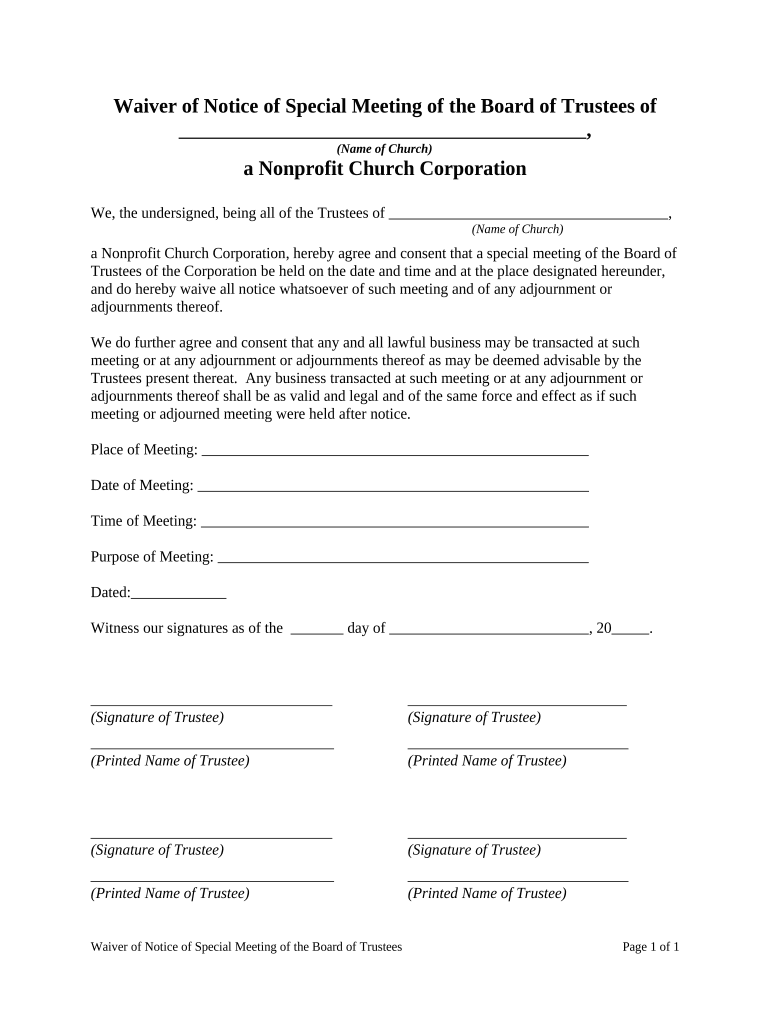
A Waiver of Notice of Special Meeting of the Board of Trustees is a written record in which one or more trustees acknowledge receipt of notice (or waive notice) for a special meeting and consent to the meeting’s business without formal prior notice. The document preserves the validity of actions taken at that meeting by confirming that the signer received notice or voluntarily forewent it. Under U.S. law, electronic execution can create a legally binding waiver when it satisfies ESIGN (15 U.S.C. ch. 96) and applicable state UETA or ESRA rules governing electronic records and signatures.

Why use a Waiver of Notice for a special board meeting

A signed waiver prevents procedural challenges to board actions by proving trustees had actual or constructive notice and consented to proceed. It documents intent, reduces risk of voided resolutions, and helps satisfy corporate bylaws and state statutes when meeting notice requirements are in question.

Why use a Waiver of Notice for a special board meeting

Step-by-step: executing a valid waiver

Follow these steps to prepare, sign, and retain a legally sound waiver of notice.

  • 01
    Draft Waiver: Use precise waiver language consistent with bylaws and meeting purpose.
  • 02
    Identify Signers: List trustees required to waive notice or acknowledge receipt.
  • 03
    Obtain Signatures: Collect wet or e-signatures before or immediately after the meeting date.
  • 04
    Record Retention: Attach waiver to meeting minutes and store with corporate records.

FAQs and troubleshooting for common waiver issues

Answers to common questions about validity, execution, and electronic submission of waivers.


Need help? Contact support

Who typically signs or prepares this waiver

Use the waiver to support meeting minutes and to document trustee consent when notice timing or form is contested.

  • Corporate secretaries maintaining board minutes and records.
  • Board chairs or trustees exercising governance duties.
  • In-house counsel or outside corporate counsel reviewing procedural compliance.

Core components to include in a professional waiver

A complete waiver contains clear identification, the waiver statement, signer details, and record-keeping language to preserve enforceability.

Meeting Identification

Reference the board, trust name, and precise special meeting date so the waiver unambiguously ties to the subject meeting and agenda items.
Waiver Language

A concise clause stating that the trustee acknowledges receipt of notice or waives notice and consents to the meeting’s proceedings.

Signature Block

Printed name, signature, title (Trustee), and signature date; include contact information if required by bylaws.

Notary / Witness

If required by bylaws or state law, include a notary acknowledgment or witness attestation section.

Record Attachment

A statement that the signed waiver will be attached to the meeting minutes and kept with corporate records.

Governing Law

Optional clause stating the governing state law for interpretation and disputes, useful when trustees are in different jurisdictions.

Security and compliance considerations for electronic execution

Encryption: TLS 1.2/1.3 in transit; AES-256 at rest
Audit Trail: Timestamp, IP address, action log
Access Controls: Role-based permissions and SSO
HIPAA Support: BAA available where required
Regulatory Standards: ESIGN, UETA, 21 CFR Part 11
Certifications: SOC 2 Type II, ISO 27001

Penalties and legal risks of an incorrect or missing waiver

Voidable Actions: Meeting resolutions may be voided
Fiduciary Liability: Trustees could face breach claims
Procedural Challenge: Opponents may contest corporate acts
Regulatory Noncompliance: Violations of state corporate statutes
Evidence Gaps: Missing proof for litigation or audits
Recordkeeping Failures: Loss of legal defenses tied to records

Common preparation mistakes to avoid

  • Using vague waiver language that fails to reference the specific meeting date and agenda items.
  • Collecting unsigned or initial-only acknowledgments where bylaws require full signatures and dates.
  • Failing to attach the signed waiver to official minutes, producing a gap in the corporate record.
  • Assuming notarization is unnecessary without checking bylaws or state rules that may require it.

Typical online workflow settings for eSigning a waiver

Recommended configuration options for secure, auditable electronic execution and storage.

Field Configuration
Document Upload PDF or DOCX, use final meeting agenda attachment
Signature Placement Add signature and date fields for each trustee
Authentication Email + SMS code or stronger KBA for high-assurance
Retention Save signed copy and audit trail in records system

How electronic submission typically works

A concise sequence for sending, signing, and archiving a waiver using an eSignature platform.

  • Upload: Upload the waiver and attach meeting minutes or agenda.
  • Assign Fields: Place signature, printed name, title, and date fields.
  • Authenticate: Choose signer verification: email link, SMS code, or KBA.
  • Archive: Store the signed PDF and audit trail with minutes.

Digital signing and integration considerations

Confirm that the chosen platform can export tamper-evident signed PDFs and retain a searchable audit trail for compliance and future review.

  • File Formats: PDF, DOCX supported for signed records
  • Integrations: Connectors for Google Workspace and Microsoft 365
  • Authentication: Email, SMS, or stronger KBA options

Typical vendor pricing and feature overview for eSigning waivers

Comparing starter pricing and common enterprise features across major eSignature vendors; signNow appears first for clarity.

signNow DocuSign Adobe Sign PandaDoc HelloSign
Starting Price $8/user/mo $15/user/mo $14/user/mo $19/user/mo $15/user/mo
Free Trial Yes, 7-day free trial Varies Varies Varies Varies
Bulk Send Yes Yes Yes Yes Yes
Audit Trail Yes Yes Yes Yes Yes
HIPAA Compliant Yes Yes Yes No No
Envelope Cap No cap 100 envelopes/user/year Varies Varies Varies

Key timing considerations when preparing or accepting a waiver

Meeting timing and signature dates influence waiver effectiveness and documentary support for board actions.

Waiver Date:

Date the trustee signs; often controls effective waiver timing

Meeting Date:

Ensure the waiver references the exact special meeting date

Attachment Date:

Attach waiver to minutes on the date minutes are finalized

Filing or Recording:

File any statutorily required notices consistent with state deadlines

Retention Start:

Begin retention from signature or meeting date per policy

Typical document authors and signers

Board Chair

The chair often coordinates meeting logistics and may draft or approve the waiver language; the chair’s involvement helps confirm quorum status and ensures the waiver aligns with agenda items and corporate governance obligations.

Corporate Secretary

The corporate secretary or recordkeeper prepares minutes and attaches signed waivers to the official record; their role is to ensure the waiver is properly executed, dated, and retained with corporate documents.

be ready to get more
Join over 28 million airSlate SignNow users