Establishing secure connection…Loading editor…Preparing document…

Minnesota Satisfaction Judgment

This template is fully customizable. Edit the text, fill out the fields, and send it for signature. Give it a try!
Minnesota Satisfaction Judgment

What a Minnesota Satisfaction Judgment Is

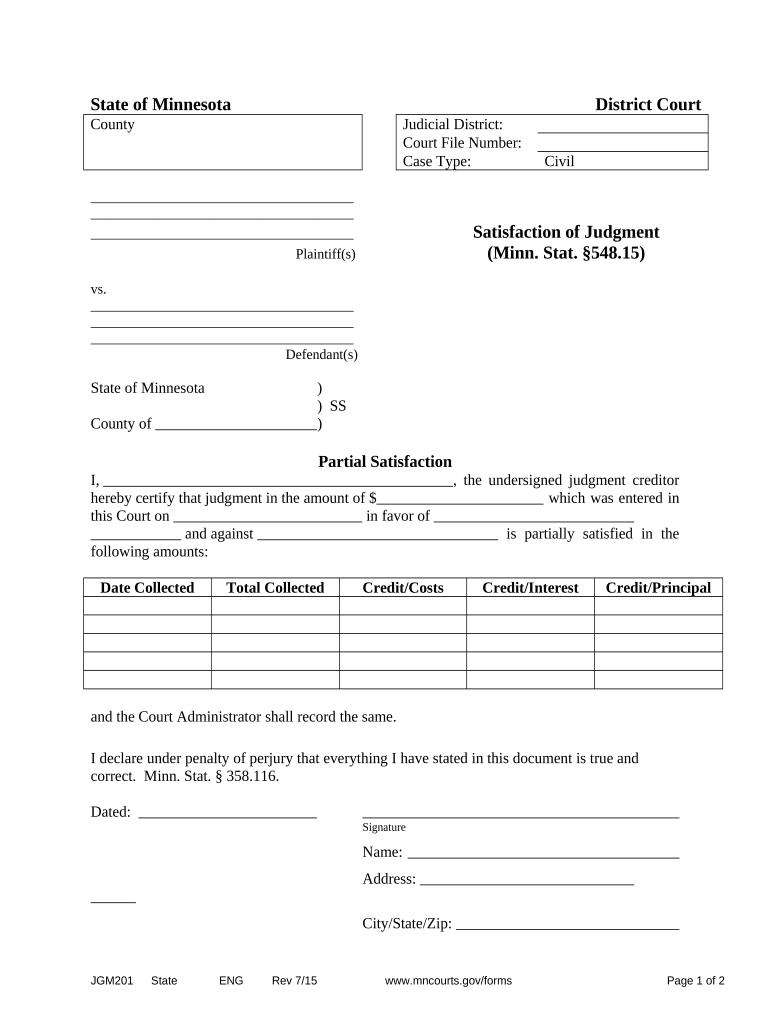
A Minnesota Satisfaction Judgment is a court filing or recorded statement that documents a creditor’s acknowledgment that a judgment has been satisfied in full or in part. It notifies the court and any public records that a lien created by the judgment has been discharged or reduced, and it typically clears encumbrances that could block property transfers or credit searches. The document generally names the original judgment, parties, payment or settlement terms, and the date of satisfaction. Procedures and recording practices vary by county and by whether the judgment has been docketed or recorded as a lien.

Why a Satisfaction Entry Matters

A properly completed satisfaction judgment clears liens, updates court dockets, and protects debtors from continued enforcement actions. It preserves title marketability and reduces the risk of mistaken collection attempts.

Why a Satisfaction Entry Matters

Who typically completes or relies on this document

Several parties prepare or rely on a Satisfaction Judgment depending on the case stage and the creditor’s choice to record a release.

  • Judgment creditors or their counsel — initiate the satisfaction to release liens and update court records.
  • Judgment debtors and their representatives — request or confirm satisfaction to clear title or credit encumbrances.
  • Title companies, lenders, and purchasers — rely on the recorded satisfaction to confirm lien status before closing.

The filing party should confirm county clerk or recorder requirements and preserve proof of filing or recording for the parties to rely upon later.

Core elements to include in a professional Satisfaction Judgment

A complete document is concise but precise: it identifies the judgment, the parties, the relief, and the effective date of satisfaction.

Caption

Court name, case number, and caption matching the original judgment to ensure the clerk links the instrument.
Parties

Full legal names of judgment creditor(s) and debtor(s), including business entity type where applicable.

Judgment Details

Original judgment amount, judgment date, and docket or instrument number so the satisfaction can be matched.

Satisfaction Language

Clear statement that the judgment or specified portion has been satisfied, released, or partially discharged.

Effective Date

Date when payment or settlement occurred and when the satisfaction is to be treated as effective.

Signature Block

Authorized signature line, printed name, title, and date; include notary acknowledgement if required by local rules.

Required information and short-reference checklist

Court Case: Case name and number
Creditor: Creditor full legal name
Debtor: Debtor full legal name
Judgment Date: Original judgment date
Amount: Amount satisfied or remaining
Signature: Authorized signatory and date

Step-by-step: Completing a Minnesota Satisfaction Judgment

Follow these core steps to prepare, sign, and file a satisfaction so it will be effective and discoverable in public records.

  • 01
    Locate judgment: Confirm case number and docket entry details before drafting.
  • 02
    Draft statement: Use precise language identifying the amount and date of satisfaction.
  • 03
    Obtain signature: Have authorized creditor representative sign; notarize if required.
  • 04
    File/record: Submit to court clerk or county recorder and retain proof of filing.

Where to file and how the document circulates

After execution, route the satisfaction to the appropriate public office so the clearing of lien status is reflected in search results.

  • Court Clerk: File the satisfaction with the clerk who issued the judgment so the docket shows the release.
  • County Recorder: If the judgment was recorded as a lien, record the satisfaction with the county recorder to release the lien.
  • Title Company: Provide recorded satisfaction to any title or escrow agent involved in a pending transfer.
  • Maintain proof: Keep stamped copies or electronic receipt showing acceptance and recording details.

Digital signing and e‑filing considerations

Electronic execution and e‑filing are often possible but must match court and recorder rules for admissibility.

  • Authentication: Use reliable signer attribution methods to show intent and identity.
  • Notary / RON: If notarization is required, confirm whether remote online notarization is accepted.
  • File format: Submit PDFs compatible with court or recorder e‑filing systems.

Check local court or county recorder technical and signature acceptance policies before relying on electronic filing or remote notarization.

Timing and practical deadlines to track

Timely filing after payment or settlement reduces disputes and speeds title clearance; follow local procedures for recording.

After Payment:

File the satisfaction promptly to reflect payment date on record.

Recorder Processing:

Recording processing times vary by county; expect 1–10 business days.

Title Searches:

Allow time for title services to update their reports after recording.

Retention:

Retain originals and recorded copies per retention requirements.

Dispute Window:

Resolve discrepancies quickly to avoid re-lien or collection notices.

Common mistakes to avoid when preparing a satisfaction

  • Using a name variant or abbreviation that doesn’t match the original judgment record, preventing automated matching.
  • Failing to include the original case or docket number, which leads clerks to misfile or not link the entry.
  • Omitting notarization or following county-specific acknowledgement language when required, risking rejection.
  • Not obtaining or preserving a stamped/recorded copy to prove the lien release to third parties.

Risks and potential consequences of errors

Continued lien: Liens may remain enforceable against property
Title issues: Delayed closings or loan denials
Rejection: Clerk or recorder may refuse filing
Collection notices: Debtor may receive incorrect demands
Liability: Creditor may face disputes or indemnity claims
Extra costs: Additional fees for re-filing or corrections

Comparing eSignature options for executing a Satisfaction Judgment

The table summarizes core pricing and compliance differences among common eSignature providers; signNow appears first for parity with platform feature data.

signNow DocuSign Adobe Sign PandaDoc HelloSign
Starting Price $8/user/mo $15/user/mo $14/user/mo $19/user/mo $15/user/mo
Free Trial 7-day free trial Varies Varies Varies Varies
Bulk Send Yes Yes Yes Yes No
Audit Trail Yes Yes Yes Yes Yes
HIPAA Compliant Yes Yes Yes No No

Frequently asked questions about Minnesota Satisfaction Judgments

Answers to common practical and legal questions about preparing and filing a satisfaction judgment in Minnesota and comparable jurisdictions.


Need help? Contact support

be ready to get more
Join over 28 million airSlate SignNow users