Establishing secure connection…Loading editor…Preparing document…

Complaint for Alienation of Affections

This template is fully customizable. Edit the text, fill out the fields, and send it for signature. Give it a try!
Complaint for Alienation of Affections

What a Complaint for Alienation of Affections Is and When It Applies

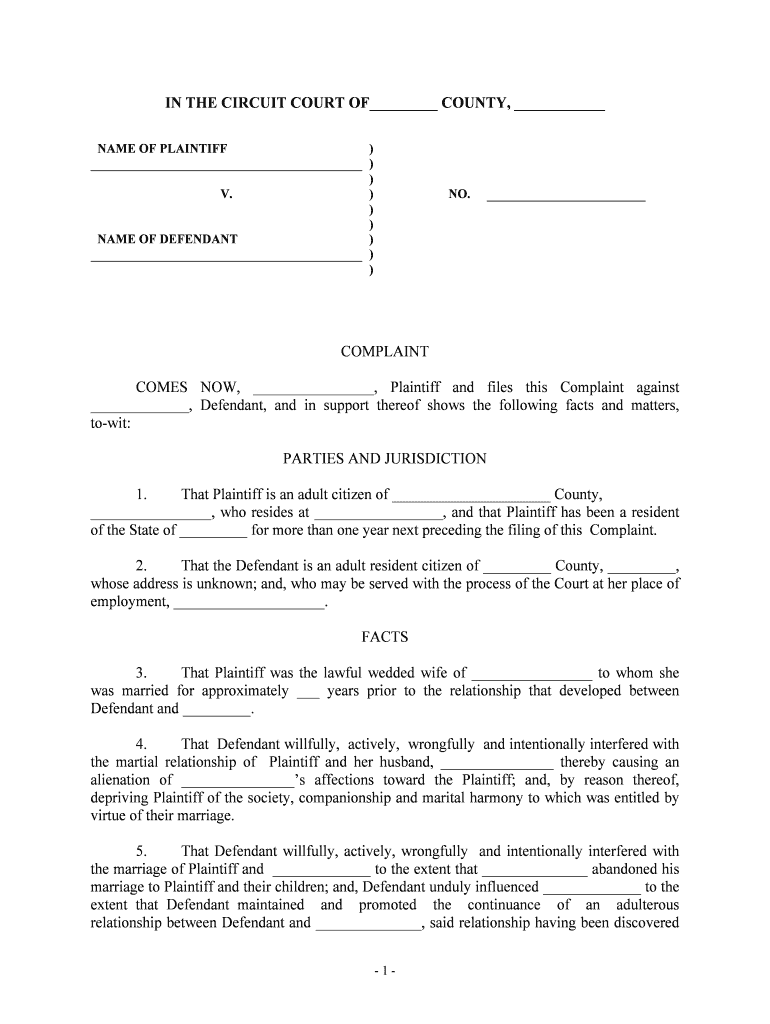
The Complaint for Alienation of Affections is a civil pleading used by a spouse who alleges that a third party intentionally interfered with the marital relationship and caused loss of consortium, affection, or other marital benefits. This complaint sets out jurisdictional facts, the nature and timing of the alleged wrongful conduct, the resulting harm to the marital relationship, and the damages sought. Availability and elements of the tort vary by state; several jurisdictions have abolished or limited the cause of action. Plaintiffs typically attach supporting evidence and request compensatory and, in some cases, punitive damages.

Why Preparing a Clear Complaint Matters

A properly drafted Complaint for Alienation of Affections explains the legal basis for relief, frames factual allegations for discovery, and preserves claims within statute of limitations. It helps quantify damages and supports requests for compensatory or punitive awards where state law permits.

Why Preparing a Clear Complaint Matters

Who Prepares and Uses This Complaint

Typical users include spouses asserting the cause, attorneys practicing family or tort law, and paralegals who prepare and file civil complaints.

  • Spouse plaintiffs seeking recovery for loss of consortium, affection, or marital companionship in applicable states.
  • Family law and tort attorneys drafting complaints, managing discovery, and calculating provable damages.
  • Paralegals and court clerks who assemble exhibits, prepare service packets, and file the complaint.

Key Sections to Include in the Complaint for Alienation of Affections

Core sections of the Complaint for Alienation of Affections identify parties, set factual allegations, state legal claims, list damages, and request relief and jurisdictional facts.

Caption

Present plaintiff and defendant legal names, addresses, and court caption; include docket designation and attorney contact information so the court and opposing parties can identify and serve process correctly.
Jurisdiction

Specify the court's subject-matter jurisdiction and personal jurisdiction facts, including venue and any statutory basis for the tort under state law tailored to local code citations or case law.

Factual Allegations

Chronologically plead specific acts, dates, locations, and interactions showing the third party's intentional interference with the marital relationship and how those acts caused loss.

Cause of Action

State the legal elements under controlling state law, including intent, conduct, causation, and resulting loss of consortium or affection as required by jurisdiction.

Damages

Quantify economic and non-economic losses with supporting computation, list past and future damages, and attach documentary proof such as receipts or expert reports when available.

Relief Requested

Specify the precise remedies sought, including compensatory damages, consequential losses, punitive damages if available under state law, and attorney fees if permitted.

Step-by-Step: Prepare, File, Serve

Follow a clear sequence to prepare, sign, file, and serve the complaint while preserving evidence and meeting local court rules and deadlines.

  • 01
    Draft Complaint: Draft clear allegations, legal elements, and damages claim.
  • 02
    Gather Evidence: Collect communications, photos, and witness declarations.
  • 03
    File With Court: File complaint per local civil procedure and pay fees.
  • 04
    Serve Defendant: Serve process according to state service rules and record proof.

Where to File and How the Process Flows

Identify filing destination, select method of service, choose eSignature or in-person signing, and track proof of service and completion.

  • Court Filing: Determine proper county or state court for filing the complaint.
  • eFiling Options: Use the court's e-filing portal if available for faster processing.
  • Service Methods: Personal, certified mail, or statutory substitute service per state law.
  • Proof of Service: File affidavit of service to document delivery and timing.

Setting Up an Electronic Workflow for Preparation and Signing

Configure an electronic workflow to prepare, sign, and transmit the complaint while capturing audit data and preserving a tamper-evident record.

Field Configuration
Signer Authentication Email + SMS code
Document Format PDF/A with attachments
Evidence Capture Audit trail, IP, timestamps
Delivery Method eFile or certified mail

Digital Signing and Platform Requirements

Use an eSignature platform that supports audit trails, secure storage, and optional advanced signer authentication for court-grade evidentiary records.

  • Encryption: TLS 1.2/1.3 in transit
  • Data at Rest: AES-256 encryption
  • Integrations: PDF, DOCX, eFile portals

Penalties and Risks of Incorrect or Deficient Pleadings

Dismissal Risk: Incomplete pleadings risk dismissal.
Sanctions & Fees: Court may award costs or sanctions.
Perjury Exposure: False statements carry legal penalties.
Privacy Concerns: Sensitive information may trigger HIPAA issues.
Service Defects: Improper service can void proceedings.
Time Bar: Statute of limitations may bar claims.

Common Preparation Mistakes to Avoid

  • Vague allegations without dates or specifics weaken causation and make discovery more difficult, increasing likelihood of motion to dismiss.
  • Failing to confirm the tort's availability in the filing jurisdiction can result in immediate dismissal or transfer.
  • Omitting proof of relationship or separation status undermines the marital element necessary to support loss of consortium claims.
  • Insufficient service attempts, wrong defendant identity, or missing exhibits cause delays and may forfeit remedies.

Practical Tips to Strengthen Your Complaint

Follow procedural rules, document preservation practices, and clear pleading structure to strengthen claims and reduce dismissal risk.

Describe specific conduct and timing precisely
Plead each alleged act with dates, locations, and involved persons. Specificity supports causation and avoids dismissal for vagueness; it improves ability to obtain witness statements and documentary proof during discovery.
Preserve all relevant communications and records
Save emails, texts, social media messages, voicemail logs, and any third-party communications; record chain of custody and metadata where possible to establish authenticity and timing during evidentiary review and at trial.
Confirm cause of action exists in jurisdiction
Research state statutes and case law to verify the tort is recognized; where abolished, consider alternative claims such as intentional infliction of emotional distress or civil conspiracy tailored to local law.
Use clear exhibit references and chronology
Number and label exhibits, reference them in factual allegations, and include a clear timeline. A well-organized record simplifies motions, discovery responses, and trial presentation and reduces credibility challenges and aids appellate review.

Two Illustrative Filing Scenarios

Two illustrative scenarios show typical use and practical evidence presentation when filing a Complaint for Alienation of Affections.

Case 1

A married plaintiff documents repeated communications showing a third party's intimate relationship with their spouse, including dates, messages, and photos that indicate ongoing interference.

  • Witness declarations corroborate timeline and intent.
  • The plaintiff attaches exhibits and expert testimony on loss of consortium, seeks compensatory damages, and uses organized chronology to survive motions to dismiss and support a discovery plan to prove causation.

Case 2

A spouse alleges that a long-term acquaintance deliberately pursued the spouse after reconciliation, causing estrangement and emotional harm documented in messages and third-party testimony.

  • Photographs and calendar entries support presence and timing.
  • Counsel frames claims to show intentionality, includes damages calculations for lost companionship, and pursues discovery to establish the third party's knowledge and purposeful actions that led to measurable marital harm.

Who Signs and Controls the Complaint

Plaintiff — Spouse

A current or former spouse who asserts the claim and provides sworn statements, supporting communications, and evidence of diminished consortium. The plaintiff controls litigation decisions and must authenticate exhibits and testify on the impact of interference.

Attorney — Plaintiff Counsel

Licensed attorney who prepares and files the complaint, advises on applicable state law, conducts discovery, and represents the plaintiff at hearings and trial. Counsel evaluates alternative claims where alienation tort is unavailable.

Essential Information to Include in the Complaint

Plaintiff Identity: Full legal name and contact.
Defendant Identity: Legal name, aliases, and address.
Marriage Details: Date, place, and spouse names.
Incident Records: Messages, photos, dates, witnesses.
Damages Summary: Economic and non-economic totals.
Supporting Exhibits: Numbered documents and labels.

Pricing and Feature Comparison — Common eSignature Vendors

Comparison of typical eSignature vendor pricing and basic feature availability relevant to filing and signing legal complaints.

signNow DocuSign Adobe Sign PandaDoc HelloSign
Starting Price $8/user/mo $15/user/mo $14/user/mo $19/user/mo $15/user/mo
Free Trial 7-day free trial Varies Varies Varies Varies
Bulk Send Yes (premium) Varies Varies Varies Varies
Audit Trail Yes Yes Yes Yes Yes
HIPAA Compliant Yes Varies Varies Varies Varies

Frequently Asked Questions About Filing and Signing

Common questions about preparing, signing, filing, and preserving a Complaint for Alienation of Affections, and practical answers for U.S. jurisdictions.


Need help? Contact support

be ready to get more
Join over 28 million airSlate SignNow users