Establishing secure connection…Loading editor…Preparing document…

Minnesota Uniform Conveyancing Blanks

This template is fully customizable. Edit the text, fill out the fields, and send it for signature. Give it a try!
Minnesota Uniform Conveyancing Blanks

What the Minnesota Uniform Conveyancing Blanks Are

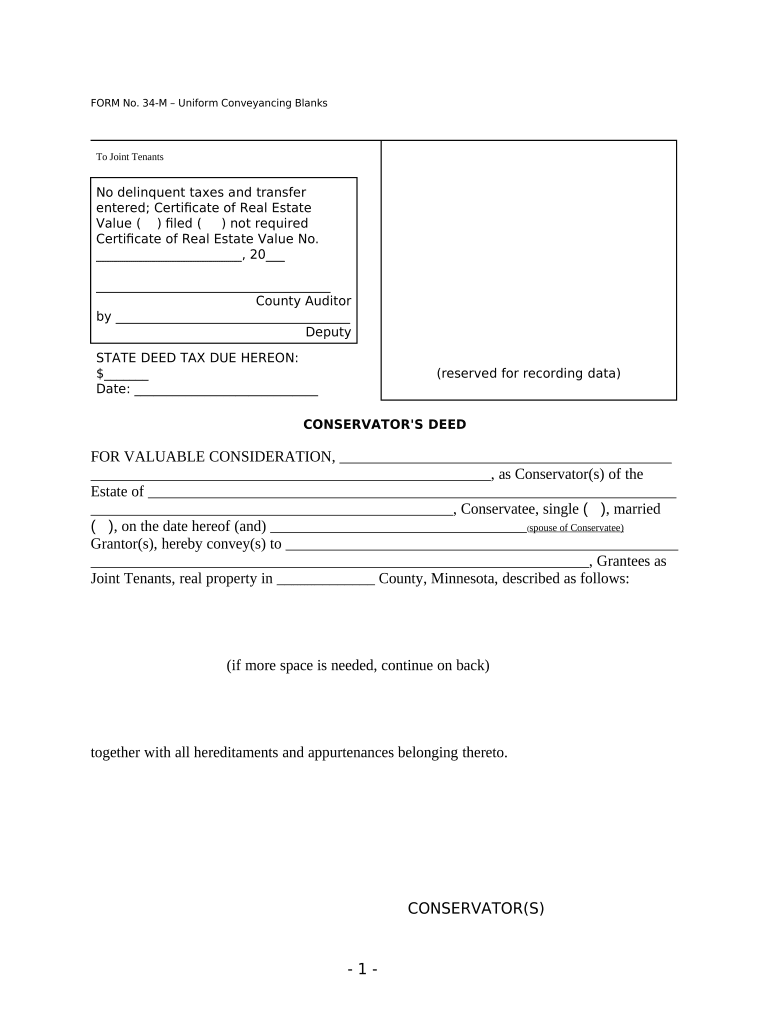
The Minnesota Uniform Conveyancing Blanks are standardized real estate form templates used to prepare conveyancing instruments such as deeds, mortgages, releases, and related acknowledgments for recording in Minnesota counties. They consolidate common fields — parties, legal description, consideration, and notary acknowledgement — to reduce drafting variation and help county recorders process instruments consistently. These blanks are a practical starting point for attorneys, title agents, lenders, and closing agents who must ensure that executed instruments meet county recording office formatting and acknowledgement expectations.

Why standardized conveyancing blanks matter

Using Minnesota Uniform Conveyancing Blanks reduces formatting errors, speeds title review, and clarifies notarization and recording elements so documents meet county requirements and avoid rejections.

Why standardized conveyancing blanks matter

Who commonly completes these forms

Professionals and parties involved in Minnesota property transfers typically use the blanks as a consistent drafting template.

  • Title companies and escrow officers who prepare and submit deeds and mortgage documents for recording.
  • Real estate attorneys and paralegals drafting conveyancing instruments and reviewing chain-of-title issues.
  • Lenders, mortgage servicers, and closing agents ensuring security instruments meet recording office standards.

Step-by-step: preparing a conveyancing blank

Follow a simple sequence to prepare, execute, and record the instrument reliably.

  • 01
    Prepare the form: Populate parties, legal description, parcel ID, and consideration accurately.
  • 02
    Review title: Confirm chain of title and any existing liens before signing.
  • 03
    Execute and notarize: Sign in presence of notary; complete notary acknowledgement precisely.
  • 04
    Record with county: Submit instrument and required fees to the appropriate county recorder.

Typical digital workflow settings for online completion

Configure fields, signer authentication, and delivery to match legal and county requirements.

Action | Settings Field | Configuration
Upload Document PDF/A preferred; include all exhibits and attachments
Place Fields Signature, date, printed name, initials, acknowledgement
Authentication Email + SMS code or stronger ID verification for critical signers
Delivery & Storage Send final PDF to title insurer and store in secure repository

End-to-end route for a completed instrument

Typical conveyancing flow covers drafting through recording and final distribution.

  • Draft: Populate the blank with accurate party and property details.
  • Sign: Parties sign in presence of notary or via approved RON procedure.
  • Notarize: Complete acknowledgement and notary certificate per state rules.
  • Record: Submit to county recorder and obtain recorded instrument number.

Essential parts of a professional conveyancing blank

A complete blank contains standardized sections that align with recording office expectations and support title continuity.

Parties

Clear printed names and mailing addresses for grantor and grantee so the public record and tax authorities can match the instrument to the correct parties and notices.
Legal Description

Full recorded legal description or metes-and-bounds text inserted verbatim from prior deed or survey to ensure accurate parcel identification during title examination.

Consideration Clauses

Explicit dollar amount or other defined consideration language that clarifies the transaction value and supports tax and title reporting requirements.

Notary Acknowledgement

A state-compliant notary block including venue, acknowledgment language, notary signature, seal, and commission expiration to satisfy county recording standards.

Recording Block

Space reserved for recorder's office stamps, book/page or document number, and recording fees so the instrument can accept county endorsements without obscuring substantive content.

Exhibits and Attachments

Referenced exhibits such as surveys or legal descriptions are attached and labeled consistently to preserve an unbroken chain of title documentation.

Required data elements at a glance

Grantor Name: Full legal name required
Grantee Name: Full legal name required
Legal Description: Complete parcel description
Consideration: Exact amount or terms
Signatures: All parties must sign
Notary Block: State-compliant acknowledgement

Common preparation pitfalls to avoid

  • Using an abbreviated or street-only description instead of the recorded legal description, which often leads to recorder rejection and delays.
  • Mismatched party names between the conveyance and title documents; small discrepancies can require corrective deeds or affidavits.
  • Failing to complete the notary acknowledgement correctly or using expired notary commission information, leading counties to reject the instrument.
  • Submitting the instrument to the wrong county recorder or omitting required exhibits, resulting in voided recording or administrative return.

Consequences of incorrect or incomplete blanks

Recording Rejection: Instrument returned by county
Title Delays: Closings and insurance issuance delayed
Additional Fees: Re-recording or correction costs
Priority Risk: Lien or deed priority may be affected
Tax Reporting: Incorrect consideration affects tax filings
Litigation Exposure: Potential disputes over ownership

Timing considerations and typical deadlines

Key timing items affect priority, tax proration, and lender requirements; local practices and lender instructions may impose additional deadlines.

Record Promptly:

Record as soon as practical to protect priority; delay may affect lien positions

Tax Proration Timing:

Closing date determines property tax proration for the current year

Mortgage Payoff:

Lien discharge processing timelines vary; coordinate payoff with recording

Document Corrections:

Plan for time to prepare corrective deeds if errors discovered

County Hours:

Submission windows and electronic cutoffs differ by county

Key milestones from drafting to recorded instrument

A sequential milestone view helps teams coordinate tasks and confirm recording.

01

Draft Completion

Finalize parties, legal description, and exhibits before signature

02

Execution & Notarization

Signers execute in presence of notary or via approved RON

03

Submission for Recording

Deliver the executed instrument and fees to county recorder

04

Confirmation & Distribution

Obtain recorded copy and distribute to title insurer and parties

Comparison: signNow and common eSignature vendors

Pricing and feature availability vary by vendor and plan; the rows below show common starting prices and basic capability signals for evaluation.

signNow DocuSign Adobe Sign PandaDoc HelloSign
Starting Price $8/user/mo $15/user/mo $14/user/mo $19/user/mo $15/user/mo
Free Trial 7-day free trial Varies by plan Varies by plan Varies by plan Varies by plan
Bulk Send Yes (Business Premium) Varies by plan Varies by plan Varies by plan Varies by plan
Audit Trail Yes Yes Yes Yes Yes
HIPAA Compliant Yes Yes Yes No No
Envelope Cap No envelope cap 100 envelopes/user/year Varies by plan Varies by plan Varies by plan

Technical considerations for eSigning and storage

Confirm supported file formats and integration needs before digitizing conveyancing blanks.

  • File Formats: PDF, DOCX supported
  • Integrations: Salesforce, NetSuite, Microsoft 365
  • Storage: Encrypted at rest (AES-256)

Frequently asked questions and troubleshooting

Answers to common execution, notarization, and recording questions that arise when using Minnesota conveyancing blanks.


Need help? Contact support

be ready to get more
Join over 28 million airSlate SignNow users