Establishing secure connection…Loading editor…Preparing document…

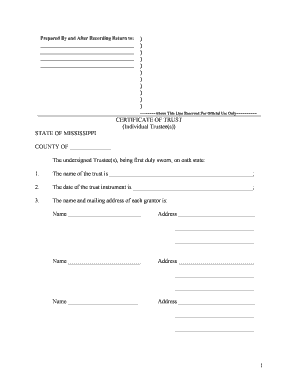
Mississippi Certificate Form

This template is fully customizable. Edit the text, fill out the fields, and send it for signature. Give it a try!
Mississippi Certificate Form

What the Mississippi Certificate Form Is and when it applies

The Mississippi Certificate Form is a generic term for official state certificates used to record or verify specific facts — examples include certificates of formation, certificates of authority, and certified records required by state agencies or county recorders. These forms typically establish the legal existence of an entity, confirm an event or status, or provide proof required for registration, licensing, or recording. The exact structure and required attachments vary by agency and by the certificate type, so confirm which certificate you need before completing or submitting any documents.

Why this form matters for compliance and recordkeeping

Completing the Mississippi Certificate Form accurately ensures legal recognition, proper filing with the state or county, and a clear evidentiary record for third parties. Proper completion reduces rejections, preserves statutory rights, and supports later registrations or enforcement actions under ESIGN and UETA where applicable.

Why this form matters for compliance and recordkeeping

Who typically prepares and relies on this certificate

Organizations and individuals use these certificates to formalize status, prove facts to government agencies, or record instruments with county offices.

  • Business owners and corporate officers who file formation or amendment certificates for state recognition.
  • Attorneys and paralegals preparing official filings and verifying legal capacity and signatures.
  • Title companies, real estate agents, and county clerks relying on certified facts for recording.

Essential components of a professional Mississippi Certificate Form

A complete certificate includes identifying data, a clear statement of the fact being certified, accurate dates, parties' legal names, authorized signatory blocks, and any statutory attestations or notary acknowledgements required for recording or legal effect.

Entity Identification

Full legal entity name, state of formation, and any registration or EIN number to uniquely identify the subject of the certificate.
Declared Fact

A concise, unambiguous statement describing the fact or event being certified — avoid vague language that could create ambiguity for third parties.

Effective Date

The date the certificate takes effect or the date of the underlying event; format consistently using MM/DD/YYYY to avoid interpretation issues.

Signatory Block

Name, title, and capacity of the signer; include corporate titles or officer designations when an entity signs on behalf of a business.

Notary or Acknowledgement

A completed notarial block or state-required acknowledgement with the notary seal if the certificate requires notarization for recording.

Attachments

Supporting exhibits, filing fees, or proof documents referenced by the certificate; label exhibits clearly and attach in order.

Step-by-step: filling out the Mississippi Certificate Form

Complete this form in the order suggested below to reduce errors and speed processing.

  • 01
    Gather Documents: Collect formation papers, EIN, and supporting exhibits before you begin.
  • 02
    Complete Fields: Enter names, dates, and addresses using the field guide formats described above.
  • 03
    Obtain Signatures: Have authorized signers execute in the stated capacity; include notarization if required.
  • 04
    Submit and Pay: Send to the correct agency or recorder with the appropriate fee and any required attachments.

How to set up an online completion workflow

Configure a repeatable online workflow to reduce manual steps and ensure consistent quality across filings.

Field Configuration
Auto-fill Populate common fields from a template or database to avoid retyping.
Conditional Fields Show or hide sections based on entity type or filing purpose.
Signer Roles Assign role-based signing order and specify capacities for each signer.
Delivery Automatically route final copies to stakeholders and the recorder after completion.

Digital signing and eSubmission essentials

Electronic completion and eSubmission streamline execution but must meet identity, integrity, and retention requirements for legal effect.

  • Authentication: Email, SMS, or multi-factor
  • Audit Trail: Timestamp, IP, and signer actions
  • File Formats: PDF, DOCX, or PDF/A

Where to send or file the completed certificate

Choose the correct filing destination based on certificate type; misrouting causes delays or rejection.

  • State Secretary of State: Common destination for formation, amendment, or authority certificates.
  • County Recorder: Use for instruments or certificates that affect real property or require recording.
  • Licensing Agency: Send to occupational or licensing boards when required for permits or registrations.
  • Employer or Payor: Deliver copies to employers or payors as proof of status when required.

Typical timelines, processing expectations, and delivery windows

Processing times depend on the receiving agency and submission method; plan for longer delays when mailing or during high-volume periods.

Immediate Acknowledgement:

Email confirmations available when filing online.

State Processing:

Online filings often processed within 1–10 business days.

County Recording:

Recording may take several days to weeks, depending on backlogs.

Expedited Options:

Many Secretaries of State offer expedited processing for fees.

Document Return:

Returned certified copy timing varies by agency delivery methods.

Common preparation mistakes to avoid

  • Using informal or trade names instead of the entity's legal name, which triggers rejections or amendments.
  • Incorrect date formats or omitted effective dates that create ambiguity about when the certificate takes effect.
  • Failing to identify the signer’s capacity (officer, manager, attorney-in-fact), which can void the filing.
  • Not attaching required exhibits or paying the correct fee, causing processing delays or returned filings.

Consequences of incorrect or late filing

Filing Penalties: Late or incorrect filings can trigger fines or penalty interest.
Record Rejection: Agency rejection leading to delays or loss of priority.
Tax Consequences: Wrong entity status may affect tax reporting and withholding.
I-9 Violations: I-9 paperwork penalties (8 CFR §274a.2) for employment-related errors.
IRC Penalties: Information return penalties apply under IRC §6721.
HIPAA Risk: Improper handling of PHI raises issues under 45 CFR §164.530(j).

eSignature vendor comparison for completing and signing certificates

Compare basic pricing and capability markers across common eSignature vendors; signNow is listed first per comparison protocol.

signNow DocuSign Adobe Sign PandaDoc HelloSign
Starting Price $8/user/mo $15/user/mo $14/user/mo $19/user/mo $15/user/mo
Free Trial 7-day free trial, no credit card required Varies by plan Varies by plan Varies by plan Varies by plan
Bulk Send Yes Yes Varies by plan Yes Varies by plan
Audit Trail Yes Yes Yes Yes Yes
Envelope Cap No cap 100 envelopes/user/year Varies by plan Varies by plan Varies by plan

Frequently asked questions about the Mississippi Certificate Form

Answers to common questions about completion, notarization, e-signing, and correction to help prevent processing delays or rejections.


Need help? Contact support

be ready to get more
Join over 28 million airSlate SignNow users