Establishing secure connection…Loading editor…Preparing document…

Minnesota Affidavit in Support of Motion for Judgment

This template is fully customizable. Edit the text, fill out the fields, and send it for signature. Give it a try!
Minnesota Affidavit in Support of Motion for Judgment

What the Minnesota Affidavit in Support of Motion for Judgment Is

A Minnesota Affidavit in Support of Motion for Judgment is a sworn written statement filed with a Minnesota court to provide factual support for a motion seeking a judgment. The affiant sets out facts, attaches exhibits, and affirms the statements under oath before a notary or other authorized official. Courts use the affidavit to evaluate credibility and admissibility without live testimony at a hearing. Note that some courts require original notarized affidavits or follow local e‑filing and notarization rules; federal and state e‑signature authority may not eliminate court-required originals for certain filings.

Why this affidavit matters to your case

An accurate affidavit focuses the court on material facts, preserves sworn evidence, and reduces reliance on oral testimony. It helps the judge decide motions for default judgment, summary disposition, or evidentiary rulings by providing a clear, signed record of the affiant’s statements under penalty of perjury.

Why this affidavit matters to your case

Who prepares and relies on this affidavit

Several parties commonly prepare or receive this affidavit depending on the case stage and role.

  • Plaintiffs and plaintiffs' counsel preparing factual support for a motion for judgment or default judgment.
  • Defendants when submitting counter‑affidavits or factual responses to challenge credibility.
  • Court clerks and judges who review sworn statements to schedule hearings or enter rulings.

Properly completed affidavits reduce procedural risk and help courts resolve factual disputes without extended evidentiary hearings.

Essential parts of a professional Minnesota affidavit

A well-structured affidavit follows court captioning rules, presents concise sworn facts, attaches evidentiary exhibits, and ends with a notary or verification block to ensure admissibility.

Court Caption

Full court heading, case number and party names exactly as on the complaint or motion to ensure correct filing and docketing.
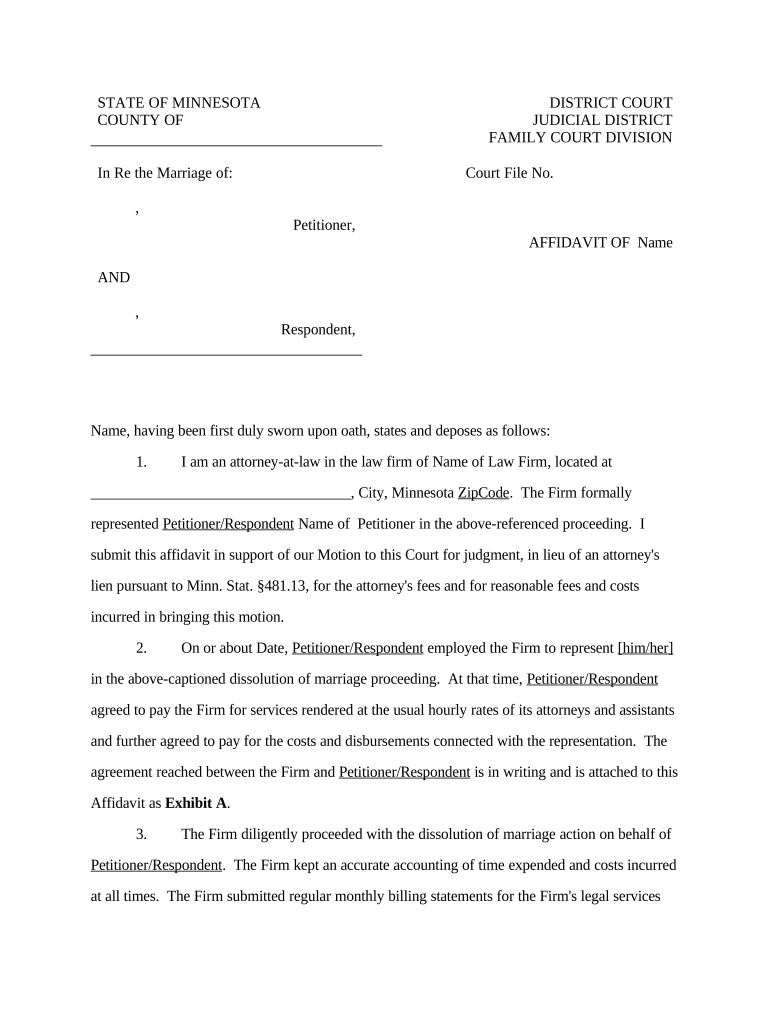
Affiant Identification

Full legal name, address, relationship to the case, and capacity (individual, officer, custodian of records) to establish standing and competency to testify.

Statement of Facts

Chronological, numbered factual paragraphs describing the events, with specific dates, amounts, and actions tied to documentary exhibits.

Exhibits and References

Attach labeled exhibits (A, B, etc.) and reference them in the narrative so the court can verify supporting documents directly.

Verification Clause

Affirmation language declaring truthfulness under penalty of perjury and citation to applicable state law is typically required.

Notary / Signature

Signature block with date and a notary acknowledgment or other authorized verification consistent with Minnesota’s notarization rules.

Required information at a glance

Court Caption: Case name and number
Affiant Identity: Full legal name
Factual Statements: Numbered paragraphs
Exhibit List: Labeled attachments
Verification Language: Penalty of perjury clause
Notary Block: Acknowledgment or jurat

Step-by-step: completing and filing the affidavit

Follow these four steps to prepare a court‑ready affidavit and submit it with a motion for judgment.

  • 01
    Gather evidence: Collect documents, invoices, and communications to attach as exhibits.
  • 02
    Draft affidavit: Write clear numbered factual paragraphs tied to exhibits.
  • 03
    Notarize: Sign before a notary or use RON if permitted by court.
  • 04
    File and serve: File with the clerk and serve opposing parties per local rules.

Configuring an online workflow for affidavit completion

Set up a digital workflow that maps fields, enforces required data, and captures an audit trail for court review.

Field Configuration
Case Caption Field Required; prefill from case metadata
Affiant Name Field Required; exact match validation
Exhibit Attachment Field Accept PDF/DOCX; limit file size
Authentication Enable strong signer verification (email+SMS or KBA)

Where to send the completed affidavit

A completed affidavit typically follows a three‑part path: filing with the court, serving other parties, and retaining a certified copy.

  • Court Clerk: File the original or per e‑filing rules
  • Opposing Counsel: Serve via court‑approved service methods
  • E‑Filing System: Submit through the district’s e‑filing portal when available
  • File Copy: Keep a notarized copy for records

Technical considerations for digital completion and submission

Ensure your platform supports required file formats, signer authentication, and an immutable audit trail before e‑submission.

  • File Formats: PDF and DOCX supported
  • Authentication: Email, SMS, or stronger KBA
  • Audit Trail: Capture IP, timestamp, and events

Confirm the court’s local rules for e‑filing, acceptance of scanned notarizations, and any requirements for remote online notarization before relying solely on digital workflows.

Typical timelines and filing expectations

Deadlines depend on the type of motion and local rules; verify timing with the assigned court and the Minnesota Rules of Civil Procedure.

Motion Response Window:

Varies by rule and judge; consult local procedure for exact days

Hearing Scheduling:

Hearings are typically calendared within days to weeks depending on court workload

Service Deadlines:

Service must comply with Minn. R. Civ. P. and local rules

Notarization Timing:

Notarize immediately before filing to match jurat date

Retention for Filing:

Keep originals until final disposition and appeals expire

Common preparation errors to avoid

  • Omitting the correct court caption or case number, which can lead to misfiling and clerical rejection.
  • Failing to attach or properly label exhibits, leaving factual claims unsupported and weakening the motion.
  • Using imprecise dates or vague descriptions that allow the opposing party to dispute the facts without clear proof.
  • Signing without a proper notary or using an uncertified electronic signature when the court requires a notarized original.

Consequences of an incorrect or incomplete affidavit

Motion Denied: Court may refuse relief
Default Relief Lost: Judgment may be delayed or denied
Sanctions: Court may impose monetary sanctions
Perjury Risk: False statements risk criminal penalties
Refiling Costs: Additional fees and delays
Evidentiary Exclusion: Unverified evidence may be excluded

Comparing eSignature vendors for affidavit workflows

Basic pricing and feature availability for popular eSignature vendors; signNow is listed first for comparison consistency.

signNow DocuSign Adobe Sign PandaDoc HelloSign
Starting Price $8/user/mo $15/user/mo $14/user/mo $19/user/mo $15/user/mo
Free Trial 7-day free trial Varies by vendor Varies Varies Varies
Bulk Send Yes Yes Yes Yes Yes
Audit Trail Yes Yes Yes Yes Yes
HIPAA Compliant Yes Yes Yes No No

Real-world examples of digital affidavits and workflows

These short examples show how organizations streamline sworn statements while maintaining compliance and auditability.

Martin Properties

Prepared standardized sworn statements for property dispute motions to reduce clerical errors and speed filings.

  • Processed affidavits online for faster turnaround.
  • "I can process and execute all of these documents online with 100% compliance and built-in security," said Tim Martin, founder, describing reduced in‑person steps and consistent filing quality.

Fertility Centers of Illinois

Centralized affidavit templates and audit trails for patient consent and administrative motions to simplify reviews.

  • Integrated signing into case management workflows.
  • John Butler, founder, praised the responsiveness and API support that helped route signed records into internal systems securely and reliably.

Who may sign or verify the affidavit

Affiant — Individual

The person with direct knowledge of the facts signs the affidavit under oath; for organizations, an individual with personal knowledge or records custody must sign.

Authorized Representative

Officers, managers, or custodians of records may execute affidavits on behalf of entities, provided their capacity and basis for knowledge are clearly stated.

Frequently asked questions about affidavits and e‑submission

Answers to common concerns about e‑signatures, notarization, filing, and correcting sworn statements in Minnesota court practice.


Need help? Contact support

be ready to get more
Join over 28 million airSlate SignNow users